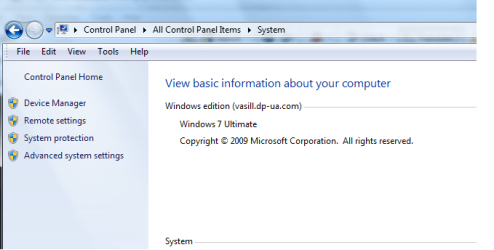
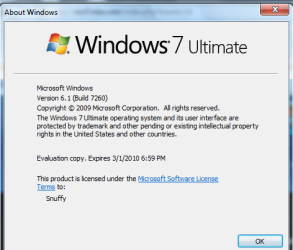
First i thought i'd give it the RTM name so as to insure everybody about the newest LEAK. suppose to be SameAs RTM.
1. I am very unhappy with it, not as fast as 7260-7229(loader) version.
2. Live Email did not work properly. manual import to get all things right.
3. 7260-RTM did not ask for KEY. on upgrade. there for you only get 3 days.
4. Leak info was for .iso not VHD. (reason pissed was iso maker add his name to it. SUKS. I can make my own iso, his need for FAME is SUKY (IMHO.)
5. Not as fast as 7260-7229.
6. RTM version does give 4 -rearms.
start -> cmd (run as admin) - you can get addition 30 days 5 times.
slmgr.vbs -rearm - you can do 4 times. this gives you 120 days after expire time. recommend you do on day 29.
7. The 5th time for REARM can be accomplished via REGEDIT. and reset the key bac to 0. this allows 1 more rearm. (Same as Vista)
8. To activate your 7260-RTM
start -> cmd (run as admin) slmgr.vbs -ipk (enter key) wait for popup
start -> cmd (run as admin) slmgr.vbs -ato (activate - wait for popup
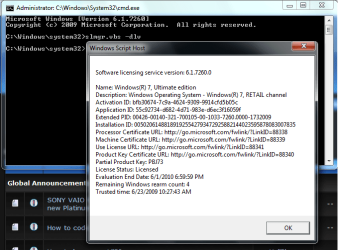
start -> cmd (run as admin) slmgr.vbs -dlv (chk license - wait for popup
1. I am very unhappy with it, not as fast as 7260-7229(loader) version.
2. Live Email did not work properly. manual import to get all things right.
3. 7260-RTM did not ask for KEY. on upgrade. there for you only get 3 days.
4. Leak info was for .iso not VHD. (reason pissed was iso maker add his name to it. SUKS. I can make my own iso, his need for FAME is SUKY (IMHO.)
5. Not as fast as 7260-7229.
6. RTM version does give 4 -rearms.
start -> cmd (run as admin) - you can get addition 30 days 5 times.
slmgr.vbs -rearm - you can do 4 times. this gives you 120 days after expire time. recommend you do on day 29.
7. The 5th time for REARM can be accomplished via REGEDIT. and reset the key bac to 0. this allows 1 more rearm. (Same as Vista)
8. To activate your 7260-RTM
start -> cmd (run as admin) slmgr.vbs -ipk (enter key) wait for popup
start -> cmd (run as admin) slmgr.vbs -ato (activate - wait for popup
start -> cmd (run as admin) slmgr.vbs -dlv (chk license - wait for popup