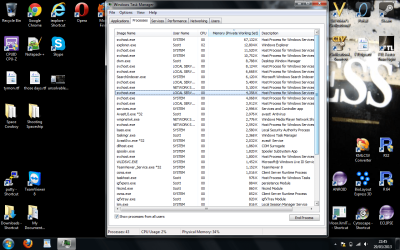
736mb memory used up with no programs open

swr1986

New member
Local time
1:57 PM
Messages
3
Any ideas why this would be happening? No windows open and only Avast and "Intel(R) Graphics Media Accelerator Driver For Mobile" in the tray.

:cry:
 

Attachments

  • processes.png
    processes.png
    128.1 KB · Views: 40
  • performance.png
    performance.png
    111.8 KB · Views: 47

My Computer

Computer type
Laptop
Computer Manufacturer/Model Number
Toshiba Satellite L40-139
OS
Windows 7 Ultimate 64bit
CPU
Intel Celeron M 520 (2X1.6GHz)
Memory
2GB
Hard Drives
1TB
Antivirus
Avast
Browser
Firefox
Any ideas why this would be happening? No windows open and only Avast and "Intel(R) Graphics Media Accelerator Driver For Mobile" in the tray.

:cry:
That isn't very bad for 64 bit Windows 7. It uses up more ram than 32 bit. Try decreasing the amount of startup programs by going to start, type in msconfig, and press enter. Then, go to the startup tab and disable everything except the Intel Graphics Media Accelerator and Avast.
 

My Computer

Computer type
PC/Desktop
Computer Manufacturer/Model Number
HP Pavilion P7-1010
OS
Windows 7 Professional x64 Service Pack 1
CPU
AMD Athlon X4 645
Motherboard
Foxxcon N-Alvorix RS880
Memory
6GB DDR3 1066
Graphics Card(s)
Sapphire Radeon HD 5670 512MB GDDR5
Sound Card
Realtek Integrated Audio
Monitor(s) Displays
HP 2011x
Screen Resolution
1600x900
Hard Drives
1. Crucial M4 128GB SSD
2. 1TB Seagate Barracuda 7200.12 RPM
3. 1TB Western Digital Caviar Green 5400RPM
PSU
Seasonic S12 II Bronze 380 Watt
Case
HP OEM
Cooling
Coolermaster Heatsink, AVC Case Fan
Keyboard
HP OEM- Made by Chicony
Mouse
HP OEM- Made by Logitech
Internet Speed
20MBit Down/4 Up
Antivirus
Microsoft Security Essentials
Browser
Internet Explorer 10
The graph shows your CPU is being used so something is going on.
 

My Computer

Computer type
PC/Desktop
Computer Manufacturer/Model Number
Lenovo IdeaCenter 450
OS
Windows 10 Pro X64
CPU
Intel Quad Core i7-4770 @ 3.4Ghz
Memory
16.0GB PC3-12800 DDR3 SDRAM 1600 MHz
Graphics Card(s)
Intel Integrated HD Graphics
Sound Card
Realtek HD Audio
Monitor(s) Displays
HP 22" LCD
Screen Resolution
1680 x 1050
Hard Drives
250GB Samsung EVO SATA-3 SSD
2TB Seagate ST2000DM001 SATA-2
1.5TB Seagate ST3150041AS SATA
Keyboard
Dell USB
Mouse
Lenovo USB
Internet Speed
Cable via Road Runner 3MB Upload, 30MB Download
Antivirus
Windows Defender, MBAM Pro, MBAE
Browser
Seamonkey
Other Info
UEFI/GPT
PLDS DVD-RW DH16AERSH
I can't remember what all the CPU peaks were. First ones will be me opening task man I imagine. Maybe the later ones were me closing a couple of programs. It stuck around about 1% and 736MB after that though.

All I had on startup was the Java AutoUpdater, Avast and 3 X "Intel(R) Common User Interface".
 

My Computer

Computer type
Laptop
Computer Manufacturer/Model Number
Toshiba Satellite L40-139
OS
Windows 7 Ultimate 64bit
CPU
Intel Celeron M 520 (2X1.6GHz)
Memory
2GB
Hard Drives
1TB
Antivirus
Avast
Browser
Firefox
I can't remember what all the CPU peaks were. First ones will be me opening task man I imagine. Maybe the later ones were me closing a couple of programs. It stuck around about 1% and 736MB after that though.

All I had on startup was the Java AutoUpdater, Avast and 3 X "Intel(R) Common User Interface".
Keep the Java AutoUpdater enabled. Unless you tweak graphics card settings, you can disable the Intel(R) Common User Interface which shouldn't hurt anything. If you do need it, you can go back into msconfig and check its checkbox again. Honestly, your ram usage isn't too bad for 64 bit Windows. If you need more ram, you could switch to 32 bit Windows 7 which uses less ram.
 

My Computer

Computer type
PC/Desktop
Computer Manufacturer/Model Number
HP Pavilion P7-1010
OS
Windows 7 Professional x64 Service Pack 1
CPU
AMD Athlon X4 645
Motherboard
Foxxcon N-Alvorix RS880
Memory
6GB DDR3 1066
Graphics Card(s)
Sapphire Radeon HD 5670 512MB GDDR5
Sound Card
Realtek Integrated Audio
Monitor(s) Displays
HP 2011x
Screen Resolution
1600x900
Hard Drives
1. Crucial M4 128GB SSD
2. 1TB Seagate Barracuda 7200.12 RPM
3. 1TB Western Digital Caviar Green 5400RPM
PSU
Seasonic S12 II Bronze 380 Watt
Case
HP OEM
Cooling
Coolermaster Heatsink, AVC Case Fan
Keyboard
HP OEM- Made by Chicony
Mouse
HP OEM- Made by Logitech
Internet Speed
20MBit Down/4 Up
Antivirus
Microsoft Security Essentials
Browser
Internet Explorer 10
Thanks for the advice. Disappointing that this is just how it is, relieving that there isn't anything wrong with the laptop/install.
 

My Computer

Computer type
Laptop
Computer Manufacturer/Model Number
Toshiba Satellite L40-139
OS
Windows 7 Ultimate 64bit
CPU
Intel Celeron M 520 (2X1.6GHz)
Memory
2GB
Hard Drives
1TB
Antivirus
Avast
Browser
Firefox
I see nothing wrong with the screen shot posted. So what if its is using 736MBs or RAM. RAM is meant to be used! I've ran Windows 7 on 2GBs (50% memory usage on average) for years without a single issue, and I was heavy on it.
 

My Computer

Computer type
PC/Desktop
Computer Manufacturer/Model Number
Alienware Aurora ALX R4
OS
Windows 10 Pro (x64)
CPU
Intel Core i7-3930K (3.2GHz - 4.5GHz)
Motherboard
Alienware Aurora-R4 x79
Memory
4x Samsung 4GB PC3-12800 DDR3 (16GB 1600MHz)
Graphics Card(s)
Nvidia Geforce GTX 690
Sound Card
SteelSeries Siberia Elite
Monitor(s) Displays
Dell UltraSharp U3011
Screen Resolution
2560x1600
Hard Drives
Samsung 850 Pro 256 GB, Seagate 1TB Desktop Hybrid HDD, 2x Western Digital 4TB Green HDD
PSU
875W Some Dell PSU <.<
Case
Alienware Aurora ALX
Cooling
Custom Liquid Cooling (EK CPU & GPU blocks) dual EK 480RAD
Keyboard
Logitech G710+ Mechanical
Mouse
Logitech G700s
Internet Speed
Verizon Fios (50 mbps average)
Other Info
Server: Intel NUC D54250WYK: i5-4250U, 16GB, 256 GB mSATA, Windows Server 2012 R2
I'm on Windows 7 x64 with 2GB of RAM and here is my working load with Chrome open (33 Processes, 39%, 781MB). Note that I have slimmed down my machine to be very lean and mean. I see nothing out of line regarding your load.

Capture1_zps2efe9b2d.png


Capture_zpsecb08379.png
 
Last edited:

My Computer

OS
Windows 7 Home Premium x64 SP1
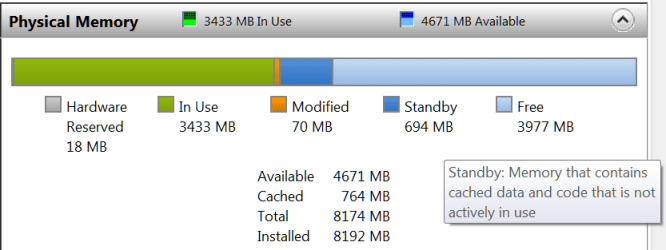
You are fine. There is nothing wrong. No need to save RAM for a rainy day. The more the system uses, the better it is. My system currently uses 3.4GB and I am not doing a lot.
 

Attachments

  • 2013-03-30_2359.png
    2013-03-30_2359.png
    12.1 KB · Views: 15

My Computer

Computer Manufacturer/Model Number
HP, Dell, Gateway, Toshiba - 4 laptops and 2 desktops
OS
Vista, Windows7, Mint Mate, Zorin, Windows 8
CPU
from 1.6GHz Duo to i7
Monitor(s) Displays
2x HP w2207
Hard Drives
5x HDD, 7x SSD, 12x Externals
Keyboard
with trackball - no mices
Mouse
Trackball mice
Internet Speed
DSL 6000
I remember all that tweaking of winxp down to like 130 MB at idle then having to wait for anything to open :-)
 

My Computer

Computer type
PC/Desktop
OS
Windows 7 Home Premium 64bit
I agree, memory usage looks normal. You have to understand that the memory usage of the system and startup processes is highly dynamic and is by no means a fixed quantity. The memory manager will always try to assign memory where it will do the most good to maintain good overall system performance. When memory demand is light, as it will be at startup, the memory manager will let startup process use pretty much whatever memory they want. Memory is meant to be used and it isn't needed for anything else. Unused memory is wasted memory. But when a large application is loaded the memory usage of inactive processes will be trimmed back, drastically if necessary. If a process is really doing nothing it's usage can be trimmed back to almost nothing. If that trimmed process starts to do something it will be given more memory. You can see this happen by watching memory usage of processes with Task Manager.

This dynamic usage of memory is why adding memory to a system improves performance.
 

My Computer

Computer type
PC/Desktop
Computer Manufacturer/Model Number
HP
OS
Windows 7 Pro 64 bit
CPU
Xeon W3520
Memory
8 GB
Graphics Card(s)
Nvidia Geforce 210
my msi laptop uses about 2 gb with no apps running. I have an older toshiba a205 and I put w7 on it and completely stripped it down to nothing and it ony has 1 gb ddr2 and the best I can do is 400-500mb idle. so you are right there. I use clean mem mini monitor and you can clean the memory by double clicking and itll lower the usage to the minium. I can get it to 450+-mb using the mini monitor, you can also flush the cache using it too. it usually takes it from about 700-800mb used down to 500-550mb area. and ram is pretty cheap nowadays so upgrading isn't as crazy as it once was
 

My Computer

Computer type
Laptop
Computer Manufacturer/Model Number
msi
OS
windows 7 home premium
CPU
i5-2410m
Motherboard
msi
Memory
16gb ddr3-1333
Graphics Card(s)
nvidia geforce gt 540m
Screen Resolution
1366x768
Hard Drives
120gb patriot pyro se
32 gb patriot torqx2
Antivirus
norton
Browser
IE
Other Info
using throttlestop 4.00 to make cpu freq under my control best program ive found.
....I use clean mem mini monitor and you can clean the memory by double clicking and itll lower the usage to the minium. I can get it to 450+-mb using the mini monitor, you can also flush the cache using it too. it usually takes it from about 700-800mb used down to 500-550mb area. and ram is pretty cheap nowadays so upgrading isn't as crazy as it once was
It takes an app a bit longer to load the first time it is started after booting a computer. Subsequent loadings of that same app might not take as long to load because the of the way that the memory management works. It sounds like your mini monitor tool is forcing the OS memory management system to clear stuff out that it normally would keep - thus making apps start up as slow as they did when you first booted.

I could be wrong about that - but some benchmarking might be in order before you decide that you are really helping your system's performance by using that mini monitor tool.
 

My Computer

Computer type
Laptop
Computer Manufacturer/Model Number
Employer provided Dell Latitude
OS
W7 Pro SP1 64bit
CPU
i7
Memory
8GB
Graphics Card(s)
Intel HD Graphics
Hard Drives
crappy SSD
Antivirus
Employer mandated Symantec Endpoint Protection
Browser
Pale Moon 64bit, IE11 64bit & Chrome 64bit
Im not saying mini monitor will help performance. Im just telling him the mini monitor will help him get his memory usage down a little more by its cleaning ability. that's all, no performance adjustment at all. thanks
 

My Computer

Computer type
Laptop
Computer Manufacturer/Model Number
msi
OS
windows 7 home premium
CPU
i5-2410m
Motherboard
msi
Memory
16gb ddr3-1333
Graphics Card(s)
nvidia geforce gt 540m
Screen Resolution
1366x768
Hard Drives
120gb patriot pyro se
32 gb patriot torqx2
Antivirus
norton
Browser
IE
Other Info
using throttlestop 4.00 to make cpu freq under my control best program ive found.
As I mentioned previously, there is nothing wrong with the memory usage as it is. Windows 7 has excellent memory management and there is no need or benefit in any add-on memory cleaners, optimizers, boosters, etc. They will not benefit performance and will almost always impair it.

Modern operating systems are fully capable of managing memory on their own without the need of any help. The problem is that most computer users have a hopelessly outdated (1980's and older) concept of how memory is managed in a modern OS. Modern operating systems are designed with the concept that memory should be used to the fullest possible extent and free memory is evil. The basic concepts have been in use on large computers since the 1960's and have been fully validated. They were introduced to smaller systems in the 1990's when the hardware became capable.

I will say only one more thing regarding this: In the Microsoft publication "Windows Internals", 5th edition, the authors mentioned these memory cleaners and described how they worked. The comments were not very complimentary, quite the contrary. One of the authors is Mark Russinovich who holds a PHD in computer science and is a well known Windows expert.
 

My Computer

Computer type
PC/Desktop
Computer Manufacturer/Model Number
HP
OS
Windows 7 Pro 64 bit
CPU
Xeon W3520
Memory
8 GB
Graphics Card(s)
Nvidia Geforce 210
Thanks for the advice. Disappointing that this is just how it is, relieving that there isn't anything wrong with the laptop/install.

Why would you be disappointed? Your ram is working as designed. As many have already stated. I would think that would be good news. Forget the old XP tricks and thoughts because Windows 7 handles ram better than XP ever could even with a the little tricks we use to do.
If you ever use your computer in such a fashion that you need more ram, just add more ram if possible and let Windows 7 take care of it for you.
 

My Computer

Computer type
PC/Desktop
Computer Manufacturer/Model Number
Home made Desktop
OS
Windows 10 Pro. 64/ version 1709 Windows 7 Pro/64
CPU
Intel i7-6800K @ 4.3
Motherboard
ASUS X-99 Deluxe II
Memory
Corsair Platinum 16 gig @2400
Graphics Card(s)
EVGA GTX 1070 OC
Monitor(s) Displays
Asus 27" LED LCD/VE278Q
Screen Resolution
1920-1080 or 1280-720 HDMI
Hard Drives
INTEL SSD 730-240 Gb Sata 3.0/
PSU
EVGA Platium 1200W
Case
Phanteks Luxe Tempered Glass 8 fans/ one radiator
Cooling
XSPC/ Water Cooled CPU
Keyboard
Das 4 Professional
Mouse
Logitech M705/MX Anywhere 2-S
Internet Speed
100 mbits
Antivirus
Microsoft Security Essentials/ Malwarebytes Premium 3.0/ SAS
Browser
I.E. 11 default/Firefox/ ISP Time Warner Cable/Spectrum
Other Info
LG BluRay Burner/
Sound system-KLipsch-THX/
Icy Dock ssd Hot Swap bays.
I see nothing wrong with the screen shot posted. So what if its is using 736MBs or RAM. RAM is meant to be used! I've ran Windows 7 on 2GBs (50% memory usage on average) for years without a single issue, and I was heavy on it.

Running on 1 GB RAM here LOL, she runs very smoothly too:thumbsup:
 

My Computer

Computer type
PC/Desktop
OS
Microsoft Windows 7 Professional 64-bit SP1
CPU
Intel(R) Core(TM) i5 CPU M 520 @ 2.40GHz
Motherboard
Dell Inc. 0K42JR
Memory
8.00 GB
Graphics Card(s)
NVIDIA NVS 3100M
Sound Card
(1) NVIDIA High Definition Audio (2) IDT High Definition A
Monitor(s) Displays
1
Screen Resolution
1440 x 900 x 32 bits (4294967296 colors) @ 59 Hz
Hard Drives
Samsung SSD 840 PRO Series ATA Device
the thread starter wants to know how to use less memory. he doesn't want your opinion about what he should and shouldn't do with his memory. if he wants to use the bare minimum of ram that's his right to do so. if you do not agree that's your right. start a thread about how people should use their ram. and if he wants free ram that's not used then let him. do you want to go to his house and use his computer? if not then lets just answer his question. not name drop a phd to prove your right about memory cleaners. you might be right but so what? you feel good? good day and to the thread starter do what you want with your ram. and you don't have to explain why you want free ram. I have 16gb and im always wanting to use the least amount as possible at idle.
 

My Computer

Computer type
Laptop
Computer Manufacturer/Model Number
msi
OS
windows 7 home premium
CPU
i5-2410m
Motherboard
msi
Memory
16gb ddr3-1333
Graphics Card(s)
nvidia geforce gt 540m
Screen Resolution
1366x768
Hard Drives
120gb patriot pyro se
32 gb patriot torqx2
Antivirus
norton
Browser
IE
Other Info
using throttlestop 4.00 to make cpu freq under my control best program ive found.
Chris I'm not understanding you post #18.
Most post were explaining to the OP that the ram was not a problem so therefor their is nothing to fix. Just enjoy the computer.
I really don't understand all the anger.
 

My Computer

Computer type
PC/Desktop
Computer Manufacturer/Model Number
Home made Desktop
OS
Windows 10 Pro. 64/ version 1709 Windows 7 Pro/64
CPU
Intel i7-6800K @ 4.3
Motherboard
ASUS X-99 Deluxe II
Memory
Corsair Platinum 16 gig @2400
Graphics Card(s)
EVGA GTX 1070 OC
Monitor(s) Displays
Asus 27" LED LCD/VE278Q
Screen Resolution
1920-1080 or 1280-720 HDMI
Hard Drives
INTEL SSD 730-240 Gb Sata 3.0/
PSU
EVGA Platium 1200W
Case
Phanteks Luxe Tempered Glass 8 fans/ one radiator
Cooling
XSPC/ Water Cooled CPU
Keyboard
Das 4 Professional
Mouse
Logitech M705/MX Anywhere 2-S
Internet Speed
100 mbits
Antivirus
Microsoft Security Essentials/ Malwarebytes Premium 3.0/ SAS
Browser
I.E. 11 default/Firefox/ ISP Time Warner Cable/Spectrum
Other Info
LG BluRay Burner/
Sound system-KLipsch-THX/
Icy Dock ssd Hot Swap bays.
Please note that swr1986 at no time in this thread asked for how to reduce memory consumption. He asked only for an explanation for what he was seeing in Task Manager. I provided it.
 

My Computer

Computer type
PC/Desktop
Computer Manufacturer/Model Number
HP
OS
Windows 7 Pro 64 bit
CPU
Xeon W3520
Memory
8 GB
Graphics Card(s)
Nvidia Geforce 210
Back
Top