Solved 80071A91 - Update Error

boweasel

New member
Power User
Local time
11:43 AM
Messages
678
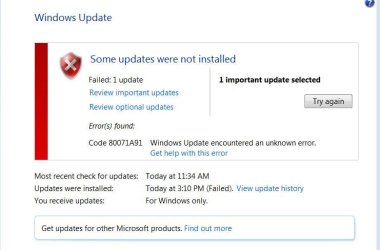
I downloaded and ran the SURT tool for this Dell Windows 7 Pro 64 bit SP1 tower with 8GB or RAM. No updates have installed for a while but there are 2 important update and about 10 optionals. I chose a single important update - January, 2017 Security Monthly Quality Rollup for Windows 7 for x64-based Systems (KB3212646).

Additionally Internet Explorer 11 has died. When I click on it, it just blinks at me. I've tried to uninstall the update, but I get the message An error has occurred. Not all of the updates were successfully uninstalled. I also get this included error when I try to run the stand alone IE11 installer.

I have created a zipped log file but after 5 minutes of trying to include it in these attachments I got an error. I will try again by editing this post.
*****
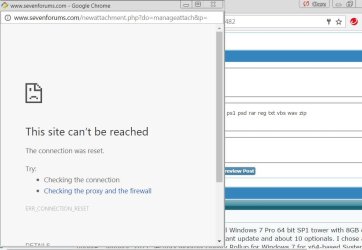
No joy on the Log file. Here is the error screen I get after about 5 minutes
 

Attachments
  • WUpdate1.JPG
    WUpdate1.JPG
    41.9 KB · Views: 2
  • Capture2.PNG
    Capture2.PNG
    12.1 KB · Views: 2
  • Capture5.PNG
    Capture5.PNG
    6.3 KB · Views: 12
  • Log.JPG
    Log.JPG
    52.3 KB · Views: 1
Last edited:

My Computer

Computer type
Laptop
OS
Windows 7 home premium 64 bit
CPU
AMD K10
Motherboard
Hewlett-Packard 1444 (Socket S1G4)
Memory
3.00GB Dual-Channel DDR3 @ 532MHz
Graphics Card(s)
ATI AMD M880G with ATI Mobility Radeon HD 4250 (HP)
Sound Card
Realtek
Screen Resolution
1366 x 768
Hard Drives
465GB Western Digital
Antivirus
MSE
Copied the Log.Zip file to a flash drive and tried a different computer and different browser
 

Attachments

  • Capture.JPG
    Capture.JPG
    37.7 KB · Views: 11

My Computer

Computer type
Laptop
OS
Windows 7 home premium 64 bit
CPU
AMD K10
Motherboard
Hewlett-Packard 1444 (Socket S1G4)
Memory
3.00GB Dual-Channel DDR3 @ 532MHz
Graphics Card(s)
ATI AMD M880G with ATI Mobility Radeon HD 4250 (HP)
Sound Card
Realtek
Screen Resolution
1366 x 768
Hard Drives
465GB Western Digital
Antivirus
MSE
Hi Boweasel,

havn't looked at the logs yet,
but run the MS fixit here
.https://support.microsoft.com/en-us/kb/948252
then run
chkdsk.

Now as for IE11
If your running Home premium then Language packs are unavailable for it, so how did you get them on your system not via Windows update, hence the error when trying to uninstall

If your not running home premium update your specs please.

Roy
 

My Computer

Computer type
PC/Desktop
Computer Manufacturer/Model Number
medionl/Aspire 6930G/acer x55a
OS
W7 home premium 32bit/W7HP 64bit/w10 tp insider ring
CPU
E5300 dual core
Motherboard
medion MS7366
Memory
3gb
Graphics Card(s)
Nvidia Geforce 7100 Nforce 630i
Monitor(s) Displays
avixc
Internet Speed
n (isp resticted to 72)
Antivirus
mse/pands
Browser
palemoon
Other Info
Belkin Fd7050 n USB using Railink RT2870 drivers, more upto date
Hi Boweasel,

havn't looked at the logs yet,

Thanks for the reply, but there are no logs to look at - I get an error every time I try to attach the CBS.zip file

I am beset by problems. First the tutorial tells me to run the SURT program and provides me with a link that doesn't work. Then you want me to run the Fixit tool and give me a link that also doesn't work. I get the page, but when I click download I get an End of support for Fixit page. If I go to the Let me fix it myself area I get another error
then run
chkdsk.

Now as for IE11
If your running Home premium then Language packs are unavailable for it, so how did you get them on your system not via Windows update, hence the error when trying to uninstall

If your not running home premium update your specs please.

Roy
I said in my post that I was running Windows 7 Pro. I have many computers here and I can't enter the specs for all of them.
 

Attachments

  • Fixit.JPG
    Fixit.JPG
    49.2 KB · Views: 0
  • torchwood.JPG
    torchwood.JPG
    74.4 KB · Views: 0

My Computer

Computer type
Laptop
OS
Windows 7 home premium 64 bit
CPU
AMD K10
Motherboard
Hewlett-Packard 1444 (Socket S1G4)
Memory
3.00GB Dual-Channel DDR3 @ 532MHz
Graphics Card(s)
ATI AMD M880G with ATI Mobility Radeon HD 4250 (HP)
Sound Card
Realtek
Screen Resolution
1366 x 768
Hard Drives
465GB Western Digital
Antivirus
MSE
Hi Boweasel

Sorry bout the links. thats MS retiring them, (forcing w10 on us it uses DISM).

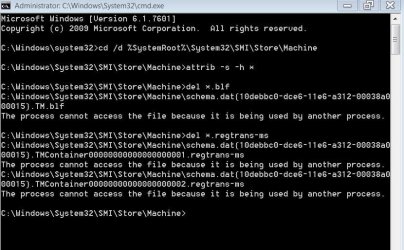
Please run the commands in safe mode with command prompt.

SURT link

http://support.microsoft.com/kb/947821
you may need to scroll down for X64 version


W7 Pro ALSO does NOT support language packs, so that remains part of the problem
(suspect installed via 3rd party app Vistalizater -- uninstaller is part of it)

have you chkdsk ??

Roy
 

My Computer

Computer type
PC/Desktop
Computer Manufacturer/Model Number
medionl/Aspire 6930G/acer x55a
OS
W7 home premium 32bit/W7HP 64bit/w10 tp insider ring
CPU
E5300 dual core
Motherboard
medion MS7366
Memory
3gb
Graphics Card(s)
Nvidia Geforce 7100 Nforce 630i
Monitor(s) Displays
avixc
Internet Speed
n (isp resticted to 72)
Antivirus
mse/pands
Browser
palemoon
Other Info
Belkin Fd7050 n USB using Railink RT2870 drivers, more upto date
Hi Boweasel

Sorry bout the links. thats MS retiring them, (forcing w10 on us it uses DISM).

Please run the commands in safe mode with command prompt.

SURT link

http://support.microsoft.com/kb/947821
you may need to scroll down for X64 version


W7 Pro ALSO does NOT support language packs, so that remains part of the problem
(suspect installed via 3rd party app Vistalizater -- uninstaller is part of it)

have you chkdsk ??

Roy
Roy, I am absolutely thrilled that someone is helping me with this, but this problem seems to be beyond both of us. I originally went to this sub-forum to post about my IE11 & Updates problem. At the top of the page is an ATTENTION box. That box contains posting instructions for both activation and update problems. The posting instructions linked me to a page headed Posting Instructions. That page wanted me to click on yet another link to download the SURT (pause to catch my breath). THAT link took me to a Microsoft page where I eventually found x64-based (64-bit) versions of Windows 7 SP1 and Windows 7. There is a download button next to it. The download does not work. So, I created a thread in this subforum titled Where is The System Update Readiness Tool? Where Is The System Update Readiness Tool?

Someone named HAVOC answered me and gave me the (almost) proper link for the SURT. I downloaded it and installed it (in normal mode). I then rebooted to see if Windows would automatically start doing updates. It did not. I then tried to manually download the updates. That did not work either. I then created a new thread (this one) and began it with 'I downloaded and ran the SURT tool for this Dell Windows 7 Pro 64 bit SP1 tower with 8GB or RAM. No updates have installed for a while but there are 2 important updates....'

Now you've just provided me with the same bogus link from the ATTENTION box (and the Updates Tutorial). That ship has sailed. I've already downloaded and run the new SURT link, provided from HAVOC.

So I am right back at the beginning. And your comments about Language Packs confuses me. How do you know I have those installed on this computer?

And I did run chkdsk. Sometime yesterday I opened an elevated command and typed chkdsk /r /f. It said that it would check the disk on the next reboot. I rebooted, saw it initiate and left the house. When I came back hours later the machine had completed the check disk and was displaying the desktop icons. I did not try to look through the log to see what (if anything) it had found or corrected.
 

My Computer

Computer type
Laptop
OS
Windows 7 home premium 64 bit
CPU
AMD K10
Motherboard
Hewlett-Packard 1444 (Socket S1G4)
Memory
3.00GB Dual-Channel DDR3 @ 532MHz
Graphics Card(s)
ATI AMD M880G with ATI Mobility Radeon HD 4250 (HP)
Sound Card
Realtek
Screen Resolution
1366 x 768
Hard Drives
465GB Western Digital
Antivirus
MSE
Back
Top