95GB Free, Disk Management Says 254MB Available to Shrink

YaMoonSun

New member
Member
Local time
10:19 AM
Messages
33
Attempting to configure a duel-boot, so I want to make my allocated space beforehand. I've done this before in the past, not sure what the deal is.

UZ8Z0mL.jpg

undefined.jpg
 

My Computer My Computer

At a glance

Windows 7 Ultimate x643rd Generation i58GB GDDR3
Computer type
PC/Desktop
Computer Manufacturer/Model Number
Gateway
OS
Windows 7 Ultimate x64
CPU
3rd Generation i5
Memory
8GB GDDR3
Hard Drives
Samsung 840 Evo 250GB
Antivirus
None
Browser
Firefox Extended Support Release
If you have system restore enabled, Windows typically writes restore points (System Volume Information folder, which is hidden) near the "middle" of the volume's empty space rather than adjacent to the rest of the data (typically clustered towards the center of the drive). As the drive fills up the restore points move closer to the "outer" edge of the volume.

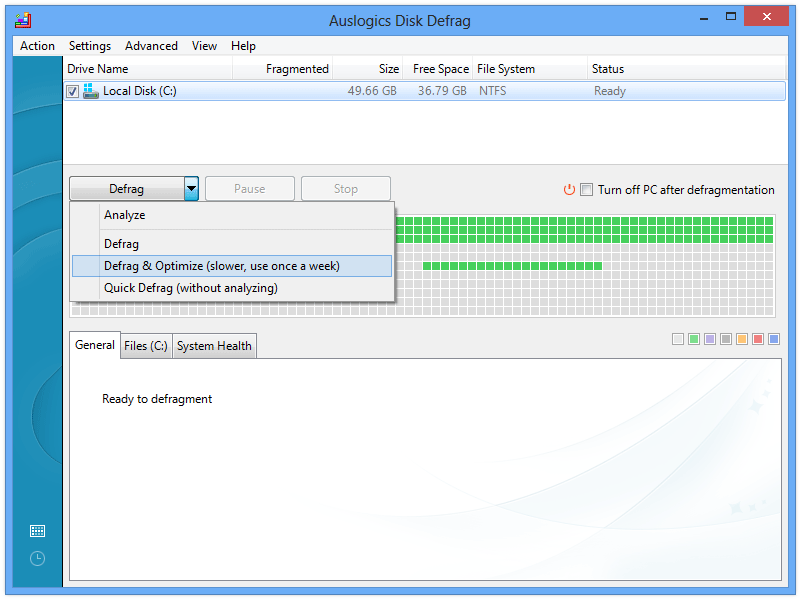
In my experience this is why I could not shrink a volume by an amount that matched or was near its actual free space. If system restore is on, you can use a third party defrag tool like Auslogics to get a rough map of the data on the volume. This sample image shows what I'm talking about, where that separate sequence of data clusters is the restore points. In that case the volume can't shrink beyond where the restore points are located, even if there's plenty of free space between them and the bulk of the data written at the start of the volume.

fw9P3we.png


If this applies to your situation you could do the following:

- make a backup of your system partition using something like Macrium Reflect
- delete the restore points by simply turning off system restore
- optional: defragment the partition to optimize available free space
- then try to shrink the volume by your desired amount

Alternatively you could use a third party partition tool, but I don't have experience with those. I know Mini Tool is popular, but I'm not sure if/how it gets around this potential situation (restore points blocking volume shrink). Of course, if system restore points aren't the source of your issue then this probably doesn't apply. Hopefully someone else chimes in. :)
 

My Computer My Computer

At a glance

Windows 7 Professional x64 SP1
Computer type
PC/Desktop
OS
Windows 7 Professional x64 SP1
I disabled system restore and removed all prior restore points. Same results.
 

My Computer My Computer

At a glance

Windows 7 Ultimate x643rd Generation i58GB GDDR3
Computer type
PC/Desktop
Computer Manufacturer/Model Number
Gateway
OS
Windows 7 Ultimate x64
CPU
3rd Generation i5
Memory
8GB GDDR3
Hard Drives
Samsung 840 Evo 250GB
Antivirus
None
Browser
Firefox Extended Support Release
It isn't just System Restore.
When shrinking a volume it is often necessary to move files and folder out of the disk area that is to be freed. Windows disk manager has some limitations in this regard and a third party alternative is often necessary. Doing a defrag before may make this possible but with only 40% free I would tend to doubt it.

I don't know if I would try dual booting on a disk that currently only has 40% free. It all depends on what OD you are going to dual boot with and how much space is needed. Adding a second hard disk may be a better alternative.

I would strongly urge having an image backup of everything on the drive before proceeding. Usually all goes well but things can go wrong with unpredictable results.
 

My Computer My Computer

At a glance

Windows 7 Pro 64 bitXeon W35208 GBNvidia Geforce 210
Computer type
PC/Desktop
Computer Manufacturer/Model Number
HP
OS
Windows 7 Pro 64 bit
CPU
Xeon W3520
Memory
8 GB
Graphics Card(s)
Nvidia Geforce 210
Only realistically need/want a 25GB partition. I had a duel-boot set up at first but I deleted the other OS and extended the windows partition for a game that I no longer play. I don't want to run defragment on my SSD, I hear bad things. Maybe I can setup the duel-boot using gparted, but hopefully it doesn't make my windows os unusable
 

My Computer My Computer

At a glance

Windows 7 Ultimate x643rd Generation i58GB GDDR3
Computer type
PC/Desktop
Computer Manufacturer/Model Number
Gateway
OS
Windows 7 Ultimate x64
CPU
3rd Generation i5
Memory
8GB GDDR3
Hard Drives
Samsung 840 Evo 250GB
Antivirus
None
Browser
Firefox Extended Support Release
Back
Top