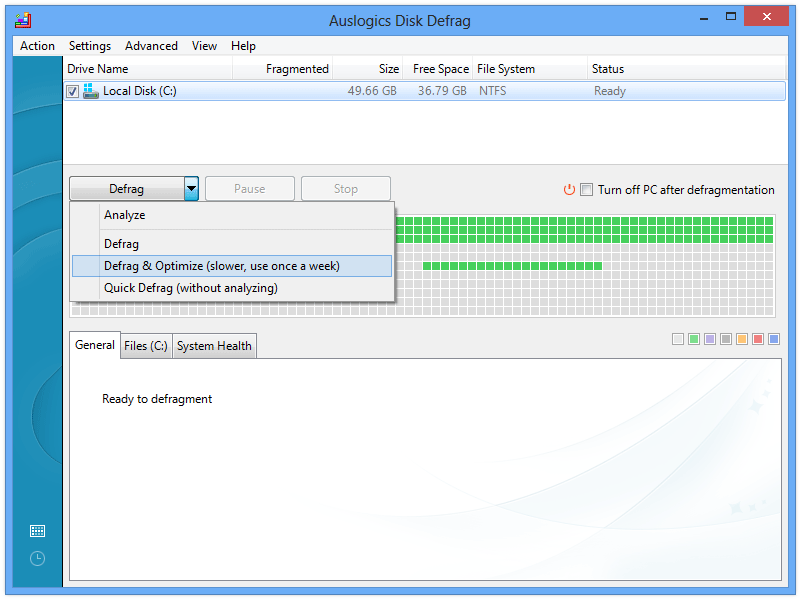
If you have system restore enabled, Windows typically writes restore points (System Volume Information folder, which is hidden) near the "middle" of the volume's empty space rather than adjacent to the rest of the data (typically clustered towards the center of the drive). As the drive fills up the restore points move closer to the "outer" edge of the volume.
In my experience this is why I could not shrink a volume by an amount that matched or was near its actual free space. If system restore is on, you can use a third party defrag tool like Auslogics to get a rough map of the data on the volume. This sample image shows what I'm talking about, where that separate sequence of data clusters is the restore points. In that case the volume can't shrink beyond where the restore points are located, even if there's plenty of free space between them and the bulk of the data written at the start of the volume.
If this applies to your situation you could do the following:
- make a backup of your system partition using something like Macrium Reflect
- delete the restore points by simply turning off system restore
- optional: defragment the partition to optimize available free space
- then try to shrink the volume by your desired amount
Alternatively you could use a third party partition tool, but I don't have experience with those. I know Mini Tool is popular, but I'm not sure if/how it gets around this potential situation (restore points blocking volume shrink). Of course, if system restore points aren't the source of your issue then this probably doesn't apply. Hopefully someone else chimes in.