Solved 9gb Ram installed. 7 Gb shown as installed, 6.1gb available. Windows 8

betterinblue

New member
Local time
2:58 AM
Messages
29
Hello,

Haven't needed help from you guys in a while. I'm even using windows 8 now. Your advice was so good the last time.. I'm back.

Ok so I have a brand new kingston 4gb ram chip installed on my ecs p-45-t black series board. It replaced a 1gb chip. My other chips all say 1.8v this new one is 1.95.

According to my board manual, the board may only take 2gb chips, that contradicts its 16gb max capacity it boldly advertises. So I threw a dart. Now its telling me that I only have 7gb's one gigabyte more than before but I technically just added 3.

So far I have increased my memory voltage in the blue setup screen you get when pressing delete to 1.95 to see if it would fix this. It has not. I also just downloaded two bios files that I have not loaded.

I wait to hear from you again.

Thanks
 

My Computer My Computer

At a glance

Windows 7 Pro 64 bitIntel Core i3 4120 3.6 Ghz8Gb DDR 3Radeon R9 290
Computer type
PC/Desktop
Computer Manufacturer/Model Number
custom build
OS
Windows 7 Pro 64 bit
CPU
Intel Core i3 4120 3.6 Ghz
Motherboard
unknown
Memory
8Gb DDR 3
Graphics Card(s)
Radeon R9 290
Monitor(s) Displays
AOC e2050s
Screen Resolution
1600 x 900
Hard Drives
500gb os
2tb storage
PSU
650 watt
Case
Antec one
Cooling
Stock intel
Keyboard
HP
Mouse
Dell
Internet Speed
256kb/s
Antivirus
Avast
Browser
Google Chrome
I would not change the bios at this time.
I recommend installing all match ram that meet the motherboard specs. Mismatching ram seldom works correctly if at all.
 

My Computer My Computer

At a glance

Windows 10 Pro. 64/ version 1709 Windows 7 Pr...Intel i7-6800K @ 4.3Corsair Platinum 16 gig @2400EVGA GTX 1070 OC
Computer type
PC/Desktop
Computer Manufacturer/Model Number
Home made Desktop
OS
Windows 10 Pro. 64/ version 1709 Windows 7 Pro/64
CPU
Intel i7-6800K @ 4.3
Motherboard
ASUS X-99 Deluxe II
Memory
Corsair Platinum 16 gig @2400
Graphics Card(s)
EVGA GTX 1070 OC
Monitor(s) Displays
Asus 27" LED LCD/VE278Q
Screen Resolution
1920-1080 or 1280-720 HDMI
Hard Drives
INTEL SSD 730-240 Gb Sata 3.0/
PSU
EVGA Platium 1200W
Case
Phanteks Luxe Tempered Glass 8 fans/ one radiator
Cooling
XSPC/ Water Cooled CPU
Keyboard
Das 4 Professional
Mouse
Logitech M705/MX Anywhere 2-S
Internet Speed
100 mbits
Antivirus
Microsoft Security Essentials/ Malwarebytes Premium 3.0/ SAS
Browser
I.E. 11 default/Firefox/ ISP Time Warner Cable/Spectrum
Other Info
LG BluRay Burner/
Sound system-KLipsch-THX/
Icy Dock ssd Hot Swap bays.
What edition of Windows 8 are you using? Your profile shows Windows 7.

In theory using any combination of compatible RAM should work. But things don't always work that way in the real world. Any differences in RAM specifications or even manufacturer often cause problems.

This is not the time for a BIOS update. This should only be done if the update specifically addresses a problem you are having. You should not do it simply because there is a newer version available or you hope it will resolve some problem. A failed BIOS flash, which can happen even if you do everything right, often has very serious consequences.
 

My Computer My Computer

At a glance

Windows 7 Pro 64 bitXeon W35208 GBNvidia Geforce 210
Computer type
PC/Desktop
Computer Manufacturer/Model Number
HP
OS
Windows 7 Pro 64 bit
CPU
Xeon W3520
Memory
8 GB
Graphics Card(s)
Nvidia Geforce 210
The ram I got is a kingston hyper x chip. It never came easy. 4gb ddr2? yeah right. are you telling me my money was not well spent?
 

My Computer My Computer

At a glance

Windows 7 Pro 64 bitIntel Core i3 4120 3.6 Ghz8Gb DDR 3Radeon R9 290
Computer type
PC/Desktop
Computer Manufacturer/Model Number
custom build
OS
Windows 7 Pro 64 bit
CPU
Intel Core i3 4120 3.6 Ghz
Motherboard
unknown
Memory
8Gb DDR 3
Graphics Card(s)
Radeon R9 290
Monitor(s) Displays
AOC e2050s
Screen Resolution
1600 x 900
Hard Drives
500gb os
2tb storage
PSU
650 watt
Case
Antec one
Cooling
Stock intel
Keyboard
HP
Mouse
Dell
Internet Speed
256kb/s
Antivirus
Avast
Browser
Google Chrome
The ram I got is a kingston hyper x chip. It never came easy. 4gb ddr2? yeah right. are you telling me my money was not well spent?

RAM modules should be bought in complete kits to ensure they are matched; all sticks should be the same brand, same size, and have the same specs. Otherwise, they may not play well together. Your new RAM module obviously is a mismatch so, yes, your money was not well spent. I'm sorry the news isn't better.

To find out what will work for you, restore your RAM to the original RAM configuration, then download and run the memory scanner from Crucial. That will tell you what RAM will work with your MOBO.

Also, if you would fill out the complete specs for your system, it will make it much easier for people to help you. If you have trouble fill out your specs, start a new thread and ask for help.
 

My Computer My Computer

At a glance

Win 7 Ultimate 64 bitIntel i7-3930KKingston HyperX Genesis 32GB Kit (8x4GB Modul...MSI R7850 Twin Frozr 2GD5/OC Radeon HD 7850 2...
Computer type
PC/Desktop
Computer Manufacturer/Model Number
Custom Build
OS
Win 7 Ultimate 64 bit
CPU
Intel i7-3930K
Motherboard
ASUS P9X79 WS
Memory
Kingston HyperX Genesis 32GB Kit (8x4GB Modules) 1600MHz DDR
Graphics Card(s)
MSI R7850 Twin Frozr 2GD5/OC Radeon HD 7850 2GB 256-bit GDDR
Sound Card
Asus Xonar Essence STX
Monitor(s) Displays
3x Asus VG248QE 24", Vizio 32" TV
Screen Resolution
1920 x 1080, ?
Hard Drives
Samsung 128GB 840 Pro SSD (1),
Samsung 4TB 850 EVO SSDs (4)
Samsung 4TB 850 EVO SSDs (16) external backup drives used in 2.5" hot swap bays in the computer.
PSU
Corsair HX750w
Case
Antec Two Hundred v2 (modified)
Cooling
Cooler Master GeminII S524 120mm (fan replaced with a 140mm)
Keyboard
Logitech G510s
Mouse
Logitech M525 (two in use)
Internet Speed
=< 32Mbps down, 8Mbps up
Antivirus
AVAST!, MBAM, SAS, Spybot S&D (all but MBAM free) Glary Util
Browser
IE11
Other Info
LSI 9211-8i HBA card (8 SATA III ports), 2.5" & 3.5" Hot Swap Bays, HooToo HT-CR001 PCI-E to USB 3.0 Internal Hub + 6 Slot Card Reader, and LG Model CH12LS28 BD-ROM Optical Drive. Also, ScanSnap S1500 ADF duplexing scanner, Canon 9000F flat bed scanner, Corsair SP2500 2.1 speakers, Samsung CLP 415nw laser color printer, Cyberpower PP2200SW UPS
The ram I got is a kingston hyper x chip. It never came easy. 4gb ddr2? yeah right. are you telling me my money was not well spent?

RAM modules should be bought in complete kits to ensure they are matched; all sticks should be the same brand, same size, and have the same specs. Otherwise, they may not play well together. Your new RAM module obviously is a mismatch so, yes, your money was not well spent. I'm sorry the news isn't better.

To find out what will work for you, restore your RAM to the original RAM configuration, then download and run the memory scanner from Crucial. That will tell you what RAM will work with your MOBO.

Also, if you would fill out the complete specs for your system, it will make it much easier for people to help you. If you have trouble fill out your specs, start a new thread and ask for help.


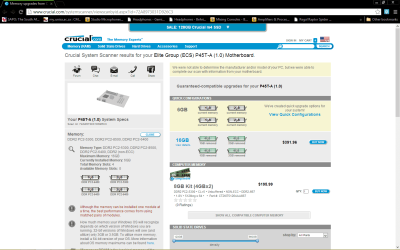
Yeah I went there just now. It's reading my 4gb chip as 2gb chip instead!
 

My Computer My Computer

At a glance

Windows 7 Pro 64 bitIntel Core i3 4120 3.6 Ghz8Gb DDR 3Radeon R9 290
Computer type
PC/Desktop
Computer Manufacturer/Model Number
custom build
OS
Windows 7 Pro 64 bit
CPU
Intel Core i3 4120 3.6 Ghz
Motherboard
unknown
Memory
8Gb DDR 3
Graphics Card(s)
Radeon R9 290
Monitor(s) Displays
AOC e2050s
Screen Resolution
1600 x 900
Hard Drives
500gb os
2tb storage
PSU
650 watt
Case
Antec one
Cooling
Stock intel
Keyboard
HP
Mouse
Dell
Internet Speed
256kb/s
Antivirus
Avast
Browser
Google Chrome
My question now is, if I get chip of the same brand but not necessarily the same size will the issue be resolved?
 

My Computer My Computer

At a glance

Windows 7 Pro 64 bitIntel Core i3 4120 3.6 Ghz8Gb DDR 3Radeon R9 290
Computer type
PC/Desktop
Computer Manufacturer/Model Number
custom build
OS
Windows 7 Pro 64 bit
CPU
Intel Core i3 4120 3.6 Ghz
Motherboard
unknown
Memory
8Gb DDR 3
Graphics Card(s)
Radeon R9 290
Monitor(s) Displays
AOC e2050s
Screen Resolution
1600 x 900
Hard Drives
500gb os
2tb storage
PSU
650 watt
Case
Antec one
Cooling
Stock intel
Keyboard
HP
Mouse
Dell
Internet Speed
256kb/s
Antivirus
Avast
Browser
Google Chrome
Please fill in your computer specs as requested.
 

My Computer My Computer

At a glance

Windows 10 Pro. 64/ version 1709 Windows 7 Pr...Intel i7-6800K @ 4.3Corsair Platinum 16 gig @2400EVGA GTX 1070 OC
Computer type
PC/Desktop
Computer Manufacturer/Model Number
Home made Desktop
OS
Windows 10 Pro. 64/ version 1709 Windows 7 Pro/64
CPU
Intel i7-6800K @ 4.3
Motherboard
ASUS X-99 Deluxe II
Memory
Corsair Platinum 16 gig @2400
Graphics Card(s)
EVGA GTX 1070 OC
Monitor(s) Displays
Asus 27" LED LCD/VE278Q
Screen Resolution
1920-1080 or 1280-720 HDMI
Hard Drives
INTEL SSD 730-240 Gb Sata 3.0/
PSU
EVGA Platium 1200W
Case
Phanteks Luxe Tempered Glass 8 fans/ one radiator
Cooling
XSPC/ Water Cooled CPU
Keyboard
Das 4 Professional
Mouse
Logitech M705/MX Anywhere 2-S
Internet Speed
100 mbits
Antivirus
Microsoft Security Essentials/ Malwarebytes Premium 3.0/ SAS
Browser
I.E. 11 default/Firefox/ ISP Time Warner Cable/Spectrum
Other Info
LG BluRay Burner/
Sound system-KLipsch-THX/
Icy Dock ssd Hot Swap bays.
The ram I got is a kingston hyper x chip. It never came easy. 4gb ddr2? yeah right. are you telling me my money was not well spent?

RAM modules should be bought in complete kits to ensure they are matched; all sticks should be the same brand, same size, and have the same specs. Otherwise, they may not play well together. Your new RAM module obviously is a mismatch so, yes, your money was not well spent. I'm sorry the news isn't better.

To find out what will work for you, restore your RAM to the original RAM configuration, then download and run the memory scanner from Crucial. That will tell you what RAM will work with your MOBO.

Also, if you would fill out the complete specs for your system, it will make it much easier for people to help you. If you have trouble fill out your specs, start a new thread and ask for help.


Yeah I went there just now. It's reading my 4gb chip as 2gb chip instead!

Please reread my post.
 

My Computer My Computer

At a glance

Win 7 Ultimate 64 bitIntel i7-3930KKingston HyperX Genesis 32GB Kit (8x4GB Modul...MSI R7850 Twin Frozr 2GD5/OC Radeon HD 7850 2...
Computer type
PC/Desktop
Computer Manufacturer/Model Number
Custom Build
OS
Win 7 Ultimate 64 bit
CPU
Intel i7-3930K
Motherboard
ASUS P9X79 WS
Memory
Kingston HyperX Genesis 32GB Kit (8x4GB Modules) 1600MHz DDR
Graphics Card(s)
MSI R7850 Twin Frozr 2GD5/OC Radeon HD 7850 2GB 256-bit GDDR
Sound Card
Asus Xonar Essence STX
Monitor(s) Displays
3x Asus VG248QE 24", Vizio 32" TV
Screen Resolution
1920 x 1080, ?
Hard Drives
Samsung 128GB 840 Pro SSD (1),
Samsung 4TB 850 EVO SSDs (4)
Samsung 4TB 850 EVO SSDs (16) external backup drives used in 2.5" hot swap bays in the computer.
PSU
Corsair HX750w
Case
Antec Two Hundred v2 (modified)
Cooling
Cooler Master GeminII S524 120mm (fan replaced with a 140mm)
Keyboard
Logitech G510s
Mouse
Logitech M525 (two in use)
Internet Speed
=< 32Mbps down, 8Mbps up
Antivirus
AVAST!, MBAM, SAS, Spybot S&D (all but MBAM free) Glary Util
Browser
IE11
Other Info
LSI 9211-8i HBA card (8 SATA III ports), 2.5" & 3.5" Hot Swap Bays, HooToo HT-CR001 PCI-E to USB 3.0 Internal Hub + 6 Slot Card Reader, and LG Model CH12LS28 BD-ROM Optical Drive. Also, ScanSnap S1500 ADF duplexing scanner, Canon 9000F flat bed scanner, Corsair SP2500 2.1 speakers, Samsung CLP 415nw laser color printer, Cyberpower PP2200SW UPS
I'll Follow your instructions carefully this time
 

My Computer My Computer

At a glance

Windows 7 Pro 64 bitIntel Core i3 4120 3.6 Ghz8Gb DDR 3Radeon R9 290
Computer type
PC/Desktop
Computer Manufacturer/Model Number
custom build
OS
Windows 7 Pro 64 bit
CPU
Intel Core i3 4120 3.6 Ghz
Motherboard
unknown
Memory
8Gb DDR 3
Graphics Card(s)
Radeon R9 290
Monitor(s) Displays
AOC e2050s
Screen Resolution
1600 x 900
Hard Drives
500gb os
2tb storage
PSU
650 watt
Case
Antec one
Cooling
Stock intel
Keyboard
HP
Mouse
Dell
Internet Speed
256kb/s
Antivirus
Avast
Browser
Google Chrome
These are my results. I first removed my original chips to test the chip though. It showed 2gb's again. But I noticed when I replaced my originals that had not changed until I ran the windows experience rating.
 

Attachments

My Computer My Computer

At a glance

Windows 7 Pro 64 bitIntel Core i3 4120 3.6 Ghz8Gb DDR 3Radeon R9 290
Computer type
PC/Desktop
Computer Manufacturer/Model Number
custom build
OS
Windows 7 Pro 64 bit
CPU
Intel Core i3 4120 3.6 Ghz
Motherboard
unknown
Memory
8Gb DDR 3
Graphics Card(s)
Radeon R9 290
Monitor(s) Displays
AOC e2050s
Screen Resolution
1600 x 900
Hard Drives
500gb os
2tb storage
PSU
650 watt
Case
Antec one
Cooling
Stock intel
Keyboard
HP
Mouse
Dell
Internet Speed
256kb/s
Antivirus
Avast
Browser
Google Chrome
We still need to know if you have a 32 or 64 bit Windows 7.
If you press the Windows key and the Pause key it will tell you their.
 

My Computer My Computer

At a glance

Windows 10 Pro. 64/ version 1709 Windows 7 Pr...Intel i7-6800K @ 4.3Corsair Platinum 16 gig @2400EVGA GTX 1070 OC
Computer type
PC/Desktop
Computer Manufacturer/Model Number
Home made Desktop
OS
Windows 10 Pro. 64/ version 1709 Windows 7 Pro/64
CPU
Intel i7-6800K @ 4.3
Motherboard
ASUS X-99 Deluxe II
Memory
Corsair Platinum 16 gig @2400
Graphics Card(s)
EVGA GTX 1070 OC
Monitor(s) Displays
Asus 27" LED LCD/VE278Q
Screen Resolution
1920-1080 or 1280-720 HDMI
Hard Drives
INTEL SSD 730-240 Gb Sata 3.0/
PSU
EVGA Platium 1200W
Case
Phanteks Luxe Tempered Glass 8 fans/ one radiator
Cooling
XSPC/ Water Cooled CPU
Keyboard
Das 4 Professional
Mouse
Logitech M705/MX Anywhere 2-S
Internet Speed
100 mbits
Antivirus
Microsoft Security Essentials/ Malwarebytes Premium 3.0/ SAS
Browser
I.E. 11 default/Firefox/ ISP Time Warner Cable/Spectrum
Other Info
LG BluRay Burner/
Sound system-KLipsch-THX/
Icy Dock ssd Hot Swap bays.
I have windows 8 64 bit
 

My Computer My Computer

At a glance

Windows 7 Pro 64 bitIntel Core i3 4120 3.6 Ghz8Gb DDR 3Radeon R9 290
Computer type
PC/Desktop
Computer Manufacturer/Model Number
custom build
OS
Windows 7 Pro 64 bit
CPU
Intel Core i3 4120 3.6 Ghz
Motherboard
unknown
Memory
8Gb DDR 3
Graphics Card(s)
Radeon R9 290
Monitor(s) Displays
AOC e2050s
Screen Resolution
1600 x 900
Hard Drives
500gb os
2tb storage
PSU
650 watt
Case
Antec one
Cooling
Stock intel
Keyboard
HP
Mouse
Dell
Internet Speed
256kb/s
Antivirus
Avast
Browser
Google Chrome
Their are many motherboards when I Google ECS p45 t Black Serie. Could you point us at the site that has your exact motherboard and its specs.
You also should download the motherboard manual if you don't already have one. A proper motherboard manual is a absolute necessity when choosing hardware.
These steps you are being guided through are not because I'm lazy. They are steps that one must know for now and in the future to work with hardware for computers.
Please get back with the information.
 
Last edited:

My Computer My Computer

At a glance

Windows 10 Pro. 64/ version 1709 Windows 7 Pr...Intel i7-6800K @ 4.3Corsair Platinum 16 gig @2400EVGA GTX 1070 OC
Computer type
PC/Desktop
Computer Manufacturer/Model Number
Home made Desktop
OS
Windows 10 Pro. 64/ version 1709 Windows 7 Pro/64
CPU
Intel i7-6800K @ 4.3
Motherboard
ASUS X-99 Deluxe II
Memory
Corsair Platinum 16 gig @2400
Graphics Card(s)
EVGA GTX 1070 OC
Monitor(s) Displays
Asus 27" LED LCD/VE278Q
Screen Resolution
1920-1080 or 1280-720 HDMI
Hard Drives
INTEL SSD 730-240 Gb Sata 3.0/
PSU
EVGA Platium 1200W
Case
Phanteks Luxe Tempered Glass 8 fans/ one radiator
Cooling
XSPC/ Water Cooled CPU
Keyboard
Das 4 Professional
Mouse
Logitech M705/MX Anywhere 2-S
Internet Speed
100 mbits
Antivirus
Microsoft Security Essentials/ Malwarebytes Premium 3.0/ SAS
Browser
I.E. 11 default/Firefox/ ISP Time Warner Cable/Spectrum
Other Info
LG BluRay Burner/
Sound system-KLipsch-THX/
Icy Dock ssd Hot Swap bays.

My Computer My Computer

At a glance

Windows 7 Pro 64 bitIntel Core i3 4120 3.6 Ghz8Gb DDR 3Radeon R9 290
Computer type
PC/Desktop
Computer Manufacturer/Model Number
custom build
OS
Windows 7 Pro 64 bit
CPU
Intel Core i3 4120 3.6 Ghz
Motherboard
unknown
Memory
8Gb DDR 3
Graphics Card(s)
Radeon R9 290
Monitor(s) Displays
AOC e2050s
Screen Resolution
1600 x 900
Hard Drives
500gb os
2tb storage
PSU
650 watt
Case
Antec one
Cooling
Stock intel
Keyboard
HP
Mouse
Dell
Internet Speed
256kb/s
Antivirus
Avast
Browser
Google Chrome

My Computer My Computer

At a glance

Windows 7 Pro 64 bitIntel Core i3 4120 3.6 Ghz8Gb DDR 3Radeon R9 290
Computer type
PC/Desktop
Computer Manufacturer/Model Number
custom build
OS
Windows 7 Pro 64 bit
CPU
Intel Core i3 4120 3.6 Ghz
Motherboard
unknown
Memory
8Gb DDR 3
Graphics Card(s)
Radeon R9 290
Monitor(s) Displays
AOC e2050s
Screen Resolution
1600 x 900
Hard Drives
500gb os
2tb storage
PSU
650 watt
Case
Antec one
Cooling
Stock intel
Keyboard
HP
Mouse
Dell
Internet Speed
256kb/s
Antivirus
Avast
Browser
Google Chrome
The information on your motherboard is all over the place. It is a duel channel with 3 ram slots.
Your cpu specs LGA775, RAM 1333.
If it was my computer I would install 4 sticks 2 gig each of DDR-2 667 spd ram. 8 gigs of ram will be more than enough for that system.
Her is a site that gives some good information on your motherboard that might help.

ECS P45T-A Intel P45 Chipset Motherboard Review | Features and Specifications

I think their is a good chance that having mismatched ram and what slot you are installing them in is causing your problem. If you install 4 sticks of proper matched ram that should take care of the problem.
Please remember never install ram in slots you think they should go in. Only install them with the method given in the motherboard manual.
Your older system would work quiet well with 4 gigs of ram. Two sticks of 2 gigs, but they must be installed in the proper slots as per the manual.
If that was my computer I also would not over clock it.
Very little to be gained except more heat which you don't want.
If you have anymore question, please ask.
 

My Computer My Computer

At a glance

Windows 10 Pro. 64/ version 1709 Windows 7 Pr...Intel i7-6800K @ 4.3Corsair Platinum 16 gig @2400EVGA GTX 1070 OC
Computer type
PC/Desktop
Computer Manufacturer/Model Number
Home made Desktop
OS
Windows 10 Pro. 64/ version 1709 Windows 7 Pro/64
CPU
Intel i7-6800K @ 4.3
Motherboard
ASUS X-99 Deluxe II
Memory
Corsair Platinum 16 gig @2400
Graphics Card(s)
EVGA GTX 1070 OC
Monitor(s) Displays
Asus 27" LED LCD/VE278Q
Screen Resolution
1920-1080 or 1280-720 HDMI
Hard Drives
INTEL SSD 730-240 Gb Sata 3.0/
PSU
EVGA Platium 1200W
Case
Phanteks Luxe Tempered Glass 8 fans/ one radiator
Cooling
XSPC/ Water Cooled CPU
Keyboard
Das 4 Professional
Mouse
Logitech M705/MX Anywhere 2-S
Internet Speed
100 mbits
Antivirus
Microsoft Security Essentials/ Malwarebytes Premium 3.0/ SAS
Browser
I.E. 11 default/Firefox/ ISP Time Warner Cable/Spectrum
Other Info
LG BluRay Burner/
Sound system-KLipsch-THX/
Icy Dock ssd Hot Swap bays.
Well the reason I am trying to get to 16gbs is simple. I want to use the pc to edit videos. I use vegas hd 11 and 12 and I suffer. Editing is tedious and slow. Rendering? that should even be forgotten. That's just off cellphone videos from my blackberry 9550!

I need the ram. An here in South Africa A pc like yours or Lady Fitzgerald's costs like R20 000 or more! I'm a student who gets R800 a month as an allowance. The cost of such a machine is 7 to 8 times a monthly minimum wage salary! Ram on the "old" machine is my only option

The current exchange rate is like 9.1 - 9.5 to the dollar
 
Last edited:

My Computer My Computer

At a glance

Windows 7 Pro 64 bitIntel Core i3 4120 3.6 Ghz8Gb DDR 3Radeon R9 290
Computer type
PC/Desktop
Computer Manufacturer/Model Number
custom build
OS
Windows 7 Pro 64 bit
CPU
Intel Core i3 4120 3.6 Ghz
Motherboard
unknown
Memory
8Gb DDR 3
Graphics Card(s)
Radeon R9 290
Monitor(s) Displays
AOC e2050s
Screen Resolution
1600 x 900
Hard Drives
500gb os
2tb storage
PSU
650 watt
Case
Antec one
Cooling
Stock intel
Keyboard
HP
Mouse
Dell
Internet Speed
256kb/s
Antivirus
Avast
Browser
Google Chrome
The PDF download is a QLV (Qualified Vendor List) of RAM that has actually been tested by ECS. QLVs do not cover all possible combinations and tend to be conservative. The QVL for my MOBO, even though the MOBO is rated for 64GB RAM, shows 24GB as the largest kit available. I went ahead and bought a 32GB kit on sale that used the same modules as the 24GB kit, figuring that if the extra two wouldn't work, I could keep them for spares (it turned out they did work).

The 2GB you are seeing on your MOBO's QVL appears to be for a single module. The specs for the MOBO say it is rated for 16GB RAM so, if you really do need the 16GB RAM (and I'm not saying you don't), I would go with the Crucial recommendation to remove your existing RAM and replace it with the 16GB kit (four matched 4GB modules) they recommended. Crucial has been in the memory business for years and have probably forgotten more about it than we will ever know.

The sad thing is RAM prices have gone up recently (I got lucky, my 32GB cost me less than what your 16GB will cost) and will probably stay higher than a kite for some time.
 

My Computer My Computer

At a glance

Win 7 Ultimate 64 bitIntel i7-3930KKingston HyperX Genesis 32GB Kit (8x4GB Modul...MSI R7850 Twin Frozr 2GD5/OC Radeon HD 7850 2...
Computer type
PC/Desktop
Computer Manufacturer/Model Number
Custom Build
OS
Win 7 Ultimate 64 bit
CPU
Intel i7-3930K
Motherboard
ASUS P9X79 WS
Memory
Kingston HyperX Genesis 32GB Kit (8x4GB Modules) 1600MHz DDR
Graphics Card(s)
MSI R7850 Twin Frozr 2GD5/OC Radeon HD 7850 2GB 256-bit GDDR
Sound Card
Asus Xonar Essence STX
Monitor(s) Displays
3x Asus VG248QE 24", Vizio 32" TV
Screen Resolution
1920 x 1080, ?
Hard Drives
Samsung 128GB 840 Pro SSD (1),
Samsung 4TB 850 EVO SSDs (4)
Samsung 4TB 850 EVO SSDs (16) external backup drives used in 2.5" hot swap bays in the computer.
PSU
Corsair HX750w
Case
Antec Two Hundred v2 (modified)
Cooling
Cooler Master GeminII S524 120mm (fan replaced with a 140mm)
Keyboard
Logitech G510s
Mouse
Logitech M525 (two in use)
Internet Speed
=< 32Mbps down, 8Mbps up
Antivirus
AVAST!, MBAM, SAS, Spybot S&D (all but MBAM free) Glary Util
Browser
IE11
Other Info
LSI 9211-8i HBA card (8 SATA III ports), 2.5" & 3.5" Hot Swap Bays, HooToo HT-CR001 PCI-E to USB 3.0 Internal Hub + 6 Slot Card Reader, and LG Model CH12LS28 BD-ROM Optical Drive. Also, ScanSnap S1500 ADF duplexing scanner, Canon 9000F flat bed scanner, Corsair SP2500 2.1 speakers, Samsung CLP 415nw laser color printer, Cyberpower PP2200SW UPS
Thank you
 

My Computer My Computer

At a glance

Windows 7 Pro 64 bitIntel Core i3 4120 3.6 Ghz8Gb DDR 3Radeon R9 290
Computer type
PC/Desktop
Computer Manufacturer/Model Number
custom build
OS
Windows 7 Pro 64 bit
CPU
Intel Core i3 4120 3.6 Ghz
Motherboard
unknown
Memory
8Gb DDR 3
Graphics Card(s)
Radeon R9 290
Monitor(s) Displays
AOC e2050s
Screen Resolution
1600 x 900
Hard Drives
500gb os
2tb storage
PSU
650 watt
Case
Antec one
Cooling
Stock intel
Keyboard
HP
Mouse
Dell
Internet Speed
256kb/s
Antivirus
Avast
Browser
Google Chrome
Back
Top