"_ _ _ _ _ has stopped working"

stuckstuck

New member
Member
VIP
Local time
12:26 AM
Messages
168
Every time I try to open the program(s) now it would immediately pop up telling me that it 'has stopped working'.
I'm not exactly too sure why this is happening seeing as it used to work before I had re-installed my windows OS.
You would think it would be that right? Well apparently everything else works fine other than a few odd programs here and there (I know that two don't work so far).
I would have my OS on my SSD, but then (mostly) everything else program-wise I will install onto another drive. (HDD)
Just thought I'd mention that, so any ideas why this is happening? Everything seems to be in order other than the two programs (so far) that just don't work.
I tried re-installing the program(s), nothing.
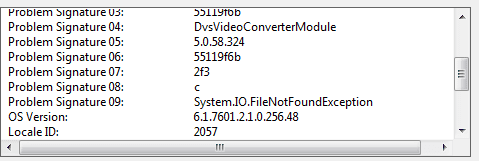
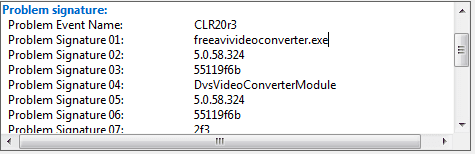
Below is one of the programs that had stopped working...
 

Attachments
  • bs.png
    bs.png
    3.6 KB · Views: 33
  • bs2.png
    bs2.png
    3.9 KB · Views: 33

My Computer My Computer

At a glance

Microsoft Windows 7 Professional 64-bit5960X @ 4.4GHz16.0 GBNVIDIA GeForce GTX 980 Ti
Computer type
PC/Desktop
Computer Manufacturer/Model Number
Custom
OS
Microsoft Windows 7 Professional 64-bit
CPU
5960X @ 4.4GHz
Motherboard
X99 SABERTOOTH
Memory
16.0 GB
Graphics Card(s)
NVIDIA GeForce GTX 980 Ti
Hard Drives
(1) OCZ-VERT EX460 SCSI Disk Device
(2) WDC WD1002FAEX-00Z3A SCSI Disk Device
(3) WDC WD1003FZEX-00MK2 SCSI Disk Device
Internet Speed
God Speed.
Antivirus
Glock 9
I would read carefully over the perfect install compiled in Clean Reinstall Windows 7 to compare it with the one you did. If it doesn't measure up, I'd redo it. Over 1.3 milllion have used that tutorial without a single complaint.

I would also not install Programs to any other than C since they write keys to the registry which integrate them into the OS and should remain a part of it and its image. Programs also benefit from SSD speed so moving them off is counterproductive. User folders can be moved instead to save space if needed. User Folders - Change Default Location

If this isn't the present problem then have you installed all Important and Optional Updates after Enable hardware auto-updating via Windows Update (Steps 3 and 6)? There may be important patches needed to make all programs and hardware work correctly.
 
But that's just it, everything was working fine before regardless whether or not the programs were installed within C drive, probably as you said about the registrys disappearing after I clean-installed my OS...
But shouldn't re-installing my programs fix that?
I'll be sure to check out that post.
 

My Computer My Computer

At a glance

Microsoft Windows 7 Professional 64-bit5960X @ 4.4GHz16.0 GBNVIDIA GeForce GTX 980 Ti
Computer type
PC/Desktop
Computer Manufacturer/Model Number
Custom
OS
Microsoft Windows 7 Professional 64-bit
CPU
5960X @ 4.4GHz
Motherboard
X99 SABERTOOTH
Memory
16.0 GB
Graphics Card(s)
NVIDIA GeForce GTX 980 Ti
Hard Drives
(1) OCZ-VERT EX460 SCSI Disk Device
(2) WDC WD1002FAEX-00Z3A SCSI Disk Device
(3) WDC WD1003FZEX-00MK2 SCSI Disk Device
Internet Speed
God Speed.
Antivirus
Glock 9
You re installed the programs, and they still don`t work ?

That`s really odd :huh:
 

My Computer My Computer

At a glance

Windows 10 Pro x64Intel Core i7 6700KGSkill TridentZ RGB 16GB 3600 16-16-16-36EVGA GTX 980 Ti SC x2
Computer type
PC/Desktop
Computer Manufacturer/Model Number
Skylake Special #666
OS
Windows 10 Pro x64
CPU
Intel Core i7 6700K
Motherboard
Asus Sabertooth Z170 Mark 1
Memory
GSkill TridentZ RGB 16GB 3600 16-16-16-36
Graphics Card(s)
EVGA GTX 980 Ti SC x2
Sound Card
Realtek High Definition
Monitor(s) Displays
AOC G2460PG
Screen Resolution
1920 x 1080 144Hz
Hard Drives
Samsung 860 Pro 256GB, Seagate Barracuda 4TB x2
PSU
EVGA 1000 P2, EVGA White Custom Braided Cables
Case
Corsair Vengeance C70 Gunmetal Black
Cooling
Corsair H100i v2, Corsair ML120 x2, Thermal Grizzly Kryonaut
Keyboard
Logitech G910 Orion Spectrum
Mouse
Logitech G700s
Internet Speed
Verizon Fios Quantum Gateway 75/75
Antivirus
Windows Defender, Malwarebytes Free 3.8.3
Browser
Chrome
Other Info
Corsair SP120 x4, LG Blu-ray Drive, Durabrand HT-395 100 Watt Dolby Digital Amp, Corsair H2100 Wireless 7.1 Headset
Some of the more dodgy video converter programs can carry malware with their downloads.

Do the full scans after downloading and installing declining trial, with Malwarebytes and also SUPERAntiSpyware, then run SFC /SCANNOW Command.

Check each browsers' Add-On's and Extensions to disable anything other than Flash, a Reader helper and any Search service other than Google.
 
It can happen. :(

After my reinstall of W7 last December, GIMP has developed a couple of glitches.
I tried the previous version (2.8.10) which worked correctly on my previous install and the latest version (2.8.14).

I'm starting to think that the order programs are installed in, can actually determine whether or not they work correctly. :confused:
 

My Computer My Computer

At a glance

W7 Ultimate SP1, LM19.2 MATE, W10 Home 1703, ...AMD Phenom II x6 1100T, 3.3 GHz12GB DDR3 1333 G-Skill (4GB x 2), G-Skill (2G...NVIDIA GeForce GTX 660
Computer type
PC/Desktop
Computer Manufacturer/Model Number
n/a
OS
W7 Ultimate SP1, LM19.2 MATE, W10 Home 1703, W10 Pro 1703 VM, #All 64 bit
CPU
AMD Phenom II x6 1100T, 3.3 GHz
Motherboard
ASUS M4A88T-M/USB3 (AM3)
Memory
12GB DDR3 1333 G-Skill (4GB x 2), G-Skill (2GB x 2)
Graphics Card(s)
NVIDIA GeForce GTX 660
Sound Card
Realtek?
Monitor(s) Displays
Samsung S23B350
Screen Resolution
1920x1080
Hard Drives
WD Green 2TB (SATA), WD Green 3TB (SATA), WD Blue 4TB (SATA), WD Blue 6TB (SATA)
PSU
Cooler Master
Case
Antec GX300 Tower
Cooling
3x Antec TRICOOL 120mm Fans
Mouse
Wired Optical
Internet Speed
DSL
Antivirus
Avast
Browser
Pale Moon (64 bit)
Other Info
2018-12-27 Upgraded HDDs
2015-12-10 Upgraded case, graphics card, storage
2015-08-15 Upgraded motherboard & RAM
2015-07-15 Upgraded LM17.1 to LM17.2
Some also require Net Frameworks or other patches from Windows Update, even those strangely queued under Optional.
 
Back
Top