A Comment on SATA connectors...

TBoyd

Always Learning
Guru
Local time
10:57 PM
Messages
249
Location
St Thomas, Virgin Islands
For about the third time in a year I've had various, hard to diagnose problems that turned out to be related to SATA connectors. The slightest bit of dust or corrosion creeping into these 7-pin connectors can cause inconsistent problems that may take days to figure out.

Don't get me wrong - SATA is a great improvement over the old IDE technology - much faster. BUT the SATA connectors - compared to IDE - are cheaply made. They will still wobble somewhat - even after being completely plugged in. This was not so with the IDE connectors - they wouldn't budge once connected.

Whoever designed the SATA plug must be a computer repair tech!

Anyone else had issues with SATA connectors - or is it just me? :sarc:
 

My Computer My Computer

At a glance

Windows 7 Professional 64 Bit SP1Intel i7-3770K. Mild Overclock to 4.2 GhzCrucial Ballistix Sport 32GB DDR3-1600 (PC3-1...Intel 4000 - On CPU
Computer type
PC/Desktop
Computer Manufacturer/Model Number
Custom Build
OS
Windows 7 Professional 64 Bit SP1
CPU
Intel i7-3770K. Mild Overclock to 4.2 Ghz
Motherboard
ASUS Sabertooth Z77
Memory
Crucial Ballistix Sport 32GB DDR3-1600 (PC3-12800)
Graphics Card(s)
Intel 4000 - On CPU
Sound Card
On Board
Monitor(s) Displays
HP w2408h
Screen Resolution
1920 x 1200
Hard Drives
Samsung 840 Pro 256Gb SSD, --
Two - WDC WD1001FALS-00J7B0 SATA
PSU
Antec EarthWatts Green Series 650 Watt ATX
Case
Fractal Design Core 3000 ATX
Cooling
Corsair H80i Water Cooled
Keyboard
Logitech Illuminated
Mouse
Logitech Wireless Trackball M570 + Touchpad T650
Internet Speed
9.5 Mbps down - 25.4 Mbps upload
Antivirus
MSE
Browser
IE 10, Chrome
As of yet I have not experienced one bad sata plug/chord.

I have replaced more ide cables over the years than I can count.
 

My Computer My Computer

At a glance

Windows 7 x64Intel i7 2600kG.skill Ripjaw 16gigs @ 1866Nvidia gtx580 (evga)
Computer Manufacturer/Model Number
Insane hobo technologies. ;-)
OS
Windows 7 x64
CPU
Intel i7 2600k
Motherboard
Asrock z68 extreme 4 gen 3
Memory
G.skill Ripjaw 16gigs @ 1866
Graphics Card(s)
Nvidia gtx580 (evga)
Sound Card
Integrated HD audio + hdmi
Monitor(s) Displays
24" ASUS widescreen + 42" insignia
Screen Resolution
1080p (1920x1080)
Hard Drives
128 Samsung 830
256 Samsung 840
3 x 1tb storage drive (various)
1 western digital 1tb (eSATA)
1 Seagate 1tb (eSATA)
PSU
1 kilowatt SLI/Crossfire rated Silverstone modular
Case
NZXT Phantom + additional 220 fan
Cooling
Zalmann
Keyboard
Microsoft wireless 3000 (v2)
Mouse
MS - wireless 5000 (bluetrack)
Internet Speed
depends on if you ask me or my provider.
Other Info
The above information is provided as is, and the author assumes no responsibility for issues it may cause with your sanity or fanboyism.
your not alone buddy!
each time i did a wire tuck, the sata cable for my hdd came out, and i had to pull out cables to get to it.
buy a few sata cables with metal clips that hold them in, you wont regret spending the 20-30 bucks mate.
 

My Computer My Computer

At a glance

windows 7 ultimate x64Intel i7 9503x2gb corsair xms 1600mhz ddr3ATI saphire 5770 OC 1GB
Computer Manufacturer/Model Number
-
OS
windows 7 ultimate x64
CPU
Intel i7 950
Motherboard
gigabyte usb3
Memory
3x2gb corsair xms 1600mhz ddr3
Graphics Card(s)
ATI saphire 5770 OC 1GB
Sound Card
-
Monitor(s) Displays
22'' acer
Screen Resolution
1680 1050
Hard Drives
320gb WD blue
PSU
cooler master modular silent pro 850watt
Case
thermaltake soprano
Internet Speed
20mbps
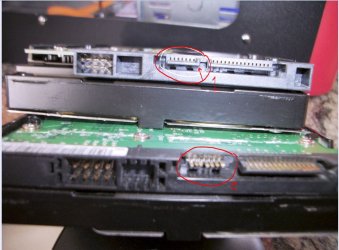
There have been several threads here at SF that have turned out to have bad / defective SATA cables. Plus the plastic support for the 7 pins is fragile. See the bottom HD in this pic. #2
 

Attachments

  • SATA HD 2 broken plastic.JPG
    SATA HD 2 broken plastic.JPG
    121.9 KB · Views: 46

My Computer My Computer

At a glance

Win7 Enterprise, Win7 x86 (Ult 7600), Win7 x6...AMD fx8350 4ghz, AMD-32 2400mhz, AMD-64 3200m...2gb, 4gb on the Ult 7600, 4gb on Technet RTM,...Draw my own Graphics, several nVidia cards
Computer type
PC/Desktop
Computer Manufacturer/Model Number
Built them myself, Science Experiments !
OS
Win7 Enterprise, Win7 x86 (Ult 7600), Win7 x64 Ult 7600, TechNet RTM on AMD x64 (2.8Ghz)
CPU
AMD fx8350 4ghz, AMD-32 2400mhz, AMD-64 3200mhz, AMDx64 2.8G
Motherboard
SIS 755, ECS-K8M890M-M (Ult 7600), GigaByte & others
Memory
2gb, 4gb on the Ult 7600, 4gb on Technet RTM, 32gb on FX8350
Graphics Card(s)
Draw my own Graphics, several nVidia cards
Sound Card
on motherboard
Monitor(s) Displays
19" flat scr, 28" I-Inc widescr,22" Emprex Widescr, 23" Acer
Screen Resolution
1280 x 1024, 1440 x 900, 1920 x 1080
Hard Drives
6 pata Ide HD's & 2 Sata HD's
added 80gb external on Ult 7600 computer,
numerous extra 1tb, 2TB, 3Tb SATA HD's
A collection of ext HD Docks w/ HDs
PSU
430w, 550w, 600w, 700, 800, etc
Case
All Generic Full Towers
Cooling
Open Air & a few fans, some w/ colored LEDs
Keyboard
Compaq & Dell recycled from GoodWill
Mouse
Made in China Optical Wired Mouse
Internet Speed
Fast Cable InterNet
Antivirus
AVG Free on 24 different Desktops, NO Problems!
Browser
IE 8 is preferred, but use FireFox sometimes
Other Info
Linksys Routers, switches, & Hubs
Too Many USB Flash Drives to count, Biggest is 64GB !
Eight computers in my home network.
Sixteen computers at my business network.
Linked via TeamViewer !
Lots of old used spare computer parts everywhere!
Must be you. I have 9 drives in my machine and not one issue with SATA cables or connections on the drives, and I sometimes have to shove my hand in the tiny space between the drives to get to the connections and have fears that I may one day snap a connector or two.
old, pic with only 8 drives,
drives.jpg
 

My Computer My Computer

At a glance

Windows 7 Ultimate 64bitIntel i7 3770K16GB DDR3 1333 Corsair XMS3XFX HD6950 2GB EyeFinity
Computer Manufacturer/Model Number
HAL-9000
OS
Windows 7 Ultimate 64bit
CPU
Intel i7 3770K
Motherboard
Asus Sabertooth Z77
Memory
16GB DDR3 1333 Corsair XMS3
Graphics Card(s)
XFX HD6950 2GB EyeFinity
Sound Card
Logitech G35 & Sennheiser PC135 & VIA HD
Monitor(s) Displays
23" HP 2310e, 23" Samsung B2230, 21.5" Viewsonic
Screen Resolution
5760x1080
Hard Drives
16TB of Storage
128GB & 256GB Crucial M4 SSD's, 2X 1TB WD Black, 3x 2TB WD, 3x 2TB Samsung F4, 1.5TB Seagate, WD 500GB,
PSU
Antec True Power New 650watt
Case
Cooler Master HAF-932
Cooling
Corsair H60 Hydro Cooler, 3x 230mm Fans, 2x120mm Fan
Keyboard
Logitech G15 and G13
Mouse
Logitech G700 Gaming Mouse
Internet Speed
50/10 Mbit
Other Info
Speakers : Alesis M1 Active Mk2 Studio Monitors , APC RS 1200 UPS, HP 4500DN Color Laser, HP P1006 mono Laser, Kodak 8500 Dye-Sub, Epson 1280 inkjet, Epson Worforce 610 MFC
Never a problem here. In my current build I made sure I used cables with the clip in the connectors.
 

My Computer My Computer

At a glance

Windows 10 Pro. EFI boot partition, full EFI ...i7 4770k 4.4GHz (44-44-43-43 turbo) @ 1.248V16GB (8GBx2) @2200 MHz G.skill Sniper 10-11-1...MSI GTX 970 Gaming 4G
Computer type
PC/Desktop
Computer Manufacturer/Model Number
Home built (GeneO industries)/Model 4
OS
Windows 10 Pro. EFI boot partition, full EFI boot
CPU
i7 4770k 4.4GHz (44-44-43-43 turbo) @ 1.248V
Motherboard
ASUS Maximus VI Hero
Memory
16GB (8GBx2) @2200 MHz G.skill Sniper 10-11-10-30-1, 1.6V
Graphics Card(s)
MSI GTX 970 Gaming 4G
Sound Card
Onboard SupremeFX Audio
Monitor(s) Displays
NEC Spectraview 2490WUXi-SV
Screen Resolution
1920 x 1200
Hard Drives
Samsung 850 Pro 256GB (OS), Samsung 2x 128GB 840 Pro SSD in RAID0, 3x WD Blue 6Gb/s 1TB RAID0, WD 2TB Black external USB 3.0, 2TB WD20EARS Green external USB 3.0, 2x 500GB Seagate and 1 750 GB external USB, 1x 350GB external USB3
PSU
Seasonic X-850 (2012 KM3 model)
Case
Fractal Design Define R4
Cooling
NH-D14, NF-F12, NF-A15; NF-P14, NF-P12,NF-A14, S12A PWM
Keyboard
Cooler Master Storm Quickfire Rapid - Brown
Mouse
Logitech G602
Internet Speed
126.4 Mb/s down, 24.3 Mb/s up
Other Info
USB 3.0 x8 , SATA III x8, eSATA, USB 2.0 x6. Samsung DVD R/W drive.

WEI: CPU 7.8, Memory 7.9, Graphics 7.9, Disk 7.9
Thanks for all the replies. I agree - the ones with the metal clips are better. I should have mentioned that. The ones that were problematic had no metal clips.

Zepher - ONLY 8 drives - is that all? :shock:
 

My Computer My Computer

At a glance

Windows 7 Professional 64 Bit SP1Intel i7-3770K. Mild Overclock to 4.2 GhzCrucial Ballistix Sport 32GB DDR3-1600 (PC3-1...Intel 4000 - On CPU
Computer type
PC/Desktop
Computer Manufacturer/Model Number
Custom Build
OS
Windows 7 Professional 64 Bit SP1
CPU
Intel i7-3770K. Mild Overclock to 4.2 Ghz
Motherboard
ASUS Sabertooth Z77
Memory
Crucial Ballistix Sport 32GB DDR3-1600 (PC3-12800)
Graphics Card(s)
Intel 4000 - On CPU
Sound Card
On Board
Monitor(s) Displays
HP w2408h
Screen Resolution
1920 x 1200
Hard Drives
Samsung 840 Pro 256Gb SSD, --
Two - WDC WD1001FALS-00J7B0 SATA
PSU
Antec EarthWatts Green Series 650 Watt ATX
Case
Fractal Design Core 3000 ATX
Cooling
Corsair H80i Water Cooled
Keyboard
Logitech Illuminated
Mouse
Logitech Wireless Trackball M570 + Touchpad T650
Internet Speed
9.5 Mbps down - 25.4 Mbps upload
Antivirus
MSE
Browser
IE 10, Chrome
Thanks for all the replies. I agree - the ones with the metal clips are better. I should have mentioned that. The ones that were problematic had no metal clips.

Zepher - ONLY 8 drives - is that all? :shock:

Ya, controller cards are kinda pricey. :)
I have all 9 onboard SATA ports used and the IDE port.
 

My Computer My Computer

At a glance

Windows 7 Ultimate 64bitIntel i7 3770K16GB DDR3 1333 Corsair XMS3XFX HD6950 2GB EyeFinity
Computer Manufacturer/Model Number
HAL-9000
OS
Windows 7 Ultimate 64bit
CPU
Intel i7 3770K
Motherboard
Asus Sabertooth Z77
Memory
16GB DDR3 1333 Corsair XMS3
Graphics Card(s)
XFX HD6950 2GB EyeFinity
Sound Card
Logitech G35 & Sennheiser PC135 & VIA HD
Monitor(s) Displays
23" HP 2310e, 23" Samsung B2230, 21.5" Viewsonic
Screen Resolution
5760x1080
Hard Drives
16TB of Storage
128GB & 256GB Crucial M4 SSD's, 2X 1TB WD Black, 3x 2TB WD, 3x 2TB Samsung F4, 1.5TB Seagate, WD 500GB,
PSU
Antec True Power New 650watt
Case
Cooler Master HAF-932
Cooling
Corsair H60 Hydro Cooler, 3x 230mm Fans, 2x120mm Fan
Keyboard
Logitech G15 and G13
Mouse
Logitech G700 Gaming Mouse
Internet Speed
50/10 Mbit
Other Info
Speakers : Alesis M1 Active Mk2 Studio Monitors , APC RS 1200 UPS, HP 4500DN Color Laser, HP P1006 mono Laser, Kodak 8500 Dye-Sub, Epson 1280 inkjet, Epson Worforce 610 MFC
SATA connectors are much better as compared to the IDE tech. Always use good SATA cables which has Silver Lockable Clips on both ends they lock and wont budge unless you press the button and about the dust thing we all have to keep our PC clean once in 3 months at least.
 

My Computer My Computer

At a glance

Windows 10 ProCore i5 9600KCorsair Vengeance Pro 2x 8GB (16GB) 3200MHz DDR4MSI GTX 1070 Gaming X 8GB
Computer type
PC/Desktop
Computer Manufacturer/Model Number
Self Built
OS
Windows 10 Pro
CPU
Core i5 9600K
Motherboard
ASUS ROG Strix Z390-F Gaming
Memory
Corsair Vengeance Pro 2x 8GB (16GB) 3200MHz DDR4
Graphics Card(s)
MSI GTX 1070 Gaming X 8GB
Sound Card
ASRock A-Style Purity Sound
Monitor(s) Displays
ASUS VX239H IPS
Screen Resolution
1920x1080
Hard Drives
XPG SPECTRIX S40G 2566GB M.2 NVMe | Patriot P210 512GB SSD | Seagate BarraCuda 4TB 5400RPM
PSU
Thermaltake Smart 600w RGB 80Plus
Case
NZXT H500 with 3x Corsair HD120 RGB w/Node Pro
Cooling
Cryorig H7
Keyboard
Corsair K70 RapidFire RGB (Cherry MX Speed)
Mouse
Logitech G402 Hyperion Fury
Internet Speed
20MB Cable Broadband
Browser
Chrome
Other Info
Corsair MM300 Extended Anti-Fray Mouse Pad | Edifier C2 2.1ch Sound System | XBOX One S Controller | XBOX 360 Wireless Controller for Windows | APC SUA1000i Smart-UPS | PS4 Slim 500GB [Region 1 - USA]
I have been having problems with SATA drives connected to my Asus P6T Deluxe V2 motherboard where I loose my D Drive every 2 or 3 months. At first, I thought it was because I used the cheap cables that came with the motherboard.

I installed more expensive cables and the problem still persisted. Next, I purchased the real good cables that have the Silver Lockable Clips on both ends, the problem persisted and I lost D Drive after a couple months. This time I thought the only thing that could be wrong was that I had a bad hard drive, so I purchased a new larger hard drive to replace the original. Two months later, I loose my D Drive again. At this point, I am lost and don't know why this is happening. Does anyone have a suggestion as to why this is happening and how I can fix it so it doesn't happen again? I built identical PC's for my wife and I, but my wifes PC has only had the problem once, where I have had it happen 5 times on my PC. Any help is appreciated.

Note: The BIOS settings are ok, but the hard drive is not visible on the on screen post messages.
 
Last edited:

My Computer My Computer

At a glance

Windows 7 64-bit
OS
Windows 7 64-bit
I have been having problems with SATA drives connected to my Asus P6T Deluxe V2 motherboard where I loose my D Drive every 2 or 3 months. At first, I thought it was because I used the cheap cables that came with the motherboard.

I installed more expensive cables and the problem still persisted. Next, I purchased the real good cables that have the Silver Lockable Clips on both ends, the problem persisted and I lost D Drive after a couple months. This time I thought the only thing that could be wrong was that I had a bad hard drive, so I purchased a new larger hard drive to replace the original. Two months later, I loose my D Drive again. At this point, I am lost and don't know why this is happening. Does anyone have a suggestion as to why this is happening and how I can fix it so it doesn't happen again? I built identical PC's for my wife and I, but my wifes PC has only had the problem once, where I have had it happen 5 times on my PC. Any help is appreciated.

Note: The BIOS settings are ok, but the hard drive is not visible on the on screen post messages.

Sounds like there is a minor issue with the hard drive controller on the motherboard itself.
Have you seen if any of the bios updates address a similar issue?

...definitely a hardware issue though.
 

My Computer My Computer

At a glance

Windows 7 x64Intel i7 2600kG.skill Ripjaw 16gigs @ 1866Nvidia gtx580 (evga)
Computer Manufacturer/Model Number
Insane hobo technologies. ;-)
OS
Windows 7 x64
CPU
Intel i7 2600k
Motherboard
Asrock z68 extreme 4 gen 3
Memory
G.skill Ripjaw 16gigs @ 1866
Graphics Card(s)
Nvidia gtx580 (evga)
Sound Card
Integrated HD audio + hdmi
Monitor(s) Displays
24" ASUS widescreen + 42" insignia
Screen Resolution
1080p (1920x1080)
Hard Drives
128 Samsung 830
256 Samsung 840
3 x 1tb storage drive (various)
1 western digital 1tb (eSATA)
1 Seagate 1tb (eSATA)
PSU
1 kilowatt SLI/Crossfire rated Silverstone modular
Case
NZXT Phantom + additional 220 fan
Cooling
Zalmann
Keyboard
Microsoft wireless 3000 (v2)
Mouse
MS - wireless 5000 (bluetrack)
Internet Speed
depends on if you ask me or my provider.
Other Info
The above information is provided as is, and the author assumes no responsibility for issues it may cause with your sanity or fanboyism.
Hello irish003

Are there any other spare SATA ports on your motherboard? I would try another port if possible.

If not, try swapping ports with another drive & see if the problem moves to that drive.

From the info you've given, I would be suspicious of the motherboard or that one SATA port.

Please let us know the results!
 

My Computer My Computer

At a glance

Windows 7 Professional 64 Bit SP1Intel i7-3770K. Mild Overclock to 4.2 GhzCrucial Ballistix Sport 32GB DDR3-1600 (PC3-1...Intel 4000 - On CPU
Computer type
PC/Desktop
Computer Manufacturer/Model Number
Custom Build
OS
Windows 7 Professional 64 Bit SP1
CPU
Intel i7-3770K. Mild Overclock to 4.2 Ghz
Motherboard
ASUS Sabertooth Z77
Memory
Crucial Ballistix Sport 32GB DDR3-1600 (PC3-12800)
Graphics Card(s)
Intel 4000 - On CPU
Sound Card
On Board
Monitor(s) Displays
HP w2408h
Screen Resolution
1920 x 1200
Hard Drives
Samsung 840 Pro 256Gb SSD, --
Two - WDC WD1001FALS-00J7B0 SATA
PSU
Antec EarthWatts Green Series 650 Watt ATX
Case
Fractal Design Core 3000 ATX
Cooling
Corsair H80i Water Cooled
Keyboard
Logitech Illuminated
Mouse
Logitech Wireless Trackball M570 + Touchpad T650
Internet Speed
9.5 Mbps down - 25.4 Mbps upload
Antivirus
MSE
Browser
IE 10, Chrome
I have been having problems with SATA drives connected to my Asus P6T Deluxe V2 motherboard where I loose my D Drive every 2 or 3 months. At first, I thought it was because I used the cheap cables that came with the motherboard.

I installed more expensive cables and the problem still persisted. Next, I purchased the real good cables that have the Silver Lockable Clips on both ends, the problem persisted and I lost D Drive after a couple months. This time I thought the only thing that could be wrong was that I had a bad hard drive, so I purchased a new larger hard drive to replace the original. Two months later, I loose my D Drive again. At this point, I am lost and don't know why this is happening. Does anyone have a suggestion as to why this is happening and how I can fix it so it doesn't happen again? I built identical PC's for my wife and I, but my wifes PC has only had the problem once, where I have had it happen 5 times on my PC. Any help is appreciated.

Note: The BIOS settings are ok, but the hard drive is not visible on the on screen post messages.

Can you update your system specs for us so we know what kind of hard ware we are dealing with. Thank you,
 

My Computer My Computer

At a glance

Windows 7 Ultimate x64 SP1AMD Phenom II 1090 3.2 six core16 gig DDR3MSI R6950 2gig
Computer Manufacturer/Model Number
Custom Build
OS
Windows 7 Ultimate x64 SP1
CPU
AMD Phenom II 1090 3.2 six core
Motherboard
MSI 890FXA-GD65
Memory
16 gig DDR3
Graphics Card(s)
MSI R6950 2gig
Sound Card
on board
Monitor(s) Displays
Acer 23inch led
Screen Resolution
1900x1080 widescreen
Hard Drives
Seagate 1tb SATA6
2x 1tb HITACHI Deskstar
PSU
CORSAIR Enthusiast Series TX750 V2 750W
Case
CoolMaster HAF 922
Cooling
Box AMD Heatsink/Fan
Internet Speed
Cable 12Mbps/3Mbps
I have an extra SATA connection, but I do use it a few times a year when prepping new hard drives. As for switching to a new SATA connector, I have never done that because once I replace the cable it works for a couple months. Also, if I just remove the SATA cable and plug the same cable back in the system the system will work and runs fine for a few weeks. That is why I think it is a connection problem.

The Asus FAQ area explains how it may me corroded connectors, and they recommend cleaning the connectors with ethanol alcohol and a flattened Qtip. I haven't tried the Qtip thing yet, but that will be my next attempt. My BIOS is updated to the latest version, so I think I am covered in that way. If you can think of anything else, please let me know.

Below is my system info:

Operating System
Windows 7 Professional (x64) Service Pack 1 (build 7601)
Install Language: English (United States)
System Locale: English (United States)
Processor a
2.67 gigahertz Intel Core i7 920
32 kilobyte primary memory cache
1024 kilobyte secondary memory cache
8192 kilobyte tertiary memory cache
64-bit ready
Multi-core (4 total)
Hyper-threaded (8 total)
Drives
2500.40 Gigabytes Usable Hard Drive Capacity
1647.23 Gigabytes Hard Drive Free Space

Optiarc DVD RW AD-7240S [Optical drive]
PIONEER BD-RW BDR-206 [Optical drive]

WDC WD2002FAEX-007BA0 [Hard drive] (2000.40 GB) -- drive 1, s/n WD-WMAY00913500, rev 05.01D05, SMARTStatus: Healthy
WDC WD5001AALS-00L3B2 [Hard drive] (500.11 GB) -- drive 0, s/n WD-WCAT00242072, SMART Status: Healthy


Users (mouse over user name for details)
local user accounts last logon
IRISH003 4/7/2011 7:42:07 PM (admin)
local system accounts
Administrator 7/14/2009 12:08:59 AM (admin)
Guest 4/7/2011 10:04:24 PM
HomeGroupUser$ 5/16/2010 6:11:04 PM

Marks a disabled account; Marks a locked account
Controllers
Intel(R) ICH10R SATA AHCI Controller
Bus Adapters
Marvell 61xx RAID Controller
Intel(R) ICH10 Family USB Enhanced Host Controller - 3A3A
Intel(R) ICH10 Family USB Enhanced Host Controller - 3A3C
Intel(R) ICH10 Family USB Universal Host Controller - 3A34
Intel(R) ICH10 Family USB Universal Host Controller - 3A35
Intel(R) ICH10 Family USB Universal Host Controller - 3A36
Intel(R) ICH10 Family USB Universal Host Controller - 3A37
Intel(R) ICH10 Family USB Universal Host Controller - 3A38
Intel(R) ICH10 Family USB Universal Host Controller - 3A39
Main Circuit Board b
Board: ASUSTeK Computer INC. P6T DELUXE V2 Rev 1.xx
Serial Number: MS1C97B07102415
Bus Clock: 133 megahertz
BIOS: American Megatrends Inc. 1108 09/21/2010
Memory Modules c,d
6136 Megabytes Usable Installed Memory

Slot 'DIMM0' has 2048 MB (serial number SerNum00)
Slot 'DIMM1' is Empty
Slot 'DIMM2' has 2048 MB (serial number SerNum02)
Slot 'DIMM3' is Empty
Slot 'DIMM4' has 2048 MB (serial number SerNum04)
Slot 'DIMM5' is Empty
Local Drive Volumes

c: (NTFS on drive 0) 500.00 GB 387.50 GB free
d: (NTFS on drive 1) 2000.40 GB 1259.73 GB free

Network Drives
None discovered
Printers
HP Photosmart C309a series on HP_192.168.1.125_MY97DG91H2058R
HP Photosmart C309a series fax on HP_192.168.1.125_MY97DG91H2058R
HP Universal Printing PCL 6 on 192.168.1.106
Microsoft Shared Fax Driver on SHRFAX:
Microsoft XPS Document Writer on XPSPort:
Nitro PDF Driver on Nitro PDF Port:
Snagit 10 Printer on C:\ProgramData\TechSmith\Snagit 10\PrinterPortFile

Display
ATI Radeon HD 5700 Series [Display adapter]
Samsung SyncMaster [Monitor] (24.0"vis, s/n H9LS701173, July 2009)
Multimedia
AMD High Definition Audio Device
SoundMAX Integrated Digital HD Audio
 

My Computer My Computer

At a glance

Windows 7 64-bit
OS
Windows 7 64-bit
Back
Top