a computer failure

lexl

New member
Local time
9:17 AM
Messages
2
i have win7 ult 32 bit
and it seems that there are 2 process that run without a username:
winlogon + csrss

when i checked my win xp laptop this process run with user

and when in safe mode my live protection of McAfee turns off automatically even if i tries to restore it !!!

how can i go back to day one ? wipe partition ?
i have run every know anti removal program in the universe ....still i have a slow computer and a slow surfing !!!
 

My Computer

OS
indows 7 ultimate 32bit
i have win7 ult 32 bit
and it seems that there are 2 process that run without a username:
winlogon + csrss

That is normal and as it should be.

and when in safe mode my live protection of McAfee turns off automatically even if i tries to restore it !!!

Take a look in the MSCONFIG utility and check to make sure that the items required to run McAfee have been checked while in safe mode.

how can i go back to day one ? wipe partition ?
i have run every know anti removal program in the universe ....still i have a slow computer and a slow surfing !!!

Use the system restore feature to go back the earliest known period when you're computer was in good working order.

Also some more information about your system specs would be helpful. Please give us details.

Furthermore (this is just my opinion of course) McAfee is a horrible antivirus package and you should do away with it completely. Before we turn this thread into a "What is the best AV software" discussion, it would help if you scanned your system with some good anti-malware tools. See below:

The home of Spybot-S&D!
Malwarebytes
 

My Computer

Computer Manufacturer/Model Number
Custom Built
OS
Win7 Pro 64-bit & WinXP Pro 32-bit
CPU
Q6700
Motherboard
EVGA 680i SLI
Memory
4 GB OCZ Grim Reaper PC 8500 + 2 GB Crucial Balistix PC 6400
Graphics Card(s)
EVGA 8800 GT 512 MB (factory overclocked)
Sound Card
Sound Blaster
Monitor(s) Displays
Samsung 2233 SW (21.5")
Screen Resolution
1920 x 1080
PSU
Antec Neopower 650 Watt
Case
Antec 900
Cooling
Artic Cooler 7 Pro
Very misleading thread title.

Nevertheless, we need you to help us to help you by completing your system specs:
________________________________________
________________________________________

HOW TO FILL OUT YOUR SYSTEM SPECS

In the line at the top of www.SevenForums.com you will see UserCP.
That is an abbreviation for User Control Panel.
Click on UserCP.
In the left-hand column, under Your Profile you will see Edit System Spec.
Click on Edit System Spec
You can copy and paste from the output of Speccy, Speccy - System Information - Free Download to fill out much of the info. Be sure to use the Other Info section of your System Specs for such info as your optical drive, your wireless adapter, your speakers, etc.

________________________________________
________________________________________

Now to some important matters:
One is to download Microsoft Security Essentials.
Two totally remove McAffee.
Three install and run Microsoft Security Essentials which is free, updated very regularly, the best, small footprint, non-interfering, works very well with all Microsoft software. Will never cause you weird and strange problems which one can not say for your present av software.
The link is:
http://www.microsoft.com/security_essentials/

Oh yes, remove any other AV/firewall/anti-malware/anti-spyware programs on your computer. With MSE you have full and complete protection.

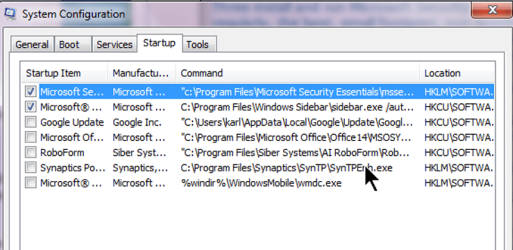
Now let's see, what do I have running at startup time?
Startup programs.png

You can safely disable programs, because you can always can back and enable them.
WIN | type MSCONFIG | ENTER

After following the AV-related advice and reducing the number of programs running at start time, let us know how the performance is.


WIN is the key with the wavy flag.
 

My Computer

Computer Manufacturer/Model Number
Toshiba Satellite S875D-S7239 laptop
OS
MS Windows 7 Ultimate SP1 64-bit
CPU
AMD A10-4600M
Motherboard
AMD Pumori (Socket FT1)
Memory
6.00 GB Dual-Channel DDR3 @ 798MHz (11-11-12-28)
Graphics Card(s)
AMD Radeon HD 7660G
Sound Card
High Definition Audio Device
Monitor(s) Displays
Generic PnP Monitor (1600x900@60Hz)
Screen Resolution
1600x900@60Hz
Hard Drives
SSD 119GB Corsair CSSD-V128GB2 ATA Device
Keyboard
Standard PS/2 Keyboard
Mouse
HP Wireless Optical Mobile Mouse Model FHA-3410
Internet Speed
What the local pub, local coffee shop offers.
Other Info
Optical Drive:MATSHITA BD-CMB UJ160B ATA Device


Also have an Asus ha1002xp netbook with Win 7 Ultimate installed.
great i'll do that and report beck
 

My Computer

OS
indows 7 ultimate 32bit
Uninstall MacAfee and install MS Security Essentials. This will greatly help performance.
 
Back
Top