a delay in sound coming in and invalid asio driver

sqrach

New member
Local time
10:49 AM
Messages
20
It might be about 1/10 of a second off but that's too much for me

For example my turntables are hooked up and the sound comes through
but I easily notice the sound is off

I actually tried to record sound
It says something about my ASIO driver is invalid
is that causing it?
I'll try to resolve it in the meantime
if someone knows how to fix that or this
thanks
 

My Computer My Computer

At a glance

Many XP versions and 7 home premium
OS
Many XP versions and 7 home premium
Yes. You need a well coded ASIO driver for low latency. If your hardware (sound device you're using) does not support or have such a driver, you'll need to upgrade to something better.

If you have a setting for samples per buffer, you can set a lower value.
 

My Computer My Computer

At a glance

7600.20510 x86P4 550 3.4 GHz HT running at 3.5 GHzOCZ 2 GB(2x1GB) DDR400mHz running @ 414 mHzHIS Radeon HD 3850 IceQ 3 Turbo HDMI Dual DL-...
Computer Manufacturer/Model Number
self built
OS
7600.20510 x86
CPU
P4 550 3.4 GHz HT running at 3.5 GHz
Motherboard
MSI PM8M3-V (MS-7211 v1.x) Micro-ATX mainboard
Memory
OCZ 2 GB(2x1GB) DDR400mHz running @ 414 mHz
Graphics Card(s)
HIS Radeon HD 3850 IceQ 3 Turbo HDMI Dual DL-DVI AGP
Sound Card
MOTU Traveler firewire studio interface 192 kHz 24 bit
Monitor(s) Displays
22" widescreen Acer X223W LCD, 17" Compaq P75 CRT
Screen Resolution
1680x1050 and 1280x1024
Hard Drives
SATA I x2 WD, 400 GB and 120 GB, SATA 2 WD Caviar Black 1 TB
PSU
350W generic
Case
Cybertronpc, it glows blue
Cooling
stock cpu fan, Ice-Q 3 gpu and system, many case fans
Keyboard
Logitch Classical Keyboard 200
Mouse
Logitech Mediaplay cordless
Internet Speed
1792/448 kbits/sec
Other Info
SATA II PCI fake RAID adapter, 1 GB Readyboost, original ATI Remote Wonder (even works with WMC perfectly), Logitech Rumblepad 2 game controller x2
OK

It is normal that everything worked well with XP but with 7 there is latency?
or
does is it something that can be fixed because it worked with xp?

thanks
 

My Computer My Computer

At a glance

Many XP versions and 7 home premium
OS
Many XP versions and 7 home premium
Which audio adapter are you using?
 

My Computer My Computer

At a glance

7600.20510 x86P4 550 3.4 GHz HT running at 3.5 GHzOCZ 2 GB(2x1GB) DDR400mHz running @ 414 mHzHIS Radeon HD 3850 IceQ 3 Turbo HDMI Dual DL-...
Computer Manufacturer/Model Number
self built
OS
7600.20510 x86
CPU
P4 550 3.4 GHz HT running at 3.5 GHz
Motherboard
MSI PM8M3-V (MS-7211 v1.x) Micro-ATX mainboard
Memory
OCZ 2 GB(2x1GB) DDR400mHz running @ 414 mHz
Graphics Card(s)
HIS Radeon HD 3850 IceQ 3 Turbo HDMI Dual DL-DVI AGP
Sound Card
MOTU Traveler firewire studio interface 192 kHz 24 bit
Monitor(s) Displays
22" widescreen Acer X223W LCD, 17" Compaq P75 CRT
Screen Resolution
1680x1050 and 1280x1024
Hard Drives
SATA I x2 WD, 400 GB and 120 GB, SATA 2 WD Caviar Black 1 TB
PSU
350W generic
Case
Cybertronpc, it glows blue
Cooling
stock cpu fan, Ice-Q 3 gpu and system, many case fans
Keyboard
Logitch Classical Keyboard 200
Mouse
Logitech Mediaplay cordless
Internet Speed
1792/448 kbits/sec
Other Info
SATA II PCI fake RAID adapter, 1 GB Readyboost, original ATI Remote Wonder (even works with WMC perfectly), Logitech Rumblepad 2 game controller x2
can't say I entirely understand what you mean by adapter

I have analog line in
I experience some latency with serato (1/100 sec off) {usb connections} but this is just audio in
I can confirm it when I use my headphones on the mixer. The sound from the computer is like an echo when I cut the sound off. Takes a fraction of a second longer to recieve the sound.
It's sigmatel High Definition CODEC
On a dell E1505 laptop
I don't think this is related but when I install XP I have to change the registry so I can enable the option for muting(unmuting) speaker during recording which otherwise would be silent while recording

I tried to record sound and the ASIO driver is invalid message comes up
I ran ASIO4ALL but I already had it, .. it did not seem to do anything
are the two issues related
if I can somehow get that driver working will it solve the latency problem

Where should I be looking for solutions
Microsoft
Dell
Sigmatel
or something else
 

My Computer My Computer

At a glance

Many XP versions and 7 home premium
OS
Many XP versions and 7 home premium
For you to be able to notice the latency, it has to be much much greater than .01 of a second. It's very impossible for anyone to notice that little.

Make sure that the audio is not looping itself from an input to the output and then back to an input. Basically, when recording, mute the sound and let only the application itself allow the sound to be heard.

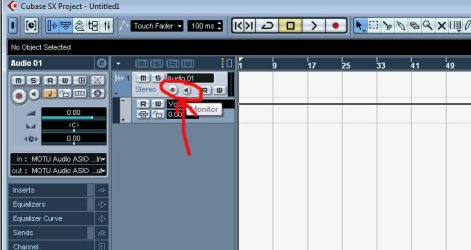
When using something like Cubase, do not monitor your sound in it. Just let Windows play the sound and mute it in the app.

Here's an example of what I'm referring to in Cubase and it's Monitor function:
 

Attachments

  • Untitled-1.jpg
    Untitled-1.jpg
    54.2 KB · Views: 139

My Computer My Computer

At a glance

7600.20510 x86P4 550 3.4 GHz HT running at 3.5 GHzOCZ 2 GB(2x1GB) DDR400mHz running @ 414 mHzHIS Radeon HD 3850 IceQ 3 Turbo HDMI Dual DL-...
Computer Manufacturer/Model Number
self built
OS
7600.20510 x86
CPU
P4 550 3.4 GHz HT running at 3.5 GHz
Motherboard
MSI PM8M3-V (MS-7211 v1.x) Micro-ATX mainboard
Memory
OCZ 2 GB(2x1GB) DDR400mHz running @ 414 mHz
Graphics Card(s)
HIS Radeon HD 3850 IceQ 3 Turbo HDMI Dual DL-DVI AGP
Sound Card
MOTU Traveler firewire studio interface 192 kHz 24 bit
Monitor(s) Displays
22" widescreen Acer X223W LCD, 17" Compaq P75 CRT
Screen Resolution
1680x1050 and 1280x1024
Hard Drives
SATA I x2 WD, 400 GB and 120 GB, SATA 2 WD Caviar Black 1 TB
PSU
350W generic
Case
Cybertronpc, it glows blue
Cooling
stock cpu fan, Ice-Q 3 gpu and system, many case fans
Keyboard
Logitch Classical Keyboard 200
Mouse
Logitech Mediaplay cordless
Internet Speed
1792/448 kbits/sec
Other Info
SATA II PCI fake RAID adapter, 1 GB Readyboost, original ATI Remote Wonder (even works with WMC perfectly), Logitech Rumblepad 2 game controller x2
.01 may be an exaggeration :)
it sounds crazy but I do detect very small latency
i am known to do very quick stabs
http://www.youtube.com/watch?v=NiYVMISehpA
and that is not on a good day :confused:
I can do it with regular records but not serato. Besides that specific technique the serato latency is not detectable at all so I figured this is less than a second but easily noticeable, much more than serato. I also don't know of other people who can detect serato latency but it's with those kind of stabs. I'm not great but other people don't do that. It's crazy but I pick up on it


Good news
I tried windows sound recorder, and it did work
So I installed an old version of the software I was trying to use
It has problems with some compatibility
but I can still manage to make it record so I can use that


The latency is there regardless
I guess it's just a windows 7 set back
It wasn't my entire reason but XP media center does not work with any midi/usb devices. 7 does midi but the recording issues are annoying

it's funny because XP home edition on my desktop from 2002 handles everything
no problems
I think I need to buy that for my laptop

If I ever figure out a solution to any of these problems I'll come back
I had the RTM one a few months ago on my desktop (long gone now). I never really got into recording with it. I'm not sure if it had the same problems
I've only had 7 for a few days so hopefully after messing around with it more I can figure out what the problem is.
I could mute it but with XP, I could line in and line out to my speakers or bridge it between things because it had no latency
I also just realized, even if any audio editing software will function.
I can't edit audio because I need to match the audio going in with the audio playing
it just will not work if it is off

I can't accept that loss just because it's 7 and that is how it is

 
Last edited:

My Computer My Computer

At a glance

Many XP versions and 7 home premium
OS
Many XP versions and 7 home premium
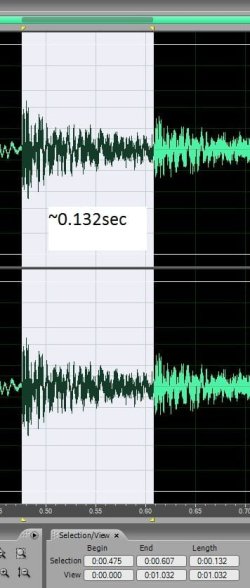
Still no resolution but the windows support do not seem to understand exactly either. So I recorded an example. The audio levels I wasn't trying to capture so obviously they are off but you'll see in this picture (if it uploads correctly), it is about 0.13sec off.
in XP it would be phasing
I should have recorded an example of that as well to prove my point but for now this may help
 

Attachments

  • timeshift.jpg
    timeshift.jpg
    47.3 KB · Views: 40

My Computer My Computer

At a glance

Many XP versions and 7 home premium
OS
Many XP versions and 7 home premium
That looks like you just highlighted a sample of audio in an app with .132 selection range.

How do you conclude that this is some kind of latency?
 

My Computer My Computer

At a glance

7600.20510 x86P4 550 3.4 GHz HT running at 3.5 GHzOCZ 2 GB(2x1GB) DDR400mHz running @ 414 mHzHIS Radeon HD 3850 IceQ 3 Turbo HDMI Dual DL-...
Computer Manufacturer/Model Number
self built
OS
7600.20510 x86
CPU
P4 550 3.4 GHz HT running at 3.5 GHz
Motherboard
MSI PM8M3-V (MS-7211 v1.x) Micro-ATX mainboard
Memory
OCZ 2 GB(2x1GB) DDR400mHz running @ 414 mHz
Graphics Card(s)
HIS Radeon HD 3850 IceQ 3 Turbo HDMI Dual DL-DVI AGP
Sound Card
MOTU Traveler firewire studio interface 192 kHz 24 bit
Monitor(s) Displays
22" widescreen Acer X223W LCD, 17" Compaq P75 CRT
Screen Resolution
1680x1050 and 1280x1024
Hard Drives
SATA I x2 WD, 400 GB and 120 GB, SATA 2 WD Caviar Black 1 TB
PSU
350W generic
Case
Cybertronpc, it glows blue
Cooling
stock cpu fan, Ice-Q 3 gpu and system, many case fans
Keyboard
Logitch Classical Keyboard 200
Mouse
Logitech Mediaplay cordless
Internet Speed
1792/448 kbits/sec
Other Info
SATA II PCI fake RAID adapter, 1 GB Readyboost, original ATI Remote Wonder (even works with WMC perfectly), Logitech Rumblepad 2 game controller x2
I'm making all of this up?
Why would I choose a random image?
Actually, you're right
I used the snipping tool I noticed windows 7 had
of audio I recorded on another system and then opened in 7
I sent the audio from mixer one Rane TTM 56 to the line in on the laptop Dell E1505 running 7 and then into mixer two Vestax PMC05
I sent the same audio directly from the Rane mixer to the 2nd channel on the vestax mixer
The vestax mixer was then sent onto another computer to record
I could have used something else but it was there so i used that
I recorded a 30sec clip on the other computer with approximately 10 second intervals
The non latency normal way, then the latency and then the two mixed together
I took that 30sec clip and saved it as wma 64kbps because the file size is small but the sound quality is still decent enough to get my point across
I put it on a thumb drive and reopened it in windows 7 in audio editing software
{it will not record line in but it will open files}
I randomly chose a section in the mixed area (last 10 seconds of the 30 second clip) of the file
Found two similar sounds (an echoed effect)
The difference was consistent throughout the mixed area so it did not really matter what two sounds I chose to analyze as long as they were the same
I didn't care about adjusting the audio levels so the latency portion is a tiny bit lower in volume but that has no significance for what I am trying to show

why an image and not a video?
saving file size
I wanted to send it to the windows support and figured an audio sample an image might be better to send than a video

it's still just that picture but this is the audio
http://www.youtube.com/watch?v=iujDVsg_2xY

I guess I can try to make a video of the actual wave generation
what else should I do to validate my problem?
This person here has the same problem
Windows 7 - Line In Monitor Extreme Latency
 

My Computer My Computer

At a glance

Many XP versions and 7 home premium
OS
Many XP versions and 7 home premium
I don't think you understand.

I'm not saying you don't have an issue. What I'm saying is the video, screenshot and test methods you tried do not qualify in any way whatsoever to proving or disproving any present latencies in the audio subsystems.

You're using onboard audio on a laptop and expecting professional stand-alone Firewire interface results. Therein lies the problem.
 
Last edited:

My Computer My Computer

At a glance

7600.20510 x86P4 550 3.4 GHz HT running at 3.5 GHzOCZ 2 GB(2x1GB) DDR400mHz running @ 414 mHzHIS Radeon HD 3850 IceQ 3 Turbo HDMI Dual DL-...
Computer Manufacturer/Model Number
self built
OS
7600.20510 x86
CPU
P4 550 3.4 GHz HT running at 3.5 GHz
Motherboard
MSI PM8M3-V (MS-7211 v1.x) Micro-ATX mainboard
Memory
OCZ 2 GB(2x1GB) DDR400mHz running @ 414 mHz
Graphics Card(s)
HIS Radeon HD 3850 IceQ 3 Turbo HDMI Dual DL-DVI AGP
Sound Card
MOTU Traveler firewire studio interface 192 kHz 24 bit
Monitor(s) Displays
22" widescreen Acer X223W LCD, 17" Compaq P75 CRT
Screen Resolution
1680x1050 and 1280x1024
Hard Drives
SATA I x2 WD, 400 GB and 120 GB, SATA 2 WD Caviar Black 1 TB
PSU
350W generic
Case
Cybertronpc, it glows blue
Cooling
stock cpu fan, Ice-Q 3 gpu and system, many case fans
Keyboard
Logitch Classical Keyboard 200
Mouse
Logitech Mediaplay cordless
Internet Speed
1792/448 kbits/sec
Other Info
SATA II PCI fake RAID adapter, 1 GB Readyboost, original ATI Remote Wonder (even works with WMC perfectly), Logitech Rumblepad 2 game controller x2
I made a better video

It's boring to watch but it's only 1:13
The latency comes in at about 1min
You'll also see the drop in volume from phasing with xp about 20seconds in

I used small clicks to check the gaps easier which is confirmed at 130ms
It was a 2.4sec loop repeated made of the same click every 0.6 sec but dropped in volume each time per loop to show where
Again, I was a bit lazy on the volume monitoring so the volume from the xp half were too high but it's really not important at all, actually it helped show the phasing
everything was set the same, all I did was restart the computer from xp to 7


professional?
i just want xp results
what's wrong with that?

http://www.youtube.com/watch?v=ymrcRagtAvM

There's a lot of people with this problem and in time there will be many more reporting it.
As of now there seems to be no solution. The windows support have no idea either.
It's not a big deal you have no clue. Nobody does.
It definitely doesn't help saying people should not expect the audio will function as well as it had with xp.
I'm just trying to figure out why. I don't expect help here though.
 
Last edited:

My Computer My Computer

At a glance

Many XP versions and 7 home premium
OS
Many XP versions and 7 home premium
lol all you did was set a delay on the clicks, in the software, at ~ the 1 min mark - with about 70% of the original volume.

You can not get professional results out of laptop audio no matter how much you try, complain or make videos.

I'm just trying to help ya out with facts. I'm not even sure, by your posts, that you understand what latency is.

Latency is when you speak into a mic or hit a string on a guitar, the speakers don't reflect that until moments later...whether it be .1 second or more. To fix this issue, professional audio equipment allows you to alter buffers. The more processing you do to a signal, the more likely there is to be latency unless you have a stand-alone solution connected to the pc for audio.

That being said, if you connect a mic to the laptop, you should be able to hear what you're saying at just about the same exact time, through the speakers.
 

My Computer My Computer

At a glance

7600.20510 x86P4 550 3.4 GHz HT running at 3.5 GHzOCZ 2 GB(2x1GB) DDR400mHz running @ 414 mHzHIS Radeon HD 3850 IceQ 3 Turbo HDMI Dual DL-...
Computer Manufacturer/Model Number
self built
OS
7600.20510 x86
CPU
P4 550 3.4 GHz HT running at 3.5 GHz
Motherboard
MSI PM8M3-V (MS-7211 v1.x) Micro-ATX mainboard
Memory
OCZ 2 GB(2x1GB) DDR400mHz running @ 414 mHz
Graphics Card(s)
HIS Radeon HD 3850 IceQ 3 Turbo HDMI Dual DL-DVI AGP
Sound Card
MOTU Traveler firewire studio interface 192 kHz 24 bit
Monitor(s) Displays
22" widescreen Acer X223W LCD, 17" Compaq P75 CRT
Screen Resolution
1680x1050 and 1280x1024
Hard Drives
SATA I x2 WD, 400 GB and 120 GB, SATA 2 WD Caviar Black 1 TB
PSU
350W generic
Case
Cybertronpc, it glows blue
Cooling
stock cpu fan, Ice-Q 3 gpu and system, many case fans
Keyboard
Logitch Classical Keyboard 200
Mouse
Logitech Mediaplay cordless
Internet Speed
1792/448 kbits/sec
Other Info
SATA II PCI fake RAID adapter, 1 GB Readyboost, original ATI Remote Wonder (even works with WMC perfectly), Logitech Rumblepad 2 game controller x2
if i connect a mic
i'll hear it "just about" but not as well as xp
so windows 7 can't perform as well as windows xp?
wrt audio

i set a delay on clicks?
you're insane
you think i'm on a mission to sabotage windows 7 while i'm simultaneously supporting xp
I like 7. I just want to figure this out
I have plenty of hardware for recording. It is simpler to use the computer for quick recording though. I'd like to have it working properly or know it can't be done with this OS
Besides the latency. Yes LATENCY
Some software won't even record audio. It said due to invalid asio driver or (something else)
I forget exactly, I deleted it
you can spazz out about that if you want

the reason the volume is down is because i did not adjust anything switching over to 7 and that audio was saved lower
volume has nothing to do with the problem

i made a video to help people understand
i'm not complaining i'm trying to fix a problem

either windows 7 has latency
or it is caused by something else
what is causing it or what is lacking that would avoid it?
would a different computer help? would a new sound card help?
why would they help?
why does the same equipment work well with xp and not 7?
i'm trying to figure this out
 
Last edited:

My Computer My Computer

At a glance

Many XP versions and 7 home premium
OS
Many XP versions and 7 home premium
There is definitely a serious issue coming to light here. I just discovered that there is also a delay in recording live music on my laptop that I just installed Windows 7 on that had no problem recording live music when I had Vista. This is a serious disappointment because I had looked forward to Windows 7 for months.I refuse to downgrade my OS after all of the trouble I went though to install a new OS.Please help us who are experiencing this problem!
 

My Computer My Computer

At a glance

Windows 7
OS
Windows 7

My Computer My Computer

At a glance

7600.20510 x86P4 550 3.4 GHz HT running at 3.5 GHzOCZ 2 GB(2x1GB) DDR400mHz running @ 414 mHzHIS Radeon HD 3850 IceQ 3 Turbo HDMI Dual DL-...
Computer Manufacturer/Model Number
self built
OS
7600.20510 x86
CPU
P4 550 3.4 GHz HT running at 3.5 GHz
Motherboard
MSI PM8M3-V (MS-7211 v1.x) Micro-ATX mainboard
Memory
OCZ 2 GB(2x1GB) DDR400mHz running @ 414 mHz
Graphics Card(s)
HIS Radeon HD 3850 IceQ 3 Turbo HDMI Dual DL-DVI AGP
Sound Card
MOTU Traveler firewire studio interface 192 kHz 24 bit
Monitor(s) Displays
22" widescreen Acer X223W LCD, 17" Compaq P75 CRT
Screen Resolution
1680x1050 and 1280x1024
Hard Drives
SATA I x2 WD, 400 GB and 120 GB, SATA 2 WD Caviar Black 1 TB
PSU
350W generic
Case
Cybertronpc, it glows blue
Cooling
stock cpu fan, Ice-Q 3 gpu and system, many case fans
Keyboard
Logitch Classical Keyboard 200
Mouse
Logitech Mediaplay cordless
Internet Speed
1792/448 kbits/sec
Other Info
SATA II PCI fake RAID adapter, 1 GB Readyboost, original ATI Remote Wonder (even works with WMC perfectly), Logitech Rumblepad 2 game controller x2
It might be about 1/10 of a second off but that's too much for me

For example my turntables are hooked up and the sound comes through
but I easily notice the sound is off

I actually tried to record sound
It says something about my ASIO driver is invalid
is that causing it?
I'll try to resolve it in the meantime
if someone knows how to fix that or this
thanks

Check with the manufacturer for driver updates or with the Windows compatibility center: Windows 7 Compatibility Center home.

Cheers,
Tara
Windows Outreach Team
 

My Computer My Computer

At a glance

Windows 7
OS
Windows 7
I just discovered that there is also a delay in recording live music on my laptop

How did you discover this?
Yesterday was the first time that I have set out to record a mix with Windows 7 installed on my pc( I have recorded a few on Vista with the same pc and many on my old pc with XP installed). When I was beat matching I noticed that something was off a little and upon investigation I could hear just a slight delay coming from my external 2.1 speakers and then the bulit in laptop speakers also. I checked the drivers and they are current. When I had Vista the audio drivers were Sigmatel but now they are Microsoft. I did a fair amount of research and found a few other musicians who are experiencing the same problem while trying to record live with Windows 7. I am trusting that this issue will be resolved in a patch or update shortly and will just have to wait until I can record again I guess. I will check periodically to see if the issue is resolved and if not I am not sure what I will do but I know that I am dissappointed.
 

My Computer My Computer

At a glance

Windows 7
OS
Windows 7
You're trying to record live with onboard audio of a laptop. That's problem number one.

Other than that, there should be no issue because even if there is a delay of 20 seconds, it's still getting recorded to HDD. All the same.

There is a way to get low latency: Invest in a professional audio solution.
 

My Computer My Computer

At a glance

7600.20510 x86P4 550 3.4 GHz HT running at 3.5 GHzOCZ 2 GB(2x1GB) DDR400mHz running @ 414 mHzHIS Radeon HD 3850 IceQ 3 Turbo HDMI Dual DL-...
Computer Manufacturer/Model Number
self built
OS
7600.20510 x86
CPU
P4 550 3.4 GHz HT running at 3.5 GHz
Motherboard
MSI PM8M3-V (MS-7211 v1.x) Micro-ATX mainboard
Memory
OCZ 2 GB(2x1GB) DDR400mHz running @ 414 mHz
Graphics Card(s)
HIS Radeon HD 3850 IceQ 3 Turbo HDMI Dual DL-DVI AGP
Sound Card
MOTU Traveler firewire studio interface 192 kHz 24 bit
Monitor(s) Displays
22" widescreen Acer X223W LCD, 17" Compaq P75 CRT
Screen Resolution
1680x1050 and 1280x1024
Hard Drives
SATA I x2 WD, 400 GB and 120 GB, SATA 2 WD Caviar Black 1 TB
PSU
350W generic
Case
Cybertronpc, it glows blue
Cooling
stock cpu fan, Ice-Q 3 gpu and system, many case fans
Keyboard
Logitch Classical Keyboard 200
Mouse
Logitech Mediaplay cordless
Internet Speed
1792/448 kbits/sec
Other Info
SATA II PCI fake RAID adapter, 1 GB Readyboost, original ATI Remote Wonder (even works with WMC perfectly), Logitech Rumblepad 2 game controller x2
You're trying to record live with onboard audio of a laptop. That's problem number one.

Other than that, there should be no issue because even if there is a delay of 20 seconds, it's still getting recorded to HDD. All the same.

There is a way to get low latency: Invest in a professional audio solution.
I guess I will have to if this issue isn't resolved. Thank you for all of your fantastic help and I hope you have a good holiday season.
 

My Computer My Computer

At a glance

Windows 7
OS
Windows 7
Back
Top