
A few issues I need some help with!

slicecbr

New member
Local time
9:53 AM
Messages
20
Hi,

My first post so please go easy on me!

I'd really appreciate it if anyone could shed some light on some issues I have.

1) I keep getting Data Base Files appearing randomly on my system, why is that, and how can I stop them from appearing?

2) When I updated to MSN 2011 my 'Live Mail' keeps saying a program has caused it to stop working when I try and write/send an email. I assume it's my firewall? I am currently using the free version of AVG. Which has now revealed another issue, (3).

3) When I go into 'Control Panel\System and Security\Windows Firewall' and click the option "Allow a program or feature through Windows Firewall" to hopefully add Live Mail through the firewall, nothing happens, as if I had never clicked it?

I would really appreciate some advice.

Thanks!
 

My Computer My Computer

Computer Manufacturer/Model Number
HP DV6-2030sa
OS
Windows 7 Home Premium 64bit
CPU
AMD Turion II Dual-Core Mobile Processor M520 2.3GHz
Memory
4096 MB (2 x 2048 MB)
Graphics Card(s)
ATI Radeon HD 4530 512MB
Monitor(s) Displays
15.6 inch High Definition HP LED Brightview Display
Hard Drives
Internal:320GB
External: 500GB
Welcome to the forums! While we wait for someone to post advice on how to detect malware, can you post a screenshot of these "data base files"? And when/how did you notice them appearing?
 

My Computer My Computer

Computer Manufacturer/Model Number
Self-built rig
OS
Win7 Pro x64
CPU
Koa i5-2550K
Memory
8 GB
Graphics Card(s)
Sapphire ATI 6870 1GB GDDR5
Sound Card
RealTek HD Audio / ATI HDMI Audio
Monitor(s) Displays
Samsung HDTV Monitor T23A350
Screen Resolution
1920 x 1080
Hard Drives
- SSD (C:)
- HDD (D:)
- BD-ROM (E:)
Keyboard
Logitech G110
Internet Speed
Unifi home (5mbps)
Let's start at the end :D
[3) When I go into 'Control Panel\System and Security\Windows Firewall' and click the option "Allow a program or feature through Windows Firewall" to hopefully add Live Mail through the firewall, nothing happens, as if I had never clicked it? /QUOTE]

OK, the free Version of AVG has no Firewall as far as I know. so your firewall is the regular Windows Firewall that came pre installed, right? Or do you have any other firewall currently running?
Log into an account with admin rights and try again. You should get a (more or less) useful window with the programs that are already allowed.
If that still doesn't pop up, I recommend you run
http://www.sevenforums.com/tutorials/1538-sfc-scannow-command-system-file-checker.html
to make sure that there are no damaged system files interfering.
After that you should run
http://download.cnet.com/Malwarebytes-Anti-Malware/3000-8022_4-10804572.html
just to stay on the safe site ;)

I use the free version this program to monitor and set network rights for my programs that's just more useful to me. But that is something to keep in mind for later

Windows 7 Firewall Control : Sphinx Software

now we're waiting on the database files screen shot

http://www.sevenforums.com/tutorials/9733-screenshots-files-upload-post-seven-forums.html

-DG
 

My Computer My Computer

Computer Manufacturer/Model Number
HP m8000n
OS
Windows 7 Ultimate x86
CPU
DualCore AMD Athlon 64 X2, 2600 MHz 5200+
Motherboard
Asus M2N68-LA (Narra)
Memory
Samsung 2GB DDR2
Graphics Card(s)
Onboard NVIDIA GeForce 6150SE nForce 430
Sound Card
Onboard nVIDIA nForce 6100-430 (MCP61P)
Monitor(s) Displays
Westinghouse 19" LED
Screen Resolution
1280x1024
Hard Drives
SATA II Seagate Barracuda 500GB
USB II WD Elements 500GB
USB II WD My Book 1TB
USB II WD My Book 2TB
PSU
Stock (HP)
Case
Stock (HP)
Cooling
Stock
Keyboard
Logitech Classic KB 200
Mouse
Standard HP opticle USB mouse
I would recommend the following....

We will start with this first,
Just incase, you might want to backup any data you don't want to lose if something is really going wrong....

AVG = Uninstall it and never go back. (if I could triple underline and double bold that I would)

Then as suggested run SFC \Scannow ,, could be a good idea to do this now.
however, I might not suggest this if it is infact malware or virus related.
The choice is yours.

Run the following on-line scanners....
Run both of these one at a time till complete.. Very important.

What's new - Windows Live OneCare safety scanner for Windows Vista and Windows 7

Free ESET Online Antivirus Scanner

Then yes, Install Malwarebytes as suggested and run that....

If anything is found,, clean it as needed (clean, quarantine, delete, whatever is needed)
Then run them again till nothing is found in each.
If something is found, but can't be cleaned, then there are other issues to worry about.
I would then install MSE and try scanning and cleaning with that.
Post anything that is found and can not be got rid of.

If everything comes back clean or is cleaned.

Then run SFC /Scannow

Install MSE

You may need to reinstall Live Mail,,, but I would do that later after doing what is listed above.
Then we can see what else might be going on.

Database files being created like that could be caused by malware or virus.
Or a corrupt application or OS.
 

My Computer My Computer

Computer Manufacturer/Model Number
Self Built
OS
Win 7 Ultimate 32bit
CPU
C2D E6600 2.4Ghz
Motherboard
Intel D965WH
Memory
4G Kingston KHX5400D2
Graphics Card(s)
EVGA GTX 570 HD SC (012-P3-1573-KR)
Sound Card
On-Board
Monitor(s) Displays
Samsung 226BW
Screen Resolution
1680 x 1050
Hard Drives
2 x 250 Seagate Barracuda
2 x 500 Seagate Barracuda (Raid1)
PSU
Corsair TX750W
Case
In-Win C589
Cooling
Stock Intel Cooling
Welcome to the forums! While we wait for someone to post advice on how to detect malware, can you post a screenshot of these "data base files"? And when/how did you notice them appearing?

Thanks. I'm pretty sure I had these files randomly appearing when I first had this laptop, bought it around a year ago, so hopefully not a virus :confused: and something to do with the OS or something as suggested in one of the other posts. Okay, the first screenshot is within a folder I created on my desktop and the second is a data base file which appeared on my desktop when I saved the screenshot.

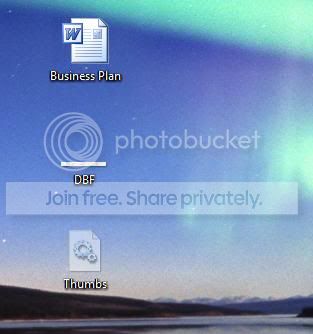



Hope this helps? Thanks.
 

My Computer My Computer

Computer Manufacturer/Model Number
HP DV6-2030sa
OS
Windows 7 Home Premium 64bit
CPU
AMD Turion II Dual-Core Mobile Processor M520 2.3GHz
Memory
4096 MB (2 x 2048 MB)
Graphics Card(s)
ATI Radeon HD 4530 512MB
Monitor(s) Displays
15.6 inch High Definition HP LED Brightview Display
Hard Drives
Internal:320GB
External: 500GB
OK, the free Version of AVG has no Firewall as far as I know. so your firewall is the regular Windows Firewall that came pre installed, right? Or do you have any other firewall currently running?
Log into an account with admin rights and try again. You should get a (more or less) useful window with the programs that are already allowed.

-DG

Thanks for the response, I did have a paid version of AVG on my laptop but when I used 'Glary Utilities' for the first time and restarted my laptop, AVG was saying that it couldn't find the license number, and as I can't find the license number anymore I've reverted back to AVG free. But other than that I haven't installed any other Firewall software, so yes my firewall is the regular Windows Firewall that came pre installed.

I only have one account on my laptop, which is set to admin rights, so I will make a restoration point, back up any data on my external HDD I really wouldn't want deleted and follow the steps you and the other poster (sorry I forgot to quote you, but I have read your response, thanks) have kindly given.

I will post up my plan of action and any issues. Thanks.
 

My Computer My Computer

Computer Manufacturer/Model Number
HP DV6-2030sa
OS
Windows 7 Home Premium 64bit
CPU
AMD Turion II Dual-Core Mobile Processor M520 2.3GHz
Memory
4096 MB (2 x 2048 MB)
Graphics Card(s)
ATI Radeon HD 4530 512MB
Monitor(s) Displays
15.6 inch High Definition HP LED Brightview Display
Hard Drives
Internal:320GB
External: 500GB
Oh, "Thumbs" - fairly sure that's referring to "thumbs.db", which Windows itself creates. They shouldn't be a problem. I'll let the others help you on your other questions since I don't use MSN or Live Mail. Good luck.
 

My Computer My Computer

Computer Manufacturer/Model Number
Self-built rig
OS
Win7 Pro x64
CPU
Koa i5-2550K
Memory
8 GB
Graphics Card(s)
Sapphire ATI 6870 1GB GDDR5
Sound Card
RealTek HD Audio / ATI HDMI Audio
Monitor(s) Displays
Samsung HDTV Monitor T23A350
Screen Resolution
1920 x 1080
Hard Drives
- SSD (C:)
- HDD (D:)
- BD-ROM (E:)
Keyboard
Logitech G110
Internet Speed
Unifi home (5mbps)
Oh, "Thumbs" - fairly sure that's referring to "thumbs.db", which Windows itself creates. They shouldn't be a problem. I'll let the others help you on your other questions since I don't use MSN or Live Mail. Good luck.


Phew...hopefully not any viruses then. Thanks for your input mate, appreciate it.
 

My Computer My Computer

Computer Manufacturer/Model Number
HP DV6-2030sa
OS
Windows 7 Home Premium 64bit
CPU
AMD Turion II Dual-Core Mobile Processor M520 2.3GHz
Memory
4096 MB (2 x 2048 MB)
Graphics Card(s)
ATI Radeon HD 4530 512MB
Monitor(s) Displays
15.6 inch High Definition HP LED Brightview Display
Hard Drives
Internal:320GB
External: 500GB
Run the following on-line scanners....
Run both of these one at a time till complete.. Very important.

What's new - Windows Live OneCare safety scanner for Windows Vista and Windows 7


After downloading IE I keep getting "We were unable to install the scanner
Please follow the instructions for each troubleshooting step below and then click Retry Installation to try to install the scanner again.
"

I accept the installation from a pop up but I keep getting the above message?
 

My Computer My Computer

Computer Manufacturer/Model Number
HP DV6-2030sa
OS
Windows 7 Home Premium 64bit
CPU
AMD Turion II Dual-Core Mobile Processor M520 2.3GHz
Memory
4096 MB (2 x 2048 MB)
Graphics Card(s)
ATI Radeon HD 4530 512MB
Monitor(s) Displays
15.6 inch High Definition HP LED Brightview Display
Hard Drives
Internal:320GB
External: 500GB
That might be related to your problem that you can't allow stuff through your firewall.
I just tried Eset and it requested permission 3 times.
From your answer I suspect that there is still some "residue"/leftover from the AVG firewall that now interferes with windows FW. So if you can't run online scanners due to FW permissions you can't install resident scanners either (they also would need permission to update their database)
That's why I would say remove AVG completely for now, run the sfc /scannow and then try the online scanners again.
Don't forget...once we're through here you will need to install an AV solution again.
If you go with the free AVG again, free AVAST or free MSE that's up to you. I would recommend AVAST as it kept me safe for 3, 4 years now on 5 PCs...so I am partial now :D
-DG
 

My Computer My Computer

Computer Manufacturer/Model Number
HP m8000n
OS
Windows 7 Ultimate x86
CPU
DualCore AMD Athlon 64 X2, 2600 MHz 5200+
Motherboard
Asus M2N68-LA (Narra)
Memory
Samsung 2GB DDR2
Graphics Card(s)
Onboard NVIDIA GeForce 6150SE nForce 430
Sound Card
Onboard nVIDIA nForce 6100-430 (MCP61P)
Monitor(s) Displays
Westinghouse 19" LED
Screen Resolution
1280x1024
Hard Drives
SATA II Seagate Barracuda 500GB
USB II WD Elements 500GB
USB II WD My Book 1TB
USB II WD My Book 2TB
PSU
Stock (HP)
Case
Stock (HP)
Cooling
Stock
Keyboard
Logitech Classic KB 200
Mouse
Standard HP opticle USB mouse
Okay, so I have used the program above to uninstall AVG, thanks for the link, then ran [FONT=&quot]SFC/SCANNOW and "Windows Resource Protection did not find any integrity violations".

[FONT=&quot]What's new - Windows Live OneCare safety scanner for Windows Vista and Windows 7
This still didn't open.

[/FONT][FONT=&quot]Free ESET Online Antivirus Scanner
I used this and it did not find any threats.[/FONT]

Then I installed Malware, as suggested, and did a full system scan, with no threats.

Then I installed Microsoft Security Essentials, and I am planning to use it as a replacement to AVG (?) as I can now write/send emails on 'Live Mail 2011'.

I do still however get 'thumbs' appearing on my system (been like that since the day I got the laptop)?

Thanks for all the advise and comments, helped alot so far! :D
[FONT=&quot]http://download.cnet.com/Malwarebytes-Anti-Malware/3000-8022_4-10804572.html[/FONT][/FONT]
 

My Computer My Computer

Computer Manufacturer/Model Number
HP DV6-2030sa
OS
Windows 7 Home Premium 64bit
CPU
AMD Turion II Dual-Core Mobile Processor M520 2.3GHz
Memory
4096 MB (2 x 2048 MB)
Graphics Card(s)
ATI Radeon HD 4530 512MB
Monitor(s) Displays
15.6 inch High Definition HP LED Brightview Display
Hard Drives
Internal:320GB
External: 500GB
That is GREAT news :thumbsup:
Now to the last problem:
Thumbs.db usually are Thumbnail cache files. To stop Windows 7 from creating them you need to prevent the creation in the group policy editor. under
UserConfiguration/Administrative Templates/Windows Components/Windows Explorer Turn off the chaching of thumbnails.....But I think Home premium doesn't have that option, so here is a reg file to make that change directly in the registry. You will have to delete the old thumbs.db files manually but the creation of new ones should be stopped.
For curious people...here's what's inside :
Windows Registry Editor Version 5.00

[HKEY_CURRENT_USERSoftwareMicrosoftWindowsCurrentVersionPoliciesExplorer]
"NoThumbnailCache"=dword:00000001


Just start regedit with Admin rights and merge the reg file in.
-DG
 

Attachments

My Computer My Computer

Computer Manufacturer/Model Number
HP m8000n
OS
Windows 7 Ultimate x86
CPU
DualCore AMD Athlon 64 X2, 2600 MHz 5200+
Motherboard
Asus M2N68-LA (Narra)
Memory
Samsung 2GB DDR2
Graphics Card(s)
Onboard NVIDIA GeForce 6150SE nForce 430
Sound Card
Onboard nVIDIA nForce 6100-430 (MCP61P)
Monitor(s) Displays
Westinghouse 19" LED
Screen Resolution
1280x1024
Hard Drives
SATA II Seagate Barracuda 500GB
USB II WD Elements 500GB
USB II WD My Book 1TB
USB II WD My Book 2TB
PSU
Stock (HP)
Case
Stock (HP)
Cooling
Stock
Keyboard
Logitech Classic KB 200
Mouse
Standard HP opticle USB mouse
Thanks for the reply.

I'm going to have a go at the instructions which you posted to attempt to get rid of the 'thumbs'.

However, although I have successfully sent an email via Live Mail, it did crash on itself like it was doing previously, but was then able to send an email when it restarted?

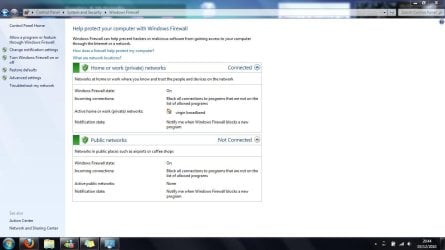
I suppose it brings me back to one of my initial issues, from the position, shown below, how would I go about adding Live Mail to the firewall?

firewall.jpg


Thanks for the help so far, really appreciate it :D
 

My Computer My Computer

Computer Manufacturer/Model Number
HP DV6-2030sa
OS
Windows 7 Home Premium 64bit
CPU
AMD Turion II Dual-Core Mobile Processor M520 2.3GHz
Memory
4096 MB (2 x 2048 MB)
Graphics Card(s)
ATI Radeon HD 4530 512MB
Monitor(s) Displays
15.6 inch High Definition HP LED Brightview Display
Hard Drives
Internal:320GB
External: 500GB
It is most likely not your firewall !!! A firewall either blocks or lets through. But it does not block at first and let through after a reboot.
Besides your picture shows that incoming connections are blocked if not specifically allowed (just as it should). Your mailer program connects to a server to deliver mail, so it's an outgoing connection.
You said that all started after you updated to WLM 2011. A short skim on the internet reveals that there are many people out there having the same problem. So what you could do, would be to uninstall wlm and try togo back to the former version.

-DG
 

My Computer My Computer

Computer Manufacturer/Model Number
HP m8000n
OS
Windows 7 Ultimate x86
CPU
DualCore AMD Athlon 64 X2, 2600 MHz 5200+
Motherboard
Asus M2N68-LA (Narra)
Memory
Samsung 2GB DDR2
Graphics Card(s)
Onboard NVIDIA GeForce 6150SE nForce 430
Sound Card
Onboard nVIDIA nForce 6100-430 (MCP61P)
Monitor(s) Displays
Westinghouse 19" LED
Screen Resolution
1280x1024
Hard Drives
SATA II Seagate Barracuda 500GB
USB II WD Elements 500GB
USB II WD My Book 1TB
USB II WD My Book 2TB
PSU
Stock (HP)
Case
Stock (HP)
Cooling
Stock
Keyboard
Logitech Classic KB 200
Mouse
Standard HP opticle USB mouse
The registry fixed worked! I no longer get these 'thumbs', as for WLM, as you said I'm going to revert back to an older version and wait for a new version to come out!

Thanks for your help guys, especially DG. :D
 

My Computer My Computer

Computer Manufacturer/Model Number
HP DV6-2030sa
OS
Windows 7 Home Premium 64bit
CPU
AMD Turion II Dual-Core Mobile Processor M520 2.3GHz
Memory
4096 MB (2 x 2048 MB)
Graphics Card(s)
ATI Radeon HD 4530 512MB
Monitor(s) Displays
15.6 inch High Definition HP LED Brightview Display
Hard Drives
Internal:320GB
External: 500GB
You're very welcome
glad you got your problems sorted out
and thanks for the feedback.

-DG
 

My Computer My Computer

Computer Manufacturer/Model Number
HP m8000n
OS
Windows 7 Ultimate x86
CPU
DualCore AMD Athlon 64 X2, 2600 MHz 5200+
Motherboard
Asus M2N68-LA (Narra)
Memory
Samsung 2GB DDR2
Graphics Card(s)
Onboard NVIDIA GeForce 6150SE nForce 430
Sound Card
Onboard nVIDIA nForce 6100-430 (MCP61P)
Monitor(s) Displays
Westinghouse 19" LED
Screen Resolution
1280x1024
Hard Drives
SATA II Seagate Barracuda 500GB
USB II WD Elements 500GB
USB II WD My Book 1TB
USB II WD My Book 2TB
PSU
Stock (HP)
Case
Stock (HP)
Cooling
Stock
Keyboard
Logitech Classic KB 200
Mouse
Standard HP opticle USB mouse
Normally when Thumbs appear it means you've unhidden System Files in Control Panel>FOlder Options>View.

I would keep the System and Hidden files hidden by default as intended.
 
Back
Top