A little bit of help needed with my display ports.

FantasyUnion

New member
Local time
2:48 PM
Messages
2
Hey SF, to start out please dont just paste in a DVI-I to DVI-D and call it a day..
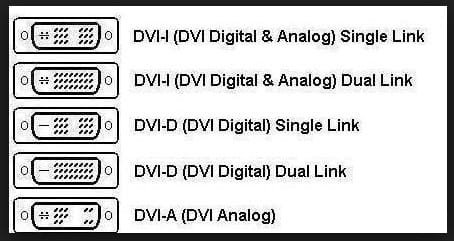
http://www.avsupply.co.za/images/DVI-Chart.jpg Monitor is DVI-D Dual Link, PC is DVI-I Dual link.

My situation is this: I want to get this monitor, three to be exact, I need to plug the DVI-D into my DVI-I port, then I need an HDMI to DVI adapter. I am using a GTX 760 and I am VERY limited on ports. The monitor has no HDMI either so thats why I need that adapter.

Heres the monitor:
Amazon.com: Acer G206HQL bd 19.5-Inch LED Back-Lit Widescreen Display: Computers & Accessories I am getting the 24 inch.

And no i'm not looking for monitor opinions ;)

Anyway, yeah. I am pretty sure the monitor is DVI-D DUAL LINK, this is killing me, help me out guys.

The next thing, is I need something to convert my HDMI signal on my card to DVI i can plug monitor into.


And just to be sure im clear, I am not changing any signals with adapters on the monitor, I am changing my PCs signals with adapters to make it work WITH the monitors.


Sorry if some stuff I said sounds stupid, im just a n00b.

Thanks, Fantasy
 

My Computer My Computer

At a glance

Windows 7 Home Premium x64AMD FX 6300-6 Core16GB (Unsure of name)NVIDIA GTX 760
Computer type
PC/Desktop
Computer Manufacturer/Model Number
Custom Built
OS
Windows 7 Home Premium x64
CPU
AMD FX 6300-6 Core
Memory
16GB (Unsure of name)
Graphics Card(s)
NVIDIA GTX 760
Antivirus
McAfee
Browser
Chrome, Edge
You don't need Dual Link for that resolution (1920x1080 or 1200). Single Link will work alright. (1920 3D need Dual Link)

DVI-I and DVI-D are the same as well, DVI-D is digital only, DVI-I is both digital and analog.
And HDMI to DVI is just a simple converter as both specs use the same signaling, no active conversion needed.

So single link DVI-to-DVI cable for 2 monitors and HDMI-to-DVI converter + DVI-to-DVI cable for 3rd (or HDMI cable + HDMI-to-DVI converter).

Edit: Not sure about 1200 so deleted that bit.

Edit 2: Wiki page :p
Single-link DVI employs a single 165 MHz transmitter that supports resolutions up to 1920 × 1200 at 60 Hz. Dual-link DVI adds six additional pins (located in the center of the connector) for a second transmitter increasing the bandwidth and supporting resolutions up to 2560 × 1600 at 60 Hz
 

My Computer My Computer

At a glance

Windows 7 Ultimate x64 SP1AMD Phenom 2 1090T2x8GB Kingston HyperX Fury Black 1600Mhz Unga...MSI GTX 970 Gaming 4G
Computer type
PC/Desktop
Computer Manufacturer/Model Number
Custom Build
OS
Windows 7 Ultimate x64 SP1
CPU
AMD Phenom 2 1090T
Motherboard
Gigabyte GA-890FXA-UD5
Memory
2x8GB Kingston HyperX Fury Black 1600Mhz Unganged
Graphics Card(s)
MSI GTX 970 Gaming 4G
Sound Card
Realtek On-Board HD 7.1 Audio / Logitech G35
Monitor(s) Displays
3xAcer GD245HQ
Screen Resolution
1920x1080
Hard Drives
Samsung 850 Pro 512GB SSD - OS /
WD Caviar Black SATA 3 - 1 TBx2 - Dynamic RAID 0 /
WD Caviar Green SATA 2 - 640GBx2 - Dynamic RAID 0 /
WD Caviar Green SATA 2 - 640GB - Internal Backup /
Seagate Barracude SATA 3 - 3TB - External Backup/ Sync
PSU
HighPower 1000W
Case
Cooler Master HAF 932
Cooling
Noctua NH-D14
Keyboard
Logitech G19
Mouse
Logitech G500
Internet Speed
100/4 Mbit Cable (100GB quota)
Antivirus
ZoneAlarm Extreme Security / MBAM Pro / MBAE Free / SAS Free
Browser
IE 11 - Firefox - Chrome
Other Info
Logitech F710/ G27/ G940/ Z5500 // TrackIR 5 // Nvidia 3D Surround Vision
You don't need Dual Link for that resolution (1920x1080 or 1200). Single Link will work alright. (1920 3D need Dual Link)

DVI-I and DVI-D are the same as well, DVI-D is digital only, DVI-I is both digital and analog.
And HDMI to DVI is just a simple converter as both specs use the same signaling, no active conversion needed.

So single link DVI-to-DVI cable for 2 monitors and HDMI-to-DVI converter + DVI-to-DVI cable for 3rd (or HDMI cable + HDMI-to-DVI converter).

Edit: Not sure about 1200 so deleted that bit.

Edit 2: Wiki page :p
Single-link DVI employs a single 165 MHz transmitter that supports resolutions up to 1920 × 1200 at 60 Hz. Dual-link DVI adds six additional pins (located in the center of the connector) for a second transmitter increasing the bandwidth and supporting resolutions up to 2560 × 1600 at 60 Hz

Well, you are right BUT the port on the monitor is DVI-D dual link and the plug is the same that goes in the computer. I'm buying 3 of the same monitor. So please no advice like I originally asked and if anyone has some good adapter for what I ask let me know.
 

My Computer My Computer

At a glance

Windows 7 Home Premium x64AMD FX 6300-6 Core16GB (Unsure of name)NVIDIA GTX 760
Computer type
PC/Desktop
Computer Manufacturer/Model Number
Custom Built
OS
Windows 7 Home Premium x64
CPU
AMD FX 6300-6 Core
Memory
16GB (Unsure of name)
Graphics Card(s)
NVIDIA GTX 760
Antivirus
McAfee
Browser
Chrome, Edge
You don't need to have the exact same DVI port/cable combo, as long as cable can plug in (for 1920x1080 single link is ok). I have a Samsung LED XL2370 monitor, which has a DVI-I Dual Link port but the cable that came with the box is DVI-D Single Link and had no issues back when I was using it with a GTX480.

So, perhaps could you at least wait until you get your monitors? They are supposed to come with DVI cables. And check your pile of PC parts for a HDMI-to-DVI converter, as most graphic cards (and sometimes motherboards) come with one. Then only cable you will need to buy (if not have a spare in the house already) is an HDMI cable version 1.3+. HDMI 2 is latest and doesn't cost much higher than others.

Or alternatively something like this - Amazon.com: Gefen DVI to HDMI Cable 6 feet Male-Male: Electronics

And if yours will be like mine, your 3rd monitor (further away from the PC) will need a longer cable or an extension

dvi plugs.jpg
Taken from: CAT-5 Ethernet Cable Pinouts HDMI Firewire USB

In any case, enjoy your new goodies :D
 

My Computer My Computer

At a glance

Windows 7 Ultimate x64 SP1AMD Phenom 2 1090T2x8GB Kingston HyperX Fury Black 1600Mhz Unga...MSI GTX 970 Gaming 4G
Computer type
PC/Desktop
Computer Manufacturer/Model Number
Custom Build
OS
Windows 7 Ultimate x64 SP1
CPU
AMD Phenom 2 1090T
Motherboard
Gigabyte GA-890FXA-UD5
Memory
2x8GB Kingston HyperX Fury Black 1600Mhz Unganged
Graphics Card(s)
MSI GTX 970 Gaming 4G
Sound Card
Realtek On-Board HD 7.1 Audio / Logitech G35
Monitor(s) Displays
3xAcer GD245HQ
Screen Resolution
1920x1080
Hard Drives
Samsung 850 Pro 512GB SSD - OS /
WD Caviar Black SATA 3 - 1 TBx2 - Dynamic RAID 0 /
WD Caviar Green SATA 2 - 640GBx2 - Dynamic RAID 0 /
WD Caviar Green SATA 2 - 640GB - Internal Backup /
Seagate Barracude SATA 3 - 3TB - External Backup/ Sync
PSU
HighPower 1000W
Case
Cooler Master HAF 932
Cooling
Noctua NH-D14
Keyboard
Logitech G19
Mouse
Logitech G500
Internet Speed
100/4 Mbit Cable (100GB quota)
Antivirus
ZoneAlarm Extreme Security / MBAM Pro / MBAE Free / SAS Free
Browser
IE 11 - Firefox - Chrome
Other Info
Logitech F710/ G27/ G940/ Z5500 // TrackIR 5 // Nvidia 3D Surround Vision
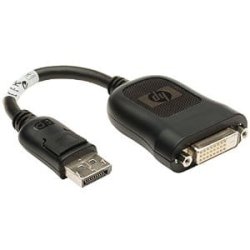
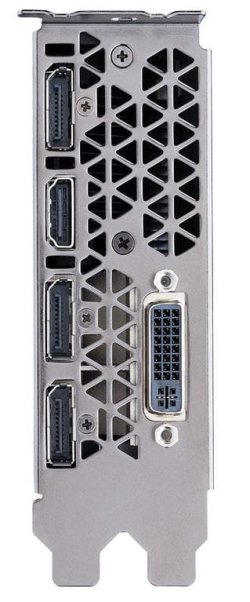
My GTX 980 Ti`s only have 1 DVI output so I use a Display Port to DVI adapter forr my other monitor/s, does your card have any dispaly port ports.

As Gokay states, you don`t not need a dual link dvi cable, a single link will work fine.

If you`re not going any higher then 1920 by 1080 then all you need is a single link cable.

What does dual-link DVI actually mean? | FireUser Blog

DVI: Single and dual link - Monitors - Tech Explained - HEXUS.net

Mine HP DisplayPort to DVI Adapter Passive 481409-002 REV.F
 

Attachments

  • 41MXEzBBAuL._SY300_.jpg
    41MXEzBBAuL._SY300_.jpg
    7 KB · Views: 10
  • PCI Bracket.JPG
    PCI Bracket.JPG
    43 KB · Views: 0

My Computer My Computer

At a glance

Windows 10 Pro x64Intel Core i7 6700KGSkill TridentZ RGB 16GB 3600 16-16-16-36EVGA GTX 980 Ti SC x2
Computer type
PC/Desktop
Computer Manufacturer/Model Number
Skylake Special #666
OS
Windows 10 Pro x64
CPU
Intel Core i7 6700K
Motherboard
Asus Sabertooth Z170 Mark 1
Memory
GSkill TridentZ RGB 16GB 3600 16-16-16-36
Graphics Card(s)
EVGA GTX 980 Ti SC x2
Sound Card
Realtek High Definition
Monitor(s) Displays
AOC G2460PG
Screen Resolution
1920 x 1080 144Hz
Hard Drives
Samsung 860 Pro 256GB, Seagate Barracuda 4TB x2
PSU
EVGA 1000 P2, EVGA White Custom Braided Cables
Case
Corsair Vengeance C70 Gunmetal Black
Cooling
Corsair H100i v2, Corsair ML120 x2, Thermal Grizzly Kryonaut
Keyboard
Logitech G910 Orion Spectrum
Mouse
Logitech G700s
Internet Speed
Verizon Fios Quantum Gateway 75/75
Antivirus
Windows Defender, Malwarebytes Free 3.8.3
Browser
Chrome
Other Info
Corsair SP120 x4, LG Blu-ray Drive, Durabrand HT-395 100 Watt Dolby Digital Amp, Corsair H2100 Wireless 7.1 Headset
Back
Top