A little guidance for a fresh install of Windows 7 ultimate, please.

Toasty84

New member
Local time
11:44 AM
Messages
6
Hey, newbie here looking for a little guidance in regards to a fresh install of Windows 7 ultimate.

My boss recently gave me a copy of Win. 7 Ultimate 32 bit so I decided to give it a go.
Not sure if this makes a difference, but it is being installed on a Compaq Presario F700 (laptop). The laptop was bought with Vista pre-installed.

Now, before I went ahead and installed 7, my HDD was set up in that Vista itself was on partition D: as a recovery partition, and everything else (My documents, Program Files etc..) was on C:.

When I installed 7, I left both partitions the way they were, formatted them and pointed the 7 installation to (what was) D: (is now C:).
The problem is, Program Files and all that is stuck on that partition. I can 'move' My Documents and whatnot from within the properties tab, but not Program Files.

Basically, what I'm looking to do is have it setup the way it was when Vista was installed - C: Program Files, My documents etc... D: Win. 7 (recovery partition?).

Thanks in advance for and help.
Joe
 

My Computer My Computer

At a glance

Windows 7 Ultimate 32 bit
OS
Windows 7 Ultimate 32 bit
Welcome to Windows Seven Forums, Toasty.

Use this link to HP support for your laptop then choose from the various options within.

Compaq Presario F700 Notebook PC series*-* System recovery - HP Business Support Center

If your recovery partition is still intact your recovery procedure is quite straightforward.

If you don't have a recovery partition you can use recovery discs if you created them.

If you don't have either, you can buy recovery discs from HP.

You will need to backup all your personal data first, and then reinstall your programs after your computer has been restored to its factory state.
 

My Computer My Computer

At a glance

Windows 7 Ultimate SP1 64-BitIntel Core i7 870 @ 2.93GHz8Gb Dual-Channel DDR3 @ 664MHznVidia GeForce GTX 460 1024MB dedicated RAM
Computer Manufacturer/Model Number
HP Pavilion Elite 495UK
OS
Windows 7 Ultimate SP1 64-Bit
CPU
Intel Core i7 870 @ 2.93GHz
Motherboard
MSI 2A9C (CPU1)
Memory
8Gb Dual-Channel DDR3 @ 664MHz
Graphics Card(s)
nVidia GeForce GTX 460 1024MB dedicated RAM
Sound Card
Realtek HD Audio
Monitor(s) Displays
HP2310i
Screen Resolution
1920 x 1080
Hard Drives
1x1954GB Hitachi HDS22020ALA 330 (RAID), 1x1954GB Hitachi External for backup and storage
PSU
460W
Case
HP Elite
Cooling
Air cooled
Keyboard
Logitech K750 solar-powered keyboard
Mouse
Logitech Wireless M180 mouse
Internet Speed
2Mb
Other Info
Pure Avanti Flow Internet Radio with iPod Dock, 64Gb iPod, HP USB Speakers, Sony MDR-V500 Headphones, Sony Vaio F-Series Laptop
seavixen, I appreciate the response, but I am not looking to recover anything.
The reason I wrote 'recovery partition' is because that's what the partition was labled as when Vista was installed.

All I'm trying to do is get the partitions set up more or less the same as they were in Vista; C: (My Documents, Program Files etc..), D: (Windows 7).
 

My Computer My Computer

At a glance

Windows 7 Ultimate 32 bit
OS
Windows 7 Ultimate 32 bit
Hard to follow your explanation, but....

I doubt if Vista was ever on D. The D partition was presumably a partition from which you could restore Vista to C.

It looks like you may have installed Windows 7 to what used to be D, thereby overwriting your previously available recovery partition?

And did not touch C, where Vista was originally installed?

Or I may be confused entirely about what you have done or what you originally had.

Can you post a screen shot of your Disk Management as it now exists?
 

My Computer My Computer

At a glance

Windows 7 Home Premium SP1, 64-bitIntel Skylake i5-6600K, not overclocked8 GB HyperX DDR4-2666 (2 x 4 GB)none; graphics are integrated on CPU
Computer type
PC/Desktop
Computer Manufacturer/Model Number
Ignatz Special; 4 speed manual gearbox; factory air conditioning; one of one
OS
Windows 7 Home Premium SP1, 64-bit
CPU
Intel Skylake i5-6600K, not overclocked
Motherboard
AsRock Z170M Extreme 4, micro ATX
Memory
8 GB HyperX DDR4-2666 (2 x 4 GB)
Graphics Card(s)
none; graphics are integrated on CPU
Sound Card
onboard: Realtek ALC1150; external: USB Behringer UF0-202
Monitor(s) Displays
Dell S2340M 23 inch IPS
Screen Resolution
1600 x 900
Hard Drives
System: Crucial MX100 series SSD, 128 GB;
Data: Samsung Spinpoint 103SJ, 1 TB;
Backup: WD Caviar Green WD30EZRX-00D8PB0, 3 TB
PSU
Rosewill SilentNight 500 watt fanless, semi-modular
Case
Antec Solo II
Cooling
Noctua NH-U12S; Noctua F12 intake, Noctua S12A exhaust
Keyboard
Microsoft 200 6JH-00001 USB
Mouse
Dell or Microsoft optical wired; USB
Antivirus
Microsoft Security Essentials and Malwarebytes Premium
Browser
Pale Moon
Other Info
All fans PWM; speeds at idle: CPU circa 500 rpm; intake circa 600 rpm; exhaust circa 600 rpm; CPU temps 27 idle and 47 C load in a warm room (27 C/81 F) when running Intel Extreme Tuning Utility stress test.
In that case, the title of your thread is somewhat misleading: A little guidance for a fresh install of Windows 7 ultimate

That suggests to me you're wanting to re-install Windows.

Further confusion arises from this: Basically, what I'm looking to do is have it setup the way it was when Vista was installed

That also suggests you're wanting to re-install Vista. :)

The problem you're faced with is that for some reason Vista was installed to your D drive, when normally you would install it on your C drive, now that you've installed Windows 7, it will automatically change its drive letter to C.

Before we go any further can you please upload a screenshot of your fully-expanded Disk Management layout to give us a better idea of what's going on?

http://www.sevenforums.com/tutorials/9733-screenshots-files-upload-post-seven-forums.html
 

My Computer My Computer

At a glance

Windows 7 Ultimate SP1 64-BitIntel Core i7 870 @ 2.93GHz8Gb Dual-Channel DDR3 @ 664MHznVidia GeForce GTX 460 1024MB dedicated RAM
Computer Manufacturer/Model Number
HP Pavilion Elite 495UK
OS
Windows 7 Ultimate SP1 64-Bit
CPU
Intel Core i7 870 @ 2.93GHz
Motherboard
MSI 2A9C (CPU1)
Memory
8Gb Dual-Channel DDR3 @ 664MHz
Graphics Card(s)
nVidia GeForce GTX 460 1024MB dedicated RAM
Sound Card
Realtek HD Audio
Monitor(s) Displays
HP2310i
Screen Resolution
1920 x 1080
Hard Drives
1x1954GB Hitachi HDS22020ALA 330 (RAID), 1x1954GB Hitachi External for backup and storage
PSU
460W
Case
HP Elite
Cooling
Air cooled
Keyboard
Logitech K750 solar-powered keyboard
Mouse
Logitech Wireless M180 mouse
Internet Speed
2Mb
Other Info
Pure Avanti Flow Internet Radio with iPod Dock, 64Gb iPod, HP USB Speakers, Sony MDR-V500 Headphones, Sony Vaio F-Series Laptop
" The D partition was presumably a partition from which you could restore Vista to C.". Perhaps you're right, ignatzatsonic. I'm semi computer illiterate.

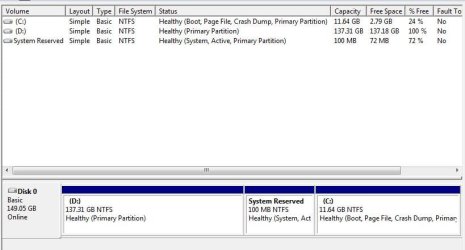
"It looks like you may have installed Windows 7 to what used to be D, thereby overwriting your previously available recovery partition?" Correct.

"And did not touch C, where Vista was originally installed?" I wiped C as well before installing 7.

So what you're saying is that D was nothing more than a recovery partition?
If so, should I just get rid of the D partiton altogether?

Thanks.
 

Attachments

  • Capture.JPG
    Capture.JPG
    42.2 KB · Views: 14
Last edited:

My Computer My Computer

At a glance

Windows 7 Ultimate 32 bit
OS
Windows 7 Ultimate 32 bit
My guess is that yes, D was only a recovery partition.

If you installed to it, whatever it was, it's no longer a recovery partition.

Offhand, I'd delete all partitions and install to a new C, but we'd really like to see a pic of Disk Management to see the extent of the carnage.
 

My Computer My Computer

At a glance

Windows 7 Home Premium SP1, 64-bitIntel Skylake i5-6600K, not overclocked8 GB HyperX DDR4-2666 (2 x 4 GB)none; graphics are integrated on CPU
Computer type
PC/Desktop
Computer Manufacturer/Model Number
Ignatz Special; 4 speed manual gearbox; factory air conditioning; one of one
OS
Windows 7 Home Premium SP1, 64-bit
CPU
Intel Skylake i5-6600K, not overclocked
Motherboard
AsRock Z170M Extreme 4, micro ATX
Memory
8 GB HyperX DDR4-2666 (2 x 4 GB)
Graphics Card(s)
none; graphics are integrated on CPU
Sound Card
onboard: Realtek ALC1150; external: USB Behringer UF0-202
Monitor(s) Displays
Dell S2340M 23 inch IPS
Screen Resolution
1600 x 900
Hard Drives
System: Crucial MX100 series SSD, 128 GB;
Data: Samsung Spinpoint 103SJ, 1 TB;
Backup: WD Caviar Green WD30EZRX-00D8PB0, 3 TB
PSU
Rosewill SilentNight 500 watt fanless, semi-modular
Case
Antec Solo II
Cooling
Noctua NH-U12S; Noctua F12 intake, Noctua S12A exhaust
Keyboard
Microsoft 200 6JH-00001 USB
Mouse
Dell or Microsoft optical wired; USB
Antivirus
Microsoft Security Essentials and Malwarebytes Premium
Browser
Pale Moon
Other Info
All fans PWM; speeds at idle: CPU circa 500 rpm; intake circa 600 rpm; exhaust circa 600 rpm; CPU temps 27 idle and 47 C load in a warm room (27 C/81 F) when running Intel Extreme Tuning Utility stress test.
Yeah, sorry. Screenshot is now up on my previous post.
 

My Computer My Computer

At a glance

Windows 7 Ultimate 32 bit
OS
Windows 7 Ultimate 32 bit
Yeah, the C that you wiped is now shown as D, 137 GB, and empty.

I assume you have a valid install disc and don't care about anything now on that entire hard drive?

If that is the case, do the install over.

Delete all partitions in the process.

You should end up with 2 partitions: C of around 149 GB and a little one called System Reserved of 100 MB or so.

You have passed the point of no return---you can't go back to Vista unless you have Vista disks of some type.
 

My Computer My Computer

At a glance

Windows 7 Home Premium SP1, 64-bitIntel Skylake i5-6600K, not overclocked8 GB HyperX DDR4-2666 (2 x 4 GB)none; graphics are integrated on CPU
Computer type
PC/Desktop
Computer Manufacturer/Model Number
Ignatz Special; 4 speed manual gearbox; factory air conditioning; one of one
OS
Windows 7 Home Premium SP1, 64-bit
CPU
Intel Skylake i5-6600K, not overclocked
Motherboard
AsRock Z170M Extreme 4, micro ATX
Memory
8 GB HyperX DDR4-2666 (2 x 4 GB)
Graphics Card(s)
none; graphics are integrated on CPU
Sound Card
onboard: Realtek ALC1150; external: USB Behringer UF0-202
Monitor(s) Displays
Dell S2340M 23 inch IPS
Screen Resolution
1600 x 900
Hard Drives
System: Crucial MX100 series SSD, 128 GB;
Data: Samsung Spinpoint 103SJ, 1 TB;
Backup: WD Caviar Green WD30EZRX-00D8PB0, 3 TB
PSU
Rosewill SilentNight 500 watt fanless, semi-modular
Case
Antec Solo II
Cooling
Noctua NH-U12S; Noctua F12 intake, Noctua S12A exhaust
Keyboard
Microsoft 200 6JH-00001 USB
Mouse
Dell or Microsoft optical wired; USB
Antivirus
Microsoft Security Essentials and Malwarebytes Premium
Browser
Pale Moon
Other Info
All fans PWM; speeds at idle: CPU circa 500 rpm; intake circa 600 rpm; exhaust circa 600 rpm; CPU temps 27 idle and 47 C load in a warm room (27 C/81 F) when running Intel Extreme Tuning Utility stress test.

My Computer My Computer

At a glance

Windows 7 Ultimate SP1 64-BitIntel Core i7 870 @ 2.93GHz8Gb Dual-Channel DDR3 @ 664MHznVidia GeForce GTX 460 1024MB dedicated RAM
Computer Manufacturer/Model Number
HP Pavilion Elite 495UK
OS
Windows 7 Ultimate SP1 64-Bit
CPU
Intel Core i7 870 @ 2.93GHz
Motherboard
MSI 2A9C (CPU1)
Memory
8Gb Dual-Channel DDR3 @ 664MHz
Graphics Card(s)
nVidia GeForce GTX 460 1024MB dedicated RAM
Sound Card
Realtek HD Audio
Monitor(s) Displays
HP2310i
Screen Resolution
1920 x 1080
Hard Drives
1x1954GB Hitachi HDS22020ALA 330 (RAID), 1x1954GB Hitachi External for backup and storage
PSU
460W
Case
HP Elite
Cooling
Air cooled
Keyboard
Logitech K750 solar-powered keyboard
Mouse
Logitech Wireless M180 mouse
Internet Speed
2Mb
Other Info
Pure Avanti Flow Internet Radio with iPod Dock, 64Gb iPod, HP USB Speakers, Sony MDR-V500 Headphones, Sony Vaio F-Series Laptop
I have a Vista disk as well as a Windows 7 disk. I have absolutely nothing on the drive as of now as I just installed 7 before creating this thread.

I will take both of your advice and do another install of 7 and delete the partitions.

Thanks for your help, seavixen32 and ignatzatsonic. Much appreciated.
Joe
 

My Computer My Computer

At a glance

Windows 7 Ultimate 32 bit
OS
Windows 7 Ultimate 32 bit
You're very welcome, Joe.

Please post back if you need further help.
 

My Computer My Computer

At a glance

Windows 7 Ultimate SP1 64-BitIntel Core i7 870 @ 2.93GHz8Gb Dual-Channel DDR3 @ 664MHznVidia GeForce GTX 460 1024MB dedicated RAM
Computer Manufacturer/Model Number
HP Pavilion Elite 495UK
OS
Windows 7 Ultimate SP1 64-Bit
CPU
Intel Core i7 870 @ 2.93GHz
Motherboard
MSI 2A9C (CPU1)
Memory
8Gb Dual-Channel DDR3 @ 664MHz
Graphics Card(s)
nVidia GeForce GTX 460 1024MB dedicated RAM
Sound Card
Realtek HD Audio
Monitor(s) Displays
HP2310i
Screen Resolution
1920 x 1080
Hard Drives
1x1954GB Hitachi HDS22020ALA 330 (RAID), 1x1954GB Hitachi External for backup and storage
PSU
460W
Case
HP Elite
Cooling
Air cooled
Keyboard
Logitech K750 solar-powered keyboard
Mouse
Logitech Wireless M180 mouse
Internet Speed
2Mb
Other Info
Pure Avanti Flow Internet Radio with iPod Dock, 64Gb iPod, HP USB Speakers, Sony MDR-V500 Headphones, Sony Vaio F-Series Laptop
Alright, did a clean install and everything seems to be in check.
Thanks again for the help, guys.

Joe
 

My Computer My Computer

At a glance

Windows 7 Ultimate 32 bit
OS
Windows 7 Ultimate 32 bit
You're very welcome.

Thanks for the update.
 

My Computer My Computer

At a glance

Windows 7 Ultimate SP1 64-BitIntel Core i7 870 @ 2.93GHz8Gb Dual-Channel DDR3 @ 664MHznVidia GeForce GTX 460 1024MB dedicated RAM
Computer Manufacturer/Model Number
HP Pavilion Elite 495UK
OS
Windows 7 Ultimate SP1 64-Bit
CPU
Intel Core i7 870 @ 2.93GHz
Motherboard
MSI 2A9C (CPU1)
Memory
8Gb Dual-Channel DDR3 @ 664MHz
Graphics Card(s)
nVidia GeForce GTX 460 1024MB dedicated RAM
Sound Card
Realtek HD Audio
Monitor(s) Displays
HP2310i
Screen Resolution
1920 x 1080
Hard Drives
1x1954GB Hitachi HDS22020ALA 330 (RAID), 1x1954GB Hitachi External for backup and storage
PSU
460W
Case
HP Elite
Cooling
Air cooled
Keyboard
Logitech K750 solar-powered keyboard
Mouse
Logitech Wireless M180 mouse
Internet Speed
2Mb
Other Info
Pure Avanti Flow Internet Radio with iPod Dock, 64Gb iPod, HP USB Speakers, Sony MDR-V500 Headphones, Sony Vaio F-Series Laptop
Back
Top