A Prime95 question

Lava King

New member
Pro User
Local time
5:02 AM
Messages
522
Location
Arkansas, USA
Hi folks,

Got my EVGA Superclock cooler installed and started working on overclocking my E8500. :p

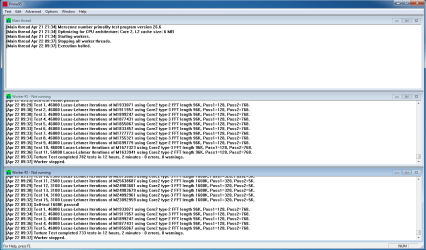
I'm currently running Prime95 64bit version 26.6. It's been running for nearly 10 hours without any apparent problem, but the strange thing (to me, anyway) is that "worker 1" is ahead of "worker 2." What I mean is, "worker 1" was already on Test 10 of the 1M length test when "worker 2" started Test 1. :huh:

Is this normal or should I be concerned? Could it be some Windows "housekeeping" task that has caused this unsynchronicity? :D

During preliminary testing, while searching for the correct Vcore setting, it was always core1 ("worker 2") that would error out.

Anyhow, I may call it good after 12 hours and post some photos and benchmarks.
 

My Computer

Computer type
PC/Desktop
Computer Manufacturer/Model Number
Custom Build
OS
Windows 7 Home Premium x64
CPU
Intel Core i7 5960X @3.0 GHz
Motherboard
Gigabyte GA-X99-SOC Force
Memory
4 x 4 GB G.Skill Ripjaws4 DDR4-2400
Graphics Card(s)
PNY GTX 780
Sound Card
Realtek on-board ALC1150
Monitor(s) Displays
HP Z30i + Asus PA246Q + Dell U2412M
Screen Resolution
2560x1600 + 1920x1200 + 1920x1200
Hard Drives
Samsung 830 256GB
PSU
Antec EarthWatts 650W
Case
Cooler Master HAF 932
Cooling
Corsair Hydro Series H105
Keyboard
Razer BlackWidow Tournament Edition Stealth
Mouse
Razer Naga
I don't have the answer, but running Prime on my i5-2550K, 4 cores, one core will run 6-8 tests out of synch, sometime they catch up though. Run a temp monitor with Prime to see if the offending core is getting hotter than the other. It may be just throttling back on frequency and voltage.
 

My Computer

Computer type
PC/Desktop
Computer Manufacturer/Model Number
Home Built Desktop By DataTech
OS
Windows 7 Ultimate X64 SP1
CPU
Intel i5-2550K, Differing ~4.4-4.8GHz No built in GPU
Motherboard
ASUS P8Z68-V PRO/GEN3
Memory
16GB G.Skill Sniper 1866MHz @ 2133MHz 2x8GB
Graphics Card(s)
ASUS GTX650TIB-DC2OC-2GD5, (650TI Boost)
Sound Card
Onboard Realtek 5-1
Monitor(s) Displays
Samsung P2570HD
Screen Resolution
1920x1080
Hard Drives
Samsung 840 Pro 256GB SSD for OS, 500GB Seagate Constellation (Enterprise drive) for Data
PSU
Corsair HX650W
Case
Inwin Dragon Rider
Cooling
Hyper 212 EVO w/two Noctua fans, push-pull, @1300 RPM
Keyboard
E-Z Eyes, bright yellow keys with large characters
Mouse
steelseries SENSEI Laser Pro Gaming
Internet Speed
48-51Mbs Mbs down, 11 Mbs up Xfinity Cable
Antivirus
Norton Internet Security 2013
Browser
IE 10, Opera, Pale Moon if needed
Other Info
4 case fans, LG BluRay-RE, ASUS DVD-RW, Mr. Fusion power supply, 1.21 gigawatts.
I don't have the answer, but running Prime on my i5-2550K, 4 cores, one core will run 6-8 tests out of synch, sometime they catch up though. Run a temp monitor with Prime to see if the offending core is getting hotter than the other. It may be just throttling back on frequency and voltage.


Good to know that others have experienced this as well. In that case, I won't let it trouble me too much. :D

It did run for 12 hours without problems, so I called it good for now.

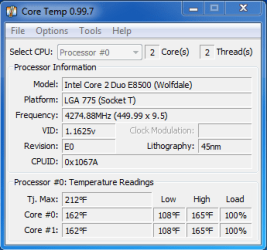
Got my E8500 up from 3.16GHz to 4.27GHz, I think that's fantastic! :p

I'm going to run with this until it quits or becomes so outdated that I can't stand it any longer. :p

Temps were good (if just a tad high) with only 1 degree between the cores.

Yeah, CoreTemp is in Fahrenheit just so I can relate to the number, but I'm becoming more comfortable with Celsius. :geek:
 

Attachments

  • CoreTempPrime95.PNG
    CoreTempPrime95.PNG
    10.1 KB · Views: 12
  • HWiNFOPrime95.PNG
    HWiNFOPrime95.PNG
    23.9 KB · Views: 19
  • Prime95.PNG
    Prime95.PNG
    30 KB · Views: 20

My Computer

Computer type
PC/Desktop
Computer Manufacturer/Model Number
Custom Build
OS
Windows 7 Home Premium x64
CPU
Intel Core i7 5960X @3.0 GHz
Motherboard
Gigabyte GA-X99-SOC Force
Memory
4 x 4 GB G.Skill Ripjaws4 DDR4-2400
Graphics Card(s)
PNY GTX 780
Sound Card
Realtek on-board ALC1150
Monitor(s) Displays
HP Z30i + Asus PA246Q + Dell U2412M
Screen Resolution
2560x1600 + 1920x1200 + 1920x1200
Hard Drives
Samsung 830 256GB
PSU
Antec EarthWatts 650W
Case
Cooler Master HAF 932
Cooling
Corsair Hydro Series H105
Keyboard
Razer BlackWidow Tournament Edition Stealth
Mouse
Razer Naga

My Computer

Computer type
PC/Desktop
Computer Manufacturer/Model Number
Home Built Desktop By DataTech
OS
Windows 7 Ultimate X64 SP1
CPU
Intel i5-2550K, Differing ~4.4-4.8GHz No built in GPU
Motherboard
ASUS P8Z68-V PRO/GEN3
Memory
16GB G.Skill Sniper 1866MHz @ 2133MHz 2x8GB
Graphics Card(s)
ASUS GTX650TIB-DC2OC-2GD5, (650TI Boost)
Sound Card
Onboard Realtek 5-1
Monitor(s) Displays
Samsung P2570HD
Screen Resolution
1920x1080
Hard Drives
Samsung 840 Pro 256GB SSD for OS, 500GB Seagate Constellation (Enterprise drive) for Data
PSU
Corsair HX650W
Case
Inwin Dragon Rider
Cooling
Hyper 212 EVO w/two Noctua fans, push-pull, @1300 RPM
Keyboard
E-Z Eyes, bright yellow keys with large characters
Mouse
steelseries SENSEI Laser Pro Gaming
Internet Speed
48-51Mbs Mbs down, 11 Mbs up Xfinity Cable
Antivirus
Norton Internet Security 2013
Browser
IE 10, Opera, Pale Moon if needed
Other Info
4 case fans, LG BluRay-RE, ASUS DVD-RW, Mr. Fusion power supply, 1.21 gigawatts.
Very good OC chap! It would bet best to rum only one temp monitoring software when benchmarking, it can cause them to give errant readings.
another stress test we use a lot is Intel Burn Test, whic can bring a CPU to its knees. If you can pass it at standard your should be good to go. IntelBurnTest - The new stress-testing program


I hear ya about the multiple temp monitors. I started CoreTemp only to show the CPU speed. :)

Doesn't IBT use LinPack? I started a LinPack test in OCCT and the temps went through the roof immediately. :shock:

Fired up my favorite game (Borderlands) with a temp monitor on the secondary monitor so I could see it during gameplay, temps stayed at a reasonable level.

It doesn't show in the HWiNFO capture in my previous post, but I also have a slight overclock on my graphics card, from 900MHz to 950MHz on GPU clock and from 2206MHz to 2400MHz on memory clock.

I'll try IBT and see what happens...hopefully not an earth shattering kaboom. :p
 

My Computer

Computer type
PC/Desktop
Computer Manufacturer/Model Number
Custom Build
OS
Windows 7 Home Premium x64
CPU
Intel Core i7 5960X @3.0 GHz
Motherboard
Gigabyte GA-X99-SOC Force
Memory
4 x 4 GB G.Skill Ripjaws4 DDR4-2400
Graphics Card(s)
PNY GTX 780
Sound Card
Realtek on-board ALC1150
Monitor(s) Displays
HP Z30i + Asus PA246Q + Dell U2412M
Screen Resolution
2560x1600 + 1920x1200 + 1920x1200
Hard Drives
Samsung 830 256GB
PSU
Antec EarthWatts 650W
Case
Cooler Master HAF 932
Cooling
Corsair Hydro Series H105
Keyboard
Razer BlackWidow Tournament Edition Stealth
Mouse
Razer Naga

My Computer

Computer type
PC/Desktop
Computer Manufacturer/Model Number
Golden Mk. I.4
OS
Windows 10 Pro x64 ; Xubuntu x64
CPU
Intel i7 860 @ 2.80 GHz O/C'ed to 4.0GHz
Motherboard
Gigabyte P55A-UD3R Rev.1. Award BIOS F13
Memory
16GB Corsair Vengance DDR3 @ 661 MHz Dual Channel (9-9-9-24)
Graphics Card(s)
EVGA NVidia GTX 560 1024MB
Sound Card
Realtek Integrated
Monitor(s) Displays
Dual Samsung SyncMaster 2494HS
Screen Resolution
1920*1080 and 1920*1080
Hard Drives
1*Samsung 840 EVO 120GB SSD;
1*OCZ Vertex 2 60GB SSD;
2*Samsung F3 SpinPoint 1TB in RAID0;
1*Samsung F1 SpinPoint 1TB;
2*Western Digital 1TB External USB 3.0
1*Western Digital 500GB External USB 3.0
1*Seagate 500GB External USB 2.0
PSU
Thermaltake ToughPower QFan 750W
Case
Thermaltake Element S VK60001W2Z
Cooling
Corsair H60 Water Cooling, 2*230mm and 2*80mm case fans
Keyboard
Logitech G110
Mouse
Logitech MX518
Back
Top