
Solved A quick question

thegromble

New member
Local time
6:02 AM
Messages
8
Hello everybody,

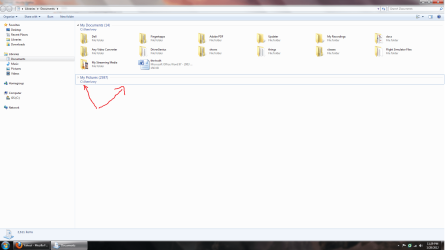
I just want to know how to get rid of the my pictures collapse/expand tab in my documents as shown in the picture. How do I hide this tab without deleting it? Thank you for your help.

Note: I figured it out.
 

Attachments
  • Untitled.png
    Untitled.png
    69.7 KB · Views: 13
Last edited:

My Computer

Computer Manufacturer/Model Number
Dell Studio Laptop 1535
OS
windows 7 ultimate 32bit
Here are a few suggestions. After you try each one, close your Windows Explorer and then reopen it:

Click Organize, Layout, and try UNchecking Preview Pane.

If that doesn't work, in the Layout section, see if there is any other link checked that might control the My Pictures section.

You can also try clicking (and/or right/clicking) the little 4 arrow in the header of the My Pictures section to see if that brings up any control to enable/disable the section. Also try clicking the blank area of the header.

Also see if that brings up a Properties link, which might also give you an enable/disable option.
 

My Computer

Computer Manufacturer/Model Number
HP Pavillion dv5t (generation 1)
OS
Vista 64 bit and 32 bit (SP2)
CPU
Intel(R) Core(TM)2 Duo Processor T9400 (2.53 GHz
Memory
4GB DDR2 System Memory (2 Dimm)
Graphics Card(s)
512 MB NVIDIA GeForce 9600M GT
Monitor(s) Displays
15.4" diagonal WSXGA+ High-Definition HP BrightView Widescre
Screen Resolution
1680 x 1050
Hard Drives
320GB 5400RPM SATA Hard Drive with HP ProtectSmart Hard Drive Protection
Keyboard
Built-in HP
Mouse
Built in - Synaptics TouchPad V6.5 on PS/2 Port
Internet Speed
Max
Other Info
~ Intel Next-Gen Wireless-N Mini-card w/Bluetooth ~ Blu-Ray ROM DVD+/-R/RW ~ Integ. HDTV Hybrid Tuner ~ 12 Cell Battery ~ MS Office (Home Premium) 2007 ~
Back
Top