
A quite new laptop lags when playing almost any games

Actiza

New member
Local time
12:28 PM
Messages
2
Hello, I'm actiza. I bought this laptop last Christmas and have been quite happy with it, but I know it must be capable of more. A friend of mine has an older laptop and much worse one but for some reason he has the same/higher fps playing those games than me. Everything should be updated, Nvidia drivers, windows updates etc.
For example, when playing League of Legends at maximum, it says that my FPS is at 40-48 but I can see clearly, how it lags. When lowering the shadow quality, everything becomes fine, but Nvidia experience, sets everything to Very High when optimizing. My battery is plugged in whenever my laptop is working. And it is set to maximum performance.

Problems:
1. Games lag
2. Kind of slow start up in my opinion
3. Performance is way too bad for such a laptop in my opinion.

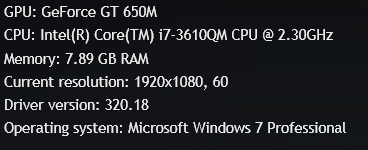
Laptop info:
Asus N56VZ
Vy6OwsZ.png


I hope you can help me increase my laptop's performance because I'm sure there's something misconfigured.
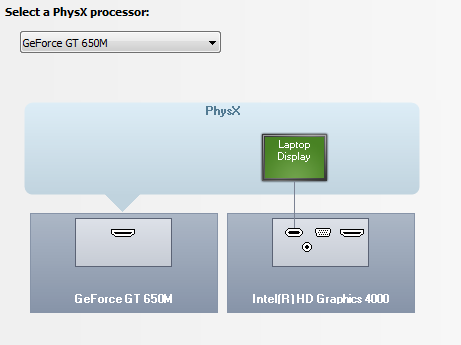
Also should this be a problem:
iUwPqSE.png

Why isn't the laptop display above GT 650M?
 
Last edited:

My Computer My Computer

At a glance

Windows 7 64bitIntel Core i7-3610QM CPU @ 2.30GHz8 GBGT 650m
Computer type
Laptop
Computer Manufacturer/Model Number
Asus
OS
Windows 7 64bit
CPU
Intel Core i7-3610QM CPU @ 2.30GHz
Memory
8 GB
Graphics Card(s)
GT 650m
Browser
Chrome
I think my BIOS version could be outdated though.
Current is: N56VZ.211, 21.08.2012.
Newest downloadable is: 216 2013.01.09.
But if I need to update it, I need step-by-step instructions on how to, because I'm not really sure how to. I downloaded something called the "WinFlash" from Asus's support site.
 

My Computer My Computer

At a glance

Windows 7 64bitIntel Core i7-3610QM CPU @ 2.30GHz8 GBGT 650m
Computer type
Laptop
Computer Manufacturer/Model Number
Asus
OS
Windows 7 64bit
CPU
Intel Core i7-3610QM CPU @ 2.30GHz
Memory
8 GB
Graphics Card(s)
GT 650m
Browser
Chrome
2 things as possible bottleneck on that laptop:

2.3Ghz CPU and probably a 5400RPM hard drive. [per specs visit, they sell it with 5400 or 7200RPM HD's]

Specs found here: N56VZ - Notebooks & Ultrabooks - ASUS

BIOS flashing wise follow the instructions Asus provides. [Flashing procedure varies, no one fits all]
Hopefully that Winflash will flash it from within Windows with an immediate reboot after, but they certainly should provide adequate documentation on doing it, no guess work required.
Do write down all your current settings before you flash it, since it will come back with defaults on new bios.

Nvidia driver wise, you may have to fiddle with settings, that laptop might have Optimus technology.
One thread sample on the subject:

http://www.sevenforums.com/graphic-cards/199457-nvidia-optimus-problems.html
 

My Computer My Computer

At a glance

Windows 7 Ultimate Retail Box (64-bit install...AMD FX-8350 CPU v1.15 (or 1.0F) BIOS was requ...8G CAS-7 G-Skill DDR3 @1333 (2 fours) [mobo n...Radeon HD 7950 [3 gigs of GDDR5] MSI Twin Fro...
Computer type
PC/Desktop
Computer Manufacturer/Model Number
Self Built Custom
OS
Windows 7 Ultimate Retail Box (64-bit installed) + Service Pack 1
CPU
AMD FX-8350 CPU v1.15 (or 1.0F) BIOS was required!
Motherboard
MSI 890FXA-GD70
Memory
8G CAS-7 G-Skill DDR3 @1333 (2 fours) [mobo nonOC max rec'd]
Graphics Card(s)
Radeon HD 7950 [3 gigs of GDDR5] MSI Twin Frozr model
Sound Card
Realtek High Definition Audio (onboard mobo, ALC-889 chip)
Monitor(s) Displays
2 WS LED Monitors: One LG One Viewsonic
Screen Resolution
1920 by 1080
Hard Drives
SSD for OS: Samsung 840 Pro
SSD for VM and utilities: Adata SX900
7200 RPM SATA HDs for the rest: Hitachi and Seagate
PSU
Corsair TX850 - 850W max, in service since August 2010.
Case
Thermaltake Armor A90
Cooling
Thermaltake Spin Q CPU Cooler, in service since August 2010
Keyboard
Logitech G11
Mouse
Logitech M310 Wireless
Internet Speed
100 Megabit broadband supposedly upgraded from 50 (Cable)
Antivirus
Bitdefender Internet Security 2014 suite
Browser
Pale Moon 64-bit main, also IceDragon, Opera, and Maxthon.
Other Info
CompTIA A+ certified (220-800 series) in July 2013.
You're using the Intel HD 4000 graphics instead of the 650M while running games. You can try forcing a game to run on the Nvidia by following the screenshot below:

Capture.JPG
 

My Computer My Computer

At a glance

Windows 7 Professional x64 SP1Intel® Pentium® 4 @ 2.26 GHz, Intel Core i7-2...512MB Dual channel DDR SDRAM @ 400MHz 2.5-3-3...Intel 82865G, Nvidia GeForce 520M Graphics
Computer type
Laptop
Computer Manufacturer/Model Number
Dell Optiplex SX270, Lenovo Z470
OS
Windows 7 Professional x64 SP1
CPU
Intel® Pentium® 4 @ 2.26 GHz, Intel Core i7-2670QM @ 2.20 GH
Motherboard
Dell, Lenovo
Memory
512MB Dual channel DDR SDRAM @ 400MHz 2.5-3-3-7, 8 GB DDR3
Graphics Card(s)
Intel 82865G, Nvidia GeForce 520M Graphics
Sound Card
SoundMax Integrated Audio, Integrated HD Audio
Monitor(s) Displays
LG W1952
Screen Resolution
1440x900, 1366 x 768
Hard Drives
40 GB 2.5" IDE 4200 RPM HDD, 500 GB 5400 RPM Sata 1.5 + 32 GB SSD
PSU
Dell 145 Watt, Lenovo 120 Watt Power Adapter
Case
Optiplex SX270 Small Form Factor, Laptop
Cooling
Dell Proprietary Air Cooling, Stock laptop cooling
Keyboard
Dell SK-8125 USB Keyboard
Mouse
Dell PS/2 2 button ball mouse with wheel scroll
Internet Speed
300 Mbit down / 20 Mbps up Time Warner Cable
Antivirus
MSE, Malwarebytes Scanner
Browser
Internet (Aizawa) Explorer 11
Other Info
Running Windows Server 2012 Datacenter on a virtual machine to run Metro Apps.
You say its a new machine since xmas ...... did you/have you tried any of these tips? They'll help you squeeze out the last drop of performance :).
We have many fine tutorials here, written by some very knowledgeable people. Try some of these if you haven't and welcome to the forums! (just click on the link)

http://www.sevenforums.com/tutorials/11728-optimize-windows-7-a.html
 

My Computer My Computer

At a glance

Windows 10x64 Build 1709Intel i7 7700HQ Kaby Lake16 GB DDR4 @2400Nvidia Geforce GTX 1060
Computer type
Laptop
Computer Manufacturer/Model Number
MSI GE72VR Apache Pro-416
OS
Windows 10x64 Build 1709
CPU
Intel i7 7700HQ Kaby Lake
Motherboard
Micro-Star Intl. MS-179B (U3C1)
Memory
16 GB DDR4 @2400
Graphics Card(s)
Nvidia Geforce GTX 1060
Screen Resolution
1920x1080 120Hz
Hard Drives
256 GB Nvme M.2 SSD

1TB HDD@7200
Cooling
Cooler Blast 4
Keyboard
Steel Series
Antivirus
Bit Defender Free
Browser
Edge
Back
Top