“A required CD/DVD drive device is missing"

perjac

New member
Local time
6:15 AM
Messages
25
“A required CD/DVD drive device is missing"

So I have this problem that it would appear heaps of others have:

I have a Kogan Agora pro:
Kogan Agora Netbook PRO - Kogan Technologies Pty Ltd

It does have a sata hdd. I looked through the BIOS but couldn't find any places to change the sata settings to AHCI or raid.

I am trying to install from a usb key (using an ISO I created from an install dvd) but had the same problem with a downloaded iso. Also tried to install using the default language settings (As identified by David76 in another thread) but no luck.

I think it relates to the SATA HDD. I put the drivers for the netbook onto a seperate usb drive which it finds and lists in the box but none of the drivers do anything (hit next it thinks about things for a while then says no new drivers found).

I am really starting to get a bit ticked and regretting my move away from linux. If it wasn't for a few particular programs I use that don't work on linux i would have given up ages ago.

Any help would be hugely appreciated.

Cheers,

J
 

My Computer

OS
wish it was windows 7

My Computer

Computer Manufacturer/Model Number
Custom
OS
Windows 7 Professional x64
CPU
Intel i7 2600K OC'd @ 4620 MHz
Motherboard
Asus P8Z68-V Pro
Memory
16GB GSkill Sniper 2133 Mhz (4x4GB)
Graphics Card(s)
EVGA GeForce GTX 480 SuperClocked+
Sound Card
Realtek High Definition Audio
Monitor(s) Displays
2x Acer S273HLbmii 27"
Screen Resolution
2 x 1920x1080
Hard Drives
64GB Crucial M4 SSD

Storage: Hitachi 1TB 5400RPM, Samsung 1.5TB 5400RPM
PSU
Corsair HW Series 750w (modular)
Case
Cooler Master HAF 932 Advanced Blue Edition
Cooling
CM Hyper 212+ CPU cooler, 3x 230mm + 1x 140mm case fans
Keyboard
Logitech MK320 (wireless)
Mouse
Logitech MK320 (wireless)
Internet Speed
30 Mb/s : 2 Mb/s
Hi

Where did you get the WINDOWS DRIVERS from?
 

My Computer

OS
ME/XP/Vista/Win7
Yeah i've been through all of them as I said in my post.

- Can't find the bios setting to change to AHCI
- Am already trying to install via usb key
- Tried using the drivers using the browse button on the screen but they are saying no new drivers found.

Keep in mind I am installing fresh over top of Linux so can't just run the setup.

If i've missed something in thos posts I apologise but they all seem to say the same things.


EDIT: I gotthe windows drivers from the support site at Kogan. It's a comprehensive vista file for all the hardware on the system.
 

My Computer

OS
wish it was windows 7
Your BIOS should have a setting such as SATA Operation Mode.
 

My Computer

Computer Manufacturer/Model Number
Custom
OS
Windows 7 Professional x64
CPU
Intel i7 2600K OC'd @ 4620 MHz
Motherboard
Asus P8Z68-V Pro
Memory
16GB GSkill Sniper 2133 Mhz (4x4GB)
Graphics Card(s)
EVGA GeForce GTX 480 SuperClocked+
Sound Card
Realtek High Definition Audio
Monitor(s) Displays
2x Acer S273HLbmii 27"
Screen Resolution
2 x 1920x1080
Hard Drives
64GB Crucial M4 SSD

Storage: Hitachi 1TB 5400RPM, Samsung 1.5TB 5400RPM
PSU
Corsair HW Series 750w (modular)
Case
Cooler Master HAF 932 Advanced Blue Edition
Cooling
CM Hyper 212+ CPU cooler, 3x 230mm + 1x 140mm case fans
Keyboard
Logitech MK320 (wireless)
Mouse
Logitech MK320 (wireless)
Internet Speed
30 Mb/s : 2 Mb/s
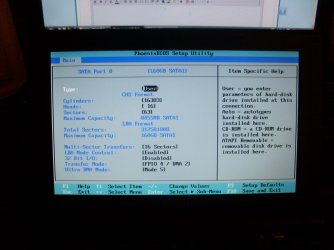
QUick pic of the only options available in BIOS>
 

Attachments

  • SL370946.JPG
    SL370946.JPG
    416.1 KB · Views: 584

My Computer

OS
wish it was windows 7
Is that the only page it has in the bios? Or one before it?


IDE/ACHI mode should be located at something like:

Integrated Periphials

inside there: SATA Mode

Each board is different depend on bios.
 

My Computer

Computer Manufacturer/Model Number
Custom (Self Build)
OS
Windows 7 Home Premium 64bit
CPU
Intel Core i7 2700k
Motherboard
eVGA P67 SLI
Memory
8GB Mushkin Redline Ridgebacks @1866
Graphics Card(s)
EVGA GTX570 SC
Sound Card
XiFi Titanium HD
Monitor(s) Displays
LG W2453V
Screen Resolution
1920x1080
Hard Drives
Intel 320 80GB -- Intel X25-V 40GB --WD Black 1TB x2 -- WD Blue 640GB
PSU
Seasonic x750
Case
Corsair 600T SE White
Cooling
eVGA Superclocked CPU Cooler
Keyboard
Saitek Cyborg
Antivirus
Kaspersky
Browser
IE
Other Info
LG BD/DVD
This bios I think is a cut down version. Other than that screen it's really only boot order and a security tab.
 

My Computer

OS
wish it was windows 7
Hi

Can you post a link to your Windows Drivers?
 

My Computer

OS
ME/XP/Vista/Win7

My Computer

Computer Manufacturer/Model Number
Custom
OS
Windows 7 Professional x64
CPU
Intel i7 2600K OC'd @ 4620 MHz
Motherboard
Asus P8Z68-V Pro
Memory
16GB GSkill Sniper 2133 Mhz (4x4GB)
Graphics Card(s)
EVGA GeForce GTX 480 SuperClocked+
Sound Card
Realtek High Definition Audio
Monitor(s) Displays
2x Acer S273HLbmii 27"
Screen Resolution
2 x 1920x1080
Hard Drives
64GB Crucial M4 SSD

Storage: Hitachi 1TB 5400RPM, Samsung 1.5TB 5400RPM
PSU
Corsair HW Series 750w (modular)
Case
Cooler Master HAF 932 Advanced Blue Edition
Cooling
CM Hyper 212+ CPU cooler, 3x 230mm + 1x 140mm case fans
Keyboard
Logitech MK320 (wireless)
Mouse
Logitech MK320 (wireless)
Internet Speed
30 Mb/s : 2 Mb/s
Yeah i will give it a shot if nothign else shows up as I will have to backup my linux partition just in case it doesn't work.
 

My Computer

OS
wish it was windows 7
Hi

Where did you get your Win7 DVD & licence from?
 

My Computer

OS
ME/XP/Vista/Win7
Hi

Where did you get your Win7 DVD & licence from?

from a computer store in the area. i followed the oem licensing requirements for it.
 

My Computer

OS
wish it was windows 7
Have you confirmed you have the latest BIOS version?

What was the problem with the ISO that caused you to recompile from DVD files?

Did you attempt to write ISO to stick using this method: http://www.sevenforums.com/tutorials/2432-usb-windows-7-installation-key-drive-create.html

Did you then recompile files into ISO using this method: http://www.sevenforums.com/tutorials/32055-bootable-iso-create-installation-files.html

Are you running the installer from the OS or booting it from BIOS? Try the other option.

Can you run or boot the installer on another computer so that it gets further into the install?
 
Back
Top