
Solved A single keystroke keeps glitching, bug or virus?

glenjj

New member
Member
Local time
5:27 PM
Messages
61
I really don't know where to post this because it's such a weird bug, but here's my issue:

My "e" keystroke stopped working, just the 'e', and I don't mean my physical keyboard broke, because even using the on screen keyboard clicking "e" doesn't work, but it will work if I press SHIFT E for a capital E, or put caps lock on and press SHIFT E again to get a lower case 'e', so it works.. but also doesn't work :/

If I restart my pc it fixes it for a very short time but then it comes right back for no particular reason, baffled :/, it's never done this before until recently, and I didn't do anything significant lately.

I don't know where to begin to try and fix this, I'd really prefer not to jump straight to reinstalling windows from scratch, that would be a nightmare for this PC with years of settings and programs id hat to have to reinstall.

PC specs:
Win7 pro 64bit
Intel i7 6700, 3.4ghz
Nvidia gforce GTX 970
32gb ram
ASrock z170 Extreme4
 

My Computer

Computer type
PC/Desktop
Computer Manufacturer/Model Number
Custom build
OS
Windows 7 pro 64bit
CPU
Intel core i7 6700 @ 3.40ghz
Motherboard
ASRock z170 extreme4
Memory
32gb
Graphics Card(s)
Nvidia gefoce GTX 970 MSI
Sound Card
Realtek High Definition Audio. NVIDIA High Definition Audio.
Monitor(s) Displays
LG ultrawide
Screen Resolution
2560 x 1080
Hard Drives
2tb
Keyboard
logitech G510s
Mouse
logitech g502
Antivirus
malwarebytes, spybot
Browser
Chrome/firefox
Other Info
Audio Playback Devices:
Realtek Digital Output (Realtek High Definition Audio)
Speakers (Realtek High Definition Audio) (default)
LG ULTRAWIDE (NVIDIA High Definition Audio)
Does it happen if you boot on Safe Mode?
Did you run Malwarebytes to scan for virus etc?
 

My Computers

System One System Two

  • Computer type
    PC/Desktop
    Computer Manufacturer/Model Number
    custom build
    OS
    Windows 7 HP 64
    CPU
    i5 6600K - 800MHz to 4200MHz
    Motherboard
    GA-Z170-HD3P
    Memory
    4+4G GSkill DDR4 3000
    Graphics Card(s)
    IG - Intel 530
    Monitor(s) Displays
    Samsung 226BW
    Screen Resolution
    1680x1050
    Hard Drives
    (1) -1 SM951 – 128GB M.2 AHCI PCIe SSD drive for Windows 7 and Lubuntu
    (2) -1 WD SATA 3 - 1T for Data
    (3) -1 WD SATA 3 - 1T for backup
    PSU
    Thermaltake 450W TR2 gold
    Keyboard
    Old and good Chicony mechanical keyboard
    Mouse
    Logitech mX performance - 9 buttons (had to disable some)
    Internet Speed
    500Mb/s
    Browser
    Firefox 64
    Other Info
    TinyWall firewall
  • Computer type
    Laptop
    System Manufacturer/Model Number
    Asus Q550LF
    OS
    Windows 7 Pro
    CPU
    i7-4500U 800MHz to 3.0GHz
    Motherboard
    Asus Q550LF
    Memory
    (4+4)G DDR3 1600
    Graphics Card(s)
    IG intel 4400 + NVIDIA GeForce GT 745M
    Sound Card
    Realtek
    Monitor(s) Displays
    LG Display LP156WF4-SPH1
    Screen Resolution
    1920 x 1080
    Hard Drives
    BX500 120G SSD for Windows and programs +
    1T HDD for data
    Internet Speed
    500 Mb/s
    Browser
    Firefox
    Other Info
    TinyWall firewall
Also, do you have all win 7 updates installed?
 

My Computer

Computer type
Laptop
Computer Manufacturer/Model Number
Dell M6500 Precision Work Station
OS
Windows 7 Pro SP1 64 bit
Memory
8 GB
Screen Resolution
1920x
Internet Speed
30 Mbps
Antivirus
Norton Security
Browser
IE 11
Safe mode i will have to test, virus scan hasnt found anything yet.
And yeah I recently updated, didnt fix it.
 

My Computer

Computer type
PC/Desktop
Computer Manufacturer/Model Number
Custom build
OS
Windows 7 pro 64bit
CPU
Intel core i7 6700 @ 3.40ghz
Motherboard
ASRock z170 extreme4
Memory
32gb
Graphics Card(s)
Nvidia gefoce GTX 970 MSI
Sound Card
Realtek High Definition Audio. NVIDIA High Definition Audio.
Monitor(s) Displays
LG ultrawide
Screen Resolution
2560 x 1080
Hard Drives
2tb
Keyboard
logitech G510s
Mouse
logitech g502
Antivirus
malwarebytes, spybot
Browser
Chrome/firefox
Other Info
Audio Playback Devices:
Realtek Digital Output (Realtek High Definition Audio)
Speakers (Realtek High Definition Audio) (default)
LG ULTRAWIDE (NVIDIA High Definition Audio)
Try a System File Check
Open a CMD windows as admin and type:
sfc /scannow
 

My Computers

System One System Two

  • Computer type
    PC/Desktop
    Computer Manufacturer/Model Number
    custom build
    OS
    Windows 7 HP 64
    CPU
    i5 6600K - 800MHz to 4200MHz
    Motherboard
    GA-Z170-HD3P
    Memory
    4+4G GSkill DDR4 3000
    Graphics Card(s)
    IG - Intel 530
    Monitor(s) Displays
    Samsung 226BW
    Screen Resolution
    1680x1050
    Hard Drives
    (1) -1 SM951 – 128GB M.2 AHCI PCIe SSD drive for Windows 7 and Lubuntu
    (2) -1 WD SATA 3 - 1T for Data
    (3) -1 WD SATA 3 - 1T for backup
    PSU
    Thermaltake 450W TR2 gold
    Keyboard
    Old and good Chicony mechanical keyboard
    Mouse
    Logitech mX performance - 9 buttons (had to disable some)
    Internet Speed
    500Mb/s
    Browser
    Firefox 64
    Other Info
    TinyWall firewall
  • Computer type
    Laptop
    System Manufacturer/Model Number
    Asus Q550LF
    OS
    Windows 7 Pro
    CPU
    i7-4500U 800MHz to 3.0GHz
    Motherboard
    Asus Q550LF
    Memory
    (4+4)G DDR3 1600
    Graphics Card(s)
    IG intel 4400 + NVIDIA GeForce GT 745M
    Sound Card
    Realtek
    Monitor(s) Displays
    LG Display LP156WF4-SPH1
    Screen Resolution
    1920 x 1080
    Hard Drives
    BX500 120G SSD for Windows and programs +
    1T HDD for data
    Internet Speed
    500 Mb/s
    Browser
    Firefox
    Other Info
    TinyWall firewall
Try a System File Check
Open a CMD windows as admin and type:
sfc /scannow

I'll try that shortly, after some virus scans are completed with a few different programs I got recently.
 

My Computer

Computer type
PC/Desktop
Computer Manufacturer/Model Number
Custom build
OS
Windows 7 pro 64bit
CPU
Intel core i7 6700 @ 3.40ghz
Motherboard
ASRock z170 extreme4
Memory
32gb
Graphics Card(s)
Nvidia gefoce GTX 970 MSI
Sound Card
Realtek High Definition Audio. NVIDIA High Definition Audio.
Monitor(s) Displays
LG ultrawide
Screen Resolution
2560 x 1080
Hard Drives
2tb
Keyboard
logitech G510s
Mouse
logitech g502
Antivirus
malwarebytes, spybot
Browser
Chrome/firefox
Other Info
Audio Playback Devices:
Realtek Digital Output (Realtek High Definition Audio)
Speakers (Realtek High Definition Audio) (default)
LG ULTRAWIDE (NVIDIA High Definition Audio)
I went most of a day without the E key dying on me again, I thought my virus scan fixed it, but nope.

I ran sfc /scannow, it gave me this message:

Windows resource protection found corrupt files and successfully repaired them.

But the E key didnt fix. :/

Yesterday I was looking through task managers processes and I closed anything I didnt recognize, and it did fix my key issue, but I forgot the process name and its not there anymore to close again to fix the issue again, strange
 

My Computer

Computer type
PC/Desktop
Computer Manufacturer/Model Number
Custom build
OS
Windows 7 pro 64bit
CPU
Intel core i7 6700 @ 3.40ghz
Motherboard
ASRock z170 extreme4
Memory
32gb
Graphics Card(s)
Nvidia gefoce GTX 970 MSI
Sound Card
Realtek High Definition Audio. NVIDIA High Definition Audio.
Monitor(s) Displays
LG ultrawide
Screen Resolution
2560 x 1080
Hard Drives
2tb
Keyboard
logitech G510s
Mouse
logitech g502
Antivirus
malwarebytes, spybot
Browser
Chrome/firefox
Other Info
Audio Playback Devices:
Realtek Digital Output (Realtek High Definition Audio)
Speakers (Realtek High Definition Audio) (default)
LG ULTRAWIDE (NVIDIA High Definition Audio)
Did you reboot after running the SFC and then run it again?
 

My Computer

Computer type
Laptop
Computer Manufacturer/Model Number
Dell M6500 Precision Work Station
OS
Windows 7 Pro SP1 64 bit
Memory
8 GB
Screen Resolution
1920x
Internet Speed
30 Mbps
Antivirus
Norton Security
Browser
IE 11
glenjj. Have you tried another keyboard?. If you do a lot of text work on your computer "e" is the most used letter, so it may be failing.
 

My Computer

Computer type
PC/Desktop
Computer Manufacturer/Model Number
Self built using existing case
OS
Windows 7 Home Premium 64 bit sp1
CPU
Intel i5 3570 3.4Ghz Ivy Bridge SKT 1155 quad core
Motherboard
Gigabyte Z77-HD3 SKT 1155 2xSata 3, 4x USB 3.0
Memory
G-Skill Rip Jaws 16Gb (8x2) DDR3 -1600 PC3 12800 CL 10 red
Graphics Card(s)
Gigabyte NVIDIA GT610 1Gb DDR3 810/1200 PCI-E 2.0 Silent
Sound Card
NVIDIA High Definition & Realtech High Definition Audio
Monitor(s) Displays
2 x Philips 226V4L 16:9 aspect ratio
Screen Resolution
1920 x 1080 HD
Hard Drives
Samsung 840 Pro 256gb SSD, SATA 3.
Hitachi Touro Portable 1tb, USB 3.0 HDD used for image b/ups.
PSU
Corsair VS450
Case
Codeng
Cooling
PSU fan & CPU fan
Keyboard
Logitech
Mouse
Logitech Wireless trackball M570
Internet Speed
Wireless 3G. 3mg down & 550kb up.
Antivirus
Bitdefender Internet Security 2020
Browser
Opera (Current Version) & Firefox
Other Info
MS Office 2013 Pro. Davis weather station software. MGE Nova 600 avr UPS.
Did you reboot after running the SFC and then run it again?

Yes, it returned no errors on the 2nd scan.

glenjj. Have you tried another keyboard?. If you do a lot of text work on your computer "e" is the most used letter, so it may be failing.

I assumed that at first but I said it was not my physical keyboard, even on the On Screen Keyboard the E key wont work. So it's not hardware related.

After some googling Ive found a couple similar cases where they say it was malware related, but Ive scanned thoroughly with multiple programs and found nothing that causes it, what free anti malware/spyware programs would you guys recommend I try to find any hidden virus? so far ive used malwarebytes, AVG. cheers
 

My Computer

Computer type
PC/Desktop
Computer Manufacturer/Model Number
Custom build
OS
Windows 7 pro 64bit
CPU
Intel core i7 6700 @ 3.40ghz
Motherboard
ASRock z170 extreme4
Memory
32gb
Graphics Card(s)
Nvidia gefoce GTX 970 MSI
Sound Card
Realtek High Definition Audio. NVIDIA High Definition Audio.
Monitor(s) Displays
LG ultrawide
Screen Resolution
2560 x 1080
Hard Drives
2tb
Keyboard
logitech G510s
Mouse
logitech g502
Antivirus
malwarebytes, spybot
Browser
Chrome/firefox
Other Info
Audio Playback Devices:
Realtek Digital Output (Realtek High Definition Audio)
Speakers (Realtek High Definition Audio) (default)
LG ULTRAWIDE (NVIDIA High Definition Audio)

My Computers

System One System Two

  • Computer type
    PC/Desktop
    Computer Manufacturer/Model Number
    custom build
    OS
    Windows 7 HP 64
    CPU
    i5 6600K - 800MHz to 4200MHz
    Motherboard
    GA-Z170-HD3P
    Memory
    4+4G GSkill DDR4 3000
    Graphics Card(s)
    IG - Intel 530
    Monitor(s) Displays
    Samsung 226BW
    Screen Resolution
    1680x1050
    Hard Drives
    (1) -1 SM951 – 128GB M.2 AHCI PCIe SSD drive for Windows 7 and Lubuntu
    (2) -1 WD SATA 3 - 1T for Data
    (3) -1 WD SATA 3 - 1T for backup
    PSU
    Thermaltake 450W TR2 gold
    Keyboard
    Old and good Chicony mechanical keyboard
    Mouse
    Logitech mX performance - 9 buttons (had to disable some)
    Internet Speed
    500Mb/s
    Browser
    Firefox 64
    Other Info
    TinyWall firewall
  • Computer type
    Laptop
    System Manufacturer/Model Number
    Asus Q550LF
    OS
    Windows 7 Pro
    CPU
    i7-4500U 800MHz to 3.0GHz
    Motherboard
    Asus Q550LF
    Memory
    (4+4)G DDR3 1600
    Graphics Card(s)
    IG intel 4400 + NVIDIA GeForce GT 745M
    Sound Card
    Realtek
    Monitor(s) Displays
    LG Display LP156WF4-SPH1
    Screen Resolution
    1920 x 1080
    Hard Drives
    BX500 120G SSD for Windows and programs +
    1T HDD for data
    Internet Speed
    500 Mb/s
    Browser
    Firefox
    Other Info
    TinyWall firewall
Also tried that one. Found nothing major really.
 

My Computer

Computer type
PC/Desktop
Computer Manufacturer/Model Number
Custom build
OS
Windows 7 pro 64bit
CPU
Intel core i7 6700 @ 3.40ghz
Motherboard
ASRock z170 extreme4
Memory
32gb
Graphics Card(s)
Nvidia gefoce GTX 970 MSI
Sound Card
Realtek High Definition Audio. NVIDIA High Definition Audio.
Monitor(s) Displays
LG ultrawide
Screen Resolution
2560 x 1080
Hard Drives
2tb
Keyboard
logitech G510s
Mouse
logitech g502
Antivirus
malwarebytes, spybot
Browser
Chrome/firefox
Other Info
Audio Playback Devices:
Realtek Digital Output (Realtek High Definition Audio)
Speakers (Realtek High Definition Audio) (default)
LG ULTRAWIDE (NVIDIA High Definition Audio)
Did you once install a software to change the keyboard layout (for example, change the . to ,) ?

Try to change your keyboard layout from English - Australia to English - US and see what happens.
Control Panel\All Control Panel Items\Region and Language
 

My Computers

System One System Two

  • Computer type
    PC/Desktop
    Computer Manufacturer/Model Number
    custom build
    OS
    Windows 7 HP 64
    CPU
    i5 6600K - 800MHz to 4200MHz
    Motherboard
    GA-Z170-HD3P
    Memory
    4+4G GSkill DDR4 3000
    Graphics Card(s)
    IG - Intel 530
    Monitor(s) Displays
    Samsung 226BW
    Screen Resolution
    1680x1050
    Hard Drives
    (1) -1 SM951 – 128GB M.2 AHCI PCIe SSD drive for Windows 7 and Lubuntu
    (2) -1 WD SATA 3 - 1T for Data
    (3) -1 WD SATA 3 - 1T for backup
    PSU
    Thermaltake 450W TR2 gold
    Keyboard
    Old and good Chicony mechanical keyboard
    Mouse
    Logitech mX performance - 9 buttons (had to disable some)
    Internet Speed
    500Mb/s
    Browser
    Firefox 64
    Other Info
    TinyWall firewall
  • Computer type
    Laptop
    System Manufacturer/Model Number
    Asus Q550LF
    OS
    Windows 7 Pro
    CPU
    i7-4500U 800MHz to 3.0GHz
    Motherboard
    Asus Q550LF
    Memory
    (4+4)G DDR3 1600
    Graphics Card(s)
    IG intel 4400 + NVIDIA GeForce GT 745M
    Sound Card
    Realtek
    Monitor(s) Displays
    LG Display LP156WF4-SPH1
    Screen Resolution
    1920 x 1080
    Hard Drives
    BX500 120G SSD for Windows and programs +
    1T HDD for data
    Internet Speed
    500 Mb/s
    Browser
    Firefox
    Other Info
    TinyWall firewall
Did you once install a software to change the keyboard layout (for example, change the . to ,) ?

Try to change your keyboard layout from English - Australia to English - US and see what happens.
Control Panel\All Control Panel Items\Region and Language

Okay I changed it to the US keyboard, I will see if it helps, though the E key glitch comes and goes, sometimes 2 or 3 times in a day, I really cant pin it down.

And I have installed my new razer tartarus mini hotkey keyboard, but its been running for months without issue in unison with my logitech keyboard. Razers software does update regularly, so I dont know if that may be a cause. I have tested unplugging it and stopping all razer processes when the E key glitch happens but it didnt fix it.
 

My Computer

Computer type
PC/Desktop
Computer Manufacturer/Model Number
Custom build
OS
Windows 7 pro 64bit
CPU
Intel core i7 6700 @ 3.40ghz
Motherboard
ASRock z170 extreme4
Memory
32gb
Graphics Card(s)
Nvidia gefoce GTX 970 MSI
Sound Card
Realtek High Definition Audio. NVIDIA High Definition Audio.
Monitor(s) Displays
LG ultrawide
Screen Resolution
2560 x 1080
Hard Drives
2tb
Keyboard
logitech G510s
Mouse
logitech g502
Antivirus
malwarebytes, spybot
Browser
Chrome/firefox
Other Info
Audio Playback Devices:
Realtek Digital Output (Realtek High Definition Audio)
Speakers (Realtek High Definition Audio) (default)
LG ULTRAWIDE (NVIDIA High Definition Audio)
I took a brief look at the manual and you can assign "key + shift" macros to a key. Might only apply to a G-key but I don't have time to look into that. I'm wondering if that has somehow happened.

Have you posted this problem at the Logitech forum or addressed it with support, if it's still under warranty?
 

My Computer

Computer type
Laptop
Computer Manufacturer/Model Number
Dell M6500 Precision Work Station
OS
Windows 7 Pro SP1 64 bit
Memory
8 GB
Screen Resolution
1920x
Internet Speed
30 Mbps
Antivirus
Norton Security
Browser
IE 11
I took a brief look at the manual and you can assign "key + shift" macros to a key. Might only apply to a G-key but I don't have time to look into that. I'm wondering if that has somehow happened.

Have you posted this problem at the Logitech forum or addressed it with support, if it's still under warranty?

How would that also affect the On Screen keyboard? that's the one thing that leads me away from blaming my physical keyboards.
 

My Computer

Computer type
PC/Desktop
Computer Manufacturer/Model Number
Custom build
OS
Windows 7 pro 64bit
CPU
Intel core i7 6700 @ 3.40ghz
Motherboard
ASRock z170 extreme4
Memory
32gb
Graphics Card(s)
Nvidia gefoce GTX 970 MSI
Sound Card
Realtek High Definition Audio. NVIDIA High Definition Audio.
Monitor(s) Displays
LG ultrawide
Screen Resolution
2560 x 1080
Hard Drives
2tb
Keyboard
logitech G510s
Mouse
logitech g502
Antivirus
malwarebytes, spybot
Browser
Chrome/firefox
Other Info
Audio Playback Devices:
Realtek Digital Output (Realtek High Definition Audio)
Speakers (Realtek High Definition Audio) (default)
LG ULTRAWIDE (NVIDIA High Definition Audio)
I understand but it might have somehow affected the On Screen keyboard. It was just something to look into. You didn't say if you sought help from Logitech.

If you go to Accessories, System Tools, Character Map, is the "e" character shown? Just wondering if the Map got corrupted.
 

My Computer

Computer type
Laptop
Computer Manufacturer/Model Number
Dell M6500 Precision Work Station
OS
Windows 7 Pro SP1 64 bit
Memory
8 GB
Screen Resolution
1920x
Internet Speed
30 Mbps
Antivirus
Norton Security
Browser
IE 11
Could it be possible that a program you're using on your computer has a hotkey assigned to the lowercase letter "e", but a design flaw in the program is causing the letter "e" not to type and/or causing the program to fail?
 

My Computer

Computer type
PC/Desktop
Computer Manufacturer/Model Number
Custom Build
OS
Windows 7 Home Premium
CPU
Intel Core i7-4790K
Motherboard
MSI
Memory
16 GB of RAM
Graphics Card(s)
nVidia GeForce GTX 970
Hard Drives
2 Terabytes of Storage
Antivirus
Kaspersky Internet Security
Browser
Firefox
You have probably looked for some strange program on MSconfig.
Did you looked at task manager?
 

My Computers

System One System Two

  • Computer type
    PC/Desktop
    Computer Manufacturer/Model Number
    custom build
    OS
    Windows 7 HP 64
    CPU
    i5 6600K - 800MHz to 4200MHz
    Motherboard
    GA-Z170-HD3P
    Memory
    4+4G GSkill DDR4 3000
    Graphics Card(s)
    IG - Intel 530
    Monitor(s) Displays
    Samsung 226BW
    Screen Resolution
    1680x1050
    Hard Drives
    (1) -1 SM951 – 128GB M.2 AHCI PCIe SSD drive for Windows 7 and Lubuntu
    (2) -1 WD SATA 3 - 1T for Data
    (3) -1 WD SATA 3 - 1T for backup
    PSU
    Thermaltake 450W TR2 gold
    Keyboard
    Old and good Chicony mechanical keyboard
    Mouse
    Logitech mX performance - 9 buttons (had to disable some)
    Internet Speed
    500Mb/s
    Browser
    Firefox 64
    Other Info
    TinyWall firewall
  • Computer type
    Laptop
    System Manufacturer/Model Number
    Asus Q550LF
    OS
    Windows 7 Pro
    CPU
    i7-4500U 800MHz to 3.0GHz
    Motherboard
    Asus Q550LF
    Memory
    (4+4)G DDR3 1600
    Graphics Card(s)
    IG intel 4400 + NVIDIA GeForce GT 745M
    Sound Card
    Realtek
    Monitor(s) Displays
    LG Display LP156WF4-SPH1
    Screen Resolution
    1920 x 1080
    Hard Drives
    BX500 120G SSD for Windows and programs +
    1T HDD for data
    Internet Speed
    500 Mb/s
    Browser
    Firefox
    Other Info
    TinyWall firewall
UPDATE
Razer have given me steps to take that do seem to have fixed the issue, I would call this problem 50% confirmed to be solved, but I will test another couple of days just to be sure.

I understand but it might have somehow affected the On Screen keyboard. It was just something to look into. You didn't say if you sought help from Logitech.

If you go to Accessories, System Tools, Character Map, is the "e" character shown? Just wondering if the Map got corrupted.

Fair enough, I'll email them to ask if such an error can occur, but I have used this keyboard for years without issue.

Yeah the e key is shown on the character map, but I'll recheck when the e key dies again, it comes and goes which is weird too.

Could it be possible that a program you're using on your computer has a hotkey assigned to the lowercase letter "e", but a design flaw in the program is causing the letter "e" not to type and/or causing the program to fail?

The only other thing that has any control over key usage would be my mini Razer hotkey keyboard, which does include the e key on it but they've worked in harmony for months without issue now, but as razers software is asking for updates like once a week maybe one of the updates bugged it out, I'll ask razer if this can happen or has happened to others.

You have probably looked for some strange program on MSconfig.
Did you looked at task manager?

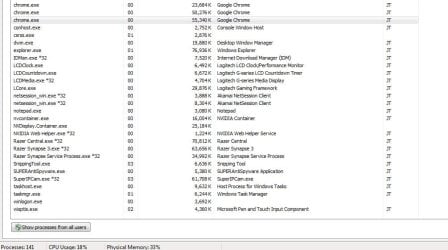
Yeah I looked very thoroughly for programs I wasn't familiar with on msconfig and task manager, but there's a lot lol, I don't know what to look for beyond the programs I know about. I see nothing unusual here running (screenshot), "CefSharp.BrowserSubprocess.exe *32" is also running usually.
 

Attachments

  • sc.JPG
    sc.JPG
    71.4 KB · Views: 0
Last edited:

My Computer

Computer type
PC/Desktop
Computer Manufacturer/Model Number
Custom build
OS
Windows 7 pro 64bit
CPU
Intel core i7 6700 @ 3.40ghz
Motherboard
ASRock z170 extreme4
Memory
32gb
Graphics Card(s)
Nvidia gefoce GTX 970 MSI
Sound Card
Realtek High Definition Audio. NVIDIA High Definition Audio.
Monitor(s) Displays
LG ultrawide
Screen Resolution
2560 x 1080
Hard Drives
2tb
Keyboard
logitech G510s
Mouse
logitech g502
Antivirus
malwarebytes, spybot
Browser
Chrome/firefox
Other Info
Audio Playback Devices:
Realtek Digital Output (Realtek High Definition Audio)
Speakers (Realtek High Definition Audio) (default)
LG ULTRAWIDE (NVIDIA High Definition Audio)
Back
Top