A small problem w/ dialog boxes

agathajack

New member
Local time
9:38 PM
Messages
2
Well, the problem that I'm experiencing isn't that big of a deal, but it is bugging me, so I decided to get it fixed. I've been looking everywhere (even in 2 languages) how to fix it, but I didn't find the solution, so I'm posting a thread here.

So, when I'm dragging a window (you know, the dialog box where all my stuff is) around, a frame appears at the move event. It used to be like when I drag it I can see all my stuff moving with the dialog box. Now it's like I wanna move the box somewhere else, a frame appears, so I can see where I wanna put that box and when I'm done placing it, the contents appear.

I looked it up in the control panel, but I still didn't find a place for that to be changed. I know where I could find that on win xp, but now I'm using win 7 HP. I cannot remember when this started to happen, but I discovered it today, that it's not like it is supposed to be.

I hope I made sense and I hope to get it fixed with your help. I feel real dumb right now, because the solution to my problem seems to be so easy and usually I aint that dumb with computers.

Helena
 

My Computer

OS
Windows 7 Home Premium

My Computer

Computer type
PC/Desktop
Computer Manufacturer/Model Number
Self built custom
OS
64-bit Windows 11 Pro for Workstations
CPU
Intel i7-8700K OC'd to 5 GHz
Motherboard
ASUS ROG Maximus XI Formula Z390
Memory
64 GB (4x16GB) G.SKILL TridentZ RGB DDR4 3600 MHz
Graphics Card(s)
ASUS ROG-STRIX-GTX1080TI-O11G-GAMING
Sound Card
Integrated
Monitor(s) Displays
2 x Samsung Odyssey G7 27"
Screen Resolution
2560x1440
Hard Drives
1TB Samsung 990 PRO M.2,
4TB Samsung 990 PRO PRO M.2,
TerraMaster F8 SSD Plus NAS
PSU
Seasonic Prime Titanium 850W
Case
Thermaltake Core P3
Cooling
Corsair Hydro H115i
Keyboard
Logitech wireless K800
Mouse
Logitech MX Master 4
Internet Speed
2 Gb/s Download and 100 Mb/s Upload
Antivirus
Malwarebyte Anti-Malware Premium
Browser
Google Chrome
Other Info
Logitech Z625 speaker system,
Logitech BRIO 4K Pro webcam,
HP Color LaserJet Pro MFP M477fdn,
APC SMART-UPS RT 1000 XL - SURT1000XLI,
Galaxy S23 Plus phone
Well, the problem that I'm experiencing isn't that big of a deal, but it is bugging me, so I decided to get it fixed. I've been looking everywhere (even in 2 languages) how to fix it, but I didn't find the solution, so I'm posting a thread here.

So, when I'm dragging a window (you know, the dialog box where all my stuff is) around, a frame appears at the move event. It used to be like when I drag it I can see all my stuff moving with the dialog box. Now it's like I wanna move the box somewhere else, a frame appears, so I can see where I wanna put that box and when I'm done placing it, the contents appear.

I looked it up in the control panel, but I still didn't find a place for that to be changed. I know where I could find that on win xp, but now I'm using win 7 HP. I cannot remember when this started to happen, but I discovered it today, that it's not like it is supposed to be.

I hope I made sense and I hope to get it fixed with your help. I feel real dumb right now, because the solution to my problem seems to be so easy and usually I aint that dumb with computers.

Helena

Try this:
1) Click the Start button, right-click on "Computer", then select "Properties"
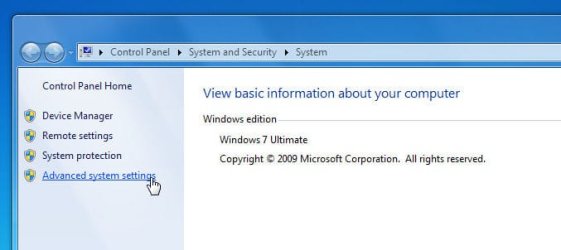
2) Click "Advanced system settings" (you may need to respond to a UAC prompt):
Image1.jpg

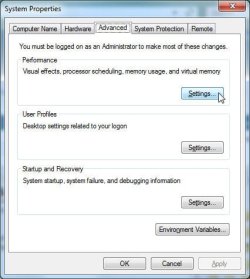
3) Under the "Advanced" tab of "System Properties", click the "Settings" button:
Image2.jpg

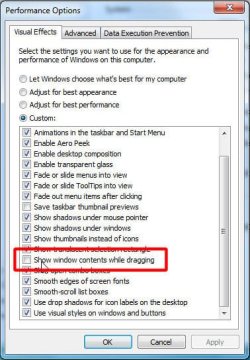
4) If all you want is to have the window contents displayed when dragging, click "Show window contents while dragging" in "Visual Effects":
Image3.jpg

5) I keep my settings on "Adjust for best appearance", whie basically selects everything in the "Custom" list. when you are done making your settings changes, click "OK"
 

My Computer

Computer type
PC/Desktop
Computer Manufacturer/Model Number
Virtual Machine
OS
Windows 7 Professional 32-bit SP1
CPU
AMD A4/A6
Motherboard
Intel Corporation 440BX Desktop Reference Platform
Memory
3.00GB EDO
Graphics Card(s)
VMware SVGA 3D
Sound Card
High Definition Audio Device
Monitor(s) Displays
Generic Non-PnP Monitor on VMware SVGA 3D
Screen Resolution
1440x900
Hard Drives
1 x 60GB VMware Virtual SATA Hard Drive ATA Device
Antivirus
Kaspersky Total Security
And Brink beat me to it...:D
 

My Computer

Computer type
PC/Desktop
Computer Manufacturer/Model Number
Virtual Machine
OS
Windows 7 Professional 32-bit SP1
CPU
AMD A4/A6
Motherboard
Intel Corporation 440BX Desktop Reference Platform
Memory
3.00GB EDO
Graphics Card(s)
VMware SVGA 3D
Sound Card
High Definition Audio Device
Monitor(s) Displays
Generic Non-PnP Monitor on VMware SVGA 3D
Screen Resolution
1440x900
Hard Drives
1 x 60GB VMware Virtual SATA Hard Drive ATA Device
Antivirus
Kaspersky Total Security
LOL. ;)
 

My Computer

Computer type
PC/Desktop
Computer Manufacturer/Model Number
Self built custom
OS
64-bit Windows 11 Pro for Workstations
CPU
Intel i7-8700K OC'd to 5 GHz
Motherboard
ASUS ROG Maximus XI Formula Z390
Memory
64 GB (4x16GB) G.SKILL TridentZ RGB DDR4 3600 MHz
Graphics Card(s)
ASUS ROG-STRIX-GTX1080TI-O11G-GAMING
Sound Card
Integrated
Monitor(s) Displays
2 x Samsung Odyssey G7 27"
Screen Resolution
2560x1440
Hard Drives
1TB Samsung 990 PRO M.2,
4TB Samsung 990 PRO PRO M.2,
TerraMaster F8 SSD Plus NAS
PSU
Seasonic Prime Titanium 850W
Case
Thermaltake Core P3
Cooling
Corsair Hydro H115i
Keyboard
Logitech wireless K800
Mouse
Logitech MX Master 4
Internet Speed
2 Gb/s Download and 100 Mb/s Upload
Antivirus
Malwarebyte Anti-Malware Premium
Browser
Google Chrome
Other Info
Logitech Z625 speaker system,
Logitech BRIO 4K Pro webcam,
HP Color LaserJet Pro MFP M477fdn,
APC SMART-UPS RT 1000 XL - SURT1000XLI,
Galaxy S23 Plus phone
Thank you, Brink and Dzomlija, very much! It's back to normal again =).


Helena
 

My Computer

OS
Windows 7 Home Premium
You're most welcome Helena. I'm happy that we were able to help you. :)
 

My Computer

Computer type
PC/Desktop
Computer Manufacturer/Model Number
Self built custom
OS
64-bit Windows 11 Pro for Workstations
CPU
Intel i7-8700K OC'd to 5 GHz
Motherboard
ASUS ROG Maximus XI Formula Z390
Memory
64 GB (4x16GB) G.SKILL TridentZ RGB DDR4 3600 MHz
Graphics Card(s)
ASUS ROG-STRIX-GTX1080TI-O11G-GAMING
Sound Card
Integrated
Monitor(s) Displays
2 x Samsung Odyssey G7 27"
Screen Resolution
2560x1440
Hard Drives
1TB Samsung 990 PRO M.2,
4TB Samsung 990 PRO PRO M.2,
TerraMaster F8 SSD Plus NAS
PSU
Seasonic Prime Titanium 850W
Case
Thermaltake Core P3
Cooling
Corsair Hydro H115i
Keyboard
Logitech wireless K800
Mouse
Logitech MX Master 4
Internet Speed
2 Gb/s Download and 100 Mb/s Upload
Antivirus
Malwarebyte Anti-Malware Premium
Browser
Google Chrome
Other Info
Logitech Z625 speaker system,
Logitech BRIO 4K Pro webcam,
HP Color LaserJet Pro MFP M477fdn,
APC SMART-UPS RT 1000 XL - SURT1000XLI,
Galaxy S23 Plus phone
Back
Top