A sticky situation involving Windows on a SSD and HDD

Zamaj

New member
Local time
2:58 PM
Messages
4
I am currently building a new PC, and I am reusing my hard drive from my old one with Windows 7 on it. I have bought a new copy of Windows 7 and an SSD and I want to install and boot Windows from the SSD. My question is, how will this work with the old copy of Windows on the hard drive? I think it might have been better to wipe the old HDD while it was still in the old PC, but I've dismantled it now so that isn't really an option. I'm unsure as to exactly what steps I should take to get everything working properly. If anyone could provide some guidance, it would be much appreciated. Thanks!
 

My Computer My Computer

At a glance

Windows 7 Home Premium 64 bit SP1AMD A8-38008 GB DDR3ATI AMD Radeon HD 6550 512 MB
Computer type
PC/Desktop
Computer Manufacturer/Model Number
HP Pavilion p7-1102
OS
Windows 7 Home Premium 64 bit SP1
CPU
AMD A8-3800
Motherboard
PEGATRON 2ACD
Memory
8 GB DDR3
Graphics Card(s)
ATI AMD Radeon HD 6550 512 MB
Hard Drives
1 TB Hitachi SATA
Antivirus
Centurylink f-secure
Browser
Chrome
Hi

I would recommend ;

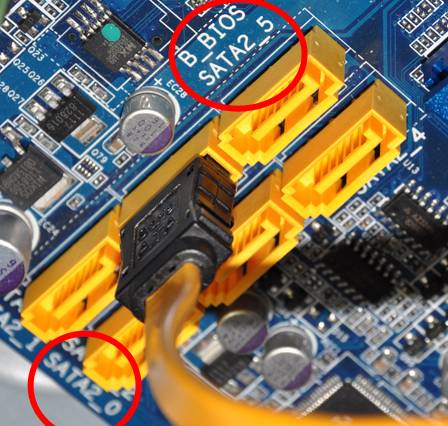
1. Connect only SSD and install Windows as usual. Make sure to connect it to the first SATA port to avoid boot issues later (usually SATA port numbers will be printed near to it ).

sata-ports.jpg


Some systems may have SATA 3gb/s and SATA 6gb/s ports. In that case finding SATA 6gb/s port and connecting SSD to it is recommended. However HP documentation doesn't seems to provide any details about the motherboard used. So i would recommend stick with port one.

2. Once Windows install finished, connect the old HDD to one of the secondary SATA port and boot to Windows. Then open "Disk Management" ( diskmgmt.msc in RUN dialogue ) and delete all partitions on the slave hard drive. You can then partition it to one or two volumes which are exclusive for data storage.

How to delete partitions : http://www.sevenforums.com/tutorials/2668-partition-volume-delete.html

How to create new partition : http://www.sevenforums.com/tutorials/2674-partition-volume-create-new.html
 

My Computer My Computer

At a glance

Windows 7 Ultimate x64
Computer type
PC/Desktop
OS
Windows 7 Ultimate x64
If you kept the same motherboard then you can move any Win7 license to another hard drive whether you reimage it or do a Clean Reinstall Windows 7.

Follow Lady's suggestions for plugging in your SSD, boot the Win7 disk for your licensed version provided if needed in Clean Reinstall Windows 7 and follow those steps to get and keep a perfect install.

After install, plug back in the Hard drive making sure the SSD remains primary hard drive set first to boot in BIOS setup. Then I would transfer any data needed and go the extra step to wipe the HD with Diskpart Clean Command to get it cleanest, repartition and format in Disk Management.

If you have a specific partition scheme you can ask back and we'll give you the exact steps.
 
Last edited:
Thanks; that makes sense and seems pretty simple.

@ gregrocker: I had the OEM version of Windows that came on my machine. I looked into transfer, decided it was not viable, and decided to buy an new copy.
 

My Computer My Computer

At a glance

Windows 7 Home Premium 64 bit SP1AMD A8-38008 GB DDR3ATI AMD Radeon HD 6550 512 MB
Computer type
PC/Desktop
Computer Manufacturer/Model Number
HP Pavilion p7-1102
OS
Windows 7 Home Premium 64 bit SP1
CPU
AMD A8-3800
Motherboard
PEGATRON 2ACD
Memory
8 GB DDR3
Graphics Card(s)
ATI AMD Radeon HD 6550 512 MB
Hard Drives
1 TB Hitachi SATA
Antivirus
Centurylink f-secure
Browser
Chrome

My Computer My Computer

At a glance

Windows 7 Home Premium SP1, 64-bitIntel Skylake i5-6600K, not overclocked8 GB HyperX DDR4-2666 (2 x 4 GB)none; graphics are integrated on CPU
Computer type
PC/Desktop
Computer Manufacturer/Model Number
Ignatz Special; 4 speed manual gearbox; factory air conditioning; one of one
OS
Windows 7 Home Premium SP1, 64-bit
CPU
Intel Skylake i5-6600K, not overclocked
Motherboard
AsRock Z170M Extreme 4, micro ATX
Memory
8 GB HyperX DDR4-2666 (2 x 4 GB)
Graphics Card(s)
none; graphics are integrated on CPU
Sound Card
onboard: Realtek ALC1150; external: USB Behringer UF0-202
Monitor(s) Displays
Dell S2340M 23 inch IPS
Screen Resolution
1600 x 900
Hard Drives
System: Crucial MX100 series SSD, 128 GB;
Data: Samsung Spinpoint 103SJ, 1 TB;
Backup: WD Caviar Green WD30EZRX-00D8PB0, 3 TB
PSU
Rosewill SilentNight 500 watt fanless, semi-modular
Case
Antec Solo II
Cooling
Noctua NH-U12S; Noctua F12 intake, Noctua S12A exhaust
Keyboard
Microsoft 200 6JH-00001 USB
Mouse
Dell or Microsoft optical wired; USB
Antivirus
Microsoft Security Essentials and Malwarebytes Premium
Browser
Pale Moon
Other Info
All fans PWM; speeds at idle: CPU circa 500 rpm; intake circa 600 rpm; exhaust circa 600 rpm; CPU temps 27 idle and 47 C load in a warm room (27 C/81 F) when running Intel Extreme Tuning Utility stress test.
One little addition - before you boot make sure the SSD is #2 in the BIOS boot sequence. #1 should be the CD/DVD drive.
 

My Computer My Computer

At a glance

Vista, Windows7, Mint Mate, Zorin, Windows 8from 1.6GHz Duo to i7
Computer Manufacturer/Model Number
HP, Dell, Gateway, Toshiba - 4 laptops and 2 desktops
OS
Vista, Windows7, Mint Mate, Zorin, Windows 8
CPU
from 1.6GHz Duo to i7
Monitor(s) Displays
2x HP w2207
Hard Drives
5x HDD, 7x SSD, 12x Externals
Keyboard
with trackball - no mices
Mouse
Trackball mice
Internet Speed
DSL 6000

My Computer My Computer

At a glance

Vista, Windows7, Mint Mate, Zorin, Windows 8from 1.6GHz Duo to i7
Computer Manufacturer/Model Number
HP, Dell, Gateway, Toshiba - 4 laptops and 2 desktops
OS
Vista, Windows7, Mint Mate, Zorin, Windows 8
CPU
from 1.6GHz Duo to i7
Monitor(s) Displays
2x HP w2207
Hard Drives
5x HDD, 7x SSD, 12x Externals
Keyboard
with trackball - no mices
Mouse
Trackball mice
Internet Speed
DSL 6000

My Computer My Computer

At a glance

Windows 7 Home Premium SP1, 64-bitIntel Skylake i5-6600K, not overclocked8 GB HyperX DDR4-2666 (2 x 4 GB)none; graphics are integrated on CPU
Computer type
PC/Desktop
Computer Manufacturer/Model Number
Ignatz Special; 4 speed manual gearbox; factory air conditioning; one of one
OS
Windows 7 Home Premium SP1, 64-bit
CPU
Intel Skylake i5-6600K, not overclocked
Motherboard
AsRock Z170M Extreme 4, micro ATX
Memory
8 GB HyperX DDR4-2666 (2 x 4 GB)
Graphics Card(s)
none; graphics are integrated on CPU
Sound Card
onboard: Realtek ALC1150; external: USB Behringer UF0-202
Monitor(s) Displays
Dell S2340M 23 inch IPS
Screen Resolution
1600 x 900
Hard Drives
System: Crucial MX100 series SSD, 128 GB;
Data: Samsung Spinpoint 103SJ, 1 TB;
Backup: WD Caviar Green WD30EZRX-00D8PB0, 3 TB
PSU
Rosewill SilentNight 500 watt fanless, semi-modular
Case
Antec Solo II
Cooling
Noctua NH-U12S; Noctua F12 intake, Noctua S12A exhaust
Keyboard
Microsoft 200 6JH-00001 USB
Mouse
Dell or Microsoft optical wired; USB
Antivirus
Microsoft Security Essentials and Malwarebytes Premium
Browser
Pale Moon
Other Info
All fans PWM; speeds at idle: CPU circa 500 rpm; intake circa 600 rpm; exhaust circa 600 rpm; CPU temps 27 idle and 47 C load in a warm room (27 C/81 F) when running Intel Extreme Tuning Utility stress test.

My Computer My Computer

At a glance

Vista, Windows7, Mint Mate, Zorin, Windows 8from 1.6GHz Duo to i7
Computer Manufacturer/Model Number
HP, Dell, Gateway, Toshiba - 4 laptops and 2 desktops
OS
Vista, Windows7, Mint Mate, Zorin, Windows 8
CPU
from 1.6GHz Duo to i7
Monitor(s) Displays
2x HP w2207
Hard Drives
5x HDD, 7x SSD, 12x Externals
Keyboard
with trackball - no mices
Mouse
Trackball mice
Internet Speed
DSL 6000
If you are using the same motherboard then you could replace everything else and still use the same license which lives and dies only with the motherboard.

In addition there are reports recently that MS is increasingly allowing transfer of OEM licenses to new mobo, so that might be worth a try using Activate Windows 7 by Phone - Windows 7 Help Forums
before wasting another key. Previously a really good excuse needed to be given, but the relaxing of these rules may be due to Win7 only being available now in OEM version.
 
Last edited:
Okay I will be the one to ask.

Zamaj did you or did you not replace the motherboard?
If you replaced the motherboard what motherboard did you install?

This information will help these good folks in their guidance.

Building a new PC means different things to different people.
To me a new PC always means a new motherboard is included.
 

My Computer My Computer

At a glance

Windows 10 Pro. 64/ version 1709 Windows 7 Pr...Intel i7-6800K @ 4.3Corsair Platinum 16 gig @2400EVGA GTX 1070 OC
Computer type
PC/Desktop
Computer Manufacturer/Model Number
Home made Desktop
OS
Windows 10 Pro. 64/ version 1709 Windows 7 Pro/64
CPU
Intel i7-6800K @ 4.3
Motherboard
ASUS X-99 Deluxe II
Memory
Corsair Platinum 16 gig @2400
Graphics Card(s)
EVGA GTX 1070 OC
Monitor(s) Displays
Asus 27" LED LCD/VE278Q
Screen Resolution
1920-1080 or 1280-720 HDMI
Hard Drives
INTEL SSD 730-240 Gb Sata 3.0/
PSU
EVGA Platium 1200W
Case
Phanteks Luxe Tempered Glass 8 fans/ one radiator
Cooling
XSPC/ Water Cooled CPU
Keyboard
Das 4 Professional
Mouse
Logitech M705/MX Anywhere 2-S
Internet Speed
100 mbits
Antivirus
Microsoft Security Essentials/ Malwarebytes Premium 3.0/ SAS
Browser
I.E. 11 default/Firefox/ ISP Time Warner Cable/Spectrum
Other Info
LG BluRay Burner/
Sound system-KLipsch-THX/
Icy Dock ssd Hot Swap bays.
I am most definitely using a different motherboard; everything is new except for the HDD, RAM, and optical drive, which I am reusing.

I was using the Pegatron mobo that came with my old HP, for my new build I'm using the a Gigabyte Z97x board.
 
Last edited:

My Computer My Computer

At a glance

Windows 7 Home Premium 64 bit SP1AMD A8-38008 GB DDR3ATI AMD Radeon HD 6550 512 MB
Computer type
PC/Desktop
Computer Manufacturer/Model Number
HP Pavilion p7-1102
OS
Windows 7 Home Premium 64 bit SP1
CPU
AMD A8-3800
Motherboard
PEGATRON 2ACD
Memory
8 GB DDR3
Graphics Card(s)
ATI AMD Radeon HD 6550 512 MB
Hard Drives
1 TB Hitachi SATA
Antivirus
Centurylink f-secure
Browser
Chrome
I am currently building a new PC, and I am reusing my hard drive from my old one with Windows 7 on it. I have bought a new copy of Windows 7 and an SSD and I want to install and boot Windows from the SSD. My question is, how will this work with the old copy of Windows on the hard drive? I think it might have been better to wipe the old HDD while it was still in the old PC, but I've dismantled it now so that isn't really an option. I'm unsure as to exactly what steps I should take to get everything working properly. If anyone could provide some guidance, it would be much appreciated. Thanks!

I built a new PC about six months ago and ran into similar issues.

I bought a new SSD to use as drive C, and used two old SATA drives for D and E. On the first attempt at installing Windows 7, it installed to drive D. Then I remembered, this old drive had been used as a boot drive.

Rebooting from the Windows CD, I deleted the partitions on all three drives, repartitioned each one, and continued the installation. To my surprise, Windows installed to drive D once again! (Now I'm really confused.)

To make a long story short: I had to unplug drive D and E and then install Windows 7 to the SSD. The installation went fine, and once completed, I powered down, reconnected drive D and E and rebooted.

Being a "permanent student of the school of hard knocks", I had forgotten to repartitioned drive D and had a boot up conflict because of two drives having active partitions. I then powered down, booted from the CD, repartitioned drive D, thus deleting the unwanted active partition.

We all live and learn :cry:, I hope this helped.

Tinmann
 

My Computer My Computer

At a glance

Windows 7 (64 bit)Intel i5-4670K Quad core 3.4 GhzCorsair 16 GB2 - NVidia GeForce GTX660 (SLI mode) 6Gb Vide...
Computer type
PC/Desktop
Computer Manufacturer/Model Number
Custom bulid
OS
Windows 7 (64 bit)
CPU
Intel i5-4670K Quad core 3.4 Ghz
Motherboard
MSI Z97S SLI Pluss (MS-7930)
Memory
Corsair 16 GB
Graphics Card(s)
2 - NVidia GeForce GTX660 (SLI mode) 6Gb Video ram
Sound Card
Onboard - MSI Intel 9 Series
Monitor(s) Displays
HSD HF229
Screen Resolution
(1680x1050, 22.3")
Hard Drives
Samsung SSD EVO (250GB, STA600,SSD)
Seagate ST1000DM003-1CH162 (1TB, SATA600, 7200 rpm)
WDC WD10 03FBYX-18Y7B (1TB, SATA300,7200rpm)
PSU
750 Watt
Case
MSI
Cooling
1 CPU, 4 Case
Keyboard
USB
Mouse
USB
Internet Speed
18 MB
Antivirus
BitDefender
Browser
IE 11
Back
Top