
I am trying to make a bat file to put on a cd that when the cd is put in and the bat file is run, it will make a directory on the hard drive then copy the DOS game from the cd and past the game to the directory that was made on the hard drive. I am making this cd for a friend and it is a new learning experience for me.
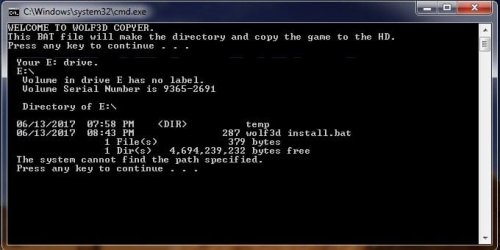
I got the bat file partly working. I am having a sync text error in the copy cmd line that I can't figure out. I have a few read/write DVD's. I am using the 1 of the read/write DVD's as a test bead instead of using up all my blank DVD's and CD's until I get all the bugs out of the bat file. The DVD is formated. Bellow is the bat file as it stands now and a screen capture of the DOS cmd box. I would be very grateful if someone can help me work out the bugs. The dir names in the copy line are for test purposes only. Once the bat file is working right I will put in the real dir's. The test dir names are so I don't screw up my hard drive during testing.
@echo off
echo WELCOME TO WOLF3D COPYER.
echo This BAT file will make the directory and copy the game to the HD.
pause &rem [this pause is here because the echo lines above won't show when the bat file runs without the pause]
mkdir C:\dgames\dgames\wolf3d-
cd /d "%~dp0"
cls
echo Your %~d0 drive.
cd %~d0
dir
cd temp &rem [the bat file works fine to this point]
COPY "Cd %~d0\temp\test file.doc" "C:\dgames\dgames"
rem [I am having a sync error in the copy line]
pause &rem [the pause is here to keep the dos cmd window open to take a screen capture picture]
Steve
I got the bat file partly working. I am having a sync text error in the copy cmd line that I can't figure out. I have a few read/write DVD's. I am using the 1 of the read/write DVD's as a test bead instead of using up all my blank DVD's and CD's until I get all the bugs out of the bat file. The DVD is formated. Bellow is the bat file as it stands now and a screen capture of the DOS cmd box. I would be very grateful if someone can help me work out the bugs. The dir names in the copy line are for test purposes only. Once the bat file is working right I will put in the real dir's. The test dir names are so I don't screw up my hard drive during testing.
@echo off
echo WELCOME TO WOLF3D COPYER.
echo This BAT file will make the directory and copy the game to the HD.
pause &rem [this pause is here because the echo lines above won't show when the bat file runs without the pause]
mkdir C:\dgames\dgames\wolf3d-
cd /d "%~dp0"
cls
echo Your %~d0 drive.
cd %~d0
dir
cd temp &rem [the bat file works fine to this point]
COPY "Cd %~d0\temp\test file.doc" "C:\dgames\dgames"
rem [I am having a sync error in the copy line]
pause &rem [the pause is here to keep the dos cmd window open to take a screen capture picture]
Steve
Attachments
My Computer
At a glance
windows 7 home 32 bit, I just changed back fr...amc a6-6310, radon r4 graphics 1800mhz with 4...6.8gbnot sure off hand
- Computer type
- Laptop
- Computer Manufacturer/Model Number
- Dell Inspiron 3541
- OS
- windows 7 home 32 bit, I just changed back from 64 to 32bit
- CPU
- amc a6-6310, radon r4 graphics 1800mhz with 4 cores
- Memory
- 6.8gb
- Graphics Card(s)
- not sure off hand
- Sound Card
- not shure off hand
- Monitor(s) Displays
- built in lcd
- Screen Resolution
- 1366 x 768
- Hard Drives
- 1 500gb sata internal HDD and 1 250 gb's sata HDD in a USB external USB case.
- Keyboard
- Wifi with attached wifi mouse
- Internet Speed
- don't know
- Antivirus
- Zone Alarm
- Browser
- Firefox
- Other Info
- The gateway laptop model MD2614U died because a voltage regulator on the motherboard went poof. The Gateway laptop has been scraped.


