hi everyone!
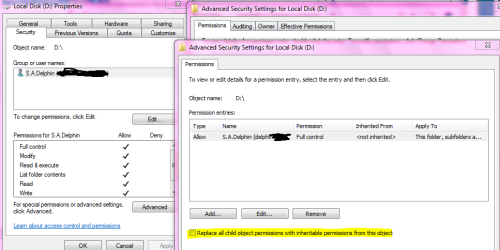
thanx to some of you my pc managed to recover from a serious crash a week ago. now, everything is up again and running. except for one pretty important partition with all my music and foto stuff on it. the problem is, although i can see what is on the partition, i cannot get access to the folders and files on it.
here's what i tried to do:
1)gain access through assigning admin user priviliges. this seems to work for the top folder but not for the content below. the option, to treat all folders below the top folder alike would not work. so what i would have to do is go manually oder thousands of files and folder btw: after getting access to a folder, a small lock symbol appears on the folder in explorer.
2)execute icacls.exe -> this program should take care of global access priviliges on my hd. unfortunately, i get errors as well.
3)i read in a forum that converting the entire partition from ntfs to fat32 and back would reset the access priviliges. is that right? i did not dare doing that yet ...
looking very, very much forward to your ideas ....
thanx for reading,
markus
http://www.humanchaos.net
thanx to some of you my pc managed to recover from a serious crash a week ago. now, everything is up again and running. except for one pretty important partition with all my music and foto stuff on it. the problem is, although i can see what is on the partition, i cannot get access to the folders and files on it.
here's what i tried to do:
1)gain access through assigning admin user priviliges. this seems to work for the top folder but not for the content below. the option, to treat all folders below the top folder alike would not work. so what i would have to do is go manually oder thousands of files and folder
btw: after getting access to a folder, a small lock symbol appears on the folder in explorer.2)execute icacls.exe -> this program should take care of global access priviliges on my hd. unfortunately, i get errors as well.
3)i read in a forum that converting the entire partition from ntfs to fat32 and back would reset the access priviliges. is that right? i did not dare doing that yet ...
looking very, very much forward to your ideas ....
thanx for reading,
markus
http://www.humanchaos.net
My Computer
- OS
- xp, w7
- CPU
- q6600
- Motherboard
- gigabyte p35 dq6
- Memory
- 2x 4gb kingston 1066, hyperx cl5
- Graphics Card(s)
- x1950pro