A very Peculiar Network Situation - minus the pelican

mr pc

I Love Judy
Power User
Local time
2:42 PM
Messages
340
Currently sitting on desk I have 3 machines, 3 Operating Systems.

Win7 Home Pro on an Asus CM5570 - ethernet
OS X Leopard on a G4 Powerbook - wifi
Lucid Lynx Ubuntu on a Compaq Presario - ethernet

and a Belkin Surf wireless router

Nothing fancy - all OEM network adapters, all machines can connect to the internet just fine - My Windows machine is on a Homegroup with my gf's laptop as well.

Now here is the weird part - Zfter a few hours of finagling my network connections I can:

Share my Win7 to my Mac but unable to share my Mac to PC
I can Share my Mac with my Ubuntu machine, but cannot share Ubuntu to Mac
I can see my Ubuntu machine in my Win7 Network connections but cannot access it.

So it goes like this: Win -> Mac -> Ubuntu ~> Win


So each machine can get a piece of each other - but most concerning is my lack of being able to access either Ubuntu/Mac from My Win machine.

What am I missing with my Windows network sharing (no gpedit for this version of windows) - I don't think this is router related because I have pieces shared between the machines.

I'm so close to getting it all tied together!
 

My Computer My Computer

At a glance

Windows 7
OS
Windows 7

My Computer My Computer

At a glance

Windows 7 Ult, Windows 8.1 Pro,Q9650-4.275GHz, E8600 4.5GHz, E6750-3.8GHzG.Skill PC2 9600 1200Mhz 5 5 5 15 2TGTX480
Computer type
PC/Desktop
Computer Manufacturer/Model Number
Home built
OS
Windows 7 Ult, Windows 8.1 Pro,
CPU
Q9650-4.275GHz, E8600 4.5GHz, E6750-3.8GHz
Motherboard
Evga 780i FTW
Memory
G.Skill PC2 9600 1200Mhz 5 5 5 15 2T
Graphics Card(s)
GTX480
Sound Card
Asus Xonar D2
Monitor(s) Displays
HannsG
Screen Resolution
1680X1050
Hard Drives
GSkill Phoenix Pro 120GB SSD
PSU
ThermalTake Toughpower 1000Watt modular
Case
ThermalTake XaserV
Cooling
Xigmatek S1283
Keyboard
Logitech G15
Mouse
Logitech G9
Internet Speed
T1
cool I'll check it out - my biggest curiousity is Windows failure to see the other machines. The Mac is a champ with connecting to the Win machine (my gf's laptop as well)

oddly as well how the Ubuntu machine sees the Mac, but not vice versa, both running Samba I believe.

thanks for the info
 

My Computer My Computer

At a glance

Windows 7
OS
Windows 7
The Windows7 setup section doesn't give any insight - just pc name and ip address (they could've suggested ipconfig...haha)

still no dice.
 

My Computer My Computer

At a glance

Windows 7
OS
Windows 7
Have you tried relaxing the NTLM levels yet? There are a few more things you can try.

Control Panel - Administrative Tools - Local

Local Policies - Security Options

Network security: LAN Manager authentication level
Send LM & NTLM responses

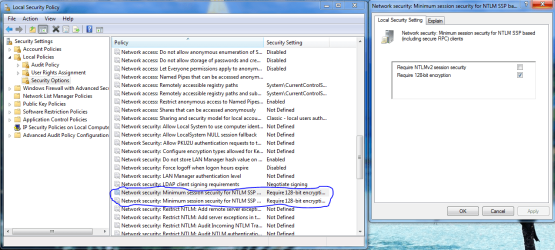
Minimum session security for NTLM SSP
Disable Require 128-bit encryption

It could also be your A/V software causing a problem.

With Windows 7 Home Premium you would need to edit the registry to achieve the same results.

You should also set up a workgroup on the Windows 7 machine rather than a Homegroup which is mostly made to work with Windows 7 machines.

So you might want to leave the Homegroup first then create a workgroup using the same workgroup name and password for all machines. Also make sure that the date/time is in sync on all machines.

Then edit the registry on the Windows 7 Home Premium machine.

1 . Open registry editor ( Start search - regedit)
2 . Browse to HKEY_LOCAL_MACHINE\SYSTEM\CurrentControlSet\Control\Lsa
3. Create a new DWORD value with the following properties: NAME: LmCompatibilityLevel
VALUE: 1
4. Restart your PC and try the connection again...
 

Attachments

  • lanman security options.PNG
    lanman security options.PNG
    58.5 KB · Views: 2
  • MINIMUM SESSION SECURITY SETTINGS FOR OLD SERVERS.PNG
    MINIMUM SESSION SECURITY SETTINGS FOR OLD SERVERS.PNG
    67 KB · Views: 0
Last edited:

My Computer My Computer

At a glance

Windows 7 Ult, Windows 8.1 Pro,Q9650-4.275GHz, E8600 4.5GHz, E6750-3.8GHzG.Skill PC2 9600 1200Mhz 5 5 5 15 2TGTX480
Computer type
PC/Desktop
Computer Manufacturer/Model Number
Home built
OS
Windows 7 Ult, Windows 8.1 Pro,
CPU
Q9650-4.275GHz, E8600 4.5GHz, E6750-3.8GHz
Motherboard
Evga 780i FTW
Memory
G.Skill PC2 9600 1200Mhz 5 5 5 15 2T
Graphics Card(s)
GTX480
Sound Card
Asus Xonar D2
Monitor(s) Displays
HannsG
Screen Resolution
1680X1050
Hard Drives
GSkill Phoenix Pro 120GB SSD
PSU
ThermalTake Toughpower 1000Watt modular
Case
ThermalTake XaserV
Cooling
Xigmatek S1283
Keyboard
Logitech G15
Mouse
Logitech G9
Internet Speed
T1
I'm sorry - unfortunately I was wrong with my Win7 version - I have Home Premium, which doesn't have the secpol.msc option. Hell, I don't think it has any .msc files ?!?

I can ping my Win7 ip 100% from my Ubuntu machine so it knows it's there. I really thought it would be as simple as the Mac settings with connecting to the server/password/mounting the drive.

hate to say it but my Win7 machine is the biggest pain
 

My Computer My Computer

At a glance

Windows 7
OS
Windows 7
So obviously the best answer is always the easiest one - So I was in my network connections window right clicked - group by - more... and added IP address and Mac address to my options that were checked.

Lo and behold - my Mac share and Ubuntu share popped up. I immediately tested the sharing capabilities and my mac worked fine - oddly I can see my Ubuntu machine, but the windows machine cannot access it. I have NFS along with Samba running on my Ubuntu machine, so I guess back to the drawing board.

Now my network works like this

Mac <-> Win7 (besides rights to write to windows share on mac)
Mac -> Ubuntu
Ubuntu ~> Win7 (posts it but can't access- guessing it's at the Ubuntu end)

moving along!
 

My Computer My Computer

At a glance

Windows 7
OS
Windows 7
Back
Top