
Solved A Wide Variety Of BSODs Happening Randomly And Without Pattern

homepcsi

New member
Local time
11:42 AM
Messages
4
This is my second attempt to make this thread, as I just experienced a BSOD while trying to type it up the first time. Let me give you a brief history. This is an older custom built computer from the Windows XP days:

Intel Pentium 4 w/HT @ 3Ghz 2GB
PC3200 (1GBx2) 1 120GB
Seagate PATA Hard Drive 1 40GB
Seagate PATA Hard Drive
AGP 8X Nividia GeForce 5500FX video card

I installed Windows 7 on it, however, since I had such fabulous results doing the same on an XP-era laptop I own. However, this one is giving me trouble. It's been giving me a variety of BSODs every day since it's install. At least 3 a day, every day. Here are some of the types of BSODs I've been getting:

Memory Management
IRQ Not Less Than Or Equal
Page Fault In Non Paged Area
Unexpected Kernel Mode Trap
PFN List Corrupt
Bad Pool Header
Driver Power State Failure
Reference By Pointer

And my most recent one that happened when I tried to type this thread up the first time and while I have Driver Verifier on: Driver Verifier IOManager Violation

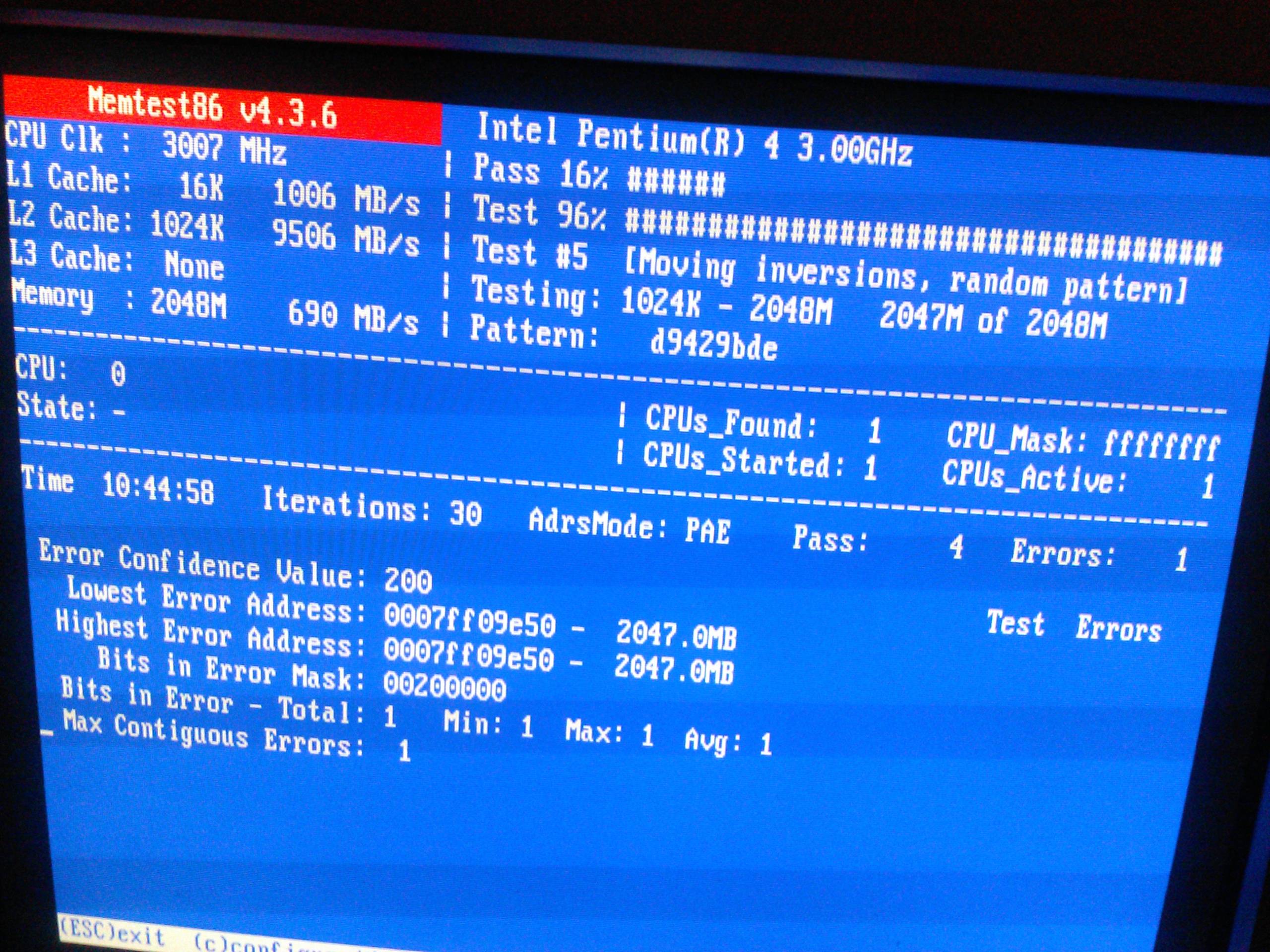
Quite a list, huh? First thing I did was run memtest86 for 10+ hours or 4 passes. It came back with one error. Here is the screenshot from that test/result:
pyOzlmq.jpg


EDIT: Sorry. BSOD again.

Anyway, after memtest86, I turned on Driver Verifier and it wasn't long before I was given another BSOD (and another). At one point I couldn't even boot to Windows due to a BSOD. I checked both of my hard drives with Seatools For Windows and they both came back clean. I am currently running sfc /scannow, but it's only at 10% finished so I still have some ways to go before it is finished.

I've attached all the dump files so someone with more knowledge with this than I can take a look at them and maybe help me get this issue resolved while I am scanning with sfc. I am also attaching your Seven Forums Diagnostic Tool results. Thank you.
 
Last edited:

My Computer My Computer

At a glance

Windows 7 32-bit3Ghz Pentium 4 HT2GB DDR PC3200AGP 8x Nvidia GeForce 5500FX
Computer type
PC/Desktop
Computer Manufacturer/Model Number
Custom Build
OS
Windows 7 32-bit
CPU
3Ghz Pentium 4 HT
Motherboard
Foxconn FX4MR-ES
Memory
2GB DDR PC3200
Graphics Card(s)
AGP 8x Nvidia GeForce 5500FX
Hard Drives
1. Seagate 120GB IDE
2. Seagate 40GB IDE
Antivirus
ESET NOD32 Anti-Virus 5.0.93.0
Browser
Mozilla Firefox 29.0.1
Memtest shows an error there.

View attachment 318005

You have two 1 MB RAM modules installed. Now follow the "Part 3: If You Have Errors:" of How to Test and Diagnose RAM Issues with Memtest86+

Errors/red lines means one or more RAM is faulty. But the fault may occur due to a faulty DIMM slot, too, which is a motherboard component. Using memtest86+, you can discriminate between a faulty RAM and a faulty motherboard.

How? Say you have two RAM sticks and two DIMM slots. You obtained errors at the test with all RAM sticks installed. Now, remove all the sticks but one. Test it in all the available slots, one by one. Continue the same procedure for all the available sticks.
How to make the inference that is it a RAM issue or it is a motherboard issue? Suppose you have got the result like that:

test|Slot1|Slot2
RAM1| Error | Error
RAM2|Good|Good

It is a RAM, a bad RAM.

But if you have got a result like that:

test|Slot1|Slot2
RAM1| Error |Good
RAM2| Error |Good

It is a motherboard issue. The particular slot is bad.

Moreover, two more interesting things are found .....
Code:
BiosVersion = 6.00 PG
[COLOR=Red]BiosReleaseDate = 10/28/2004[/COLOR]
Is it really of 10 years old?

The computer seems to be overclocked, too.
Code:
  Processor Type                Central Processor
  Processor Family              b2h - Pentium IV Processor
  Processor Manufacturer        Intel
  Processor ID                  340f0000fffbebbf
  Processor Version             Intel(R) Pentium(R) 4 CPU
  Processor Voltage             80h - 0.0V
  External Clock                200MHz
[COLOR=Red]  Max Speed                     1500MHz
  Current Speed                 3000MHz[/COLOR]
Such an old computer should not be overclocked. As you are getting BSODs, you should stop overclocking and run all the hardware components like CPU, GPU and RAM to their default settings. Also set the BIOS to default, too.
How To Clear CMOS (Reset BIOS)

Plus..... Install Service pack 1 and all other windows updates. Otherwise the system will remain vulnerable to threats.
Code:
[COLOR=Red]Windows 7 Kernel Version 7600 MP[/COLOR] (2 procs) Free x86 compatible
Product: WinNt, suite: TerminalServer SingleUserTS
Built by: 7600.17273.x86fre.win7_gdr.130318-1532
Learn how to install Windows 7 Service Pack 1 (SP1)
Service Pack and Update Center - Microsoft Windows

For any further BSOD, Post it following the Blue Screen of Death (BSOD) Posting Instructions in your subsequent post in this thread.
 

My Computer My Computer

At a glance

Microsoft Windows 10 Pro Insider Preview 64-bitIntel(R) Core(TM) i3-4130 CPU @ 3.40GHzCorsair Vengence 4GB x2 (8.00GB Dual-Channel ...2047MB GeForce GTS 450 (ZOTAC International)
Computer type
PC/Desktop
Computer Manufacturer/Model Number
Self Assembled
OS
Microsoft Windows 10 Pro Insider Preview 64-bit
CPU
Intel(R) Core(TM) i3-4130 CPU @ 3.40GHz
Motherboard
Gigabyte Technology Co., Ltd. B85M-D3H
Memory
Corsair Vengence 4GB x2 (8.00GB Dual-Channel DDR3 @ 798MHz)
Graphics Card(s)
2047MB GeForce GTS 450 (ZOTAC International)
Sound Card
Onboard (Realtek High Definition Audio)
Monitor(s) Displays
LG Flatron E2040T
Screen Resolution
1600x900
Hard Drives
Western Digital 1 TB
Seagate 500 GB
PSU
Corsair VS550
Case
Cooler Master K380
Cooling
Cooler Master Seidon 120V Plus
Keyboard
Logitech MK260r
Mouse
Logitech MK260r
Internet Speed
PMPL Broadband
Antivirus
Windows Defender + MBAM
Browser
Firefox
Other Info
Dell Studio 15" Laptop
Thank you for replying, but your response is puzzling. The CPU isn't overclocked at all. I've reset CMOS/BIOS a multitude of times before I ever installed an OS on it at all.

Secondly, I do have Windows 7 SP1 installed...

Also, yeah this is a 10 year old custom build computer. I told you it was old. :p

I was going to update the BIOS when I got home this evening, as I am at work now and cannot perform any tests on it at the moment. Does anything stand out as an obvious culprit from my logs I attached?
 

My Computer My Computer

At a glance

Windows 7 32-bit3Ghz Pentium 4 HT2GB DDR PC3200AGP 8x Nvidia GeForce 5500FX
Computer type
PC/Desktop
Computer Manufacturer/Model Number
Custom Build
OS
Windows 7 32-bit
CPU
3Ghz Pentium 4 HT
Motherboard
Foxconn FX4MR-ES
Memory
2GB DDR PC3200
Graphics Card(s)
AGP 8x Nvidia GeForce 5500FX
Hard Drives
1. Seagate 120GB IDE
2. Seagate 40GB IDE
Antivirus
ESET NOD32 Anti-Virus 5.0.93.0
Browser
Mozilla Firefox 29.0.1
Hmm, I see. You have installed SP1 either on 13/05 or on 14/05. The Crash Dumps of 13/05 says it is not SP1.

I got the information related to overclocks from the crash dumps, too.

Crash dumps say that the problem might be memory corruption, and physical memory corruption is already found. So you need to concentrate on minimizing the memory issue.
 

My Computer My Computer

At a glance

Microsoft Windows 10 Pro Insider Preview 64-bitIntel(R) Core(TM) i3-4130 CPU @ 3.40GHzCorsair Vengence 4GB x2 (8.00GB Dual-Channel ...2047MB GeForce GTS 450 (ZOTAC International)
Computer type
PC/Desktop
Computer Manufacturer/Model Number
Self Assembled
OS
Microsoft Windows 10 Pro Insider Preview 64-bit
CPU
Intel(R) Core(TM) i3-4130 CPU @ 3.40GHz
Motherboard
Gigabyte Technology Co., Ltd. B85M-D3H
Memory
Corsair Vengence 4GB x2 (8.00GB Dual-Channel DDR3 @ 798MHz)
Graphics Card(s)
2047MB GeForce GTS 450 (ZOTAC International)
Sound Card
Onboard (Realtek High Definition Audio)
Monitor(s) Displays
LG Flatron E2040T
Screen Resolution
1600x900
Hard Drives
Western Digital 1 TB
Seagate 500 GB
PSU
Corsair VS550
Case
Cooler Master K380
Cooling
Cooler Master Seidon 120V Plus
Keyboard
Logitech MK260r
Mouse
Logitech MK260r
Internet Speed
PMPL Broadband
Antivirus
Windows Defender + MBAM
Browser
Firefox
Other Info
Dell Studio 15" Laptop
Alright. I will try to isolate the faulty module or the DIMM slot when I get home. Thanks for your responses.
 

My Computer My Computer

At a glance

Windows 7 32-bit3Ghz Pentium 4 HT2GB DDR PC3200AGP 8x Nvidia GeForce 5500FX
Computer type
PC/Desktop
Computer Manufacturer/Model Number
Custom Build
OS
Windows 7 32-bit
CPU
3Ghz Pentium 4 HT
Motherboard
Foxconn FX4MR-ES
Memory
2GB DDR PC3200
Graphics Card(s)
AGP 8x Nvidia GeForce 5500FX
Hard Drives
1. Seagate 120GB IDE
2. Seagate 40GB IDE
Antivirus
ESET NOD32 Anti-Virus 5.0.93.0
Browser
Mozilla Firefox 29.0.1
OK, let us know about your progress in finding the source of the issue. :)
 

My Computer My Computer

At a glance

Microsoft Windows 10 Pro Insider Preview 64-bitIntel(R) Core(TM) i3-4130 CPU @ 3.40GHzCorsair Vengence 4GB x2 (8.00GB Dual-Channel ...2047MB GeForce GTS 450 (ZOTAC International)
Computer type
PC/Desktop
Computer Manufacturer/Model Number
Self Assembled
OS
Microsoft Windows 10 Pro Insider Preview 64-bit
CPU
Intel(R) Core(TM) i3-4130 CPU @ 3.40GHz
Motherboard
Gigabyte Technology Co., Ltd. B85M-D3H
Memory
Corsair Vengence 4GB x2 (8.00GB Dual-Channel DDR3 @ 798MHz)
Graphics Card(s)
2047MB GeForce GTS 450 (ZOTAC International)
Sound Card
Onboard (Realtek High Definition Audio)
Monitor(s) Displays
LG Flatron E2040T
Screen Resolution
1600x900
Hard Drives
Western Digital 1 TB
Seagate 500 GB
PSU
Corsair VS550
Case
Cooler Master K380
Cooling
Cooler Master Seidon 120V Plus
Keyboard
Logitech MK260r
Mouse
Logitech MK260r
Internet Speed
PMPL Broadband
Antivirus
Windows Defender + MBAM
Browser
Firefox
Other Info
Dell Studio 15" Laptop
So I replaced the RAM with some that I already knew to be working fine and continued to receive random blue screens of the same variety. Frustrated, I saved my data and installed Windows XP on it, the operating system it was designed for, and haven't received a blue screen since. I was getting at least 3 per day with Windows 7 installed. :)

I suppose it was driver related, although it could of been RAM as well or both. Regardless, I believe the issue is solved. Thanks for your help nonetheless. :)
 

My Computer My Computer

At a glance

Windows 7 32-bit3Ghz Pentium 4 HT2GB DDR PC3200AGP 8x Nvidia GeForce 5500FX
Computer type
PC/Desktop
Computer Manufacturer/Model Number
Custom Build
OS
Windows 7 32-bit
CPU
3Ghz Pentium 4 HT
Motherboard
Foxconn FX4MR-ES
Memory
2GB DDR PC3200
Graphics Card(s)
AGP 8x Nvidia GeForce 5500FX
Hard Drives
1. Seagate 120GB IDE
2. Seagate 40GB IDE
Antivirus
ESET NOD32 Anti-Virus 5.0.93.0
Browser
Mozilla Firefox 29.0.1
You are welcome mate. :)
 

My Computer My Computer

At a glance

Microsoft Windows 10 Pro Insider Preview 64-bitIntel(R) Core(TM) i3-4130 CPU @ 3.40GHzCorsair Vengence 4GB x2 (8.00GB Dual-Channel ...2047MB GeForce GTS 450 (ZOTAC International)
Computer type
PC/Desktop
Computer Manufacturer/Model Number
Self Assembled
OS
Microsoft Windows 10 Pro Insider Preview 64-bit
CPU
Intel(R) Core(TM) i3-4130 CPU @ 3.40GHz
Motherboard
Gigabyte Technology Co., Ltd. B85M-D3H
Memory
Corsair Vengence 4GB x2 (8.00GB Dual-Channel DDR3 @ 798MHz)
Graphics Card(s)
2047MB GeForce GTS 450 (ZOTAC International)
Sound Card
Onboard (Realtek High Definition Audio)
Monitor(s) Displays
LG Flatron E2040T
Screen Resolution
1600x900
Hard Drives
Western Digital 1 TB
Seagate 500 GB
PSU
Corsair VS550
Case
Cooler Master K380
Cooling
Cooler Master Seidon 120V Plus
Keyboard
Logitech MK260r
Mouse
Logitech MK260r
Internet Speed
PMPL Broadband
Antivirus
Windows Defender + MBAM
Browser
Firefox
Other Info
Dell Studio 15" Laptop
Back
Top