abnormal boot up time

takuro1103

New member
Local time
11:04 AM
Messages
44
hi every, i have just found that my windows 7 ultimate start up time too long, i have already turn off some start up program and some services on MSconfig, but start up time still start the same, i check the reboot time and it takes 19X sec! and, i found that when start up PC, after theGUI boot screen, there are about 1X seconds of black screen with mouse pointer(i can move the mouse) before the windows login screen, can any tell that whether it is normal or not? thx~
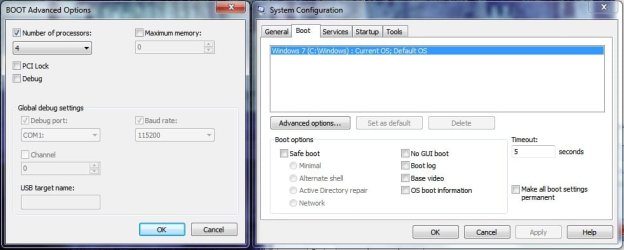
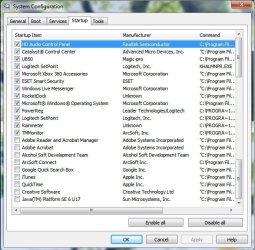
for more details of my start up, please find my print screen of MSconfig set up.
 

Attachments
  • Untitled.jpg
    Untitled.jpg
    67.1 KB · Views: 73
  • Untitled1.jpg
    Untitled1.jpg
    43.1 KB · Views: 50

My Computer

OS
windows 7
The most immediate cause that comes to mind is A/V software. What are you using? Try switching to a different one, like Microsoft Security Essentials.
 

My Computer

Computer Manufacturer/Model Number
Custom
OS
Windows 7 Professional x64
CPU
Intel i7 2600K OC'd @ 4620 MHz
Motherboard
Asus P8Z68-V Pro
Memory
16GB GSkill Sniper 2133 Mhz (4x4GB)
Graphics Card(s)
EVGA GeForce GTX 480 SuperClocked+
Sound Card
Realtek High Definition Audio
Monitor(s) Displays
2x Acer S273HLbmii 27"
Screen Resolution
2 x 1920x1080
Hard Drives
64GB Crucial M4 SSD

Storage: Hitachi 1TB 5400RPM, Samsung 1.5TB 5400RPM
PSU
Corsair HW Series 750w (modular)
Case
Cooler Master HAF 932 Advanced Blue Edition
Cooling
CM Hyper 212+ CPU cooler, 3x 230mm + 1x 140mm case fans
Keyboard
Logitech MK320 (wireless)
Mouse
Logitech MK320 (wireless)
Internet Speed
30 Mb/s : 2 Mb/s
You can reboot in 19 seconds and that is too slow?

Uncheck all of the 13 checked items in the startup tab and see how quick you can boot.
 

My Computer

Computer type
PC/Desktop
Computer Manufacturer/Model Number
Ignatz Special; 4 speed manual gearbox; factory air conditioning; one of one
OS
Windows 7 Home Premium SP1, 64-bit
CPU
Intel Skylake i5-6600K, not overclocked
Motherboard
AsRock Z170M Extreme 4, micro ATX
Memory
8 GB HyperX DDR4-2666 (2 x 4 GB)
Graphics Card(s)
none; graphics are integrated on CPU
Sound Card
onboard: Realtek ALC1150; external: USB Behringer UF0-202
Monitor(s) Displays
Dell S2340M 23 inch IPS
Screen Resolution
1600 x 900
Hard Drives
System: Crucial MX100 series SSD, 128 GB;
Data: Samsung Spinpoint 103SJ, 1 TB;
Backup: WD Caviar Green WD30EZRX-00D8PB0, 3 TB
PSU
Rosewill SilentNight 500 watt fanless, semi-modular
Case
Antec Solo II
Cooling
Noctua NH-U12S; Noctua F12 intake, Noctua S12A exhaust
Keyboard
Microsoft 200 6JH-00001 USB
Mouse
Dell or Microsoft optical wired; USB
Antivirus
Microsoft Security Essentials and Malwarebytes Premium
Browser
Pale Moon
Other Info
All fans PWM; speeds at idle: CPU circa 500 rpm; intake circa 600 rpm; exhaust circa 600 rpm; CPU temps 27 idle and 47 C load in a warm room (27 C/81 F) when running Intel Extreme Tuning Utility stress test.
Holy cow, only 19 seconds? I did not read your post very carefully. 19s is extremely fast.
 

My Computer

Computer Manufacturer/Model Number
Custom
OS
Windows 7 Professional x64
CPU
Intel i7 2600K OC'd @ 4620 MHz
Motherboard
Asus P8Z68-V Pro
Memory
16GB GSkill Sniper 2133 Mhz (4x4GB)
Graphics Card(s)
EVGA GeForce GTX 480 SuperClocked+
Sound Card
Realtek High Definition Audio
Monitor(s) Displays
2x Acer S273HLbmii 27"
Screen Resolution
2 x 1920x1080
Hard Drives
64GB Crucial M4 SSD

Storage: Hitachi 1TB 5400RPM, Samsung 1.5TB 5400RPM
PSU
Corsair HW Series 750w (modular)
Case
Cooler Master HAF 932 Advanced Blue Edition
Cooling
CM Hyper 212+ CPU cooler, 3x 230mm + 1x 140mm case fans
Keyboard
Logitech MK320 (wireless)
Mouse
Logitech MK320 (wireless)
Internet Speed
30 Mb/s : 2 Mb/s
Changing the number of processors to speed up boot times is a fallacy. If you changed the number, you were wrong to do so.
As for the mouse showing briefly, my GFs lappy does the same thing and it's good as gold, i think it may have something to do with the graphics card???

msconfig entries can nearly always all be disabled. Things that you can live with starting manually, do so. I'm sure you don't use your 360 accessories every time you turn on your PC, so, turn it off......you get the picture :)
I think you should change the title of the thread, to "abnormally quick boot up time":p

Also, what's with the 2 scroll bars?????? Now that's abnormal!
 

My Computer

Computer Manufacturer/Model Number
HP Touchsmart IQ771.uk
OS
Windows 7 Ultimate x64
CPU
AMD Turion(tm) 64 X2 Mobile Technology TL-56
Motherboard
ASUS Pheonix
Memory
3GB Nanya PC2-6400 DDR2-SDRAM SO-DIM (400MHz)
Graphics Card(s)
NVIDIA GeForce Go 7600 256MB GDDR3 SDRAM
Sound Card
High Definition Intergrated NVIDIA MCP51
Monitor(s) Displays
46" Sony Bravia HDTV
Screen Resolution
1600x1200
Hard Drives
1.5TB Samsug
320GB Seagate ST3320820AS - SATA 3Gb/s 8MB
500GB Maxtor Basics STM305003EHD301-RK
Internet Speed
↓6.32 Mb/s ↑0.35 Mb/s ↔26ms
Other Info
BIOS - American Megatrends Inc. 5.07
Ethernet Port - NVIDIA nForce 10/100/1000 Mbps
DVD Drive - TSSTcorp DVDR/RW TS-T632L
sorry guys, my reboot time is 19X sec, which is between 190-199 sec, i can't reallt remember how long it is so i just stated as 19x sec...:p
 

My Computer

OS
windows 7
Definitely check out your security system. I recommend MSE.
 

My Computer

Computer Manufacturer/Model Number
Custom
OS
Windows 7 Professional x64
CPU
Intel i7 2600K OC'd @ 4620 MHz
Motherboard
Asus P8Z68-V Pro
Memory
16GB GSkill Sniper 2133 Mhz (4x4GB)
Graphics Card(s)
EVGA GeForce GTX 480 SuperClocked+
Sound Card
Realtek High Definition Audio
Monitor(s) Displays
2x Acer S273HLbmii 27"
Screen Resolution
2 x 1920x1080
Hard Drives
64GB Crucial M4 SSD

Storage: Hitachi 1TB 5400RPM, Samsung 1.5TB 5400RPM
PSU
Corsair HW Series 750w (modular)
Case
Cooler Master HAF 932 Advanced Blue Edition
Cooling
CM Hyper 212+ CPU cooler, 3x 230mm + 1x 140mm case fans
Keyboard
Logitech MK320 (wireless)
Mouse
Logitech MK320 (wireless)
Internet Speed
30 Mb/s : 2 Mb/s
Changing the number of processors to speed up boot times is a fallacy. If you changed the number, you were wrong to do so.
As for the mouse showing briefly, my GFs lappy does the same thing and it's good as gold, i think it may have something to do with the graphics card???

msconfig entries can nearly always all be disabled. Things that you can live with starting manually, do so. I'm sure you don't use your 360 accessories every time you turn on your PC, so, turn it off......you get the picture :)
I think you should change the title of the thread, to "abnormally quick boot up time":p

Also, what's with the 2 scroll bars?????? Now that's abnormal!
the 2 scroll bars came up is because i use paint to stick 2 photos together and i just didn't release it...XDD
 

My Computer

OS
windows 7
thx everyone, i'm using NOD32 as my security SW, is it good on win 7??
 

My Computer

OS
windows 7
NOD is effective, but I am not sure of its effect on boot speed.

Uncheck it in msconfig and see if you speed up.
 

My Computer

Computer type
PC/Desktop
Computer Manufacturer/Model Number
Ignatz Special; 4 speed manual gearbox; factory air conditioning; one of one
OS
Windows 7 Home Premium SP1, 64-bit
CPU
Intel Skylake i5-6600K, not overclocked
Motherboard
AsRock Z170M Extreme 4, micro ATX
Memory
8 GB HyperX DDR4-2666 (2 x 4 GB)
Graphics Card(s)
none; graphics are integrated on CPU
Sound Card
onboard: Realtek ALC1150; external: USB Behringer UF0-202
Monitor(s) Displays
Dell S2340M 23 inch IPS
Screen Resolution
1600 x 900
Hard Drives
System: Crucial MX100 series SSD, 128 GB;
Data: Samsung Spinpoint 103SJ, 1 TB;
Backup: WD Caviar Green WD30EZRX-00D8PB0, 3 TB
PSU
Rosewill SilentNight 500 watt fanless, semi-modular
Case
Antec Solo II
Cooling
Noctua NH-U12S; Noctua F12 intake, Noctua S12A exhaust
Keyboard
Microsoft 200 6JH-00001 USB
Mouse
Dell or Microsoft optical wired; USB
Antivirus
Microsoft Security Essentials and Malwarebytes Premium
Browser
Pale Moon
Other Info
All fans PWM; speeds at idle: CPU circa 500 rpm; intake circa 600 rpm; exhaust circa 600 rpm; CPU temps 27 idle and 47 C load in a warm room (27 C/81 F) when running Intel Extreme Tuning Utility stress test.
thx everyone, i'm using NOD32 as my security SW, is it good on win 7??

NOD32 is good but their eset smart security is better. It is both nod32 plus good firewall

Ken J
 

My Computer

Computer Manufacturer/Model Number
HP Pavillion dv-7 1005 Tx
OS
Win 8 Release candidate 8400
CPU
[email protected]
Memory
4 gigs
Graphics Card(s)
Nvidia 9600M
Sound Card
HD built-in
Monitor(s) Displays
17" Wxga
Screen Resolution
1440x900
Cooling
none
Internet Speed
45Mb down 5Mb up
You could also increase your boot speed by going into BIOS and changing the boot order to boot to hard disk first.
 

My Computer

OS
Windows 7 Home Premium 64 bit
CPU
Athlon 64 x2 Dual Core 5200+
Motherboard
Gigabyte M61PME S2P
Memory
Corsair 2 X 2048 DDR2
Graphics Card(s)
NVIDIA GEForce 8400 GS
Screen Resolution
1080 x 1024
Hard Drives
WD Caviar Black Sata2 1TB - Internal
ITB-External
ok, just before i have tried the following:-

turn off NOD32, 360 accessories, and Messenger - reboot time 190 sec, seems just few sec imporved
turn off everything - reboot time 146 sec, just 44 sec improved, still slow...

are there any things else that caused slow reboot time??

sorry i just forgot to state out my PC config
CPU AMD Phenom II 945
4 GB corsair Ram DDR running at 1333
Display crad HIS 5770
with 3 hardisk (SATA II) & a DVD ROM
and one TV Card
Power supply is Corsair 650 watt

and for the boot pirority, i have already choose my OS Hardisk as my first boot, and plug & play OS is enable on my bios as well...
 

My Computer

OS
windows 7
Do you have to login too (are you including the login time)?
 

My Computer

Computer Manufacturer/Model Number
HP Touchsmart IQ771.uk
OS
Windows 7 Ultimate x64
CPU
AMD Turion(tm) 64 X2 Mobile Technology TL-56
Motherboard
ASUS Pheonix
Memory
3GB Nanya PC2-6400 DDR2-SDRAM SO-DIM (400MHz)
Graphics Card(s)
NVIDIA GeForce Go 7600 256MB GDDR3 SDRAM
Sound Card
High Definition Intergrated NVIDIA MCP51
Monitor(s) Displays
46" Sony Bravia HDTV
Screen Resolution
1600x1200
Hard Drives
1.5TB Samsug
320GB Seagate ST3320820AS - SATA 3Gb/s 8MB
500GB Maxtor Basics STM305003EHD301-RK
Internet Speed
↓6.32 Mb/s ↑0.35 Mb/s ↔26ms
Other Info
BIOS - American Megatrends Inc. 5.07
Ethernet Port - NVIDIA nForce 10/100/1000 Mbps
DVD Drive - TSSTcorp DVDR/RW TS-T632L
140 seconds isn't abnormal, in fact, i bet if you calculated the mean reboot time from this very thread, it'd be around what you are getting. (107 seconds just from first page)
Apart from watching what starts up automatically, there's not an awful lot more you can do improve on it.
 

My Computer

Computer Manufacturer/Model Number
HP Touchsmart IQ771.uk
OS
Windows 7 Ultimate x64
CPU
AMD Turion(tm) 64 X2 Mobile Technology TL-56
Motherboard
ASUS Pheonix
Memory
3GB Nanya PC2-6400 DDR2-SDRAM SO-DIM (400MHz)
Graphics Card(s)
NVIDIA GeForce Go 7600 256MB GDDR3 SDRAM
Sound Card
High Definition Intergrated NVIDIA MCP51
Monitor(s) Displays
46" Sony Bravia HDTV
Screen Resolution
1600x1200
Hard Drives
1.5TB Samsug
320GB Seagate ST3320820AS - SATA 3Gb/s 8MB
500GB Maxtor Basics STM305003EHD301-RK
Internet Speed
↓6.32 Mb/s ↑0.35 Mb/s ↔26ms
Other Info
BIOS - American Megatrends Inc. 5.07
Ethernet Port - NVIDIA nForce 10/100/1000 Mbps
DVD Drive - TSSTcorp DVDR/RW TS-T632L
Do a cold boot, go immediately to task manager, and take a screen shot of processes, with "show processes for all users" checked.

I have 36 processes running right now and boot in about 50 seconds. I have 4 items checked in msconfig.
 

My Computer

Computer type
PC/Desktop
Computer Manufacturer/Model Number
Ignatz Special; 4 speed manual gearbox; factory air conditioning; one of one
OS
Windows 7 Home Premium SP1, 64-bit
CPU
Intel Skylake i5-6600K, not overclocked
Motherboard
AsRock Z170M Extreme 4, micro ATX
Memory
8 GB HyperX DDR4-2666 (2 x 4 GB)
Graphics Card(s)
none; graphics are integrated on CPU
Sound Card
onboard: Realtek ALC1150; external: USB Behringer UF0-202
Monitor(s) Displays
Dell S2340M 23 inch IPS
Screen Resolution
1600 x 900
Hard Drives
System: Crucial MX100 series SSD, 128 GB;
Data: Samsung Spinpoint 103SJ, 1 TB;
Backup: WD Caviar Green WD30EZRX-00D8PB0, 3 TB
PSU
Rosewill SilentNight 500 watt fanless, semi-modular
Case
Antec Solo II
Cooling
Noctua NH-U12S; Noctua F12 intake, Noctua S12A exhaust
Keyboard
Microsoft 200 6JH-00001 USB
Mouse
Dell or Microsoft optical wired; USB
Antivirus
Microsoft Security Essentials and Malwarebytes Premium
Browser
Pale Moon
Other Info
All fans PWM; speeds at idle: CPU circa 500 rpm; intake circa 600 rpm; exhaust circa 600 rpm; CPU temps 27 idle and 47 C load in a warm room (27 C/81 F) when running Intel Extreme Tuning Utility stress test.
thx, but how come somebody can get less than 100 sec, or even 6x sec for the reboot time?? are they just test it straight after clean install?? confusing me....
 

My Computer

OS
windows 7
thx, but how come somebody can get less than 100 sec, or even 6x sec for the reboot time?? are they just test it straight after clean install?? confusing me....
A combination of good hardware (especially hard drive) and few programs to load.
 

My Computer

Computer Manufacturer/Model Number
Custom
OS
Windows 7 Professional x64
CPU
Intel i7 2600K OC'd @ 4620 MHz
Motherboard
Asus P8Z68-V Pro
Memory
16GB GSkill Sniper 2133 Mhz (4x4GB)
Graphics Card(s)
EVGA GeForce GTX 480 SuperClocked+
Sound Card
Realtek High Definition Audio
Monitor(s) Displays
2x Acer S273HLbmii 27"
Screen Resolution
2 x 1920x1080
Hard Drives
64GB Crucial M4 SSD

Storage: Hitachi 1TB 5400RPM, Samsung 1.5TB 5400RPM
PSU
Corsair HW Series 750w (modular)
Case
Cooler Master HAF 932 Advanced Blue Edition
Cooling
CM Hyper 212+ CPU cooler, 3x 230mm + 1x 140mm case fans
Keyboard
Logitech MK320 (wireless)
Mouse
Logitech MK320 (wireless)
Internet Speed
30 Mb/s : 2 Mb/s
You can untick realtek HD Audio Control Panel, AT Catalyst Control Centre, TMMonitor and Powerreg. None of them are necessary. Also untick one of the two duplicated Logitech SetPoint entries.
 

My Computer

Computer Manufacturer/Model Number
Self-built
OS
Win7 Pro; Linux Mint 7
CPU
E8500 @ 3.8GHz
Motherboard
Asus P5QL PRO
Memory
Corsair XMS2 2GB @800MHz
Graphics Card(s)
Nvidia 9800GT
Sound Card
onboard
Hard Drives
Western Digital Caviar 500GB x2
Back
Top