Solved Abnormally large Windows folder, size reduction possible?

ProfPepper

New member
Local time
12:38 AM
Messages
23
Hi,

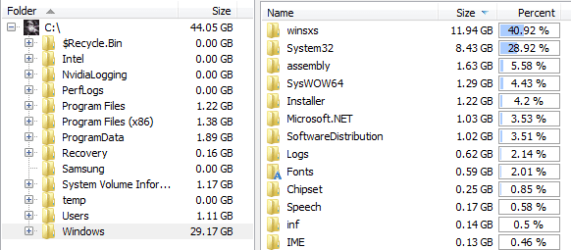
For a while now my Windows folder has been taking up more space on my 60GB SSD than I think it should. The size breakdown goes like this:

C:/Windows - 28 GB

- winsxs - 11.65 GB
- System32 - 8.45 GB
- Assembly - 1.63 GB
- SysWOW64 - 1.30 GB
- Installer - 1.17 GB
- Microsoft.NET - 1.03 GB
- SoftwareDistribution - 0.85 GB

I do regular registry fixes and temp file cleans, and I do regular inspections on my drives to remove unnecessary files and programs. However, the large increase in my Windows folder which happened about 6 months ago is really bothering me.

Is there any way get rid of some excess files? Or is this just a case of Windows inaccurately showing the actual amount of free space due to hard links?

Help is appreciated, thanks :)
 

My Computer

Computer type
PC/Desktop
OS
Windows 7 Home Premium 64-bit
CPU
Intel i5-3570K
Motherboard
ASUS P8Z77-V-LX
Memory
8GB
Graphics Card(s)
GTX 670
Hard Drives
3TB WD Green
1TB WD Blue
60GB Intel 330 SSD
Antivirus
Avast
Browser
Firefox
Have you run disk cleanup?
 

My Computer

Computer type
PC/Desktop
Computer Manufacturer/Model Number
dell precision t3400 tower
OS
Linux Lite 3.2 x64; Windows 7, 8.1
CPU
Core2Duo 2.4
Memory
6GB ddr2
Graphics Card(s)
nVidia
Hard Drives
120gb SSD, 1TB HD, 2TB HD; sata II
Internet Speed
12/2
Browser
Vivaldi, Slimjet (Chromium) x64
Yeah I do it often, and I also remove the old windows updates.
 

My Computer

Computer type
PC/Desktop
OS
Windows 7 Home Premium 64-bit
CPU
Intel i5-3570K
Motherboard
ASUS P8Z77-V-LX
Memory
8GB
Graphics Card(s)
GTX 670
Hard Drives
3TB WD Green
1TB WD Blue
60GB Intel 330 SSD
Antivirus
Avast
Browser
Firefox
Is system32 supposed to be that big?
 

My Computer

Computer type
PC/Desktop
OS
Windows 7 Home Premium 64-bit
CPU
Intel i5-3570K
Motherboard
ASUS P8Z77-V-LX
Memory
8GB
Graphics Card(s)
GTX 670
Hard Drives
3TB WD Green
1TB WD Blue
60GB Intel 330 SSD
Antivirus
Avast
Browser
Firefox
I have a fully updated, but minimal, home premium x64 system here. Only bare windows updates. System32 is 3.1GB. WinSxS is 9.8gb.
 

My Computer

Computer type
PC/Desktop
Computer Manufacturer/Model Number
dell precision t3400 tower
OS
Linux Lite 3.2 x64; Windows 7, 8.1
CPU
Core2Duo 2.4
Memory
6GB ddr2
Graphics Card(s)
nVidia
Hard Drives
120gb SSD, 1TB HD, 2TB HD; sata II
Internet Speed
12/2
Browser
Vivaldi, Slimjet (Chromium) x64
So do you reckon the fact that I've installed every windows update available to me has caused both folders to expand?
 

My Computer

Computer type
PC/Desktop
OS
Windows 7 Home Premium 64-bit
CPU
Intel i5-3570K
Motherboard
ASUS P8Z77-V-LX
Memory
8GB
Graphics Card(s)
GTX 670
Hard Drives
3TB WD Green
1TB WD Blue
60GB Intel 330 SSD
Antivirus
Avast
Browser
Firefox
If you've installed Recommended updates, that's going to affect it. Peripherals will affect it. And if the install has a long history of program installations, that's going to affect winsxs. Depending on the shell version, Disk Cleanup may offer system file cleanup as a separate function. This can add up to 3GB to the slimming, when it includes the service pack files, etc. But it sounds like you've hit that.
 

My Computer

Computer type
PC/Desktop
Computer Manufacturer/Model Number
dell precision t3400 tower
OS
Linux Lite 3.2 x64; Windows 7, 8.1
CPU
Core2Duo 2.4
Memory
6GB ddr2
Graphics Card(s)
nVidia
Hard Drives
120gb SSD, 1TB HD, 2TB HD; sata II
Internet Speed
12/2
Browser
Vivaldi, Slimjet (Chromium) x64
Yeah I've done all Disk Cleanup can do.

I'm just a bit annoyed, as somehow the windows folder has grown about 6 GB in 6 months.
 

My Computer

Computer type
PC/Desktop
OS
Windows 7 Home Premium 64-bit
CPU
Intel i5-3570K
Motherboard
ASUS P8Z77-V-LX
Memory
8GB
Graphics Card(s)
GTX 670
Hard Drives
3TB WD Green
1TB WD Blue
60GB Intel 330 SSD
Antivirus
Avast
Browser
Firefox
...I do regular registry fixes...
Why?
Let me know if you ever come across this situation:
computer was working fine
cleaned? fixed? registry
computer now works noticeably better


Including the patches/updates offered yesterday, the Windows folder is 19GB (17.2GB after disk cleanup). This was gathered from a W7pro64bit virtual machine that has very little else installed:

win.PNG

As you mentioned, these values are impacted by hard links.

There are tools that let you see the size of folders as a column in a explorer like view. I just don't use tools like that - so I cannot suggest one. If you find one that you like, let me know and I'll see about installing it into that same virtual machine. Then we can locate which folder is abnormally high. That said, the Windows folder on this laptop is 27.8GB.
 

My Computer

Computer type
Laptop
Computer Manufacturer/Model Number
Employer provided Dell Latitude
OS
W7 Pro SP1 64bit
CPU
i7
Memory
8GB
Graphics Card(s)
Intel HD Graphics
Hard Drives
crappy SSD
Antivirus
Employer mandated Symantec Endpoint Protection
Browser
Pale Moon 64bit, IE11 64bit & Chrome 64bit

Attachments

  • foldersize.PNG
    foldersize.PNG
    10.1 KB · Views: 28

My Computer

Computer type
PC/Desktop
OS
Windows 7 Home Premium 64-bit
CPU
Intel i5-3570K
Motherboard
ASUS P8Z77-V-LX
Memory
8GB
Graphics Card(s)
GTX 670
Hard Drives
3TB WD Green
1TB WD Blue
60GB Intel 330 SSD
Antivirus
Avast
Browser
Firefox
My Windows folder is 24.1 GB. I'm not far off from yours and I have a large backlog of updates.
 

My Computer

Computer type
PC/Desktop
Computer Manufacturer/Model Number
Custom Build
OS
Windows 7 Home Premium 64-bit
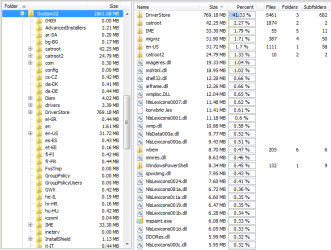
Here is the System32 folder that you mentioned:

win.PNG

How large is your DriverStore folder?
 

My Computer

Computer type
Laptop
Computer Manufacturer/Model Number
Employer provided Dell Latitude
OS
W7 Pro SP1 64bit
CPU
i7
Memory
8GB
Graphics Card(s)
Intel HD Graphics
Hard Drives
crappy SSD
Antivirus
Employer mandated Symantec Endpoint Protection
Browser
Pale Moon 64bit, IE11 64bit & Chrome 64bit
Sorry for the late reply. DriverStore is around 7 GB for me, is that unusually high?
 

My Computer

Computer type
PC/Desktop
OS
Windows 7 Home Premium 64-bit
CPU
Intel i5-3570K
Motherboard
ASUS P8Z77-V-LX
Memory
8GB
Graphics Card(s)
GTX 670
Hard Drives
3TB WD Green
1TB WD Blue
60GB Intel 330 SSD
Antivirus
Avast
Browser
Firefox

My Computer

Computer type
PC/Desktop
Computer Manufacturer/Model Number
Lenovo IdeaCenter 450
OS
Windows 10 Pro X64
CPU
Intel Quad Core i7-4770 @ 3.4Ghz
Memory
16.0GB PC3-12800 DDR3 SDRAM 1600 MHz
Graphics Card(s)
Intel Integrated HD Graphics
Sound Card
Realtek HD Audio
Monitor(s) Displays
HP 22" LCD
Screen Resolution
1680 x 1050
Hard Drives
250GB Samsung EVO SATA-3 SSD
2TB Seagate ST2000DM001 SATA-2
1.5TB Seagate ST3150041AS SATA
Keyboard
Dell USB
Mouse
Lenovo USB
Internet Speed
Cable via Road Runner 3MB Upload, 30MB Download
Antivirus
Windows Defender, MBAM Pro, MBAE
Browser
Seamonkey
Other Info
UEFI/GPT
PLDS DVD-RW DH16AERSH
Disappointing. There should be a way to reduce DriverStore right? I feel most of the space is from old Nvidia drivers or something.
 

My Computer

Computer type
PC/Desktop
OS
Windows 7 Home Premium 64-bit
CPU
Intel i5-3570K
Motherboard
ASUS P8Z77-V-LX
Memory
8GB
Graphics Card(s)
GTX 670
Hard Drives
3TB WD Green
1TB WD Blue
60GB Intel 330 SSD
Antivirus
Avast
Browser
Firefox
Sorry for the late reply. DriverStore is around 7 GB for me, is that unusually high?
The 3 computers that I checked were around 1GB.
C:\Windows\System32\DriverStore\FileRepository seems to have the most files.
 

My Computer

Computer type
Laptop
Computer Manufacturer/Model Number
Employer provided Dell Latitude
OS
W7 Pro SP1 64bit
CPU
i7
Memory
8GB
Graphics Card(s)
Intel HD Graphics
Hard Drives
crappy SSD
Antivirus
Employer mandated Symantec Endpoint Protection
Browser
Pale Moon 64bit, IE11 64bit & Chrome 64bit
Yep, FileRepository is what holds basically the entire 7 GB.

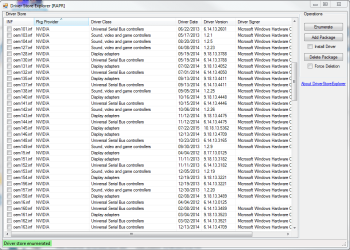
I downloaded a DriverStore explorer to take a look at what drivers are actually stored there, and I found a lot of old Razer and Nvidia drivers.

I can apparently delete these old drivers but I'm not proficient with messing around with system32.

I have a .csv file of all the drivers if you'd like to see that.
 

Attachments

  • driverstore.PNG
    driverstore.PNG
    38.6 KB · Views: 0

My Computer

Computer type
PC/Desktop
OS
Windows 7 Home Premium 64-bit
CPU
Intel i5-3570K
Motherboard
ASUS P8Z77-V-LX
Memory
8GB
Graphics Card(s)
GTX 670
Hard Drives
3TB WD Green
1TB WD Blue
60GB Intel 330 SSD
Antivirus
Avast
Browser
Firefox
I don't know of a way to safely clear out old files from there.
 

My Computer

Computer type
Laptop
Computer Manufacturer/Model Number
Employer provided Dell Latitude
OS
W7 Pro SP1 64bit
CPU
i7
Memory
8GB
Graphics Card(s)
Intel HD Graphics
Hard Drives
crappy SSD
Antivirus
Employer mandated Symantec Endpoint Protection
Browser
Pale Moon 64bit, IE11 64bit & Chrome 64bit
All good, I made another thread in the Drivers forum. Thanks for helping me diagnose the problem though!
 

My Computer

Computer type
PC/Desktop
OS
Windows 7 Home Premium 64-bit
CPU
Intel i5-3570K
Motherboard
ASUS P8Z77-V-LX
Memory
8GB
Graphics Card(s)
GTX 670
Hard Drives
3TB WD Green
1TB WD Blue
60GB Intel 330 SSD
Antivirus
Avast
Browser
Firefox
Read through this tutorial by Brink.
A lot of good ideas but you probable won't need to do all of them.

http://www.sevenforums.com/tutorials/129976-hard-disk-space-free-up-recover.html

60 gig ssd is very small. Not much room to work with. Windows 7 needs about 10% free space to work properly. I wouldn't use anything smaller than a 120 gb.

These days 120, 240 and 500 gb ssd's are priced right.
 

My Computer

Computer type
PC/Desktop
Computer Manufacturer/Model Number
Home made Desktop
OS
Windows 10 Pro. 64/ version 1709 Windows 7 Pro/64
CPU
Intel i7-6800K @ 4.3
Motherboard
ASUS X-99 Deluxe II
Memory
Corsair Platinum 16 gig @2400
Graphics Card(s)
EVGA GTX 1070 OC
Monitor(s) Displays
Asus 27" LED LCD/VE278Q
Screen Resolution
1920-1080 or 1280-720 HDMI
Hard Drives
INTEL SSD 730-240 Gb Sata 3.0/
PSU
EVGA Platium 1200W
Case
Phanteks Luxe Tempered Glass 8 fans/ one radiator
Cooling
XSPC/ Water Cooled CPU
Keyboard
Das 4 Professional
Mouse
Logitech M705/MX Anywhere 2-S
Internet Speed
100 mbits
Antivirus
Microsoft Security Essentials/ Malwarebytes Premium 3.0/ SAS
Browser
I.E. 11 default/Firefox/ ISP Time Warner Cable/Spectrum
Other Info
LG BluRay Burner/
Sound system-KLipsch-THX/
Icy Dock ssd Hot Swap bays.
Back
Top