- Local time
- 5:22 AM
- Messages
- 501
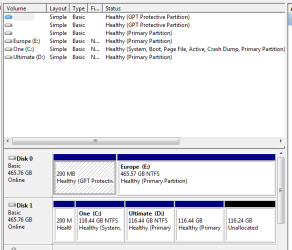
I have 2 Windows installed on my computer ( C and D ).
I would like to extend C to have more space.
I want advice about how to do this?
C and D are both 115 GB.
I can either have 190 GB C and 40 GB D (To install Windows 7 Ultimate x64, I need at least 40 GB. Am I correct? If I can install it to 30 GB, I would like to go for 200 GB of C and 30 GB of D. The second Windows is just a "just in case" Windows. Unless the first one get screwed up, I may try to fix it by using the second one).
Or I can also go for 230 GB of C.
Let's say I would like to go for complete 230 GB of C.
Is this the best way:
Go to Computer Management, Storage, Disk Manager.
Delete D, extend C
(I am asking because I do not want to have any errors after I delete D. I would like to know that I would be doing it correcly)
If I go this way - explained above-, would I have a 230 GB of C without reinstalling Windows to C again(and without reinstalling Programs)?
If I would like to have C and D:
Go to Computer Management, Storage, Disk Manager
Delete D, extend C enough to live space for an installation of Windows to the NEW D (not created yet).
Then create D in the remaining space (D also can be created while installing Windows)
install Windows to D.
(I really need the minimum requirement of disk space to install Windows 7)
Will everything go correctly?
Any suggestions?
(And if you have, you can also give information about shrinking/extending Linux -ext4- and/or Mac partition also)
P.S.: I still have around 20 GB on C, but some video programs do not give the choice to work temporarily on another partition than C, and I am worried that this can effect the programs' performance.If you have any information about video editing programs requiring space on C or effecting the performance, I would be thankful. For example, is it ok to work with a 10 GB free space on C?
Thanks.
I would like to extend C to have more space.
I want advice about how to do this?
C and D are both 115 GB.
I can either have 190 GB C and 40 GB D (To install Windows 7 Ultimate x64, I need at least 40 GB. Am I correct? If I can install it to 30 GB, I would like to go for 200 GB of C and 30 GB of D. The second Windows is just a "just in case" Windows. Unless the first one get screwed up, I may try to fix it by using the second one).
Or I can also go for 230 GB of C.
Let's say I would like to go for complete 230 GB of C.
Is this the best way:
Go to Computer Management, Storage, Disk Manager.
Delete D, extend C
(I am asking because I do not want to have any errors after I delete D. I would like to know that I would be doing it correcly)
If I go this way - explained above-, would I have a 230 GB of C without reinstalling Windows to C again(and without reinstalling Programs)?
If I would like to have C and D:
Go to Computer Management, Storage, Disk Manager
Delete D, extend C enough to live space for an installation of Windows to the NEW D (not created yet).
Then create D in the remaining space (D also can be created while installing Windows)
install Windows to D.
(I really need the minimum requirement of disk space to install Windows 7)
Will everything go correctly?
Any suggestions?
(And if you have, you can also give information about shrinking/extending Linux -ext4- and/or Mac partition also)
P.S.: I still have around 20 GB on C, but some video programs do not give the choice to work temporarily on another partition than C, and I am worried that this can effect the programs' performance.If you have any information about video editing programs requiring space on C or effecting the performance, I would be thankful. For example, is it ok to work with a 10 GB free space on C?
Thanks.
My Computer
- Computer Manufacturer/Model Number
- ASUS G72 Notebook
- OS
- Windows 7 Ultimate 64-bit
- CPU
- Intel® Core™2 Duo mobile processor P8700 2.53 GHz
- Memory
- 6GB DDRII
- Graphics Card(s)
- NVIDIA GeForce GTX 260M
- Sound Card
- EAX Advanced HD 4.0 + Logitech Wireless Headset G930
- Monitor(s) Displays
- 17.3" LED-backlit LCD high-definition plus widescreen
- Screen Resolution
- 1600 x 900
- Hard Drives
- 2 x Seagate Momentus 500 GB 5400.6 SATA 3Gb/s
- Cooling
- Targus
- Mouse
- Logitech Wireless Trackball M570
- Internet Speed
- 3 to 6 Mbps Download / .5 to 1 Mbps Upload
- Other Info
- Clear Modem with Wi-fi*
Comodo Internet Security Premium