
You are using an out of date browser. It may not display this or other websites correctly.
You should upgrade or use an alternative browser.
You should upgrade or use an alternative browser.
? about IE8
- Thread starter Lila
- Start date


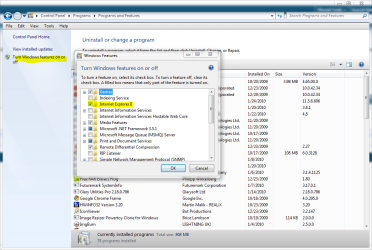
I had disabled my IE8 and would like to know how to turn it back on cause I forget how I did it..lol I would like to download an older version of Firefox as the the new one has some glitches in it yet
tyvm
Hi Lila
In search type turn windows features on or off, then just check the IE, box.
If you have problems, just post. I will monitor this thread.
My Computer
- Computer type
- PC/Desktop
- Computer Manufacturer/Model Number
- Dell XPS 420
- OS
- Windows 10, Home Clean Install
- CPU
- Intel Core2 processsor Q8200(2.33Ghz 1333FSB) Quad Core Tech
- Motherboard
- Dell
- Memory
- 6 gb
- Graphics Card(s)
- ATI Radeon 256MB HD3650
- Sound Card
- Intergrated 7.1 Channel Audio
- Monitor(s) Displays
- Dell SP2009W 20"
- Hard Drives
- 640 GB Serial ATA Hard drive
- Cooling
- Fan
- Keyboard
- Dell USB Keyboard
- Mouse
- Dell Premium Optical USB
- Internet Speed
- DSL 2.85


Such as?I would like to download an older version of Firefox as the the new one has some glitches in it yet
My Computer
- Computer Manufacturer/Model Number
- Sony Vaio FZ21Z
- OS
- Windows 7 Ultimate x64 ®™
- CPU
- Intel Core 2 Duo (2.2 GHz)
- Motherboard
- Sony (Intel Chipset)
- Memory
- 2x 2GB Corsair (667 MHz)
- Graphics Card(s)
- NVIDIA 8600M GS (256MB)
- Sound Card
- Sigmatel
- Monitor(s) Displays
- 15.4" TFT X-Black
- Screen Resolution
- 1280x800
- Hard Drives
- Western Digital 300GB Scorpio Black (7200rpm)
- Mouse
- Logitech Anywhere MX
- Internet Speed
- Sky 5MB
My Computer
- Computer type
- PC/Desktop
- Computer Manufacturer/Model Number
- Self Built
- OS
- Win 10 Pro x64
- CPU
- Intel I5-2500K @3.3GHz
- Motherboard
- Asrock P67 Extreme4
- Memory
- 16GB G.Skill Ripjaws X (4x4GB)
- Graphics Card(s)
- EVGA GeForce 750 Ti SC 2GB
- Sound Card
- ASUS Xonar DG 5.1 Channels 24-bit 96KHz PCI Interface Sound
- Monitor(s) Displays
- auria eq2367
- Screen Resolution
- 1920 x 1080
- Hard Drives
- 250GB Samsung 850 EVO SSD
1TB WD Blue
1TB Hitachi
- PSU
- SeaSonic X 650W 80 Plus Gold
- Case
- Corsair Obsidian 750D
- Cooling
- Corsair H60, Three 140mm case fans
- Keyboard
- Logitech Wireless Keyboard K520
- Mouse
- Logitech Wireless Mouse M310
- Internet Speed
- Wave Broadband ~ 100 dn 5 up
- Antivirus
- Windows Defender, Malwarebytes Premium
- Browser
- Edge, IE11, Chrome
- Other Info
- Laptop specs: HP g7-1365dx /
CPU: AMD A6-3420M APU with Radeon(tm) HD Graphics /
RAM: Crucial 8Gb (2x4Gb) /
SSD: Crucial M4-CT128M4SSD2 ATA Device/ FW 000F /
GFX: AMD Radeon HD 6520G /
OS: Windows 10 Pro x64
tyvm have my IE8 turned back on 
I downloaded Mozilla Firefox 3.5.7
If you want it here is the link
Going back to an older version - MozillaZine Knowledge Base
I downloaded Mozilla Firefox 3.5.7
If you want it here is the link
Going back to an older version - MozillaZine Knowledge Base
My Computer
- OS
- Windows 7
Hope you enjoy whatever browser you decide to use. You may want to look at Chrome.
My Computer
- Computer type
- PC/Desktop
- Computer Manufacturer/Model Number
- Dell XPS 420
- OS
- Windows 10, Home Clean Install
- CPU
- Intel Core2 processsor Q8200(2.33Ghz 1333FSB) Quad Core Tech
- Motherboard
- Dell
- Memory
- 6 gb
- Graphics Card(s)
- ATI Radeon 256MB HD3650
- Sound Card
- Intergrated 7.1 Channel Audio
- Monitor(s) Displays
- Dell SP2009W 20"
- Hard Drives
- 640 GB Serial ATA Hard drive
- Cooling
- Fan
- Keyboard
- Dell USB Keyboard
- Mouse
- Dell Premium Optical USB
- Internet Speed
- DSL 2.85