About Macrium and more

motim

New member
Local time
12:05 PM
Messages
109
Hello Forum,
Today I managed to make first Image backup with the program, it took almost an hour.

1. While installing Macrium, before making the rescue CD, not knowingly I clicked on "Add a boot menu option to start the reflect recovery environment", thinking it will be part of the CD, but now it is part of my PC start, it asks if I want to start with Macrium or Windows 7. Is it possible to get back to the normal boot -when there was no menu, it started only asking to boot from CD or Disk.
2. Cannot understand something; On G partition there are: a folder size 16 MB, another folder size 342 MB,
Macrium image size 11 GB, and Window image backup size 21.2 GB, this altogether makes 32.5 GB,
however on Right click the G partition for properties it says 53 GB used space. Is there something
hidden on the disk ?
3. Any recomendations for small free XML files viewer / reader.
Appreciate your answers.
Thanks
Motim
 

My Computer

Computer type
PC/Desktop
Computer Manufacturer/Model Number
custom built
OS
Windows 7 Pro 32 bit
CPU
intel celeron 2.66GH 2.56GH
Memory
2.00 GB
Graphics Card(s)
Nvidia fx5500
Hard Drives
Western digital
Antivirus
AVG
Browser
firefox
You should be able to remove the start up option, by opening Macrium & on the list at the top, one should have a drop down menu where you can untick "Add boot menu option".

Are you backing up to partition on your normal drive. Back up images should always be backed up to a separate drive or an external drive. If you are using your normal drive for back ups & that drive fails you have lost everything.

As far as your G partition is concerned it is possible there are hidden files there, but I can't comment on what those might be.
You could post a screen shot of your Disc Management, including all the info on that screen.

If you want to know what the XML files are for in Macrium see this Forum thread.

http://www.sevenforums.com/backup-restore/389079-whats-macrium-reflect-xml-files.html
 

My Computer

Computer type
PC/Desktop
Computer Manufacturer/Model Number
Self built using existing case
OS
Windows 7 Home Premium 64 bit sp1
CPU
Intel i5 3570 3.4Ghz Ivy Bridge SKT 1155 quad core
Motherboard
Gigabyte Z77-HD3 SKT 1155 2xSata 3, 4x USB 3.0
Memory
G-Skill Rip Jaws 16Gb (8x2) DDR3 -1600 PC3 12800 CL 10 red
Graphics Card(s)
Gigabyte NVIDIA GT610 1Gb DDR3 810/1200 PCI-E 2.0 Silent
Sound Card
NVIDIA High Definition & Realtech High Definition Audio
Monitor(s) Displays
2 x Philips 226V4L 16:9 aspect ratio
Screen Resolution
1920 x 1080 HD
Hard Drives
Samsung 840 Pro 256gb SSD, SATA 3.
Hitachi Touro Portable 1tb, USB 3.0 HDD used for image b/ups.
PSU
Corsair VS450
Case
Codeng
Cooling
PSU fan & CPU fan
Keyboard
Logitech
Mouse
Logitech Wireless trackball M570
Internet Speed
Wireless 3G. 3mg down & 550kb up.
Antivirus
Bitdefender Internet Security 2020
Browser
Opera (Current Version) & Firefox
Other Info
MS Office 2013 Pro. Davis weather station software. MGE Nova 600 avr UPS.
Hello,
1. I think I managed to go back to the old boot (still have to verify it), through Macrium.

2. Made a bootable rescue USB stick, but could not check it, restarted computer and in boot menu there is only option CD or Hard Drive and the last is an ancient 1.44 disk drive. So please, how can I check booting from USB ?

3. Made a cleenup of drive C (system) also all restore points except the last, but still 2014 and 2015 still are in the list of restore points, Ccleaner or other program do not see them at all, how can I clean the list too ?

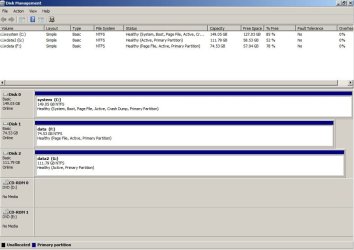
4.Recently asked about disk space on "G" drive : There are 16.6 MB folder, 343 MB folder, 11.0 GB Macrium image (of "C" drive) and 21.2 GB Windows image (of "C" drive), altogether makes 32.5 GB. But when I click "Properties" on "G" drive I get 53.2 GB used space. What is hiding in almost 21 GB ? how can I find out.
In one answer I was asked to send a screenshot of drive "G", well here is the screenshot of all of them from "Disk Management" window.
Thanks for answering
Motim
 

Attachments

  • Disk Managment.jpg
    Disk Managment.jpg
    62.6 KB · Views: 4

My Computer

Computer type
PC/Desktop
Computer Manufacturer/Model Number
custom built
OS
Windows 7 Pro 32 bit
CPU
intel celeron 2.66GH 2.56GH
Memory
2.00 GB
Graphics Card(s)
Nvidia fx5500
Hard Drives
Western digital
Antivirus
AVG
Browser
firefox
Some older mother boards do not have a USB booting facility, so you will have to stick to the CD method for booting with Macrium in the event of a disaster.
I use the CD method & have never had any problems, the only comment I would make is that when booting form the Macrium CD you do need to give it quite a long time to start.

To adjust your Restore points, open Control Panel, select System, then System Protection from the menu on the upper left side of the page, then on the small window that opens select Configure, you can now reduce the size of disc space used for restore points, delete old ones & turn it off, however turning it off is not a good idea. Probably 5% or 2 or 3 GB should be adequate.

You could download a program called Treesize which will list all programs on a hard drive & how much space they are using.
You can download it from here:

TreeSize Free - Quickly Scan Directory Sizes and Find Space Hogs

Once you have downloaded it, install it & see how you go.
 

My Computer

Computer type
PC/Desktop
Computer Manufacturer/Model Number
Self built using existing case
OS
Windows 7 Home Premium 64 bit sp1
CPU
Intel i5 3570 3.4Ghz Ivy Bridge SKT 1155 quad core
Motherboard
Gigabyte Z77-HD3 SKT 1155 2xSata 3, 4x USB 3.0
Memory
G-Skill Rip Jaws 16Gb (8x2) DDR3 -1600 PC3 12800 CL 10 red
Graphics Card(s)
Gigabyte NVIDIA GT610 1Gb DDR3 810/1200 PCI-E 2.0 Silent
Sound Card
NVIDIA High Definition & Realtech High Definition Audio
Monitor(s) Displays
2 x Philips 226V4L 16:9 aspect ratio
Screen Resolution
1920 x 1080 HD
Hard Drives
Samsung 840 Pro 256gb SSD, SATA 3.
Hitachi Touro Portable 1tb, USB 3.0 HDD used for image b/ups.
PSU
Corsair VS450
Case
Codeng
Cooling
PSU fan & CPU fan
Keyboard
Logitech
Mouse
Logitech Wireless trackball M570
Internet Speed
Wireless 3G. 3mg down & 550kb up.
Antivirus
Bitdefender Internet Security 2020
Browser
Opera (Current Version) & Firefox
Other Info
MS Office 2013 Pro. Davis weather station software. MGE Nova 600 avr UPS.
Back
Top