About to start a new project & looking for advice

McP2143

New member
Member
Local time
9:44 PM
Messages
28
I work at a lumber yard and I have a bunch of text files (called pick lists) that start with about twenty to forty lines of pointlessness then gets to the data needed. It looks like this:
1,2x4,16',2100
2,2x4,14',#2
3,2x6,12',#2
1,2x4,10',#2
1,2x4,16',2100
2,2x4,14',#2
1,2x4,10',#2
3,2x6,12',#2
3,2x6,12',#2
......
QTY,SIZE,LENGTH,GRADE
I'm the guy that gets handed this printout and gets to count all this out (they are much longer like 2-3 pgs.) I know I can write something, somewhere to sort through these files and just print out the added QTY of each instance of similar size, length & grade. I just don't know where to start.
Thanks for any input:D
 
Last edited:

My Computer My Computer

At a glance

Windows 7 Home Premium 64bit.
OS
Windows 7 Home Premium 64bit.
This could be done fairly easily with a Python script. I would be happy to write it for you, but I am extremely low on time right now. If you don't need it before June 10th, I can write it for you.
 

My Computer My Computer

At a glance

Windows 7 Professional x64Intel Core i7-2720QM4GB (2 x 2GB)NVIDIA Quadro 2000M (with Optimus)
Computer Manufacturer/Model Number
Lenovo ThinkPad W520 (4270CT)
OS
Windows 7 Professional x64
CPU
Intel Core i7-2720QM
Memory
4GB (2 x 2GB)
Graphics Card(s)
NVIDIA Quadro 2000M (with Optimus)
Hard Drives
500 GB @ 7200 RPM
Wow I didn't expect an offer to write it for me!! Thank you Brice. Waiting is not an issue at all. I was planning on teaching myself some lessons in code as I assumed this would be fairly easy. I will get a few of the full files and post them here Monday night after work.
 

My Computer My Computer

At a glance

Windows 7 Home Premium 64bit.
OS
Windows 7 Home Premium 64bit.
No problem. Just PM me around June 9th or June 10th. It won't take too long and will be really good practice for me.
 

My Computer My Computer

At a glance

Windows 7 Professional x64Intel Core i7-2720QM4GB (2 x 2GB)NVIDIA Quadro 2000M (with Optimus)
Computer Manufacturer/Model Number
Lenovo ThinkPad W520 (4270CT)
OS
Windows 7 Professional x64
CPU
Intel Core i7-2720QM
Memory
4GB (2 x 2GB)
Graphics Card(s)
NVIDIA Quadro 2000M (with Optimus)
Hard Drives
500 GB @ 7200 RPM
Can you tell me what you'd like the program to display for the sample you posted above?
 

My Computer My Computer

At a glance

Windows 7 Professional x64Intel Core i7-2720QM4GB (2 x 2GB)NVIDIA Quadro 2000M (with Optimus)
Computer Manufacturer/Model Number
Lenovo ThinkPad W520 (4270CT)
OS
Windows 7 Professional x64
CPU
Intel Core i7-2720QM
Memory
4GB (2 x 2GB)
Graphics Card(s)
NVIDIA Quadro 2000M (with Optimus)
Hard Drives
500 GB @ 7200 RPM
I just finished the script. I have attached it and a sample data file. This is how it would work for the sample data you gave me above. (The file Sample Data.txt must be in the same folder as this Python script.)
Code:
Please enter the path to a data file: [b]Sample Data.txt[/b]
Size Quantities:
 2x4: 8
 2x6: 9
Length Quantities:
 14': 4
 16': 2
 10': 2
 12': 9
Grade Quantities:
 #2: 15
 2100: 2

By the way, you must install Python before using this script. To do so, please click here and you will download the 64-bit version.
 

Attachments

My Computer My Computer

At a glance

Windows 7 Professional x64Intel Core i7-2720QM4GB (2 x 2GB)NVIDIA Quadro 2000M (with Optimus)
Computer Manufacturer/Model Number
Lenovo ThinkPad W520 (4270CT)
OS
Windows 7 Professional x64
CPU
Intel Core i7-2720QM
Memory
4GB (2 x 2GB)
Graphics Card(s)
NVIDIA Quadro 2000M (with Optimus)
Hard Drives
500 GB @ 7200 RPM
1,2x4,16',2100
2,2x4,14',#2
3,2x6,12',#2
1,2x4,10',#2
1,2x4,16',2100
2,2x4,14',#2
1,2x4,10',#2
3,2x6,12',#2
3,2x6,12',#2
......
for this example an output would be

9,2x6,12',#2
2,2x4,10',#2
4,2x4,14',#2
2,2x4,16',2100

This is a trimmed down example the real deal has many different lengths, sizes, and grades. I would also like any output of this to be in a new file. Thanks again.
 

My Computer My Computer

At a glance

Windows 7 Home Premium 64bit.
OS
Windows 7 Home Premium 64bit.
Oh, okay. I'll make some modifications to it to do that.
 

My Computer My Computer

At a glance

Windows 7 Professional x64Intel Core i7-2720QM4GB (2 x 2GB)NVIDIA Quadro 2000M (with Optimus)
Computer Manufacturer/Model Number
Lenovo ThinkPad W520 (4270CT)
OS
Windows 7 Professional x64
CPU
Intel Core i7-2720QM
Memory
4GB (2 x 2GB)
Graphics Card(s)
NVIDIA Quadro 2000M (with Optimus)
Hard Drives
500 GB @ 7200 RPM
I have now modified it to do everything you want, including putting the output in a new file. Please report back on how well this works, and please rep me if you find it useful. Thanks.

IMPORTANT: Make sure to extract the zip file before using the script.
 

Attachments

My Computer My Computer

At a glance

Windows 7 Professional x64Intel Core i7-2720QM4GB (2 x 2GB)NVIDIA Quadro 2000M (with Optimus)
Computer Manufacturer/Model Number
Lenovo ThinkPad W520 (4270CT)
OS
Windows 7 Professional x64
CPU
Intel Core i7-2720QM
Memory
4GB (2 x 2GB)
Graphics Card(s)
NVIDIA Quadro 2000M (with Optimus)
Hard Drives
500 GB @ 7200 RPM
I have now modified it to do everything you want, including putting the output in a new file. Please report back on how well this works.
Seems to work exactly as expected. Very nice.

Since the input TXT file is clearly in a CSV (comma-separated variable) format that is suitable for importing into Excel, it also would seem that a spreadsheet solution with a simple SUM/DSUM function of some kind should also exist... since the data is already prepared and it's just a matter of adding the values in cells from one column based on matching cells in other columns being the criteria.

Give me one day.

(very simple COBOL program as well)
 

My Computer My Computer

At a glance

Windows 7 Pro x64 (1), Win7 Pro X64 (2)i5-3350p 3.1Ghz/6MB-cache (1); E8400 3.0Ghz/6...8GB PC3-12800 DDR3 (1); 4GB PC3-10600 DDR3 (2)ATI HD7750 (1), (see TV cards); ATI R7 250 (2)
Computer type
PC/Desktop
Computer Manufacturer/Model Number
Home-built, two systems (1) and (2)
OS
Windows 7 Pro x64 (1), Win7 Pro X64 (2)
CPU
i5-3350p 3.1Ghz/6MB-cache (1); E8400 3.0Ghz/6MB-cache (2)
Motherboard
ASUS P8Z77-V Pro (1); ASUS P5Q3 (2)
Memory
8GB PC3-12800 DDR3 (1); 4GB PC3-10600 DDR3 (2)
Graphics Card(s)
ATI HD7750 (1), (see TV cards); ATI R7 250 (2)
Sound Card
Realtek ALC892 HD Audio (1); Realtek ALC1200 HD Audio (2)
Monitor(s) Displays
Eizo HD2441W LCD, Eizo S2433W (1); Eizo 24" S2433W (2)
Screen Resolution
1920x1200, 1920x1200 (1); 1920x1200 (2)
Hard Drives
(1) 1TB SATA-II (7200RPM), 2x2TB SATA-III (7200RPM), 250GB SATA-III (10000RPM) for OS; 2x2TB external USB 3.0

(2) 320GB SATA-II (7200RPM), 750GB SATA-II (7200RPM), 150GB SATA-II (10000RPM) for OS; 2TB external USB 3.0
PSU
Nesteq ECS-6001 600W (1); Nesteq ECS-5001 500W (2)
Case
Acousti-Case 360 (1) and (2)
Cooling
Noctua NH-U12P SE2 for CPU, 2x120mm case fans (1) and (2)
Keyboard
IBM PS/2 (1) and (2)
Mouse
Logitech MX Revolution wireless (1); Microsoft wired (2)
Internet Speed
100mbps down / 10mbps up
Antivirus
Microsoft Security Essentials; Malwarebyte Anti-Malware Pro
Browser
Firefox
Other Info
Ceton InfiniTV 4-tuner cablecard-enabled TV card as well as Hauppauge HVR-2250 OTA/ATSC 2-tuner TV card in (1), running under Win7 WMC
Pivot tables. That's the perfect Excel approach for this kind of data analysis.

I need to work out how to get the "answers" expressed line-by-line, showing the total quantity along with the detail column values of size, length, and grade, so that the "answers" can be exported as a TXT file to produce the final "pick list" for loading the truck.
 

My Computer My Computer

At a glance

Windows 7 Pro x64 (1), Win7 Pro X64 (2)i5-3350p 3.1Ghz/6MB-cache (1); E8400 3.0Ghz/6...8GB PC3-12800 DDR3 (1); 4GB PC3-10600 DDR3 (2)ATI HD7750 (1), (see TV cards); ATI R7 250 (2)
Computer type
PC/Desktop
Computer Manufacturer/Model Number
Home-built, two systems (1) and (2)
OS
Windows 7 Pro x64 (1), Win7 Pro X64 (2)
CPU
i5-3350p 3.1Ghz/6MB-cache (1); E8400 3.0Ghz/6MB-cache (2)
Motherboard
ASUS P8Z77-V Pro (1); ASUS P5Q3 (2)
Memory
8GB PC3-12800 DDR3 (1); 4GB PC3-10600 DDR3 (2)
Graphics Card(s)
ATI HD7750 (1), (see TV cards); ATI R7 250 (2)
Sound Card
Realtek ALC892 HD Audio (1); Realtek ALC1200 HD Audio (2)
Monitor(s) Displays
Eizo HD2441W LCD, Eizo S2433W (1); Eizo 24" S2433W (2)
Screen Resolution
1920x1200, 1920x1200 (1); 1920x1200 (2)
Hard Drives
(1) 1TB SATA-II (7200RPM), 2x2TB SATA-III (7200RPM), 250GB SATA-III (10000RPM) for OS; 2x2TB external USB 3.0

(2) 320GB SATA-II (7200RPM), 750GB SATA-II (7200RPM), 150GB SATA-II (10000RPM) for OS; 2TB external USB 3.0
PSU
Nesteq ECS-6001 600W (1); Nesteq ECS-5001 500W (2)
Case
Acousti-Case 360 (1) and (2)
Cooling
Noctua NH-U12P SE2 for CPU, 2x120mm case fans (1) and (2)
Keyboard
IBM PS/2 (1) and (2)
Mouse
Logitech MX Revolution wireless (1); Microsoft wired (2)
Internet Speed
100mbps down / 10mbps up
Antivirus
Microsoft Security Essentials; Malwarebyte Anti-Malware Pro
Browser
Firefox
Other Info
Ceton InfiniTV 4-tuner cablecard-enabled TV card as well as Hauppauge HVR-2250 OTA/ATSC 2-tuner TV card in (1), running under Win7 WMC
Hi there
I might be being obtuse but surely the OBVIOUS way to do this is via an EXCEL spreadsheet as others have already posted.

Plenty of examples -- just google.

Should take you all of 90 Secs to finish it.


Excel exports to Text / CSV etc etc easily.

Actually you could be even more sophisticated -- download to say a Mobile smart phone or direct to the truck drivers "Way bill" -- this sort of app is becomming more and more into use.


Cheers
jimbo
 

My Computer My Computer

At a glance

Linux CENTOS 7 / various Windows OS'es and se...Intel i7 Intel i58GB, 16GBOn Motherboard
Computer type
PC/Desktop
Computer Manufacturer/Model Number
Custom built, several laptops HP/ASUS
OS
Linux CENTOS 7 / various Windows OS'es and servers
CPU
Intel i7 Intel i5
Memory
8GB, 16GB
Graphics Card(s)
On Motherboard
Sound Card
Realtek HD audio
Monitor(s) Displays
Apple Cinema display, Samsung LCD
Screen Resolution
1920 X 1080
Hard Drives
4 X 1TB SATA
Mouse
Toshiba wireless laser
Internet Speed
> 20MB up
Thank you everyone for all the great advice. :cool:

I will try to work on this myself in excel, for a lesson if nothing else. For BriceH and anyone else interested I have attached a sample order. I have gone into much greater detail than before. So here it is to the best of my Sunday morning memory. I will post an EXACT .stk file tomorrow night. View attachment sampleorder.txt
 

My Computer My Computer

At a glance

Windows 7 Home Premium 64bit.
OS
Windows 7 Home Premium 64bit.
I will try to work on this myself in excel, for a lesson if nothing else.
Google "Excel pivot table" and take one of the many tutorials. This is the right approach to getting the answers (I have that much done).

Haven't had time yet to work on presenting the answers in a user-friendly set of cells to facilitate exporting the answers (with underlying details as qualifiers) to produce the final list.


For BriceH and anyone else interested I have attached a sample order. I have gone into much greater detail than before. So here it is to the best of my Sunday morning memory. I will post an EXACT .stk file tomorrow night.
I'll use this sample as a real prototype.
 

My Computer My Computer

At a glance

Windows 7 Pro x64 (1), Win7 Pro X64 (2)i5-3350p 3.1Ghz/6MB-cache (1); E8400 3.0Ghz/6...8GB PC3-12800 DDR3 (1); 4GB PC3-10600 DDR3 (2)ATI HD7750 (1), (see TV cards); ATI R7 250 (2)
Computer type
PC/Desktop
Computer Manufacturer/Model Number
Home-built, two systems (1) and (2)
OS
Windows 7 Pro x64 (1), Win7 Pro X64 (2)
CPU
i5-3350p 3.1Ghz/6MB-cache (1); E8400 3.0Ghz/6MB-cache (2)
Motherboard
ASUS P8Z77-V Pro (1); ASUS P5Q3 (2)
Memory
8GB PC3-12800 DDR3 (1); 4GB PC3-10600 DDR3 (2)
Graphics Card(s)
ATI HD7750 (1), (see TV cards); ATI R7 250 (2)
Sound Card
Realtek ALC892 HD Audio (1); Realtek ALC1200 HD Audio (2)
Monitor(s) Displays
Eizo HD2441W LCD, Eizo S2433W (1); Eizo 24" S2433W (2)
Screen Resolution
1920x1200, 1920x1200 (1); 1920x1200 (2)
Hard Drives
(1) 1TB SATA-II (7200RPM), 2x2TB SATA-III (7200RPM), 250GB SATA-III (10000RPM) for OS; 2x2TB external USB 3.0

(2) 320GB SATA-II (7200RPM), 750GB SATA-II (7200RPM), 150GB SATA-II (10000RPM) for OS; 2TB external USB 3.0
PSU
Nesteq ECS-6001 600W (1); Nesteq ECS-5001 500W (2)
Case
Acousti-Case 360 (1) and (2)
Cooling
Noctua NH-U12P SE2 for CPU, 2x120mm case fans (1) and (2)
Keyboard
IBM PS/2 (1) and (2)
Mouse
Logitech MX Revolution wireless (1); Microsoft wired (2)
Internet Speed
100mbps down / 10mbps up
Antivirus
Microsoft Security Essentials; Malwarebyte Anti-Malware Pro
Browser
Firefox
Other Info
Ceton InfiniTV 4-tuner cablecard-enabled TV card as well as Hauppauge HVR-2250 OTA/ATSC 2-tuner TV card in (1), running under Win7 WMC
Take just the pick list section TXT from your sheet... remove blank lines. Import it into an Excel spreadsheet. It is "delimited" using "commas". The rest of the dialog wizard you can just OK/next to.

I'd recommend starting from the prototype, and deleting the old detail data rows so that just the title row remains. When you import the next data it will be placed in the rows following the title. The presence of the title row is crucial to the pivot table concept.

Then, highlight the complete set of cells that should be part of the table, starting from the first title cell (Quantity) and running through the last detail row cell (Grade).

lumberdata.jpg


Then, click on the "Insert" item on the menu bar, and push the "PivotTable" button at the left of the "Tables" group on the left side of the button bar. The selected range from your just imported will appear in the table/range area, and the "new worksheet" radio button will be pre-checked. Just push OK.

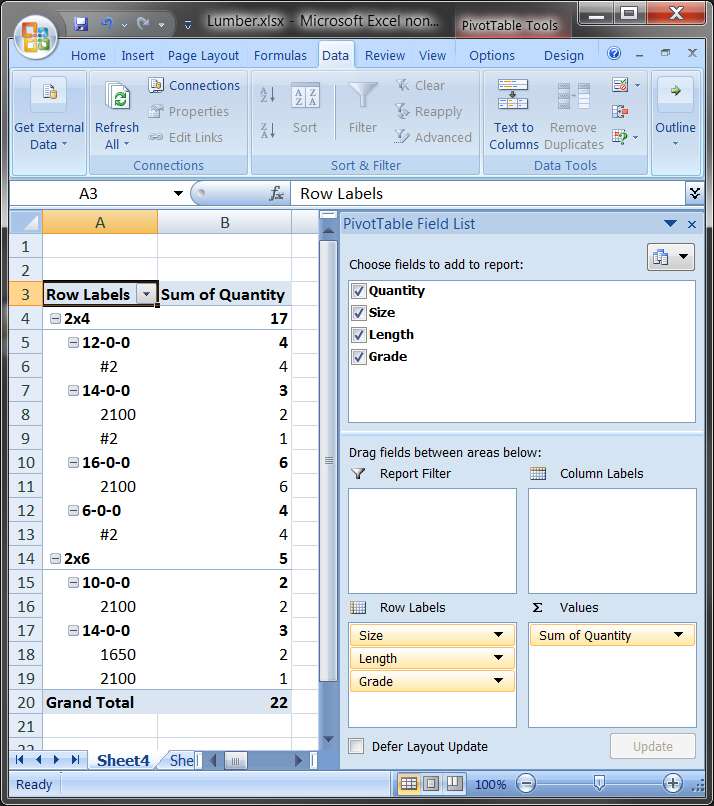
The pivot table area (shown on the left side of the presentation) will initially be empty. The pivot table field list from which you can select the values to be "spun" are shown in the upper-right. Magically, Excel knows that size, length and grade are "row labels" so if you check those items in the "choose fields to add to report" they will appear down in the "row labels" quadrant area.

And if you then check the "quantity" field, it will be placed in the "sum values" quadrant area.

And magically, on the left side, the pivot table will appear... with all of the detail row values "spun" and "totaled", and it will look like this:

lumberpivottable.jpg


This matches your sample results (except that your 2x4, 6-0-0, #2 is wrong... it should be 4, not 3 as you show):
111024A Pick List
1,2x6,14-0-0,2100
2,2x6,14-0-0,1650
2,2x6,10-0-0,2100
6,2x4,16-0-0,2100
2,2x4,14-0-0,2100
1,2x4,14-0-0,#2
4,2x4,12-0-0,#2
3,2x4,6-0-0,#2
Since the table itself will be of varying length, you should then select the complete table range (starting from the first row label cell to the Grand Total number, push the Page Layout item on the Menu bar, and then push the Print Area -> Set print area item in the Page Setup group of buttons. You can experiment with printing the table, and you can also push the "additional page setup" arrow (at the right side of the "Page Setup" bar) to get additional printing options for titling as you see fit.

Should get you started.

I believe if you save your final table spreadsheet, then the next time you open it up and delete the existing data rows, and import the new data rows onto the data sheet, that the previously established and checked "row labels" and "sum items" will be all set from before, and the pivot table sheet should instantly rebuild itself with the new pick list row data. You should not have to do anything more, other than probably redefine the new print area and print it.

 

Attachments

My Computer My Computer

At a glance

Windows 7 Pro x64 (1), Win7 Pro X64 (2)i5-3350p 3.1Ghz/6MB-cache (1); E8400 3.0Ghz/6...8GB PC3-12800 DDR3 (1); 4GB PC3-10600 DDR3 (2)ATI HD7750 (1), (see TV cards); ATI R7 250 (2)
Computer type
PC/Desktop
Computer Manufacturer/Model Number
Home-built, two systems (1) and (2)
OS
Windows 7 Pro x64 (1), Win7 Pro X64 (2)
CPU
i5-3350p 3.1Ghz/6MB-cache (1); E8400 3.0Ghz/6MB-cache (2)
Motherboard
ASUS P8Z77-V Pro (1); ASUS P5Q3 (2)
Memory
8GB PC3-12800 DDR3 (1); 4GB PC3-10600 DDR3 (2)
Graphics Card(s)
ATI HD7750 (1), (see TV cards); ATI R7 250 (2)
Sound Card
Realtek ALC892 HD Audio (1); Realtek ALC1200 HD Audio (2)
Monitor(s) Displays
Eizo HD2441W LCD, Eizo S2433W (1); Eizo 24" S2433W (2)
Screen Resolution
1920x1200, 1920x1200 (1); 1920x1200 (2)
Hard Drives
(1) 1TB SATA-II (7200RPM), 2x2TB SATA-III (7200RPM), 250GB SATA-III (10000RPM) for OS; 2x2TB external USB 3.0

(2) 320GB SATA-II (7200RPM), 750GB SATA-II (7200RPM), 150GB SATA-II (10000RPM) for OS; 2TB external USB 3.0
PSU
Nesteq ECS-6001 600W (1); Nesteq ECS-5001 500W (2)
Case
Acousti-Case 360 (1) and (2)
Cooling
Noctua NH-U12P SE2 for CPU, 2x120mm case fans (1) and (2)
Keyboard
IBM PS/2 (1) and (2)
Mouse
Logitech MX Revolution wireless (1); Microsoft wired (2)
Internet Speed
100mbps down / 10mbps up
Antivirus
Microsoft Security Essentials; Malwarebyte Anti-Malware Pro
Browser
Firefox
Other Info
Ceton InfiniTV 4-tuner cablecard-enabled TV card as well as Hauppauge HVR-2250 OTA/ATSC 2-tuner TV card in (1), running under Win7 WMC
This matches your sample results (except that your 2x4, 6-0-0, #2 is wrong... it should be 4, not 3 as you show)
Case and point!!:D
And I consider myself good at math too!!;)
You should see what happens when afternoon shift tries to do this!!:confused:

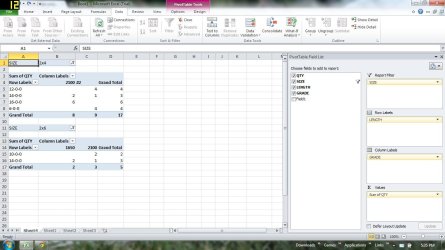
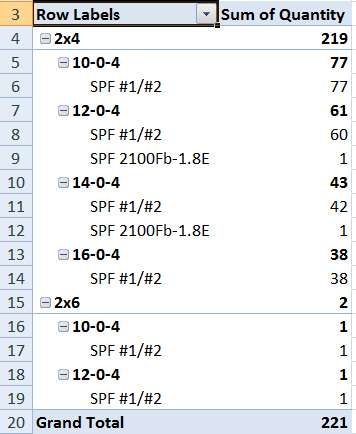
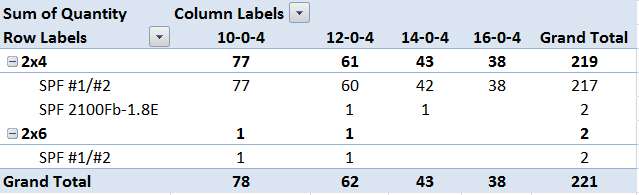
I did this in Excel! Thanks dsperber.PickList Pivot Table.jpg
Any thoughts on how to quickly get dozens of these printed?

My first thoughts on this had my boss selecting the days orders > drag and drop > printed in new style. Or add a link to the send to menu.

I don't know if this is possible with excel I will see what i can do.

Simplicity is the key to making this happen for me on a daily occurrence.
 
Last edited:

My Computer My Computer

At a glance

Windows 7 Home Premium 64bit.
OS
Windows 7 Home Premium 64bit.
I did this in Excel! Thanks dsperber.
Yes, you can drag labels to the "columns" quadrant, as I see you've done, to make the presentation 2-dimensional.

Also, notice that both the "row labels" and "column labels" columns in the table have the dropdown arrow controls on them, indicating that they can be selected for "data filter". In other words, if you wanted to present just a subset of the total pick list, for a particular board size or length or grade, you could click on the dropdown arrow, click on the "select all" item to UNCHECK all of them, and then just check that one (or more) subset value you were looking particularly for.

In other words, you can produce subsets of the table, for specific values in each of the fields... spun and totaled/sub-totaled by just the values you're interested in spinning and printing.

Also, the rows and columns of the presented pivot table are really just an ordinary spreadsheet, like any other spreadsheet. So you can "format" the title heading row, set fonts and colors, set alignment (e.g. "center"), etc. to make it look and print better.

for example, I see that the "#2" grade got left justified in the title, whereas the numeric quantity underneath the column heading got right justified. You might want to CENTER everything in the table, both column headings in the title row as well as contents, just to improve readability.


Any thoughts on how to quickly get dozens of these printed?
File -> Print Preview, to enter the print preview dialog for the table. Then you can get into Page setup, set up headers and footers for printing, center it as you want, etc.

You can then push the PRINT icon button and print as many as you want.

Again, I believe if you SAVE the resulting XLSX workbook then everything you've done using the last data set will be saved, and will be instantly applicable to the next day's set of data... including print setup, etc. Tomorrow, if you first delete the previous set of data rows (under the column heading row), and then select the four columns A-D in the next row (row 2), and then import Data -> from text, then the new data will be imported and placed into rows 2-n, leaving the column widths and separator positions, title row, colorization, etc., just as they were. You're only inserting brand new data, and the generated pivot table on the other sheet will instantly rebuild itself.


Simplicity is the key to making this happen for me on a daily occurrence.
You'll eventually figure out a daily workflow to get each day's data imported, and then print out whatever you want from that day's pivot table.

Excel. It's your friend, for lots more than you might imagine.
 

My Computer My Computer

At a glance

Windows 7 Pro x64 (1), Win7 Pro X64 (2)i5-3350p 3.1Ghz/6MB-cache (1); E8400 3.0Ghz/6...8GB PC3-12800 DDR3 (1); 4GB PC3-10600 DDR3 (2)ATI HD7750 (1), (see TV cards); ATI R7 250 (2)
Computer type
PC/Desktop
Computer Manufacturer/Model Number
Home-built, two systems (1) and (2)
OS
Windows 7 Pro x64 (1), Win7 Pro X64 (2)
CPU
i5-3350p 3.1Ghz/6MB-cache (1); E8400 3.0Ghz/6MB-cache (2)
Motherboard
ASUS P8Z77-V Pro (1); ASUS P5Q3 (2)
Memory
8GB PC3-12800 DDR3 (1); 4GB PC3-10600 DDR3 (2)
Graphics Card(s)
ATI HD7750 (1), (see TV cards); ATI R7 250 (2)
Sound Card
Realtek ALC892 HD Audio (1); Realtek ALC1200 HD Audio (2)
Monitor(s) Displays
Eizo HD2441W LCD, Eizo S2433W (1); Eizo 24" S2433W (2)
Screen Resolution
1920x1200, 1920x1200 (1); 1920x1200 (2)
Hard Drives
(1) 1TB SATA-II (7200RPM), 2x2TB SATA-III (7200RPM), 250GB SATA-III (10000RPM) for OS; 2x2TB external USB 3.0

(2) 320GB SATA-II (7200RPM), 750GB SATA-II (7200RPM), 150GB SATA-II (10000RPM) for OS; 2TB external USB 3.0
PSU
Nesteq ECS-6001 600W (1); Nesteq ECS-5001 500W (2)
Case
Acousti-Case 360 (1) and (2)
Cooling
Noctua NH-U12P SE2 for CPU, 2x120mm case fans (1) and (2)
Keyboard
IBM PS/2 (1) and (2)
Mouse
Logitech MX Revolution wireless (1); Microsoft wired (2)
Internet Speed
100mbps down / 10mbps up
Antivirus
Microsoft Security Essentials; Malwarebyte Anti-Malware Pro
Browser
Firefox
Other Info
Ceton InfiniTV 4-tuner cablecard-enabled TV card as well as Hauppauge HVR-2250 OTA/ATSC 2-tuner TV card in (1), running under Win7 WMC
Here are some examples of full data files that I need to pull the picklist from.

Note: The original file extension was .stk I changed it to .txt for upload

Sample Picklists :View attachment 110007G.txt

View attachment 110007D.txt

View attachment 110087k.txt

Ps. I have gotten quite a bit out of excel and am now examining BriceH's python script closer. I like it! It has great potential to do all that I want very efficiently.
 

My Computer My Computer

At a glance

Windows 7 Home Premium 64bit.
OS
Windows 7 Home Premium 64bit.

My Computer My Computer

At a glance

Windows 7 Pro x64 (1), Win7 Pro X64 (2)i5-3350p 3.1Ghz/6MB-cache (1); E8400 3.0Ghz/6...8GB PC3-12800 DDR3 (1); 4GB PC3-10600 DDR3 (2)ATI HD7750 (1), (see TV cards); ATI R7 250 (2)
Computer type
PC/Desktop
Computer Manufacturer/Model Number
Home-built, two systems (1) and (2)
OS
Windows 7 Pro x64 (1), Win7 Pro X64 (2)
CPU
i5-3350p 3.1Ghz/6MB-cache (1); E8400 3.0Ghz/6MB-cache (2)
Motherboard
ASUS P8Z77-V Pro (1); ASUS P5Q3 (2)
Memory
8GB PC3-12800 DDR3 (1); 4GB PC3-10600 DDR3 (2)
Graphics Card(s)
ATI HD7750 (1), (see TV cards); ATI R7 250 (2)
Sound Card
Realtek ALC892 HD Audio (1); Realtek ALC1200 HD Audio (2)
Monitor(s) Displays
Eizo HD2441W LCD, Eizo S2433W (1); Eizo 24" S2433W (2)
Screen Resolution
1920x1200, 1920x1200 (1); 1920x1200 (2)
Hard Drives
(1) 1TB SATA-II (7200RPM), 2x2TB SATA-III (7200RPM), 250GB SATA-III (10000RPM) for OS; 2x2TB external USB 3.0

(2) 320GB SATA-II (7200RPM), 750GB SATA-II (7200RPM), 150GB SATA-II (10000RPM) for OS; 2TB external USB 3.0
PSU
Nesteq ECS-6001 600W (1); Nesteq ECS-5001 500W (2)
Case
Acousti-Case 360 (1) and (2)
Cooling
Noctua NH-U12P SE2 for CPU, 2x120mm case fans (1) and (2)
Keyboard
IBM PS/2 (1) and (2)
Mouse
Logitech MX Revolution wireless (1); Microsoft wired (2)
Internet Speed
100mbps down / 10mbps up
Antivirus
Microsoft Security Essentials; Malwarebyte Anti-Malware Pro
Browser
Firefox
Other Info
Ceton InfiniTV 4-tuner cablecard-enabled TV card as well as Hauppauge HVR-2250 OTA/ATSC 2-tuner TV card in (1), running under Win7 WMC
Back
Top