About Windows 7 discs

TOFU

New member
Local time
8:20 AM
Messages
19
Hi there,
Just joined this forum.

Just a few questions.

When i got this computer (Acer), it is pre installed with windows 7 therefore i dont have the installer disc. What if i need to reformat my computer?

What's the difference between a system repair disc and recovery disc (The 3 disc i gotta create) ?
I need those 3 recovery disc for reformatting?
 

My Computer

OS
Windows 7 Home Premium

My Computer

Computer type
PC/Desktop
Computer Manufacturer/Model Number
Dell XPS 420
OS
Windows 10, Home Clean Install
CPU
Intel Core2 processsor Q8200(2.33Ghz 1333FSB) Quad Core Tech
Motherboard
Dell
Memory
6 gb
Graphics Card(s)
ATI Radeon 256MB HD3650
Sound Card
Intergrated 7.1 Channel Audio
Monitor(s) Displays
Dell SP2009W 20"
Hard Drives
640 GB Serial ATA Hard drive
Cooling
Fan
Keyboard
Dell USB Keyboard
Mouse
Dell Premium Optical USB
Internet Speed
DSL 2.85
In the event that i can't boot my desktop, which DVD i gotta boot up with? Because there are 3 Dvd's.
And how do i go about using them?
Because when i tried booting up with those discs, everything seems normal? Unless i go into the F8 mode and go Repair computer when booting up.

Million thanks!
 

My Computer

OS
Windows 7 Home Premium
Hi, welcome to Seven Forums.
I did have an Acer laptop and it had software to create 2 system restore discs(Vista), the restore discs are disks with windows on but licensed to the acer computer itself and if your os ever fails you can reinstall it on the Acer.

The system restore disk is to repair windows itself if it fails to start up, e.g. your missing a start up file the diagnostics on the disc will load up and repair/replace the file.

So if you need to reformat your computer the recovery disc is there to allow you to reinstall windows back to the factory settings.

Hope this helps ;)
 

My Computer

Computer type
PC/Desktop
Computer Manufacturer/Model Number
GIGABYTE Rig (Custom)
OS
Windows 7 Professional (x64/SP1) /Linux Mint 16
CPU
Intel i5-3570k 3.40 GHz @ 4.6 GHz
Motherboard
GIGABYTE Z77X-D3H
Memory
8GB (2133MHz) DDR3
Graphics Card(s)
Asus GTX560 Ti (Nvidia)
Monitor(s) Displays
HP 23", Acer 19" and a Dell 17"
Screen Resolution
1080p, 1440x900 and 1280x1024
Hard Drives
Sandisk Extreme 120GB (SSD), WD 2TB green and 4 other HDDs
PSU
Antec 620w High Current Gamer
Case
Corsair Obsidian 600D
Cooling
CPU - Antec KÜHLER H₂O 920
Keyboard
Steelseries 6Gv2
Mouse
Roccat LUA
Internet Speed
4 - 6mb/s
Antivirus
ESET NOD32
Browser
Chrome/Firefox
Other Info
Intel Gigabit CT (PCIE NIC) and Thinkpad T61p,

My Computer

Computer type
PC/Desktop
Computer Manufacturer/Model Number
Dell XPS 420
OS
Windows 10, Home Clean Install
CPU
Intel Core2 processsor Q8200(2.33Ghz 1333FSB) Quad Core Tech
Motherboard
Dell
Memory
6 gb
Graphics Card(s)
ATI Radeon 256MB HD3650
Sound Card
Intergrated 7.1 Channel Audio
Monitor(s) Displays
Dell SP2009W 20"
Hard Drives
640 GB Serial ATA Hard drive
Cooling
Fan
Keyboard
Dell USB Keyboard
Mouse
Dell Premium Optical USB
Internet Speed
DSL 2.85
1) The 3 recovery disks will restore your computer to the state it was in when you first unboxed it. OEM computers (branded ones like Acer, Dell etc. that come with win7 preloaded and preactivated) have a recovery partition which lets you do the same thing, however recovery disks are very handy when you cant boot into the OS or the recovery partition is corrupted. Just boot from the first disk, it'll do its thing then prompt you for the next and so on. Keep these disks safely.

2) A system repair disk is simply a disk that contains the system recovery options (such as startup repair, command prompt etc.) which are also available in the advanced boot menu. This disk would be about 120 mb in size and can also be downloaded from the Neosmart site. Remember this cannot be used to reinstall windows, it can only fix errors.

3) If you want to reformat your computer, you can use the 3 recovery disks. Alternatively you can borrow a win7 install dvd from a friend and do a clean install of the same edition your computer came with. To activate windows, you'll need to call MS.
 

My Computer

Computer Manufacturer/Model Number
Too many to describe...
OS
Windows 7 x64 pro/ Windows 7 x86 Pro/ XP SP3 x86
So a recovery disc act as the windows installation disc?

Okay here's a problem
I did not burn the recovery disc immediately when i just brought the computer. Will that affect anything?
 

My Computer

OS
Windows 7 Home Premium
So a recovery disc act as the windows installation disc?

Okay here's a problem
I did not burn the recovery disc immediately when i just brought the computer. Will that affect anything?
Burn it NOW, and no it'll be the same as if you had burnt it immediately after purchase.
 

My Computer

Computer Manufacturer/Model Number
Too many to describe...
OS
Windows 7 x64 pro/ Windows 7 x86 Pro/ XP SP3 x86
In the event that i can't boot my desktop, which DVD i gotta boot up with? Because there are 3 Dvd's.
And how do i go about using them?
Because when i tried booting up with those discs, everything seems normal? Unless i go into the F8 mode and go Repair computer when booting up.

Million thanks!

You put disc 1 in that you made and when asked replace the discs in order "please insert disc 2" put the second disc you created ect.

To start the discs you need to change the boot sequence this usually can be done by pressing 'F12' just before the Acer logo disappears when the options, select CD-ROM (DVD-ROM) (the disc drive) and it should say booting off disc press enter when that or similar.
 

My Computer

Computer type
PC/Desktop
Computer Manufacturer/Model Number
GIGABYTE Rig (Custom)
OS
Windows 7 Professional (x64/SP1) /Linux Mint 16
CPU
Intel i5-3570k 3.40 GHz @ 4.6 GHz
Motherboard
GIGABYTE Z77X-D3H
Memory
8GB (2133MHz) DDR3
Graphics Card(s)
Asus GTX560 Ti (Nvidia)
Monitor(s) Displays
HP 23", Acer 19" and a Dell 17"
Screen Resolution
1080p, 1440x900 and 1280x1024
Hard Drives
Sandisk Extreme 120GB (SSD), WD 2TB green and 4 other HDDs
PSU
Antec 620w High Current Gamer
Case
Corsair Obsidian 600D
Cooling
CPU - Antec KÜHLER H₂O 920
Keyboard
Steelseries 6Gv2
Mouse
Roccat LUA
Internet Speed
4 - 6mb/s
Antivirus
ESET NOD32
Browser
Chrome/Firefox
Other Info
Intel Gigabit CT (PCIE NIC) and Thinkpad T61p,
You can make the recovery disks at any point you choose. Just don't choose to wait until the system is not working and you cannot make them.

Once you make them, if you later decide to use them...you have to tell your system to boot from cd/dvd and insert the first of the recovery disks. These disks will put your system back to the way that it was right from the factory. You won't have to answer many questions at all. it will be as if you just brought the computer home from the store. So, rather than just a reinstall of Windows...it's putting back Windows as well as every other thing that was installed and configured by Acer.
 

My Computer

Computer Manufacturer/Model Number
Self-Built in July 2009
OS
Windows 7 Ultimate x64
CPU
Intel Q9550 2.83Ghz OC'd to 3.40Ghz
Motherboard
Gigabyte GA-EP45-UD3R rev. 1.1, F12 BIOS
Memory
8GB G.Skill PI DDR2-800, 4-4-4-12 timings
Graphics Card(s)
EVGA 1280MB Nvidia GeForce GTX570
Sound Card
Realtek ALC899A 8 channel onboard audio
Monitor(s) Displays
23" Acer x233H
Screen Resolution
1920x1080
Hard Drives
Intel X25-M 80GB Gen 2 SSD
Western Digital 1TB Caviar Black, 32MB cache. WD1001FALS
PSU
Corsair 620HX modular
Case
Antec P182
Cooling
stock
Keyboard
ABS M1 Mechanical
Mouse
Logitech G9 Laser Mouse
Internet Speed
15/2 cable modem
Other Info
Windows and Linux enthusiast. Logitech G35 Headset.
Oh yes yes!
Thanks alot guys!

Dont mind if i just ask A FEW more questions ;p

What's the difference between creating a system image and creating a new, full back up?
My friend told me that it's wiser to back things up often. But the only way i can back things up is to a Dvd right?
And trust me, i do search the internet about all these queries but it fails me ):
 

My Computer

OS
Windows 7 Home Premium
If it was me, I would just get a full DVD from a friend, or various other sources...or try to buy one from Acer. Then, you can do a fresh install anytime you need to, using that disc. If you use the COA license key on the bottom of your computer, it will activate just fine. I've done this for 10+ family and friends, and never once had to call in an activation. I gave them all a copy of the full disc to keep.
 

My Computer

OS
Windows 7 Ultimate x64 SP1
CPU
Intel Core i7-2600
Motherboard
Gigabyte GA-P67A-UD3P-B3
Memory
12 GB Patriot Extreme DDR3-1333
Graphics Card(s)
Nvidia GTX 470
Monitor(s) Displays
Dell UltraSharp 2209WA
Hard Drives
OCZ Agility3 240 GB, WD5001AALS, WD7501AALS
PSU
OCZ ModStream 700W
Case
CoolerMaster HAF 912 Advanced
Cooling
CoolerMaster Hyper 212 Plus
Oh yes yes!
Thanks alot guys!

Dont mind if i just ask A FEW more questions ;p

What's the difference between creating a system image and creating a new, full back up?
My friend told me that it's wiser to back things up often. But the only way i can back things up is to a Dvd right?
And trust me, i do search the internet about all these queries but it fails me ):

You can back up on anything that has a storage facility. I have my os backed up on my network drive and also have all my work files on there to keep it safe although it does have to be bigger than 5gb in size. Your friend is right, if you have work you don't want to loose back it up as he suggested.
 

My Computer

Computer type
PC/Desktop
Computer Manufacturer/Model Number
GIGABYTE Rig (Custom)
OS
Windows 7 Professional (x64/SP1) /Linux Mint 16
CPU
Intel i5-3570k 3.40 GHz @ 4.6 GHz
Motherboard
GIGABYTE Z77X-D3H
Memory
8GB (2133MHz) DDR3
Graphics Card(s)
Asus GTX560 Ti (Nvidia)
Monitor(s) Displays
HP 23", Acer 19" and a Dell 17"
Screen Resolution
1080p, 1440x900 and 1280x1024
Hard Drives
Sandisk Extreme 120GB (SSD), WD 2TB green and 4 other HDDs
PSU
Antec 620w High Current Gamer
Case
Corsair Obsidian 600D
Cooling
CPU - Antec KÜHLER H₂O 920
Keyboard
Steelseries 6Gv2
Mouse
Roccat LUA
Internet Speed
4 - 6mb/s
Antivirus
ESET NOD32
Browser
Chrome/Firefox
Other Info
Intel Gigabit CT (PCIE NIC) and Thinkpad T61p,
Many tech enthusiasts find a clean-copy DVD of their OS version and reinstall using the OEM Product Key on the COA sticker on machine. Any installer can also have all versions unlocked using the ei.cfg removal tool. http://www.sevenforums.com/tutorials/85813-windows-7-universal-installation-disc-create.html

Make your Recovery DIsks or save a Win7 backup image of the entire HD first so you have a path back to factory condition. Then wipe the HD of all code: http://www.sevenforums.com/tutorials/91339-ssd-hdd-optimize-windows-reinstallation.html before booting the Win7 installer to clean install: http://www.sevenforums.com/tutorials/1649-clean-install-windows-7-a.html

The installer is mostly driver-complete, with newer arriving quickly via optional Windows Updates. Any drivers then missing in Device Manager can be found on the Support Downloads webpage for your model computer or device.

Install updates and then programs slowly over time to gauge performance after each. Don't let any programs write themselves into msconfig>Startup as they become freeloaders on your RAM/CPU and can spy on you. I only allow AV and gadgets. http://www.sevenforums.com/crashes-debugging/70248-troubleshooting-msconfig.html

Use a lightweight free AV like MS Security Essentials which works perfectly with Windows 7 Firewall. http://www.microsoft.com/security_essentials/

When it is finished, clean and order the HD perfectly using state-of-the-art free CCleaner then Auslogics Disk and Registry defraggers monthly. CCleaner - Free software downloads and software reviews - CNET Download.com
Auslogics Disk Defrag - Reviews and free Auslogics Disk Defrag downloads at Download.com
Auslogics Registry Defrag - Free software downloads and software reviews - CNET Download.com

Then save a Win7 Backup image externally so you never have to reinstall again, just reimage the HD or replacement using DVD or Repair CD. http://www.sevenforums.com/tutorials/663-backup-complete-computer-create-image-backup.html
 
What you guys mean by clean-copy DVD of OS? Because i wasn't given the installer cd.

What if i back up on my D drive?
Will it be erase when i reformat my com?

Can i say that restoring the Windows back to the factory setting is as good as reformatting the com?

Thanks alot!
 

My Computer

OS
Windows 7 Home Premium
hi and welcome to the forum:)
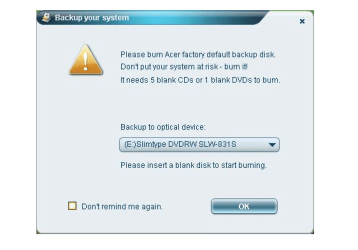
does the pc not have the acer recovery management system for you ? click the start menu orb and in search box type acer and see if a management program is in the results.

OR

Click “Start” menu.

Click “Programs.”

Click “Acer Recovery Management.”


Read more: How to Restore an Acer Computer to Factory Settings | eHow.com http://www.ehow.com/how_4478845_restore-acer-computer-factory-settings.html#ixzz13dUumIIA

if not go here

Service & Support

if you go to the website and look up SERVICE & SUPPORT and click on DRIVER DOWNLOAD and punch in your acer model number and look up APPLICATION
you should see software for your machine:)
 
Last edited:

My Computer

Computer Manufacturer/Model Number
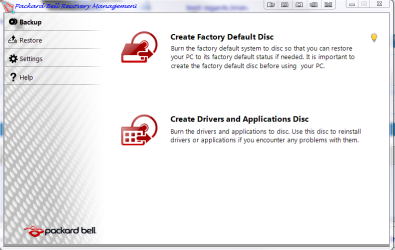
packard bell IXTREME M5722
OS
Operating System : Windows 7 Home Premium Edition 6.01.7600 SP1 (x64)
CPU
Processor : Intel Core 2 Quad Q8300 @ 2500 MHz
Motherboard
Mainboard : Packard Bell (Acer EG43M )
Memory
Physical Memory :8GB Corsair4x 2GB 800MHz C5 DDR2
Graphics Card(s)
Video Card : XFX 6700 AMD
Monitor(s) Displays
Maestro 234DL - BenQ V2220 - BenQ VW2420H
Screen Resolution
Current Display :1920x1080p pixels at 60 Hz in HD LED
Hard Drives
Hard Disks : WDC (1000 GB)
Drive C: (Hard Disk) : 428 GB available on 491 GB
Drive D: (Hard Disk) : 426 GB available on 492 GB
SAMSUNG spinpoint HD103SJ 1000.2 GB
(X 2) KINGSTON SSD NOW V 30GB
PSU
XFX ProSeries 550W PSU
Case
PACKARD BELL IXTREME
Cooling
System Blower Current: 150mA Air Flow16CFM ;Akasa 90mm rear
Keyboard
Gigabyte Aivia K8100
Mouse
TRUST-Wireless Laser Mouse - Carbon edition MI-7770C
Internet Speed
TP-LINK > TL-WN951N / AV500 Gigabit Powerline Adapters
Browser
chrome dev
Other Info
EXTRA COOLING>(FAN CONTROLLER) PC Bay Cooler 3 x 40mm fans; Akasa AK-HD-BL Blue hard drive cooler 2 x 40 mm fan 4500 rpm 29.7 dBA
Bios> American Megatrends Inc.
Version : P01-A1
Date : 08/31/2009

Attachments

  • packard bell.PNG
    packard bell.PNG
    60.1 KB · Views: 5
  • Acer.PNG
    Acer.PNG
    30 KB · Views: 4
Last edited:

My Computer

Computer Manufacturer/Model Number
packard bell IXTREME M5722
OS
Operating System : Windows 7 Home Premium Edition 6.01.7600 SP1 (x64)
CPU
Processor : Intel Core 2 Quad Q8300 @ 2500 MHz
Motherboard
Mainboard : Packard Bell (Acer EG43M )
Memory
Physical Memory :8GB Corsair4x 2GB 800MHz C5 DDR2
Graphics Card(s)
Video Card : XFX 6700 AMD
Monitor(s) Displays
Maestro 234DL - BenQ V2220 - BenQ VW2420H
Screen Resolution
Current Display :1920x1080p pixels at 60 Hz in HD LED
Hard Drives
Hard Disks : WDC (1000 GB)
Drive C: (Hard Disk) : 428 GB available on 491 GB
Drive D: (Hard Disk) : 426 GB available on 492 GB
SAMSUNG spinpoint HD103SJ 1000.2 GB
(X 2) KINGSTON SSD NOW V 30GB
PSU
XFX ProSeries 550W PSU
Case
PACKARD BELL IXTREME
Cooling
System Blower Current: 150mA Air Flow16CFM ;Akasa 90mm rear
Keyboard
Gigabyte Aivia K8100
Mouse
TRUST-Wireless Laser Mouse - Carbon edition MI-7770C
Internet Speed
TP-LINK > TL-WN951N / AV500 Gigabit Powerline Adapters
Browser
chrome dev
Other Info
EXTRA COOLING>(FAN CONTROLLER) PC Bay Cooler 3 x 40mm fans; Akasa AK-HD-BL Blue hard drive cooler 2 x 40 mm fan 4500 rpm 29.7 dBA
Bios> American Megatrends Inc.
Version : P01-A1
Date : 08/31/2009
You have been given a lot of good advice and I will throw in my two cents worth.

Always make your recover disks.

I am not sure the version of your Windows 7 will make images or not; that you can check. If it does have that capability, it works great at making images so that they can be restored in case of problems.

If it does NOT have that capability then I suggest an imaging software such as Acronis. I use Acronis simply because it seems a little faster than the built in imaging software.

Get yourself an external hard drive and create the image(s) to the external hard drive. Before creating the image, it is a good idea to make sure you are making the cleanest image possible by cleaning up your computer by deleting cookies, temporary internet files, History, remove all restore points except one, and defrag. One other note is the computer should be running without any issues when the image is made.

This assures that at any time you can go back to this image and have a good running system.

Hope this helps.
 

My Computer

OS
Windows 7 Pro
CPU
Intel(R) Pentium(R) Duel CPU E2200 2.20 Ghz
Motherboard
GA-G41M-ES2L
Memory
4 gb 2.96 Usable
Graphics Card(s)
Onboard
Sound Card
Onboard
Hard Drives
2 - 1TB WD Sata Drives
As an owner of an ACER desktop my summary suggestions (not radically different from the above):
1) Make the 2 Recovery DVDs as soon as possible. Technically it should not matter when, but ACER say straight away. These disks are essentially a copy of your hidden recovery partition on your hard drive (~8GB).
2) Read the tutorials about system images and backups.
3) Decide what trial software to keep and ditch the rest via uninstall. If you want to get rid of McAfee trial it's best to use the McAfee removal tool (MCPR).
4) If you have problems recover back to the factory state. Use the hidden partition:
Start>All programs>Acer>Acer eRecovery Management .....follow the bouncing ball. Just be patient when it starts recovery.
5) When you are happy the system is stable, install your applications
6) Make a system image (a couple would be better) to an external HDD.
7) You can do a clean install as per the Gregrocker advice at any stage but it will probably overwrite the recovery partition. At that stage I don't think it matters.
 

My Computer

Computer type
PC/Desktop
Computer Manufacturer/Model Number
Own build
OS
Windows 7x64 Home Premium SP1
CPU
Intel i7 2600k
Motherboard
ASUS P8Z68 Deluxe
Memory
G.Skill Ripjaws (DDR3-1600) 2x4GB
Graphics Card(s)
Nvidia GeForce GTS 450; Intel HD Graphics 3000(GT2+)
Monitor(s) Displays
Dell Ultrasharp IPS panel U2311H, Samsung SyncMaster P2350
Screen Resolution
1920x1080
Hard Drives
Samsung 850 Pro SSD 256GB, Samsung SSD 840 120GB, Seagates 1TB Barracuda ST31000528AS x2
PSU
Seasonic M12II 520W
Case
Lian Li Lancool PC-K60
Cooling
Case: 1x120mm, 3x140mm CPU: Hyper 212+
Keyboard
Logitech MK520 (wireless)
Mouse
Logitech MK520
Internet Speed
6-7 Mbps
Antivirus
Norton Security Premium, Malwarebytes on 2 (MSE on 3rd PC)
Browser
FireFox
Other Info
Audio: Logitech Z523 2.1
Back
Top