Access denied file sharing over home network

swarley

New member
Local time
4:50 AM
Messages
4
I have win7 on two pc's at home connected through a wireless route (lets call them pc1 and pc2)r. I have shared drives on both of the pcs but I can only access pc1's shared drive from pc2 but when i try to map the drive from pc2 to pc1, i get this message

\\PC1is not accessible. You might not have permission to use this network resource.

Why does this happens as I followed the same steps for each pc??
 

My Computer My Computer

OS
windows 7
I have win7 on two pc's at home connected through a wireless route (lets call them pc1 and pc2)r. I have shared drives on both of the pcs but I can only access pc1's shared drive from pc2 but when i try to map the drive from pc2 to pc1, i get this message

\\PC1is not accessible. You might not have permission to use this network resource.

Why does this happens as I followed the same steps for each pc??

For this problem you need to make sure that the Time and Date are in sync on both machines. You may need to check the bios Time and Date to make sure it's correct also.
 

My Computer My Computer

Computer type
PC/Desktop
Computer Manufacturer/Model Number
Home built
OS
Windows 7 Ult, Windows 8.1 Pro,
CPU
Q9650-4.275GHz, E8600 4.5GHz, E6750-3.8GHz
Motherboard
Evga 780i FTW
Memory
G.Skill PC2 9600 1200Mhz 5 5 5 15 2T
Graphics Card(s)
GTX480
Sound Card
Asus Xonar D2
Monitor(s) Displays
HannsG
Screen Resolution
1680X1050
Hard Drives
GSkill Phoenix Pro 120GB SSD
PSU
ThermalTake Toughpower 1000Watt modular
Case
ThermalTake XaserV
Cooling
Xigmatek S1283
Keyboard
Logitech G15
Mouse
Logitech G9
Internet Speed
T1
oh ok. But then why does it only work one way if the time and date need to be sync'ed
 

My Computer My Computer

OS
windows 7
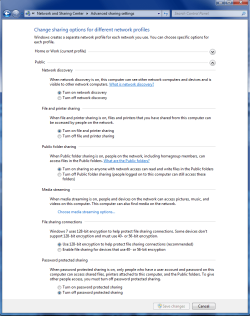
If that doesn't work make sure these settings are set correctly under advanced network settings which also can fix the access denied error message.
 

Attachments

  • Home or work homegroup enable.PNG
    Home or work homegroup enable.PNG
    45 KB · Views: 739
  • public sharing enabled all.PNG
    public sharing enabled all.PNG
    39.7 KB · Views: 511

My Computer My Computer

Computer type
PC/Desktop
Computer Manufacturer/Model Number
Home built
OS
Windows 7 Ult, Windows 8.1 Pro,
CPU
Q9650-4.275GHz, E8600 4.5GHz, E6750-3.8GHz
Motherboard
Evga 780i FTW
Memory
G.Skill PC2 9600 1200Mhz 5 5 5 15 2T
Graphics Card(s)
GTX480
Sound Card
Asus Xonar D2
Monitor(s) Displays
HannsG
Screen Resolution
1680X1050
Hard Drives
GSkill Phoenix Pro 120GB SSD
PSU
ThermalTake Toughpower 1000Watt modular
Case
ThermalTake XaserV
Cooling
Xigmatek S1283
Keyboard
Logitech G15
Mouse
Logitech G9
Internet Speed
T1
I had those setting already but it is still having the same problem. I evem turned the firewall off but nothing.
 

My Computer My Computer

OS
windows 7

My Computer My Computer

Computer type
PC/Desktop
Computer Manufacturer/Model Number
Home built
OS
Windows 7 Ult, Windows 8.1 Pro,
CPU
Q9650-4.275GHz, E8600 4.5GHz, E6750-3.8GHz
Motherboard
Evga 780i FTW
Memory
G.Skill PC2 9600 1200Mhz 5 5 5 15 2T
Graphics Card(s)
GTX480
Sound Card
Asus Xonar D2
Monitor(s) Displays
HannsG
Screen Resolution
1680X1050
Hard Drives
GSkill Phoenix Pro 120GB SSD
PSU
ThermalTake Toughpower 1000Watt modular
Case
ThermalTake XaserV
Cooling
Xigmatek S1283
Keyboard
Logitech G15
Mouse
Logitech G9
Internet Speed
T1
Did the whole Homegroup thing and the clocks are sync'ed but the problem is still there, I can only access the stuff on PC2 from PC1 but not the other way round. The only thing that is not giving me the permission message is the public user. Why is it working only one way?
 

My Computer My Computer

OS
windows 7
Back
Top