Access denied to cookies, docs & settings, etc

robertpri

New member
Local time
10:46 PM
Messages
46
I had this nightmware with Vista, but it was easy to fix. Just take ownership. But a scan shows I have many tracking cookies, but Win 7 won't let me access it. Denied. I clicked the 'turn off password' thing, but still cannot access docs and settings, cookies, and many other useful folders.

Very annoying, since I am the only user and logged on.
 

My Computer My Computer

Computer Manufacturer/Model Number
Asus G50 and Toshiba L505
OS
Win 7 - 64 Pro
CPU
2.28
Motherboard
?- asus laptop
Memory
4 gb
Graphics Card(s)
? laptop
Sound Card
? laptop
Monitor(s) Displays
dual display, laptop and 24" Samsung
Hard Drives
two 250gb drives in laptop and one 250 Esata
PSU
laptop
Case
laptop
Cooling
laptop

My Computer My Computer

Computer type
PC/Desktop
Computer Manufacturer/Model Number
Bruce ... somewhere in his 40's
OS
Windows 7 Ultimate 32bit SP1
CPU
Intel(R) Core(TM)2 Quad CPU @ 2.40GHz, 2400 MHz
Motherboard
INTEL/D975XBX2
Memory
4 GB
Graphics Card(s)
ATI Radeon HD 2600 Pro
Monitor(s) Displays
Samsung SyncMaster 914v
Screen Resolution
1280 x 1024
Hard Drives
2/500GB each ... ST3500630AS ATA Device.
One is not connected
PSU
Rocketfish 700 W
Case
G.Skill Gigabyte Chassis
Keyboard
Standard PS/2 Keyboard
Mouse
Microsoft PS/2 Mouse
Internet Speed
DSL
Antivirus
Avira Internet Security
Browser
IE 11
Other Info
ATI HDMI Audio
Because the folders you are trying to access are not really the folders you are suppose to be accessing! The Cookies folder you are looking for it right here: C:\Users\[username]\AppData\Roaming\Microsoft\Windows\Cookies

Document and Settings is nothing but a junction that points to C:\Users

Every hidden folder that is denying you access is nothing more then a junction and you better well leave them alone. I am very serious when I say leave them alone.
 

My Computer My Computer

Computer type
PC/Desktop
Computer Manufacturer/Model Number
Alienware Aurora ALX R4
OS
Windows 10 Pro (x64)
CPU
Intel Core i7-3930K (3.2GHz - 4.5GHz)
Motherboard
Alienware Aurora-R4 x79
Memory
4x Samsung 4GB PC3-12800 DDR3 (16GB 1600MHz)
Graphics Card(s)
Nvidia Geforce GTX 690
Sound Card
SteelSeries Siberia Elite
Monitor(s) Displays
Dell UltraSharp U3011
Screen Resolution
2560x1600
Hard Drives
Samsung 850 Pro 256 GB, Seagate 1TB Desktop Hybrid HDD, 2x Western Digital 4TB Green HDD
PSU
875W Some Dell PSU <.<
Case
Alienware Aurora ALX
Cooling
Custom Liquid Cooling (EK CPU & GPU blocks) dual EK 480RAD
Keyboard
Logitech G710+ Mechanical
Mouse
Logitech G700s
Internet Speed
Verizon Fios (50 mbps average)
Other Info
Server: Intel NUC D54250WYK: i5-4250U, 16GB, 256 GB mSATA, Windows Server 2012 R2
Because the folders you are trying to access are not really the folders you are suppose to be accessing! The Cookies folder you are looking for it right here: C:\Users\[username]\AppData\Roaming\Microsoft\Windows\Cookies
You are right--that is where I found the tracking cookies. Could MS have hidden them any better? Nowhere in help could I find this info.

All they want is the scorched earth delete history method, and then spend an evening getting back to one's sites.

many thanks!

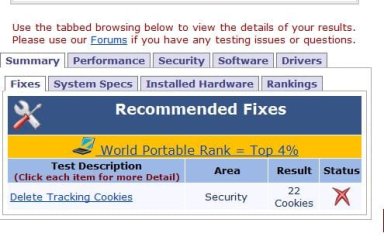
Odd one: I ranked top 8% on pcpitstop with the only flaw being those tracking cookies. I followed your steps and removed them. Re ran tests and now rank top 4%, but those 22 cookies still show, even though they are gone. Odd...
bob
 

Attachments

  • 1.JPG
    1.JPG
    36.1 KB · Views: 48
Last edited:

My Computer My Computer

Computer Manufacturer/Model Number
Asus G50 and Toshiba L505
OS
Win 7 - 64 Pro
CPU
2.28
Motherboard
?- asus laptop
Memory
4 gb
Graphics Card(s)
? laptop
Sound Card
? laptop
Monitor(s) Displays
dual display, laptop and 24" Samsung
Hard Drives
two 250gb drives in laptop and one 250 Esata
PSU
laptop
Case
laptop
Cooling
laptop
Seeing AppData Users\[username]

Because the folders you are trying to access are not really the folders you are suppose to be accessing! The Cookies folder you are looking for it right here: C:\Users\[username]\AppData\Roaming\Microsoft\Windows\Cookies

Document and Settings is nothing but a junction that points to C:\Users

Every hidden folder that is denying you access is nothing more then a junction and you better well leave them alone. I am very serious when I say leave them alone.


If you go from Computer-->C drive-->Users-->[username] there is no AppData folder visible. Is there a way to make it visible so you can get to the data using the dummy point-and-click interface that makes Windows so nice? Or do you have to do everything from the c:\?

Thanks a bunch!
 

My Computer My Computer

OS
Windows 7 64 bit
CPU
Intel Core i7 920 @ 2.67GHz
Motherboard
MSI X58 Platinum
Memory
6GB PC3 12800
Graphics Card(s)
2@ NVIDIA GeForce GTS 250
Monitor(s) Displays
4@Acer P201w
Hard Drives
128GB Corsair solid state drive
1TB Western Digital @7200
PSU
Silencer 750W
Case
Cooler Master 932 HAF full tower
Cooling
Corsair H50 Water cooler, lots of fans
Have you tried using CCleaner?
 

My Computer My Computer

Computer Manufacturer/Model Number
Toshiba Satellite S875D-S7239 laptop
OS
MS Windows 7 Ultimate SP1 64-bit
CPU
AMD A10-4600M
Motherboard
AMD Pumori (Socket FT1)
Memory
6.00 GB Dual-Channel DDR3 @ 798MHz (11-11-12-28)
Graphics Card(s)
AMD Radeon HD 7660G
Sound Card
High Definition Audio Device
Monitor(s) Displays
Generic PnP Monitor (1600x900@60Hz)
Screen Resolution
1600x900@60Hz
Hard Drives
SSD 119GB Corsair CSSD-V128GB2 ATA Device
Keyboard
Standard PS/2 Keyboard
Mouse
HP Wireless Optical Mobile Mouse Model FHA-3410
Internet Speed
What the local pub, local coffee shop offers.
Other Info
Optical Drive:MATSHITA BD-CMB UJ160B ATA Device


Also have an Asus ha1002xp netbook with Win 7 Ultimate installed.
Back
Top