Access Denied to Windows Drive.

Farhang

New member
Local time
11:35 PM
Messages
6
Hello,

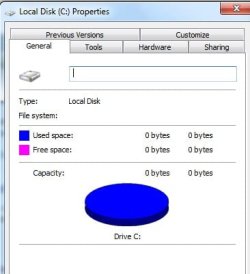
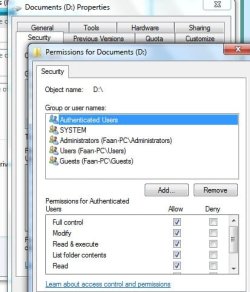
I managed to remove all user access to the windows drive by mistake.

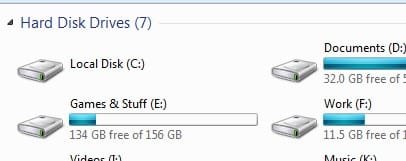
Now i cant access my main windows drive. Windows runs fine but i can't run some software, save any files to desktop and stuff. Please help as i don't want to reinstall !

I tried following http://social.technet.microsoft.com...9d14-13ccceeb756c?prof=required&wa=wsignin1.0

but that doesn't help as i dont' see any security tab inside properties.
 

Attachments
  • Clipboard01.jpg
    Clipboard01.jpg
    10 KB · Views: 7
  • Clipboard011.jpg
    Clipboard011.jpg
    17.2 KB · Views: 31

My Computer My Computer

At a glance

Windows 7 Ultimate
OS
Windows 7 Ultimate
what exactly were you messing with when it did this?

I had done this a long time ago to my computer but eventually got it back after constantly clicking around.....

I do know 1 trick in the command prompt.....
It uses the Administrator (GOD) account to fix your administrator (JESUS) account....
Thats usualy what I do when my regular admin account has any kinds of permission issues...
Just be careful if u mess anything up in the Administrator account theres nothing higher than that to fix it, then you'll need a reinstall.....

Open Dos: (Two seperate comands only use 1 at a time)

net user administrator /active:no

net user administrator /active:yes

Open dos with administrator rights...
Type the command above with the yes in it....
log off, then log into the Administrator (GOD) account...
Fix your admin (Jesus) account however needed....
**Right click on the OS hard drive and change the security permissions for the other users...
**If this does not work, delete your user you messed up then create a new one.....
**If doing that I recommend a restart between the deletion and creation of accounts, just in case....also to try a different name for the account if recreating it with the same name does not work....
after your fixed....
Then, go back into your original account and open dos with admin rights and type the dos command with the no in it to disable the Administrator (GOD) account.....
this way nobody can use it to log in....
 
Last edited:

My Computer My Computer

At a glance

Windows 7 Home PremiumIntel Core 2 Duo6 gigNvidia GTX 260M 1G
Computer Manufacturer/Model Number
ASUS G71 Laptop
OS
Windows 7 Home Premium
CPU
Intel Core 2 Duo
Memory
6 gig
Graphics Card(s)
Nvidia GTX 260M 1G
Sound Card
Altec Lansing Audio
Monitor(s) Displays
17''
Hard Drives
Western Digital 500 gb 7200 RPM
Segate 500 gb 7200 RPM
Cooling
Big Fan
Hello Farhang, and welcome to Seven Forums.

I believe that the easiest way to fix this would be to do a repair install. You will not lose anything.

Hope this helps,
Shawn
 

My Computer My Computer

At a glance

64-bit Windows 11 Pro for WorkstationsIntel i7-8700K OC'd to 5 GHz64 GB (4x16GB) G.SKILL TridentZ RGB DDR4 3600...ASUS ROG-STRIX-GTX1080TI-O11G-GAMING
Computer type
PC/Desktop
Computer Manufacturer/Model Number
Self built custom
OS
64-bit Windows 11 Pro for Workstations
CPU
Intel i7-8700K OC'd to 5 GHz
Motherboard
ASUS ROG Maximus XI Formula Z390
Memory
64 GB (4x16GB) G.SKILL TridentZ RGB DDR4 3600 MHz
Graphics Card(s)
ASUS ROG-STRIX-GTX1080TI-O11G-GAMING
Sound Card
Integrated
Monitor(s) Displays
2 x Samsung Odyssey G7 27"
Screen Resolution
2560x1440
Hard Drives
1TB Samsung 990 PRO M.2,
4TB Samsung 990 PRO PRO M.2,
TerraMaster F8 SSD Plus NAS
PSU
Seasonic Prime Titanium 850W
Case
Thermaltake Core P3
Cooling
Corsair Hydro H115i
Keyboard
Logitech wireless K800
Mouse
Logitech MX Master 4
Internet Speed
2 Gb/s Download and 100 Mb/s Upload
Antivirus
Malwarebyte Anti-Malware Premium
Browser
Google Chrome
Other Info
Logitech Z625 speaker system,
Logitech BRIO 4K Pro webcam,
HP Color LaserJet Pro MFP M477fdn,
APC SMART-UPS RT 1000 XL - SURT1000XLI,
Galaxy S23 Plus phone
I was on security tab on properties of the drive and removed all users including administrator to try something but mistakenly saved them.

Will your method work even if i cannot access the drive in Administrator ( GOD ) account ?
 

Attachments

  • Clipboard013.jpg
    Clipboard013.jpg
    32.8 KB · Views: 35

My Computer My Computer

At a glance

Windows 7 Ultimate
OS
Windows 7 Ultimate
Yes, those should remain intact. See the yellow TIP box at the top of the tutorial link above for a complete list of the minor things that may be reset to default though.
 

My Computer My Computer

At a glance

64-bit Windows 11 Pro for WorkstationsIntel i7-8700K OC'd to 5 GHz64 GB (4x16GB) G.SKILL TridentZ RGB DDR4 3600...ASUS ROG-STRIX-GTX1080TI-O11G-GAMING
Computer type
PC/Desktop
Computer Manufacturer/Model Number
Self built custom
OS
64-bit Windows 11 Pro for Workstations
CPU
Intel i7-8700K OC'd to 5 GHz
Motherboard
ASUS ROG Maximus XI Formula Z390
Memory
64 GB (4x16GB) G.SKILL TridentZ RGB DDR4 3600 MHz
Graphics Card(s)
ASUS ROG-STRIX-GTX1080TI-O11G-GAMING
Sound Card
Integrated
Monitor(s) Displays
2 x Samsung Odyssey G7 27"
Screen Resolution
2560x1440
Hard Drives
1TB Samsung 990 PRO M.2,
4TB Samsung 990 PRO PRO M.2,
TerraMaster F8 SSD Plus NAS
PSU
Seasonic Prime Titanium 850W
Case
Thermaltake Core P3
Cooling
Corsair Hydro H115i
Keyboard
Logitech wireless K800
Mouse
Logitech MX Master 4
Internet Speed
2 Gb/s Download and 100 Mb/s Upload
Antivirus
Malwarebyte Anti-Malware Premium
Browser
Google Chrome
Other Info
Logitech Z625 speaker system,
Logitech BRIO 4K Pro webcam,
HP Color LaserJet Pro MFP M477fdn,
APC SMART-UPS RT 1000 XL - SURT1000XLI,
Galaxy S23 Plus phone
It should work if u access what is in that screen shot through the Administrator (GOD) account.... (It is actually named administrator.....lol)
not your administrator account that you gave a name you always use.....

It is accessible, you just have to correctly open command prompt with admin rights and type the command with the yes in it....

As for a system repair install, I have lost data before with VISTA home premium when i have done that....
what happened was my user files were missing and my programs were still installed....
cuz my user was deleted.... I thnk i clicked the wrong option before though if you watch what is clicked you should be fine :)
 

My Computer My Computer

At a glance

Windows 7 Home PremiumIntel Core 2 Duo6 gigNvidia GTX 260M 1G
Computer Manufacturer/Model Number
ASUS G71 Laptop
OS
Windows 7 Home Premium
CPU
Intel Core 2 Duo
Memory
6 gig
Graphics Card(s)
Nvidia GTX 260M 1G
Sound Card
Altec Lansing Audio
Monitor(s) Displays
17''
Hard Drives
Western Digital 500 gb 7200 RPM
Segate 500 gb 7200 RPM
Cooling
Big Fan
Yes the God account ,main administrator account i had to enable it from the mmc, but still can't access the drive after logging into that.

What do the commands do exactly?

Thanks again
 

Attachments

  • Clipboard011.jpg
    Clipboard011.jpg
    13.7 KB · Views: 8

My Computer My Computer

At a glance

Windows 7 Ultimate
OS
Windows 7 Ultimate
the commands allow you to access the account through the log in menu....
I had done this myself a long time ago in vista.....
but my admin account still had privileges to the HDD....
It looks like your admin account does not have the permissions either.....

The next alternative is the repair installation like Brink on here posted.....
Just make sure it is done correctly and just in case it would be good to back up your personal files....

And, when all this is done make sure you type the dos command to deactivate the administrator account from the log on menu...
 

My Computer My Computer

At a glance

Windows 7 Home PremiumIntel Core 2 Duo6 gigNvidia GTX 260M 1G
Computer Manufacturer/Model Number
ASUS G71 Laptop
OS
Windows 7 Home Premium
CPU
Intel Core 2 Duo
Memory
6 gig
Graphics Card(s)
Nvidia GTX 260M 1G
Sound Card
Altec Lansing Audio
Monitor(s) Displays
17''
Hard Drives
Western Digital 500 gb 7200 RPM
Segate 500 gb 7200 RPM
Cooling
Big Fan
Back
Top