Solved Access denied when trying to remove a CD Drive

SabrinaM

New member
Local time
7:00 AM
Messages
6
Location
Florida
When I try to remove a CD Drive (CDFS), it tells me access denied. It's frustrating because I've tried deleting it with a command prompt, but no luck. It says that it is a removable storage, but it was a download gone wrong. I finally managed to delete the file it came from, but the thing won't go away. I'm worried it might be a virus or something. Can anyone help?
 

My Computer My Computer

OS
Unknown
Hi SabrinaM. Welcome to the forum.

CDFS is a special file system used to store data on CDs that can be used by multiple platforms (operating systems).
CDFS (Compact Disc File System) Definition

Can you tell us anything about what you were doing (downloading) when this first happened? It might help in figuring out how to uninstall it.

I assume that you mean that this is a phantom drive that shows up in Windows Explorer? Does it also show up in My Computer? In Devices & Printers?

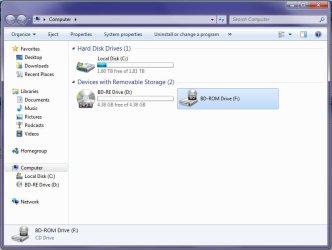
Can you post a screenshot showing the problem?
 

My Computer My Computer

Computer type
PC/Desktop
Computer Manufacturer/Model Number
Home Built - Jan 2013
OS
Windows 7 64 Bit Home Premium SP1
CPU
i7-3820
Motherboard
Asus P9X79-PRO - Bios 4608
Memory
GSkill F3-14900CL9Q - 16GB
Graphics Card(s)
EVGA GeForce GTX660 - Driver 352.86
Sound Card
On board Realtek ALC898
Monitor(s) Displays
Acer S271HL
Screen Resolution
1920 x 1080
Hard Drives
#1- Samsung 840 Pro Series
#2- Western Digital WD1002FAEX Sata3 Black
#3- Western Digital WD1002FAEX Sata3 Black
PSU
Corsair CMPSU-850TX-V2 - 850 watt (by Seasonic)
Case
Corsair Obsidian 550D
Cooling
Standard 3 120mm case fans, Cooler Master Hyper 212 EVO
Keyboard
MS KC-0405
Mouse
Intellimouse 5-button
Internet Speed
56 Mbits/Sec (on a good day)
Antivirus
Avast & Malwarebytes
Browser
Firefox
Other Info
Asus DVD - DRW-24B1ST 24X
I was downloading a video game (a torrent). It shows up only in 'My computer'. Here's a screen shot.
 

Attachments

  • Screen.jpg
    Screen.jpg
    43.4 KB · Views: 17

My Computer My Computer

OS
Unknown
Ugh... Torrents.

That download could have installed any number of "helper" programs - like Download managers, or in this case, a CDFS creator/reader/supporter.

Is the game still installed? I'm wondering what would happen if you uninstalled it. I would not hold out a lot of hope though.

A few things to try:

In My Computer > click on "Uninstall or Change a Program" on the top there > and look for any suspect programs and uninstall them. Hopefully it will be obvious, like "CDFS Creator" or something like that.

Or, Back in My Computer:

  • Right click on "BD-ROM ( F: )
  • Click on "Properties"
  • Click on the HARDWARE Tab
  • Click to highlight the phantom drive (hopefully it will be there)
  • Click on "Properties"
  • Click on the DRIVERS Tab
  • Click on the uninstall button.
Or, If only a short period of time has gone by since this problem surfaced (when you installed the program) you could uninstall everything that was installed on that date and then do a System Restore to a date before that.

Let me know if any of that works.
 

My Computer My Computer

Computer type
PC/Desktop
Computer Manufacturer/Model Number
Home Built - Jan 2013
OS
Windows 7 64 Bit Home Premium SP1
CPU
i7-3820
Motherboard
Asus P9X79-PRO - Bios 4608
Memory
GSkill F3-14900CL9Q - 16GB
Graphics Card(s)
EVGA GeForce GTX660 - Driver 352.86
Sound Card
On board Realtek ALC898
Monitor(s) Displays
Acer S271HL
Screen Resolution
1920 x 1080
Hard Drives
#1- Samsung 840 Pro Series
#2- Western Digital WD1002FAEX Sata3 Black
#3- Western Digital WD1002FAEX Sata3 Black
PSU
Corsair CMPSU-850TX-V2 - 850 watt (by Seasonic)
Case
Corsair Obsidian 550D
Cooling
Standard 3 120mm case fans, Cooler Master Hyper 212 EVO
Keyboard
MS KC-0405
Mouse
Intellimouse 5-button
Internet Speed
56 Mbits/Sec (on a good day)
Antivirus
Avast & Malwarebytes
Browser
Firefox
Other Info
Asus DVD - DRW-24B1ST 24X
Do you have a disk emulator like Daemontools, Alcohol 52% or whatever?
They are used to install most torrented stuff without burning the "pirated_torrented_game.iso" to a physical disk.
It is probably its virtual drive.
 

My Computer My Computer

Computer type
PC/Desktop
Computer Manufacturer/Model Number
custom built
OS
Win 7 Pro 64-bit 7601
CPU
AMD Phenom 9650 QuadCore, revision DR-B3
Motherboard
ASUS M4A78
Memory
5 GB yes I run 2x 2GB and 1x 1GB, different brand, spank me.
Graphics Card(s)
NVIDIA GeForce 9800 GT 512 Mb, unknown manufacturer.
Sound Card
Crappy Realtek Integrated Audio
Monitor(s) Displays
Fujitsu Siemens P19-3P
Screen Resolution
1280 x 1024 x 32 bits @ 60 Hz Oh yeah, 4:3 rocks!
Hard Drives
(1) MAXTOR S TM3320613AS SATA Disk Device (2) STM35004 18AS SATA Disk Device (3) TOSHIBA USB 2.5"-HDD
PSU
whatever, around 450w
Case
Scavenged from old company PC, 10+ years old
Cooling
CPU fan, GPU fan, case fan, nothing fancy
Keyboard
Microsoft, PS/2, white.
Mouse
Optical, logitec.
Internet Speed
effective max speeds: 70-ish kB/s down 30-ish kB/s up
Antivirus
Avira, free edition.
Browser
Firefox with FXChrome to make it look like Google Chrome :P
Other Info
Was discarded by previous owner due to "horrible performance".
Was running Win Xp from a IDE drive. Yeah. Was a pain.
SATA II drive and Win7 and it zips away! Yay!
Hi SabrinaM,

You may try GhostBuster Setup (98926). Use the portable version. GhostBuster - Download: GhostBuster Setup (98926)

I have had no occasion to use it, but have seen reports from other users who had successfully removed the phantom drives with it.

Please do read the documentation on the Ghostbuster site and also the editor's description of the program here Download GhostBuster 98926 Free - Enumerates all devices, detects the ghosted ones - Softpedia diligently.

"Beware that windows has a fair number of devices that are ghosted but should not be ununistalled (like devices in the sound, video and game controller class or system and non plug-n-play devices). Ghostbuster marks most of these as services.

So use it with care and only if you know what you are doing!

NOTE: For Vista and Windows 7 edit the properties of the shortcut so GhostBuster runs in WinXP compatibility mode."

Good luck.
 

My Computer My Computer

OS
Windows 7 Home Premium 32 bit
Ugh... Torrents.

In My Computer > click on "Uninstall or Change a Program" on the top there > and look for any suspect programs and uninstall them. Hopefully it will be obvious, like "CDFS Creator" or something like that.

Or, Back in My Computer:

  • Right click on "BD-ROM ( F: )
  • Click on "Properties"
  • Click on the HARDWARE Tab
  • Click to highlight the phantom drive (hopefully it will be there)
  • Click on "Properties"
  • Click on the DRIVERS Tab
  • Click on the uninstall button.
Or, If only a short period of time has gone by since this problem surfaced (when you installed the program) you could uninstall everything that was installed on that date and then do a System Restore to a date before that.

I couldn't find any 'suspect programs', so I tried option #2, but it wouldn't let me uninstall. I deleted the file that brought this all about a couple days ago, so that's not it.
 

My Computer My Computer

OS
Unknown
Do you have a disk emulator like Daemontools, Alcohol 52% or whatever?
They are used to install most torrented stuff without burning the "pirated_torrented_game.iso" to a physical disk.
It is probably its virtual drive.

I already deleted the thing from DAEMONtools, no luck.
 

My Computer My Computer

OS
Unknown
Hi SabrinaM,

You may try GhostBuster Setup (98926). Use the portable version. GhostBuster - Download: GhostBuster Setup (98926)

I have had no occasion to use it, but have seen reports from other users who had successfully removed the phantom drives with it.

Please do read the documentation on the Ghostbuster site and also the editor's description of the program here Download GhostBuster 98926 Free - Enumerates all devices, detects the ghosted ones - Softpedia diligently.

"Beware that windows has a fair number of devices that are ghosted but should not be ununistalled (like devices in the sound, video and game controller class or system and non plug-n-play devices). Ghostbuster marks most of these as services.

So use it with care and only if you know what you are doing!

NOTE: For Vista and Windows 7 edit the properties of the shortcut so GhostBuster runs in WinXP compatibility mode."

Good luck.

I'd rather not download anything more, at least until I know what I'm doing, but thanks.
 

My Computer My Computer

OS
Unknown
I already deleted the thing from DAEMONtools, no luck.
did you deleted the iso or the virtual drive? they are two different and separate things. This is how to delete the drive from within Daemontools.
 

My Computer My Computer

Computer type
PC/Desktop
Computer Manufacturer/Model Number
custom built
OS
Win 7 Pro 64-bit 7601
CPU
AMD Phenom 9650 QuadCore, revision DR-B3
Motherboard
ASUS M4A78
Memory
5 GB yes I run 2x 2GB and 1x 1GB, different brand, spank me.
Graphics Card(s)
NVIDIA GeForce 9800 GT 512 Mb, unknown manufacturer.
Sound Card
Crappy Realtek Integrated Audio
Monitor(s) Displays
Fujitsu Siemens P19-3P
Screen Resolution
1280 x 1024 x 32 bits @ 60 Hz Oh yeah, 4:3 rocks!
Hard Drives
(1) MAXTOR S TM3320613AS SATA Disk Device (2) STM35004 18AS SATA Disk Device (3) TOSHIBA USB 2.5"-HDD
PSU
whatever, around 450w
Case
Scavenged from old company PC, 10+ years old
Cooling
CPU fan, GPU fan, case fan, nothing fancy
Keyboard
Microsoft, PS/2, white.
Mouse
Optical, logitec.
Internet Speed
effective max speeds: 70-ish kB/s down 30-ish kB/s up
Antivirus
Avira, free edition.
Browser
Firefox with FXChrome to make it look like Google Chrome :P
Other Info
Was discarded by previous owner due to "horrible performance".
Was running Win Xp from a IDE drive. Yeah. Was a pain.
SATA II drive and Win7 and it zips away! Yay!
Back
Top