

I have two laptops at my company that have Windows 7 Home - thus cannot login to AD/Domain as a specific user. They in-turn use a local administrative account setup on those laptops. We have a database setup with linked connections to our SQL Server 2005.
Whenever we're trying to access those linked tables we get the following error message:
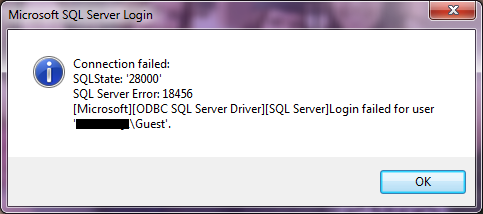
We can bypass this issue by manually typing in the Login/Password within this error prompt.
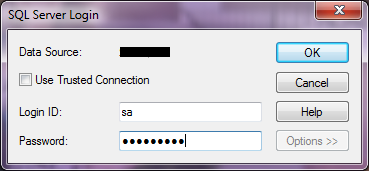
What's strange is that we have ODBC setup to use the SQL Server Authentication:

That SHOULD allow us to not use Windows Authentication (as you can see it's trying to use the 'Guest' account on Windows 7. I've tried making this change through both x32 and x64 versions of ODBC (located in wow64). I've searched all over the internet concerning this issue but no one seems to have anything similar. This used to work a few weeks ago and I don't know of anything we changed other than a few system updates.
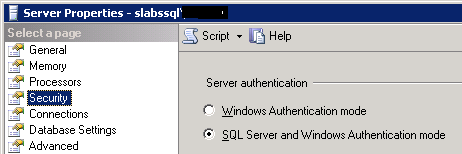
The SQL Server's Security is setup to use both authentication methods:
Our SQL Server gives us an Error: 18456, Severity: 14, State: 11
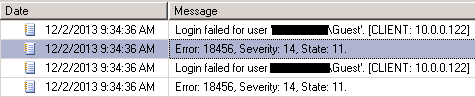
A quick Google search explains that State 11 means, "Valid login but server access failure".
Any help please? The only solution I have right now is to install W7 Pro...
Thanks
Whenever we're trying to access those linked tables we get the following error message:
We can bypass this issue by manually typing in the Login/Password within this error prompt.
What's strange is that we have ODBC setup to use the SQL Server Authentication:
That SHOULD allow us to not use Windows Authentication (as you can see it's trying to use the 'Guest' account on Windows 7. I've tried making this change through both x32 and x64 versions of ODBC (located in wow64). I've searched all over the internet concerning this issue but no one seems to have anything similar. This used to work a few weeks ago and I don't know of anything we changed other than a few system updates.
The SQL Server's Security is setup to use both authentication methods:
Our SQL Server gives us an Error: 18456, Severity: 14, State: 11
A quick Google search explains that State 11 means, "Valid login but server access failure".
Any help please? The only solution I have right now is to install W7 Pro...
Thanks
My Computer
At a glance
Windows 7 Pro x64Intel Core i7 920Corsair XMS3 12GB (3x2GB) DDR3 1333EVGA GTX 470 1280MB GDDR5 DX11
- Computer Manufacturer/Model Number
- Me
- OS
- Windows 7 Pro x64
- CPU
- Intel Core i7 920
- Motherboard
- ASUS P6T Deluxe V2
- Memory
- Corsair XMS3 12GB (3x2GB) DDR3 1333
- Graphics Card(s)
- EVGA GTX 470 1280MB GDDR5 DX11
- Monitor(s) Displays
- ASUS VW246H | ACER AL2216W
- Screen Resolution
- 3600x1080
- Hard Drives
- 1x Corsair Vertex 3 SSD (120GB)
1x Corsair Vertex 2 SSD (60GB)
2x Western Digital Black (500GB/1TB)
1x External WD Green eSATA (1TB)
- PSU
- Corsair 850HX
- Case
- Velocity Micro FullTower
- Keyboard
- Logitech G110
- Mouse
- Logitech G500
- Internet Speed
- http://www.speedtest.net/result/1226664359.png
- Antivirus
- MSE
- Browser
- Chrome
- Other Info
- Logitech Z-5500 5.1 Surround Sound
Logitech C260 Webcam
Creative Fatal1ty Headset
