JavaScript is disabled. For a better experience, please enable JavaScript in your browser before proceeding.
You are using an out of date browser. It may not display this or other websites correctly.
You should upgrade or use an
alternative browser .
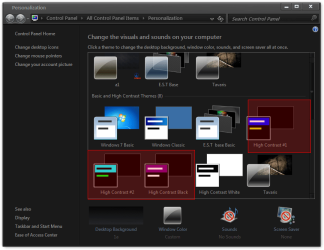
I am legally blind and currently use the "high contrast" setting with the control panel in windows XP. I tried a laptop with windows 7 and I could not find any such setting. I require a dark background and light color letters for Emails and general web use. Did I miss something?
Bruce in the Peg
Jerry ☮ 1956-2019 R.I.P.
VIP
SF Team
Personalization.png
37.5 KB
· Views: 12
Last edited by a moderator: May 6, 2011
Computer type Laptop Computer Manufacturer/Model Number Sager NP9170 OS Win 7 Pro x64 / Win 10 Pro CPU Intel(R) Core(TM) i7-3630QM CPU @ 2.40GHz Motherboard CLEVO P170EM Memory 12 GB Graphics Card(s) (1) Intel(R) HD Graphics 4000 (2) NVIDIA GeForce GTX 675M Sound Card (1) Realtek High Definition Audio (2) Intel(R) Display Aud Monitor(s) Displays 17.3 Screen Resolution 1920x1080 Hard Drives (1) Samsung 860 EVO 500GB(OS) (1) Samsung 860 EVO 500GB(Data) Keyboard Backlite Antivirus MSE, Malwarebytes Pro Browser Firefox Other Info DESKTOP: Custom-built.