Accessing Intel Mobile Express Chipset SATA AHCI Controller for DMA

jacko

New member
Local time
11:56 AM
Messages
3
Am running a new Lenovo G570 laptop with Windows 7 Home Premium. Attempting to access my IDE ATA/ATAPI controller (Intel Mobile Express Chipset SATA AHCI controller) to check for DMA settings. Getting nowhere, because what I get is a message that tells me it is working properly. No opportunity to see whether or not it is running as DMA or PIO. The computer has Intel Core i3 installed, and the driver was preinstalled when I purchased the machine. Have attempted to rip a DVD, and while it worked, it took a looooong time to load and the result was not particularly useful (short homemade DVD that duped three times!). Is it possible to access settings beyond "working properly" so that I can be sure that the rip/burn process is OK? Help appreciated! Thanks, Jacko.
 

My Computer My Computer

At a glance

Windows 7 Home Premium 64 bit
OS
Windows 7 Home Premium 64 bit

My Computer My Computer

At a glance

Windows 7 Professional SP1 - x64 [Non-UEFI Boot]Ivy Bridge Core i5 3570K (Delidded)G.Skill "Ares" DDR3 PC3-12800 - 1600MHz (16Gb)Asus Dual-RX480-O4G
Computer type
PC/Desktop
Computer Manufacturer/Model Number
Custom Build
OS
Windows 7 Professional SP1 - x64 [Non-UEFI Boot]
CPU
Ivy Bridge Core i5 3570K (Delidded)
Motherboard
Asus P8Z77-V LE PLUS
Memory
G.Skill "Ares" DDR3 PC3-12800 - 1600MHz (16Gb)
Graphics Card(s)
Asus Dual-RX480-O4G
Sound Card
Creative Sound Blaster Z w/5.1 sound system
Monitor(s) Displays
Asus IPS 23"
Screen Resolution
16/9
Hard Drives
Internal:
500Go Sata 6Gb/s (x2)
500Go Sata 3Gb/s (x2)
SSD 60Go Sata 6Gb/s
PSU
In Win C 900W Series 80+ Platinum
Case
Thermaltake Chaser A71
Cooling
Custom Water Cooling Loop
Keyboard
Cooler Master QuickFire XTi
Mouse
Razer Imperator 2012 (4G)
Antivirus
MSE
Browser
IE 11.0.xxx Rtm
Other Info
"Raid0" with Intel Smart Response Technology (HDD/SSD)
Non: Many thanks for the leads. Will check them out to see if there are some nuggets of wisdom buried therein. Guess nobody ever said life was easy!
 

My Computer My Computer

At a glance

Windows 7 Home Premium 64 bit
OS
Windows 7 Home Premium 64 bit
Yeah, not an easy that Dma thing!

On XP it was pretty ok to reset Pio mode to Dma just to uninstall the primary IDE channel then reboot or set it to Ultra DMA 5.

My intel's Storage manager settings have greyed-out the parameters box, so i can't really check either.

I can only know when i do uninstall the Intels drivers and let windows 7 loads its own drivers (msahci.sys) then i can access to that Dma setting in Devices Manager. But whats the point when i will have to install Intels one again?

Check your Bios Setting for Dma settings aswell

Maybe look for CRC errors with an old CDs...you should find over the Net some free softwares to help you on task.

Also you can check your burnt medias with VSO Inspector
 
Last edited:

My Computer My Computer

At a glance

Windows 7 Professional SP1 - x64 [Non-UEFI Boot]Ivy Bridge Core i5 3570K (Delidded)G.Skill "Ares" DDR3 PC3-12800 - 1600MHz (16Gb)Asus Dual-RX480-O4G
Computer type
PC/Desktop
Computer Manufacturer/Model Number
Custom Build
OS
Windows 7 Professional SP1 - x64 [Non-UEFI Boot]
CPU
Ivy Bridge Core i5 3570K (Delidded)
Motherboard
Asus P8Z77-V LE PLUS
Memory
G.Skill "Ares" DDR3 PC3-12800 - 1600MHz (16Gb)
Graphics Card(s)
Asus Dual-RX480-O4G
Sound Card
Creative Sound Blaster Z w/5.1 sound system
Monitor(s) Displays
Asus IPS 23"
Screen Resolution
16/9
Hard Drives
Internal:
500Go Sata 6Gb/s (x2)
500Go Sata 3Gb/s (x2)
SSD 60Go Sata 6Gb/s
PSU
In Win C 900W Series 80+ Platinum
Case
Thermaltake Chaser A71
Cooling
Custom Water Cooling Loop
Keyboard
Cooler Master QuickFire XTi
Mouse
Razer Imperator 2012 (4G)
Antivirus
MSE
Browser
IE 11.0.xxx Rtm
Other Info
"Raid0" with Intel Smart Response Technology (HDD/SSD)
NoN: Thanks. Did find out a couple more things about this issue. Downloaded a copy of 1Click DVD Copy Pro and ran a rip and dupe with it. Worked OK, tho' a little slow, but hey, it worked. Noted in the log that the chipset is indeed IPO (it's address/name is HL-DT-ST DVDRAM GT33N LEO1(Ide). This tells me (I think!) that I should go to Lenovo and ask them what the story is. No harm in trying, and I might find out something that could be useful to anyone else in this predicament. Will keep you posted. In the meantime, thanks again for your help. Jacko.
 

My Computer My Computer

At a glance

Windows 7 Home Premium 64 bit
OS
Windows 7 Home Premium 64 bit
As its a new Lenovo computer, yes you better ask them what's going on with that drive. They surely will tell you to restore complete computer, but i'm sure you'll be able to fix it before.
Maybe just a small Bios Setting.

[EDIT]
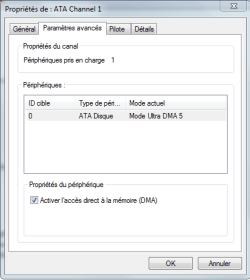
On screenshot you'll see how it gets when removing Intel Rapid Storage Technology software, how i can access to DMA with native Windows 7 drivers (Ultra DMA 5) settings in the Devices Manager.
 

Attachments

  • Capture.PNG
    Capture.PNG
    10 KB · Views: 24
Last edited:

My Computer My Computer

At a glance

Windows 7 Professional SP1 - x64 [Non-UEFI Boot]Ivy Bridge Core i5 3570K (Delidded)G.Skill "Ares" DDR3 PC3-12800 - 1600MHz (16Gb)Asus Dual-RX480-O4G
Computer type
PC/Desktop
Computer Manufacturer/Model Number
Custom Build
OS
Windows 7 Professional SP1 - x64 [Non-UEFI Boot]
CPU
Ivy Bridge Core i5 3570K (Delidded)
Motherboard
Asus P8Z77-V LE PLUS
Memory
G.Skill "Ares" DDR3 PC3-12800 - 1600MHz (16Gb)
Graphics Card(s)
Asus Dual-RX480-O4G
Sound Card
Creative Sound Blaster Z w/5.1 sound system
Monitor(s) Displays
Asus IPS 23"
Screen Resolution
16/9
Hard Drives
Internal:
500Go Sata 6Gb/s (x2)
500Go Sata 3Gb/s (x2)
SSD 60Go Sata 6Gb/s
PSU
In Win C 900W Series 80+ Platinum
Case
Thermaltake Chaser A71
Cooling
Custom Water Cooling Loop
Keyboard
Cooler Master QuickFire XTi
Mouse
Razer Imperator 2012 (4G)
Antivirus
MSE
Browser
IE 11.0.xxx Rtm
Other Info
"Raid0" with Intel Smart Response Technology (HDD/SSD)
By the way, I used a lot in XP...

Follow this tutorial to access all of your system Information. There will be displayed DMA State for your needs.

Here: System Information - Vista Forums
 

My Computer My Computer

At a glance

Windows 7 Professional SP1 - x64 [Non-UEFI Boot]Ivy Bridge Core i5 3570K (Delidded)G.Skill "Ares" DDR3 PC3-12800 - 1600MHz (16Gb)Asus Dual-RX480-O4G
Computer type
PC/Desktop
Computer Manufacturer/Model Number
Custom Build
OS
Windows 7 Professional SP1 - x64 [Non-UEFI Boot]
CPU
Ivy Bridge Core i5 3570K (Delidded)
Motherboard
Asus P8Z77-V LE PLUS
Memory
G.Skill "Ares" DDR3 PC3-12800 - 1600MHz (16Gb)
Graphics Card(s)
Asus Dual-RX480-O4G
Sound Card
Creative Sound Blaster Z w/5.1 sound system
Monitor(s) Displays
Asus IPS 23"
Screen Resolution
16/9
Hard Drives
Internal:
500Go Sata 6Gb/s (x2)
500Go Sata 3Gb/s (x2)
SSD 60Go Sata 6Gb/s
PSU
In Win C 900W Series 80+ Platinum
Case
Thermaltake Chaser A71
Cooling
Custom Water Cooling Loop
Keyboard
Cooler Master QuickFire XTi
Mouse
Razer Imperator 2012 (4G)
Antivirus
MSE
Browser
IE 11.0.xxx Rtm
Other Info
"Raid0" with Intel Smart Response Technology (HDD/SSD)
Back
Top