
Accessing MS Outlook 2010 from Network Sever (Netgear ReadyNASDuo)
Hi All
I have 2 questions
1
I have just setup my Netgear ReadyNAS Duo sever. I have 2 PC's and 1 laptop. And I want to setup Microsoft Office 2010 so that all my emails get saved directly to the sever and I am able to access my emails on any of my PC's or laptop.
So far I have put the .pst file on to the sever, and I have setup the first ok and everything seems to be working well. I have directed Outlook to open the file from the sever.
But I have run into a problem with the setup of the other PC and Laptop.
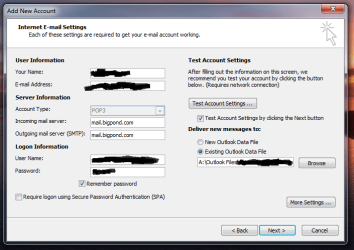
The first part of the setup went well. I directed Outlook to the correct file path, as per first picture
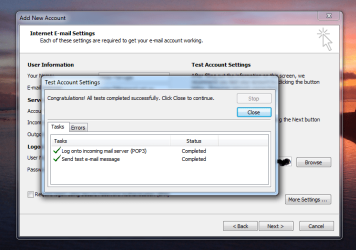
The email was successfully sent, as second picture
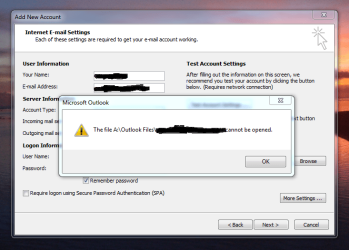
But I got this error message, as per third picture
I have done the same process on both PC and laptop and have got the same results and now I don't know what to do. I know it can be done because at work I can access my emails from any PC, although our sever at work is like 100 times the size of mine and we done have any IT guys at work that I can ask
2
Now for the second question... since I have finally got my server setup I want to import my archived .pst files that I saved prior to my HDD died (hence why I got the server).
How do I go about this? Can It be done? I am not a highly technical person, but I think I have done well so far. I am hoping this is not to hard to do!!!!
Many Thanks In Advance
Peter
P.S Sorry the PC that had Outlook installed properly is Windows 7 64bit. The Laptop is also Windows 7 64bit and the other PC is Windows 7 but 32Bit.
Hi All
I have 2 questions
1
I have just setup my Netgear ReadyNAS Duo sever. I have 2 PC's and 1 laptop. And I want to setup Microsoft Office 2010 so that all my emails get saved directly to the sever and I am able to access my emails on any of my PC's or laptop.
So far I have put the .pst file on to the sever, and I have setup the first ok and everything seems to be working well. I have directed Outlook to open the file from the sever.
But I have run into a problem with the setup of the other PC and Laptop.
The first part of the setup went well. I directed Outlook to the correct file path, as per first picture
The email was successfully sent, as second picture
But I got this error message, as per third picture
I have done the same process on both PC and laptop and have got the same results and now I don't know what to do. I know it can be done because at work I can access my emails from any PC, although our sever at work is like 100 times the size of mine and we done have any IT guys at work that I can ask
2
Now for the second question... since I have finally got my server setup I want to import my archived .pst files that I saved prior to my HDD died (hence why I got the server).
How do I go about this? Can It be done? I am not a highly technical person, but I think I have done well so far. I am hoping this is not to hard to do!!!!
Many Thanks In Advance
Peter
P.S Sorry the PC that had Outlook installed properly is Windows 7 64bit. The Laptop is also Windows 7 64bit and the other PC is Windows 7 but 32Bit.
My Computer
At a glance
windows 7 64Intel i5-25004GBASUS
- OS
- windows 7 64
- CPU
- Intel i5-2500
- Motherboard
- ASUS
- Memory
- 4GB
- Graphics Card(s)
- ASUS


 . there wasn't a great deal of instructions on the setup or use the NAS. I am trying to figure it out now I will get back to you


