Accessing other account

MsBallen

New member
Local time
2:58 AM
Messages
4
I was given this Windows 7 laptop by my grandfather years ago, and I still use it today. However, I'm wanting to access his old account because I keep getting the error "Access is denied" when attempting to connect to my wifi, which forces me to use my ethernet cord and prevents me from accessing the firewall. For this reason, I'm asking if there's a way to get into his old account.
 

My Computers

System One System Two

  • Computer type
    Laptop
    OS
    Windows 7 Ultimate x64
  • Computer type
    PC/Desktop
I was given this Windows 7 laptop by my grandfather years ago, and I still use it today. However, I'm wanting to access his old account because I keep getting the error "Access is denied" when attempting to connect to my wifi, which forces me to use my ethernet cord and prevents me from accessing the firewall. For this reason, I'm asking if there's a way to get into his old account.
Welcome to Seven Forums.

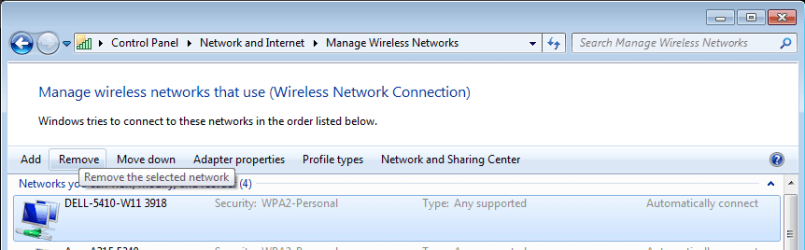
If you have trouble connecting to your WiFi first try removing any existing connection information for that WiFi network. When you next try to connect you'll be able to set it up from scratch and should be able to connect using your current WiFi password.

Remove WiFi connection.PNG

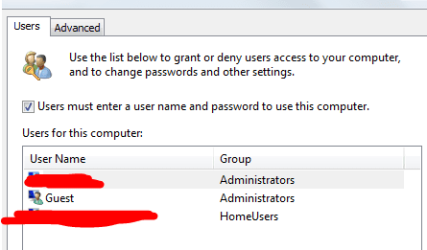
If that doesn't help, is your user account an administrator? If so you can run Netplwiz and reset the password for the old account.

image.png
 

My Computers

System One System Two

  • Computer type
    Laptop
    Computer Manufacturer/Model Number
    Toshiba satellite C650D
    OS
    Windows 7 Home Premium x64
    CPU
    AMD V120
    Memory
    4GB
    Internet Speed
    150 Mbps
    Antivirus
    MSE
    Browser
    IE11, Edge, Firefox
    Other Info
    I also have W7 Pro on my System Two, and several W7 Hyper-V VMs. My other machines run Windows 10/11. Their specs are in my Ten Forums & Eleven Forum profiles.
  • Computer type
    Laptop
    System Manufacturer/Model Number
    Lenovo Thinkpad T430
    OS
    Windows 7 Pro x64
    CPU
    Intel i5-3320M
    Memory
    8 GB
    Hard Drives
    250GB Samsung SSD 860 EVO
    Other Info
    Antivirus: MSE
Thank you for the welcome. I've already attempted to connect to the wifi using the "wireless network connection" method, but it hasn't worked. Yes, I have an administrator account, but when I try to alter the password, it says "The password for ###### could not be set." I attempted to access computer management to see if "user cannot change password" was unselected. When I tried to apply after having it unchecked once, I got the message, "The following error occurred while attemping to save properties for user ######: Access is denied."
 

My Computers

System One System Two

  • Computer type
    Laptop
    OS
    Windows 7 Ultimate x64
  • Computer type
    PC/Desktop
Thank you for the welcome. I've already attempted to connect to the wifi using the "wireless network connection" method, but it hasn't worked. Yes, I have an administrator account, but when I try to alter the password, it says "The password for ###### could not be set." I attempted to access computer management to see if "user cannot change password" was unselected. When I tried to apply after having it unchecked once, I got the message, "The following error occurred while attemping to save properties for user ######: Access is denied."
I can find others reporting the same problem. Apparently the solution is to boot to Safe Mode, you will be allowed to make the changes there. You don't need to speak Indonesian to follow the demo in this video....


My Computers

System One System Two

  • Computer type
    Laptop
    Computer Manufacturer/Model Number
    Toshiba satellite C650D
    OS
    Windows 7 Home Premium x64
    CPU
    AMD V120
    Memory
    4GB
    Internet Speed
    150 Mbps
    Antivirus
    MSE
    Browser
    IE11, Edge, Firefox
    Other Info
    I also have W7 Pro on my System Two, and several W7 Hyper-V VMs. My other machines run Windows 10/11. Their specs are in my Ten Forums & Eleven Forum profiles.
  • Computer type
    Laptop
    System Manufacturer/Model Number
    Lenovo Thinkpad T430
    OS
    Windows 7 Pro x64
    CPU
    Intel i5-3320M
    Memory
    8 GB
    Hard Drives
    250GB Samsung SSD 860 EVO
    Other Info
    Antivirus: MSE
I completed every step. Indeed, that didn't work, I accidentally hit "Help" while in safe mode, and the sheet states that guest accounts can't do anything against administrator accounts. I'm out of luck lol. but thank you, Bree. for your help
 

My Computers

System One System Two

  • Computer type
    Laptop
    OS
    Windows 7 Ultimate x64
  • Computer type
    PC/Desktop
I completed every step. Indeed, that didn't work, I accidentally hit "Help" while in safe mode, and the sheet states that guest accounts can't do anything against administrator accounts. I'm out of luck lol. but thank you, Bree. for your help
I thought you had your own account of type Admin? When in Safe mode you need to log into that account. Only an account of type Admin can change a user account password.
 

My Computers

System One System Two

  • Computer type
    PC/Desktop
    Computer Manufacturer/Model Number
    Custom build
    OS
    Windows 7 Home Premium 64-bits
    CPU
    AMD FX-8350
    Motherboard
    Gigabyte GA-990FXA-UD3 (AM3+)
    Memory
    GSKILL Ripjaw-X PC3 12800 8GB (2x4GB)
    Graphics Card(s)
    ASUS ROG STRIX GTX 1060 6GB
    Sound Card
    Integrated
    Monitor(s) Displays
    Asus VE228H (21.5-in)
    Screen Resolution
    1920x1080 60Hz
    Hard Drives
    SAMSUNG 870 EVO 2.5 Inch SATA SSD (1TB)
    SAMSUNG 870 EVO 2.5 Inch SATA SSD (1TB)
    SAMSUNG 870 EVO 2.5 Inch SATA SSD (1TB)
    PSU
    Corsair RM750x (750 watts)
    Case
    Corsair Carbide Series 200R
    Cooling
    Corsair Hydro Series H60 (CWCH60)
    Keyboard
    Logitech Elite
    Mouse
    Logitech M510 Wireless Mouse
    Internet Speed
    Comcast Gigabit Extra (1200Mbps down / 35Mbps up)
    Antivirus
    Malwarebytes
    Browser
    Firefox, Edge, Chrome
    Other Info
    ASUS DRW-24B1ST DVD-RW (24X) optical drive
    Seagate Expansion Desk (5TB) external SATA/USB HDD
    Comcast XB8 Internet Gateway
  • Computer type
    PC/Desktop
    System Manufacturer/Model Number
    Custom
    OS
    Windows 7 Pro (64-bit)
    CPU
    AMD Phenom II 960T X4
    Motherboard
    ASUS M4N82 Deluxe
    Memory
    Corsair XMS2 DDR2-800 8GB (4x2GB)
    Graphics Card(s)
    ASUS ENGTX560 DCII OC/2DI/1GD5 1GB
    Monitor(s) Displays
    Samsung 930B 19-inch LCD
    Screen Resolution
    1280x1024
    Hard Drives
    Samsung SSD 870 EVO 1000 GB (Windows 10)
    Seagate ST1000DM003 1000 GB (Windows 7)
    PSU
    Antec TruePower (new) TP-650
    Case
    Antec Three Hundred
    Cooling
    AMD stock cooler from FX8350
    Mouse
    Logitech M100
    Internet Speed
    Xfinity Gigabit Extra 1200/35 Mbps
The guest account is a administrator. I would send you a photo, but I am not sure how.


edit never mind i know how to now
 

Attachments

  • image.png
    image.png
    16.2 KB · Views: 18

My Computers

System One System Two

  • Computer type
    Laptop
    OS
    Windows 7 Ultimate x64
  • Computer type
    PC/Desktop
Why cant you go on the pc and access the files? Windows profiles have lots of permissions set to stop other access to files
 

My Computer

Computer type
PC/Desktop
OS
win 8 32 bit
Windows places some restrictions on the guest account even with admin access. Actually I haven't heard of granting a guest account admin access. Try creating another account with admin access. I would abandon the guest account. It's not designed to be used extensively and certainly not for administrative tasks.
 

My Computers

System One System Two

Back
Top