Solved Accidentally Deleted External HDD using DiskPart

soulcryst

New member
Local time
10:59 PM
Messages
7
Hi guys,

I accidentally deleted a whole external drive using the DiskPart.
I did not use clean, i used the "Delete" itself.
Please tell me I can recover it.

A little more info:

I used Select Disk
Select Partition
Delete Disk #
Is there any way I can recover it?
MiniTools isn't working for me...

Thank you
 

My Computer

Computer type
PC/Desktop
OS
Texas

My Computer

Computer type
PC/Desktop
Computer Manufacturer/Model Number
Self built custom
OS
64-bit Windows 11 Pro for Workstations
CPU
Intel i7-8700K OC'd to 5 GHz
Motherboard
ASUS ROG Maximus XI Formula Z390
Memory
64 GB (4x16GB) G.SKILL TridentZ RGB DDR4 3600 MHz
Graphics Card(s)
ASUS ROG-STRIX-GTX1080TI-O11G-GAMING
Sound Card
Integrated
Monitor(s) Displays
2 x Samsung Odyssey G7 27"
Screen Resolution
2560x1440
Hard Drives
1TB Samsung 990 PRO M.2,
4TB Samsung 990 PRO PRO M.2,
TerraMaster F8 SSD Plus NAS
PSU
Seasonic Prime Titanium 850W
Case
Thermaltake Core P3
Cooling
Corsair Hydro H115i
Keyboard
Logitech wireless K800
Mouse
Logitech MX Master 4
Internet Speed
2 Gb/s Download and 100 Mb/s Upload
Antivirus
Malwarebyte Anti-Malware Premium
Browser
Google Chrome
Other Info
Logitech Z625 speaker system,
Logitech BRIO 4K Pro webcam,
HP Color LaserJet Pro MFP M477fdn,
APC SMART-UPS RT 1000 XL - SURT1000XLI,
Galaxy S23 Plus phone
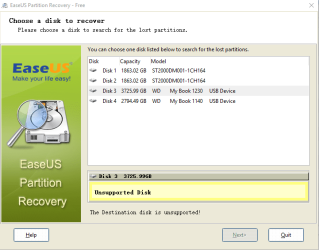
I tried both of them. EaseUS actually said it was an unsupported disc.. unfortunately. Is there any other way?
 

My Computer

Computer type
PC/Desktop
OS
Texas
1. Please furnish complete details of your External drive. Manufacturer/model Number/ capacity.

2. How many partitions did you have in that drive?

3. Plug in only your faulty external drive and post a screenshot of Windows Disk Management.

4. Post a screenshot of Partition Wizard - the first screen that appears when you launch the program.

5. What exactly did you do with Partition Wizard? Did you do a Full Scan?

Also let me know whether you have another external drive of the same manufacturer, same model Number and same capacity - in other words an identical in-all-respects external drive.

Disk Management: http://www.sevenforums.com/tutorials/274797-disk-management-post-screen-capture-image.html

Screenshots: http://www.sevenforums.com/tutorials/9733-screenshots-files-upload-post-seven-forums.html

If you had not performed a Diskpart Clean all but only deleted the partition the data should still be there, and recoverable. Let us see.
 
Last edited:

My Computer

OS
Windows 7 Home Premium 32 bit
Hi Jumanji,

1. WD - My Book 4TB External USB 3.0
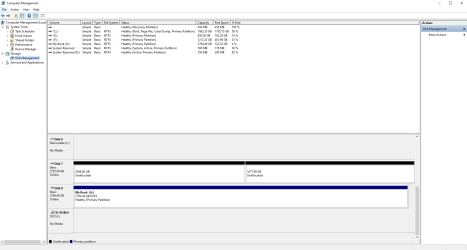
2. I had 1 Partition. Full 4TB in ExFat format.
3. Screenshot is attached
4. In Partition Wizard, I used the "Partition Recovery Wizard" I used Quick Scan only. In the end it did not let me see any old/deleted partitions etc. (probably because the disk was the one I deleted?)

I do not have a similar one at the moment.
Yes I hope the data is still there. I only deleted the drive. EaseUS Data Recovery sees my files and is scanning, but I don't know what to do with it. Is it possible to just reassign the drive and the data will still be there?

DiskMgmt2.PNG
 

My Computer

Computer type
PC/Desktop
OS
Texas

My Computer

Computer type
PC/Desktop
Computer Manufacturer/Model Number
Self built custom
OS
64-bit Windows 11 Pro for Workstations
CPU
Intel i7-8700K OC'd to 5 GHz
Motherboard
ASUS ROG Maximus XI Formula Z390
Memory
64 GB (4x16GB) G.SKILL TridentZ RGB DDR4 3600 MHz
Graphics Card(s)
ASUS ROG-STRIX-GTX1080TI-O11G-GAMING
Sound Card
Integrated
Monitor(s) Displays
2 x Samsung Odyssey G7 27"
Screen Resolution
2560x1440
Hard Drives
1TB Samsung 990 PRO M.2,
4TB Samsung 990 PRO PRO M.2,
TerraMaster F8 SSD Plus NAS
PSU
Seasonic Prime Titanium 850W
Case
Thermaltake Core P3
Cooling
Corsair Hydro H115i
Keyboard
Logitech wireless K800
Mouse
Logitech MX Master 4
Internet Speed
2 Gb/s Download and 100 Mb/s Upload
Antivirus
Malwarebyte Anti-Malware Premium
Browser
Google Chrome
Other Info
Logitech Z625 speaker system,
Logitech BRIO 4K Pro webcam,
HP Color LaserJet Pro MFP M477fdn,
APC SMART-UPS RT 1000 XL - SURT1000XLI,
Galaxy S23 Plus phone
I tried that Brink, unfortunately it does not see it well...
Attached is the picture for it. It says unsupported. I don't know why.

EaseUS.PNG
 

My Computer

Computer type
PC/Desktop
OS
Texas
In that case, you might see if you may be able to save your data found by using EaseUS Data Recovery to another location. Hopefully, you'll be able to recover it.
 

My Computer

Computer type
PC/Desktop
Computer Manufacturer/Model Number
Self built custom
OS
64-bit Windows 11 Pro for Workstations
CPU
Intel i7-8700K OC'd to 5 GHz
Motherboard
ASUS ROG Maximus XI Formula Z390
Memory
64 GB (4x16GB) G.SKILL TridentZ RGB DDR4 3600 MHz
Graphics Card(s)
ASUS ROG-STRIX-GTX1080TI-O11G-GAMING
Sound Card
Integrated
Monitor(s) Displays
2 x Samsung Odyssey G7 27"
Screen Resolution
2560x1440
Hard Drives
1TB Samsung 990 PRO M.2,
4TB Samsung 990 PRO PRO M.2,
TerraMaster F8 SSD Plus NAS
PSU
Seasonic Prime Titanium 850W
Case
Thermaltake Core P3
Cooling
Corsair Hydro H115i
Keyboard
Logitech wireless K800
Mouse
Logitech MX Master 4
Internet Speed
2 Gb/s Download and 100 Mb/s Upload
Antivirus
Malwarebyte Anti-Malware Premium
Browser
Google Chrome
Other Info
Logitech Z625 speaker system,
Logitech BRIO 4K Pro webcam,
HP Color LaserJet Pro MFP M477fdn,
APC SMART-UPS RT 1000 XL - SURT1000XLI,
Galaxy S23 Plus phone
You said "EaseUS Data Recovery sees my files and is scanning, but I don't know what to do with it. Is it possible to just reassign the drive and the data will still be there?"

May be you should post screenshot of it so that Brink can instruct you how you can save it if possible.

I shall return to this thread after you finish with Brink's instructions and EaseUs, one way or the other.( In the meanwhile I am doing a small experiment which is going to take sometime. )
 

My Computer

OS
Windows 7 Home Premium 32 bit
I will try... but is there really no way to just assign a disk drive to it again? i mean, the files are there, just that it can't be plugged in because the disk itself was deleted. Dunno. But thank you very much.

PS: I am also trying to use Easeus full scan... hopefully... it gives me a glimmer of hope.
 
Last edited:

My Computer

Computer type
PC/Desktop
OS
Texas
THANK YOU VERY MUCH GUYS!
I was able to fix it using TestDisk instead.
For people who want to know what I did:

Well of course the problem was that I deleted the file structure itself.

So I used TestDisk to restructure the HDD. I do not know if overwriting a new partition onto it will wipe everything, but in my case, fortunately, I didn't make a new partition yet.
I ran testdisk to restructure it and then used Disk Management to assign a new Letter to the drive that was restructured.

I knew the files were still there, just that the drive itself, the holder was deleted.

Finally can get back to work. Thank you again guys. :)
 

My Computer

Computer type
PC/Desktop
OS
Texas
Great news. :party:
 

My Computer

Computer type
PC/Desktop
Computer Manufacturer/Model Number
Self built custom
OS
64-bit Windows 11 Pro for Workstations
CPU
Intel i7-8700K OC'd to 5 GHz
Motherboard
ASUS ROG Maximus XI Formula Z390
Memory
64 GB (4x16GB) G.SKILL TridentZ RGB DDR4 3600 MHz
Graphics Card(s)
ASUS ROG-STRIX-GTX1080TI-O11G-GAMING
Sound Card
Integrated
Monitor(s) Displays
2 x Samsung Odyssey G7 27"
Screen Resolution
2560x1440
Hard Drives
1TB Samsung 990 PRO M.2,
4TB Samsung 990 PRO PRO M.2,
TerraMaster F8 SSD Plus NAS
PSU
Seasonic Prime Titanium 850W
Case
Thermaltake Core P3
Cooling
Corsair Hydro H115i
Keyboard
Logitech wireless K800
Mouse
Logitech MX Master 4
Internet Speed
2 Gb/s Download and 100 Mb/s Upload
Antivirus
Malwarebyte Anti-Malware Premium
Browser
Google Chrome
Other Info
Logitech Z625 speaker system,
Logitech BRIO 4K Pro webcam,
HP Color LaserJet Pro MFP M477fdn,
APC SMART-UPS RT 1000 XL - SURT1000XLI,
Galaxy S23 Plus phone
Good to know that you were able to successfully use TestDisk to find the deleted partition/File System. You must have definitely written the found partition structure/File System using TestDisk. Just one query: when coming to select the partition type which one did you choose [Intel] or [EFI GPT]? Did you [Analyse] or went to [Advanced] Filesystem Utils? More details on what exactly you did will be helpful.From your Disk Management screenshot I guessed that your 4TB drive must have been initialised as a GPT drive. Is that right?
 

My Computer

OS
Windows 7 Home Premium 32 bit
Hi Jumanji,

Yes, I used EFI GPT since I had exFat on my previous one. I had to Analyse, then check if my files really were there. Then after that, I went and wrote the file structure. It really depends on your prior formatting. And testdisk actually helps you with that once you select the disk itself. goes to the default
 

My Computer

Computer type
PC/Desktop
OS
Texas
Yep, previous history is always essential if we are to go the right way. Most old greater than 2TB external drives came as advanced formatted MBR initialised drives. Only the recent drives come formatted as GPT drives. You seem to have formatted the old MBR drives to GPT.:)

Now you seem to have a large number of drives, internal and external. If only you mark each of them with identifier and save the important sectors, it will be much easier to restore them in case the partition structure gets corrupted or gets deleted.

http://www.sevenforums.com/performa...ary-mbr-logical-partitions-3.html#post2693984

This post will also lead you to another post on how to save and restore.

Another word of caution: You seem to be using Western Digital My Book external drives. Be aware these drives use hardware encryption. The encryption chip as well as the decrypt key are in the interface electronics inside the enclosure. If that interface electronics fails, no DIY data recovery is possible inasmuch as we do not know the decrypt key or how to generate it. Only the Western Digital Data Recovery partners have the decrypt key and will demand a high sum to retrieve the data. So always have another backup of all data on your My Book drives. ( Only Western Digital Elements( Both Desktop and portable) do not use hardware encryption.)
 
Last edited:

My Computer

OS
Windows 7 Home Premium 32 bit
jumanji as always good suggestions and explanation.

I do have a question.

If one has one of those self encrypting hard drives is their any way of removing the built in self encryption method from the drive and use it as a normal drive from that point on?
 

My Computer

Computer type
PC/Desktop
Computer Manufacturer/Model Number
Home made Desktop
OS
Windows 10 Pro. 64/ version 1709 Windows 7 Pro/64
CPU
Intel i7-6800K @ 4.3
Motherboard
ASUS X-99 Deluxe II
Memory
Corsair Platinum 16 gig @2400
Graphics Card(s)
EVGA GTX 1070 OC
Monitor(s) Displays
Asus 27" LED LCD/VE278Q
Screen Resolution
1920-1080 or 1280-720 HDMI
Hard Drives
INTEL SSD 730-240 Gb Sata 3.0/
PSU
EVGA Platium 1200W
Case
Phanteks Luxe Tempered Glass 8 fans/ one radiator
Cooling
XSPC/ Water Cooled CPU
Keyboard
Das 4 Professional
Mouse
Logitech M705/MX Anywhere 2-S
Internet Speed
100 mbits
Antivirus
Microsoft Security Essentials/ Malwarebytes Premium 3.0/ SAS
Browser
I.E. 11 default/Firefox/ ISP Time Warner Cable/Spectrum
Other Info
LG BluRay Burner/
Sound system-KLipsch-THX/
Icy Dock ssd Hot Swap bays.
As far as I know, there is no way one could defeat the internal hardware encryption of the Western Digital external drives. When questioned, Western Digital in their forums replied that the users have always the option to buy the non-encrypted drives - the Elements. But the problem is many users who buy the Western Digital My Book, My Passport etc. don't even know that the drives are encrypted till the internal electronics fails and they come in for Data Recovery. We have to throw up our hands and redirect them to WD Data Recovery Partners who will naturally demand their pound of flesh, knowing fully well that they are the only ones who can recover and decrypt the data.

If one had bought two WD external drives at the same time from the same vendor, these will most likely be from the same batch and one can replace the faulty internal electronics board with the other and retrieve the data. But here again Western Digital makes it difficult by integrating the SATA to USB bridge to the HDD. It will require professional help to replace the card.
 

My Computer

OS
Windows 7 Home Premium 32 bit
Thanks for the information.
That is just a shame that a manufacture would do such a thing.

A while back I informed my local dealer what WD was doing and he didn't know and couldn't believe me until he looked into it.
He stopped selling the damn things.
 

My Computer

Computer type
PC/Desktop
Computer Manufacturer/Model Number
Home made Desktop
OS
Windows 10 Pro. 64/ version 1709 Windows 7 Pro/64
CPU
Intel i7-6800K @ 4.3
Motherboard
ASUS X-99 Deluxe II
Memory
Corsair Platinum 16 gig @2400
Graphics Card(s)
EVGA GTX 1070 OC
Monitor(s) Displays
Asus 27" LED LCD/VE278Q
Screen Resolution
1920-1080 or 1280-720 HDMI
Hard Drives
INTEL SSD 730-240 Gb Sata 3.0/
PSU
EVGA Platium 1200W
Case
Phanteks Luxe Tempered Glass 8 fans/ one radiator
Cooling
XSPC/ Water Cooled CPU
Keyboard
Das 4 Professional
Mouse
Logitech M705/MX Anywhere 2-S
Internet Speed
100 mbits
Antivirus
Microsoft Security Essentials/ Malwarebytes Premium 3.0/ SAS
Browser
I.E. 11 default/Firefox/ ISP Time Warner Cable/Spectrum
Other Info
LG BluRay Burner/
Sound system-KLipsch-THX/
Icy Dock ssd Hot Swap bays.
Recent research indicates even those who wanted their data to be secure and willingly chose to buy the hardware encrypted drives which can additionally be password protected, are not as secure as they would have thought it to be. :)

Just some that appeared in Oct 2015:

Western Digital's hard drive encryption is useless. Totally useless
Western Digital's hard drive encryption is useless. Totally useless • The Register

Western Digital self-encrypting hard drives riddled with security flaws
Western Digital self-encrypting hard drives riddled with security flaws | Ars Technica

Western Digital encrypted external hard drives have flaws that can expose data
Western Digital encrypted external hard drives have flaws that can expose data | PCWorld

Western Digital’s encrypted hard drives come under fire from security experts
Western Digital?s encrypted hard drives come under fire from security experts | ExtremeTech
 

My Computer

OS
Windows 7 Home Premium 32 bit
Sounds like WD should stick to making hard drives and leave the encryption to folks that sort of thing.
 

My Computer

Computer type
PC/Desktop
Computer Manufacturer/Model Number
Home made Desktop
OS
Windows 10 Pro. 64/ version 1709 Windows 7 Pro/64
CPU
Intel i7-6800K @ 4.3
Motherboard
ASUS X-99 Deluxe II
Memory
Corsair Platinum 16 gig @2400
Graphics Card(s)
EVGA GTX 1070 OC
Monitor(s) Displays
Asus 27" LED LCD/VE278Q
Screen Resolution
1920-1080 or 1280-720 HDMI
Hard Drives
INTEL SSD 730-240 Gb Sata 3.0/
PSU
EVGA Platium 1200W
Case
Phanteks Luxe Tempered Glass 8 fans/ one radiator
Cooling
XSPC/ Water Cooled CPU
Keyboard
Das 4 Professional
Mouse
Logitech M705/MX Anywhere 2-S
Internet Speed
100 mbits
Antivirus
Microsoft Security Essentials/ Malwarebytes Premium 3.0/ SAS
Browser
I.E. 11 default/Firefox/ ISP Time Warner Cable/Spectrum
Other Info
LG BluRay Burner/
Sound system-KLipsch-THX/
Icy Dock ssd Hot Swap bays.
Back
Top