Solved Accidentally deleted operating system partition !!!!

Robertt

New member
Local time
2:28 PM
Messages
4
Hi everyone,
I was trying to install a new copy of windows for multiboot. I turned on the pc with new OS in the usb stick, I created new volume with CMD using DISKPART, after selecting the new created volume I runned the command CLEAN, I thought this command is going to erase the volume, not the entire disk :banghead:. Now I cannot boot anymore !!!
To prevent overwiting I didn't perform any further operation on the disk.
:tip: Is there any chance to get my files and everything back ?
 

My Computer

Computer type
Laptop
Computer Manufacturer/Model Number
HP envy
OS
W 8.1 x64
CPU
Core i7 4700
Memory
16GB
Graphics Card(s)
NVIDIA GeForce GT 840M - 2GB
Im no expert in data recovery but I think as long as you haven't used Clean All, I think you should be able to recover. Its good that you didn't try to do anything else afterwards, even seasoned professionals can make mistakes and/or cannot get your data during recovery. I will try to get someone who is more of an expert on partition/data recovery. Hang tight and don't do anything else.
 

My Computer

Computer type
PC/Desktop
Computer Manufacturer/Model Number
Custom
OS
Dual Boot: Windows 8.1 & Server 2012r2 VMs: Kali Linux, Backbox, Matriux, Windows 8.1
CPU
A10 7700 Kavari SteamRoller
Motherboard
ASUS A88XM-PLUS (FM2+ )
Memory
8GB DDR3 SDRAM PC3-8500
Graphics Card(s)
1024MB ATI AMD Radeon R7 Graphics
Sound Card
Realtek High Definition Audio
Monitor(s) Displays
Samsung
Hard Drives
SSD Crucial 120gb
WD VelociRaptor 1tb
PSU
Rosewill Gaming 650w
Case
Rosewill Galaxy 2
Internet Speed
55/12
Antivirus
Malwarebytes, MSE, SAS
Browser
FireFox, Chrome
You could try using the Minitool Partition Wizard Boot CD. It has an option to recover partitions. If that works, your partition will be back.
 

My Computer

Computer type
PC/Desktop
Computer Manufacturer/Model Number
Custom
OS
Win7 Pro 32-bit, Win8 Pro 32-bit
CPU
AMD Phenom II X6 1090T
Motherboard
Gigabyte
Memory
4GB ddr3 1300
Graphics Card(s)
AMD HD 4290 onboard
Sound Card
Builtin Realtek HD Audio
Monitor(s) Displays
Samsung 24" widescreen, LG 23" widescreen
Screen Resolution
1920x1200/1920x1080
Hard Drives
Kingston 256GB SSD
Keyboard
Logitech Illuminated Keyboard
Mouse
Logitech M705 wireless mouse
Antivirus
Norton Av 2013
Browser
IE v10

My Computer

Computer Manufacturer/Model Number
HP, Dell, Gateway, Toshiba - 4 laptops and 2 desktops
OS
Vista, Windows7, Mint Mate, Zorin, Windows 8
CPU
from 1.6GHz Duo to i7
Monitor(s) Displays
2x HP w2207
Hard Drives
5x HDD, 7x SSD, 12x Externals
Keyboard
with trackball - no mices
Mouse
Trackball mice
Internet Speed
DSL 6000
Doing a diskpart Clean wipes out the first 2048 sectors on your hard drive. The HDD partitions will start from sector 2049. So all your data should still be there and your partitions can be, hopefully, recovered using the Partition Recovery Wizard in Minitools Partition Wizard.

Download MiniToola Partition Wizard Home Edition 8.1.1 Bootable CD from Free download Magic Partition Manager Software, partition magic alternative, free partition magic, partition magic Windows 7 and server partition software - Partition Wizard Online

You can either burn that ISO to a CD or create a bootable pendrive using Rufus Rufus - Create bootable USB drives the easy way

Run Partition Wizard booting from that CD or Pendrive using the onetime boot menu,

Run the Partition Recovery Wizard in it and do a quick scan.

When the detected partition list appears, select all the partitions that were there originally.

If the selections are correct, the preview map at the bottom of the Window should show your drive as it was before originally.

Finish and Apply.

Since your MBR would also have been wiped, cilck on Rebuild MBR in the left pane and Apply.

If you have any doubts, post a screenshot of the screen after running quick scan. Of course it has to be a camera shot.(In a well-lit room, take a well-focused closeup shot of the monitor screen with the camera flash turned off.)

You may also see this post on running Partition Recovery Wizard http://www.sevenforums.com/hardware...-drive-partition-disappeared.html#post2901654
 

My Computer

OS
Windows 7 Home Premium 32 bit
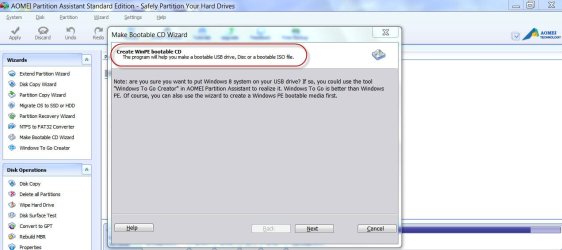
I did this for a friend just yesterday who accidentally deleted the 2 partitions on his boot drive. I took his drive (an ssd) out of his computer and stuck it into a SATA dock attached to my laptop. I then ran this software Free Partition Manager Software for Windows 8/7/Vista/XP, 32/64 bit - AOMEI Partition Assistant Standard Edition (pretty much the same as the mini-tool software).

The software found the 2 deleted partitions, I clicked recover and they were restored. Put the drive back in his computer and it booted and ran fine from the drive.

If you have another computer to use, this method will eliminate the need to create a boot cd.
 

My Computer

Computer type
PC/Desktop
Computer Manufacturer/Model Number
Home Built desktop, Dell G15 5511 Gaming laptop,MS Surface Pro 7 tablet
OS
W10 Pro desktop, W11 laptop, W11 Pro tablet (all 64-bit)
CPU
3.7Ghz 8700K i7, i7-11800H, i7-1065G7
Motherboard
ASUS TUF Z370-Pro Gaming in desktop
Memory
16G desktop, 16G laptop, 4G tablet
Graphics Card(s)
AMD Radeon RX580, RTX 3060, Intel Iris Plus
Sound Card
High Definition Audio (Built-in to mobo)
Monitor(s) Displays
Samsung U32J59 32" (2x), 15.6", 12"
Screen Resolution
3840x2160, 3840x2160, 1920x1080, 2160x1440
Hard Drives
500G SSD for OS; 2T, 10T & 15T HDDs for Data on Desktop, 1TB SSD laptop, 128G SSD tablet.
PSU
Corsair CX 750M
Case
Antec 100
Cooling
CM 212+
Keyboard
IBM Model M - used continuously since 1986
Mouse
Microsoft Pro IntelliMouse
Internet Speed
400M down 8M up
Antivirus
Windows Defender
Browser
FireFox
Other Info
Built my first computer (8Mhz 8088cpu, 640K RAM, 20MB HDD, 2 360K floppy drives) in 1985 and have been building them for myself, relatives and friends ever since.
Why would you have to do it?

You could have easily created a WinPE bootable pen drive with AOMEI Partition assistant and carried out the recovery in-situ. Where is the need to take the HDD out , then plug it into another computer, recover partition, and then remove it and then put it back into the original machine?

05-10-2014 22-13-14.jpg

Is creating a bootable CD or pendrive much more difficult than the above transplant- retransplant process that inherently carries a lot of risk??

If somebody comes to me with a HDD and tells that he wants to put it into my computer and do something, I will flatly refuse. I would rather gladly create a bootable pendrive give it to him and ask him to get lost.:) If he is a friend or relative who can't do it, I shall go to his residence with the pendrive do the restore and return home with my pen drive.:) Of course I will have a cup of coffee there. ;)
 
Last edited:

My Computer

OS
Windows 7 Home Premium 32 bit
I think you are exaggerating the risks involved. I already had the software installed on my laptop and it probably took less time for me to remove/reinstall the ssd then it would have taken to burn the CD or create the bootable thumb drive.
 

My Computer

Computer type
PC/Desktop
Computer Manufacturer/Model Number
Home Built desktop, Dell G15 5511 Gaming laptop,MS Surface Pro 7 tablet
OS
W10 Pro desktop, W11 laptop, W11 Pro tablet (all 64-bit)
CPU
3.7Ghz 8700K i7, i7-11800H, i7-1065G7
Motherboard
ASUS TUF Z370-Pro Gaming in desktop
Memory
16G desktop, 16G laptop, 4G tablet
Graphics Card(s)
AMD Radeon RX580, RTX 3060, Intel Iris Plus
Sound Card
High Definition Audio (Built-in to mobo)
Monitor(s) Displays
Samsung U32J59 32" (2x), 15.6", 12"
Screen Resolution
3840x2160, 3840x2160, 1920x1080, 2160x1440
Hard Drives
500G SSD for OS; 2T, 10T & 15T HDDs for Data on Desktop, 1TB SSD laptop, 128G SSD tablet.
PSU
Corsair CX 750M
Case
Antec 100
Cooling
CM 212+
Keyboard
IBM Model M - used continuously since 1986
Mouse
Microsoft Pro IntelliMouse
Internet Speed
400M down 8M up
Antivirus
Windows Defender
Browser
FireFox
Other Info
Built my first computer (8Mhz 8088cpu, 640K RAM, 20MB HDD, 2 360K floppy drives) in 1985 and have been building them for myself, relatives and friends ever since.
Thanks for the replies!
I created a bootable usb, and using partition wizard I restored all the partitions, but still I'm unable to boot. Probaly because of corrupted MBR. When I boot with a live usb i can see and access all the files and folders including windows folders they are all there. When i press the power button it shows "no operating system found".
I tryed to fix it with a windows 8 disc, open the repair menu and then the CMD.
I type the comand bootrec /rebuildbcd and this is what I get:

-bootrec /rebuildbcd

scanning all disks for Windows installations...

Successfully scanned Windows installations.
Total windows installations: 1
G:\Windows
Add installation to boot list? Y/N/A:
-Y
The requested system device cannot be found.
 

My Computer

Computer type
Laptop
Computer Manufacturer/Model Number
HP envy
OS
W 8.1 x64
CPU
Core i7 4700
Memory
16GB
Graphics Card(s)
NVIDIA GeForce GT 840M - 2GB
My 2 cents worth and what I have used on countless occasions
BOOTABLE UBUNTU
Make a bootable Ubuntu disk http://www.ubuntu.com/download
Set the BIOS to boot from the optical when the machine boots it will show you a screen with TRY or INSTALL > select TRY. You can of course remove the hard drive and any other drives when doing this as if the optical alone is the only drive left in the machine then the BIOS will only find it to boot from.
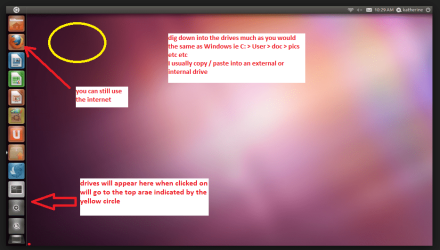
When it is finished - it takes very little time you will get a screen like in the pic .
Open the drive you want > User and dig down until you get to the data / settings you may be able to copy / paste the material you want to an external source or other installed drive doing this.
I am not sure if it will but I have recovered tons of data etc using this method both on "dead" or just plain drives that you cannot get data from using Windows - which it doesn't have to involve either.

Message me if you have problems
 

Attachments

  • UBUTUX.PNG
    UBUTUX.PNG
    128.9 KB · Views: 0

My Computer

Computer type
PC/Desktop
Computer Manufacturer/Model Number
Own build (new) Desk1 / Asus ROG Win 7 / Desk2 1st build
OS
Desk1 7 Home Prem / Desk2 10 Pro / Main lap Asus ROG 10 Pro 2 laptop Toshiba 7 Pro Asus P2520 7 & 10
CPU
Desk1 i5 3750K / Laptop i7 GTX 860M / Desk2 i5 2500
Motherboard
Desk1 Asus P877-V / Desk2 Gigabyte H67 UD3H / Laptop ?
Memory
Desk1 8GB (1866) / Desk2 16GB (1333) / Laptop 8Gb DDR3
Graphics Card(s)
Desk 1& 2NVidia GTX 650 & Laptops on board Intel
Sound Card
Desk 1 & 2 -XONAR DG Realtek High Def audio Laptop
Monitor(s) Displays
Desk 1 Benq HD 2450 / Desk2 Philips 24" / Laptop 17.5"
Screen Resolution
1920x1080 D1 & D2 & Laptop 1
Hard Drives
Desk1 Samsung 120GB 830 SSD
Asus ROG 256GB 850 Pro SSD
Desk2 Samsung 840 256 SSD
Toshiba 120GB EVO
PSU
Desk 1 Corsair HX 1050/ Laptop ? / Desk 2 Corsair HX 650
Case
Desk 1 Cooler HAF XM ? Toshiba laptop / Desk2 Coolermaster
Cooling
Fans on all Desk1 -2 Desk2 - all Coolermasters 5 Laptop ?
Keyboard
Desk 1 MS Sidewinder X6 Desk 2 MS Sidewinder X 4
Mouse
Desk 1&2 - Gigabyte MS 900 gamer - laptop - Logitec wireless
Internet Speed
ADSL2+
Other Info
One other Desktop (tester) and spare Toshba laptop both with SSD's
Running Kaspersky 2016 ISS on all machines config'd identically
Logitec audio stereo systems on each machine (x3)
Canon MG5250MFC
Router/modem TP-Link running WPA2SK
My 2 cents worth and what I have used on countless occasions
BOOTABLE UBUNTU
Make a bootable Ubuntu disk http://www.ubuntu.com/download
Set the BIOS to boot from the optical when the machine boots it will show you a screen with TRY or INSTALL > select TRY. You can of course remove the hard drive and any other drives when doing this as if the optical alone is the only drive left in the machine then the BIOS will only find it to boot from.
When it is finished - it takes very little time you will get a screen like in the pic .
Open the drive you want > User and dig down until you get to the data / settings you may be able to copy / paste the material you want to an external source or other installed drive doing this.
I am not sure if it will but I have recovered tons of data etc using this method both on "dead" or just plain drives that you cannot get data from using Windows - which it doesn't have to involve either.

Message me if you have problems

Yes I know, this method, I already have a live disk to boot from it and get all my data. But I'm trying to restore my operating system back, with all my settings like it was before. All I need is to fix the bcd file..
 

My Computer

Computer type
Laptop
Computer Manufacturer/Model Number
HP envy
OS
W 8.1 x64
CPU
Core i7 4700
Memory
16GB
Graphics Card(s)
NVIDIA GeForce GT 840M - 2GB
My 2 cents worth and what I have used on countless occasions
BOOTABLE UBUNTU
Make a bootable Ubuntu disk http://www.ubuntu.com/download
Set the BIOS to boot from the optical when the machine boots it will show you a screen with TRY or INSTALL > select TRY. You can of course remove the hard drive and any other drives when doing this as if the optical alone is the only drive left in the machine then the BIOS will only find it to boot from.
When it is finished - it takes very little time you will get a screen like in the pic .
Open the drive you want > User and dig down until you get to the data / settings you may be able to copy / paste the material you want to an external source or other installed drive doing this.
I am not sure if it will but I have recovered tons of data etc using this method both on "dead" or just plain drives that you cannot get data from using Windows - which it doesn't have to involve either.

Message me if you have problems

Yes I know, this method, I already have a live disk to boot from it and get all my data. But I'm trying to restore my operating system back, with all my settings like it was before. All I need is to fix the bcd file..
Ok mate well good luck but I suppose if you have to reinstall this is the best way
http://www.sevenforums.com/tutorials/219487-clean-reinstall-factory-oem-windows-7-a.html#post1839164 as it is the "freshest" version you will get.
 

My Computer

Computer type
PC/Desktop
Computer Manufacturer/Model Number
Own build (new) Desk1 / Asus ROG Win 7 / Desk2 1st build
OS
Desk1 7 Home Prem / Desk2 10 Pro / Main lap Asus ROG 10 Pro 2 laptop Toshiba 7 Pro Asus P2520 7 & 10
CPU
Desk1 i5 3750K / Laptop i7 GTX 860M / Desk2 i5 2500
Motherboard
Desk1 Asus P877-V / Desk2 Gigabyte H67 UD3H / Laptop ?
Memory
Desk1 8GB (1866) / Desk2 16GB (1333) / Laptop 8Gb DDR3
Graphics Card(s)
Desk 1& 2NVidia GTX 650 & Laptops on board Intel
Sound Card
Desk 1 & 2 -XONAR DG Realtek High Def audio Laptop
Monitor(s) Displays
Desk 1 Benq HD 2450 / Desk2 Philips 24" / Laptop 17.5"
Screen Resolution
1920x1080 D1 & D2 & Laptop 1
Hard Drives
Desk1 Samsung 120GB 830 SSD
Asus ROG 256GB 850 Pro SSD
Desk2 Samsung 840 256 SSD
Toshiba 120GB EVO
PSU
Desk 1 Corsair HX 1050/ Laptop ? / Desk 2 Corsair HX 650
Case
Desk 1 Cooler HAF XM ? Toshiba laptop / Desk2 Coolermaster
Cooling
Fans on all Desk1 -2 Desk2 - all Coolermasters 5 Laptop ?
Keyboard
Desk 1 MS Sidewinder X6 Desk 2 MS Sidewinder X 4
Mouse
Desk 1&2 - Gigabyte MS 900 gamer - laptop - Logitec wireless
Internet Speed
ADSL2+
Other Info
One other Desktop (tester) and spare Toshba laptop both with SSD's
Running Kaspersky 2016 ISS on all machines config'd identically
Logitec audio stereo systems on each machine (x3)
Canon MG5250MFC
Router/modem TP-Link running WPA2SK
Thanks everyone for the replies and the help !!!
Using "easybcd" to repair the BCD and then windows repair, I fianlly booted successfully back in my windows :D
 

My Computer

Computer type
Laptop
Computer Manufacturer/Model Number
HP envy
OS
W 8.1 x64
CPU
Core i7 4700
Memory
16GB
Graphics Card(s)
NVIDIA GeForce GT 840M - 2GB
Thanks everyone for the replies and the help !!!
Using "easybcd" to repair the BCD and then windows repair, I fianlly booted successfully back in my windows :D
Congrats, what a great team effort here. Good job everyone.
 

My Computer

Computer type
PC/Desktop
Computer Manufacturer/Model Number
Custom
OS
Dual Boot: Windows 8.1 & Server 2012r2 VMs: Kali Linux, Backbox, Matriux, Windows 8.1
CPU
A10 7700 Kavari SteamRoller
Motherboard
ASUS A88XM-PLUS (FM2+ )
Memory
8GB DDR3 SDRAM PC3-8500
Graphics Card(s)
1024MB ATI AMD Radeon R7 Graphics
Sound Card
Realtek High Definition Audio
Monitor(s) Displays
Samsung
Hard Drives
SSD Crucial 120gb
WD VelociRaptor 1tb
PSU
Rosewill Gaming 650w
Case
Rosewill Galaxy 2
Internet Speed
55/12
Antivirus
Malwarebytes, MSE, SAS
Browser
FireFox, Chrome
Thanks everyone for the replies and the help !!!
Using "easybcd" to repair the BCD and then windows repair, I fianlly booted successfully back in my windows :D
Congrats, what a great team effort here. Good job everyone.
Yep mate although sometimes we don't always get it right my 2 cents worth just a stab in the dark - it is good we are such a good team.:)
 

My Computer

Computer type
PC/Desktop
Computer Manufacturer/Model Number
Own build (new) Desk1 / Asus ROG Win 7 / Desk2 1st build
OS
Desk1 7 Home Prem / Desk2 10 Pro / Main lap Asus ROG 10 Pro 2 laptop Toshiba 7 Pro Asus P2520 7 & 10
CPU
Desk1 i5 3750K / Laptop i7 GTX 860M / Desk2 i5 2500
Motherboard
Desk1 Asus P877-V / Desk2 Gigabyte H67 UD3H / Laptop ?
Memory
Desk1 8GB (1866) / Desk2 16GB (1333) / Laptop 8Gb DDR3
Graphics Card(s)
Desk 1& 2NVidia GTX 650 & Laptops on board Intel
Sound Card
Desk 1 & 2 -XONAR DG Realtek High Def audio Laptop
Monitor(s) Displays
Desk 1 Benq HD 2450 / Desk2 Philips 24" / Laptop 17.5"
Screen Resolution
1920x1080 D1 & D2 & Laptop 1
Hard Drives
Desk1 Samsung 120GB 830 SSD
Asus ROG 256GB 850 Pro SSD
Desk2 Samsung 840 256 SSD
Toshiba 120GB EVO
PSU
Desk 1 Corsair HX 1050/ Laptop ? / Desk 2 Corsair HX 650
Case
Desk 1 Cooler HAF XM ? Toshiba laptop / Desk2 Coolermaster
Cooling
Fans on all Desk1 -2 Desk2 - all Coolermasters 5 Laptop ?
Keyboard
Desk 1 MS Sidewinder X6 Desk 2 MS Sidewinder X 4
Mouse
Desk 1&2 - Gigabyte MS 900 gamer - laptop - Logitec wireless
Internet Speed
ADSL2+
Other Info
One other Desktop (tester) and spare Toshba laptop both with SSD's
Running Kaspersky 2016 ISS on all machines config'd identically
Logitec audio stereo systems on each machine (x3)
Canon MG5250MFC
Router/modem TP-Link running WPA2SK
Hello guys, sorry for opening up this thread but I've also accidentally CLEANed my disk and lost my partitions when I was trying to dual boot my Windows 10 with Windows 7. The problem is I've managed to continue with the Windows 7 installation - I guess overwriting my previous partition.

WOULD I STILL BE ABLE TO RECOVER MY FILES?? 😢
 

My Computer

Computer type
Laptop
Computer Manufacturer/Model Number
Asus
OS
Windows 10 64bit

My Computer

Computer type
PC/Desktop
Computer Manufacturer/Model Number
Skylake Special #666
OS
Windows 10 Pro x64
CPU
Intel Core i7 6700K
Motherboard
Asus Sabertooth Z170 Mark 1
Memory
GSkill TridentZ RGB 16GB 3600 16-16-16-36
Graphics Card(s)
EVGA GTX 980 Ti SC x2
Sound Card
Realtek High Definition
Monitor(s) Displays
AOC G2460PG
Screen Resolution
1920 x 1080 144Hz
Hard Drives
Samsung 860 Pro 256GB, Seagate Barracuda 4TB x2
PSU
EVGA 1000 P2, EVGA White Custom Braided Cables
Case
Corsair Vengeance C70 Gunmetal Black
Cooling
Corsair H100i v2, Corsair ML120 x2, Thermal Grizzly Kryonaut
Keyboard
Logitech G910 Orion Spectrum
Mouse
Logitech G700s
Internet Speed
Verizon Fios Quantum Gateway 75/75
Antivirus
Windows Defender, Malwarebytes Free 3.8.3
Browser
Chrome
Other Info
Corsair SP120 x4, LG Blu-ray Drive, Durabrand HT-395 100 Watt Dolby Digital Amp, Corsair H2100 Wireless 7.1 Headset
I agree with Addram mate and just to get it right are you referring to the previous set up files because as Addram said clean with DISKPART is just that - CLEANED!!

One thing you could try is this but I am guessing it will not find much at all
BOOTABLE UBUNTU
Make a bootable Ubuntu disk Get Ubuntu | Download | Ubuntu
Set the BIOS to boot from the optical when the machine boots it will show you a screen with TRY or INSTALL > select TRY not INSTALL
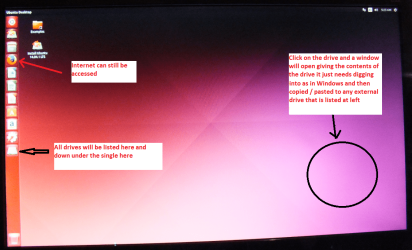
When it is finished - it takes very little time you will get a screen like in the pic .
Open the drive you want > User and dig down until you get to the data / settings you may be able to copy / paste the material you want to an external source or other installed drive doing this.
I am not sure if it will but I have recovered tons of data etc using this method both on "dead" or just plain drives that you cannot get data from using Windows.
 

Attachments

  • UBUNTU SCREEN X2.PNG
    UBUNTU SCREEN X2.PNG
    272.7 KB · Views: 0

My Computer

Computer type
PC/Desktop
Computer Manufacturer/Model Number
Own build (new) Desk1 / Asus ROG Win 7 / Desk2 1st build
OS
Desk1 7 Home Prem / Desk2 10 Pro / Main lap Asus ROG 10 Pro 2 laptop Toshiba 7 Pro Asus P2520 7 & 10
CPU
Desk1 i5 3750K / Laptop i7 GTX 860M / Desk2 i5 2500
Motherboard
Desk1 Asus P877-V / Desk2 Gigabyte H67 UD3H / Laptop ?
Memory
Desk1 8GB (1866) / Desk2 16GB (1333) / Laptop 8Gb DDR3
Graphics Card(s)
Desk 1& 2NVidia GTX 650 & Laptops on board Intel
Sound Card
Desk 1 & 2 -XONAR DG Realtek High Def audio Laptop
Monitor(s) Displays
Desk 1 Benq HD 2450 / Desk2 Philips 24" / Laptop 17.5"
Screen Resolution
1920x1080 D1 & D2 & Laptop 1
Hard Drives
Desk1 Samsung 120GB 830 SSD
Asus ROG 256GB 850 Pro SSD
Desk2 Samsung 840 256 SSD
Toshiba 120GB EVO
PSU
Desk 1 Corsair HX 1050/ Laptop ? / Desk 2 Corsair HX 650
Case
Desk 1 Cooler HAF XM ? Toshiba laptop / Desk2 Coolermaster
Cooling
Fans on all Desk1 -2 Desk2 - all Coolermasters 5 Laptop ?
Keyboard
Desk 1 MS Sidewinder X6 Desk 2 MS Sidewinder X 4
Mouse
Desk 1&2 - Gigabyte MS 900 gamer - laptop - Logitec wireless
Internet Speed
ADSL2+
Other Info
One other Desktop (tester) and spare Toshba laptop both with SSD's
Running Kaspersky 2016 ISS on all machines config'd identically
Logitec audio stereo systems on each machine (x3)
Canon MG5250MFC
Router/modem TP-Link running WPA2SK
^ The OP has said he has already reinstalled Windows. In that case I presume that he is booting into the newly installed Windows.

In such a case what will Ubuntu or any other live Linux read? Those will only read the current files in the current install. Will not recover/digup any overwritten files or show the good files in the lost/deleted original partition/s.

I feel that the OP should run Partition Recovery Wizard full Scan from the bootable PW and check whether it shows the lost/deleted partition/s. He can double click on those lost/deleted partitions and check whether it shows any of his lost files. If it shows then he should recover the partitions by asking Partition Wizard write that partition table. His current partition will be lost and he will not be able to boot into Windows. But that is not an issue or the issue. Once the old partition table is written back, he can use any Live Linux , Ubuntu/Liucid Puppy/ mint / Peppermint or whatever to recover the files.

If Partition Recovery Wizard does not show the lost/deleted partitions, then he should run PhotoRec from Test Disk DOS version Bootable which may carve out all files that it finds. If lucky OP may be able to recover some good files but without their original file names/folder structure.

The biggest mistake the OP did was to reinstall Windows.

The OP here did not do that - stopped just about and saved himself - and was able to recover all the files. Cleaned My ENTIRE Hard Drive. How can I restore it?
 

My Computer

OS
Windows 7 Home Premium 32 bit
Back
Top