Accidentally Deleted system partition. Cannot boot. Dynamic Drives.

horix

New member
Local time
9:46 AM
Messages
8
I have a 1.5TB HD of which I originally created 3 partitions of around 500GB each (C, D, and E). I have Drive C: which is my main Windows 7 Ultimate x64 partition. I had an older installation of Windows 7 Ultimate x64 residing on Drive D:. I simply use Drive E: as storage of large media like movies, software, music, or anything else and it does not have an operating system installed.

Yesterday I decided it was time to format my old Windows installation on Drive D: hoping to merge it with my storage drive E: Big mistake, because it turned out Drive D: was my system partition. When my computer tried rebooting after completing the format I got a hang while the post screen says "Loading Operating System..." indefinitely. I initially panicked and tried to re-install windows 7 with my install DVD back onto Drive D: and it still wouldn't boot.

That's when I found a few promising discussions on this forum that gave me hope; mainly starting on the third page of this following thread between user rogerfour and the always helpful gregrocker: http://www.sevenforums.com/installation-setup/23612-changing-system-partition-3.html

As Gregrocker suggests, I downloaded and burned a bootable image of Partition Wizard. Unfortunately, my entire disk and all the partitions are listed as Dynamic Disk instead of Basic. When I try and do anything inside Partition Wizard it gives an error popup saying it does not support Dynamic Disks in the free version! (╯°□°)╯︵ ┻━┻

-So then I booted using my windows 7 DVD into installer>repair my computer
I then went into command prompt and ran DISKPART commands to make sure the C: partition was set to active. I also made sure to check the other partitions to make sure they were inactive using "select partition #" and "detail partition." Both D: and E: partitions are listed as inactive. There was also a small 31KB partition listed...it doesn't show up when I "list volume." Anyways, it was also inactive.

-I then ran Startup Repair the suggested 3 times (and more), always with a restart in between repairs. At first it seemed to be finding and fixing things, but now it always says "Startup Repair could not detect a problem." Opening the list of diagnostics always shows that the tests complete successfully with no errors.

-I also tried re-entering command prompt and running some other commands suggested by Gregrocker:
"bootrec.exe /fixboot"
Returns: "The volume does not contain a recognized file system. Please make sure that all required file system drivers are loaded and that the volume is not corrupted."
"bootrec.exe /fixmbr"
Returns: "The operation completed successfully."
Bootsect.exe /nt60 all /force
Returns: "Successfully updated NTFS filesystem bootcode" for both C: and D: partitions. It then says "Bootcode was successfully updated on all targeted volumes."

That's about the full extent of what I've tried so far, and I still can't boot. I've tried repairing the D: partition as well, using all of the same steps. The same problems persist. The only difference I have noticed is that I get a slightly different error durring start-up depending on which partition I have listed as active.

If C: is active I get:
"Loading Operating System...
A disk read error occurred
Pres Ctrl+Alt+Del to restart"

But if D: is active I just get:
"Loading Operating System..."

Any help or advice would be greatly appreciated on how to get out of this pickle. I've run out of ideas and most forums suggest I do the things I've listed already, some with slight variations. Is my disk being Dynamic have something to do with the problem? Anyways, I look forward to hearing back.
 

My Computer

OS
Windows 7 Ultimate x64
Dynamic disks are pretty much to be avoided at all costs. It usually happens when a user tries to make a 4th partition. A warning should come up asking if you want to convert to dynamic. The correct answer should be "no!!!!!".

Is your data backed up?

You probably have to convert dynamic back to basic. It's doable and there may be a tutorial on this forum about it--if not, there are instructions on the net if you google.

It isn't pretty and your data is at some risk if not backed up.

Are you using version 4.2 of Partition Wizard?

Greg should see this and can give you more details.
 

My Computer

Computer type
PC/Desktop
Computer Manufacturer/Model Number
Ignatz Special; 4 speed manual gearbox; factory air conditioning; one of one
OS
Windows 7 Home Premium SP1, 64-bit
CPU
Intel Skylake i5-6600K, not overclocked
Motherboard
AsRock Z170M Extreme 4, micro ATX
Memory
8 GB HyperX DDR4-2666 (2 x 4 GB)
Graphics Card(s)
none; graphics are integrated on CPU
Sound Card
onboard: Realtek ALC1150; external: USB Behringer UF0-202
Monitor(s) Displays
Dell S2340M 23 inch IPS
Screen Resolution
1600 x 900
Hard Drives
System: Crucial MX100 series SSD, 128 GB;
Data: Samsung Spinpoint 103SJ, 1 TB;
Backup: WD Caviar Green WD30EZRX-00D8PB0, 3 TB
PSU
Rosewill SilentNight 500 watt fanless, semi-modular
Case
Antec Solo II
Cooling
Noctua NH-U12S; Noctua F12 intake, Noctua S12A exhaust
Keyboard
Microsoft 200 6JH-00001 USB
Mouse
Dell or Microsoft optical wired; USB
Antivirus
Microsoft Security Essentials and Malwarebytes Premium
Browser
Pale Moon
Other Info
All fans PWM; speeds at idle: CPU circa 500 rpm; intake circa 600 rpm; exhaust circa 600 rpm; CPU temps 27 idle and 47 C load in a warm room (27 C/81 F) when running Intel Extreme Tuning Utility stress test.
I'm not sure how the Dynamic disk was obtained, it must have been something I did ages ago and never thought twice about.

The data on the D: partition I don't need, want, or care about (hence the reason I decided to format it). Are there ways to convert specific partitions back to basic or do I have to do it for the whole disk? In any case, my whole D: partition is available for whatever kinds of experiments to try and get Windows to boot.

The data on C: and E: partitions I care about but I don't have backed up (I've been meaning to purchase a huge external HD that could handle that task.) I believe I could take the HD, plug it into another computer, mount it, and pull my precious data off before I undergo any extreme "dynamic->basic" conversion. I'd rather not have to deal with that mess though, so I'm crossing my fingers that Greg or someone has some awesome advice or ideas on how get this puppy booting again.

Edit* I just had to check the latest version of Partition Wizard and it's currently in Version 7.1. I got it from the following website: http://www.partitionwizard.com/partition-wizard-bootable-cd.html
 

My Computer

OS
Windows 7 Ultimate x64
Greg may tell you to get version 4.2 of PW. It has a feature or two not found in later versions, but I'm not sure if it is critical in your case.

Here is a tutorial on converting dynamic to basic:

http://www.sevenforums.com/tutorials/26829-convert-dynamic-disk-basic-disk.html


Among other things, it says this:

Converting the dynamic disk back to a basic disk requires that all dynamic volumes are deleted on the disk first.

Note that there are several methods.

I'd just study that and maybe make a tentative plan, but wait for Greg's input in this thread.

There may be a solution short of conversion, I'm not sure---but in the future you need to refuse dynamic disks whenever possible.
 

My Computer

Computer type
PC/Desktop
Computer Manufacturer/Model Number
Ignatz Special; 4 speed manual gearbox; factory air conditioning; one of one
OS
Windows 7 Home Premium SP1, 64-bit
CPU
Intel Skylake i5-6600K, not overclocked
Motherboard
AsRock Z170M Extreme 4, micro ATX
Memory
8 GB HyperX DDR4-2666 (2 x 4 GB)
Graphics Card(s)
none; graphics are integrated on CPU
Sound Card
onboard: Realtek ALC1150; external: USB Behringer UF0-202
Monitor(s) Displays
Dell S2340M 23 inch IPS
Screen Resolution
1600 x 900
Hard Drives
System: Crucial MX100 series SSD, 128 GB;
Data: Samsung Spinpoint 103SJ, 1 TB;
Backup: WD Caviar Green WD30EZRX-00D8PB0, 3 TB
PSU
Rosewill SilentNight 500 watt fanless, semi-modular
Case
Antec Solo II
Cooling
Noctua NH-U12S; Noctua F12 intake, Noctua S12A exhaust
Keyboard
Microsoft 200 6JH-00001 USB
Mouse
Dell or Microsoft optical wired; USB
Antivirus
Microsoft Security Essentials and Malwarebytes Premium
Browser
Pale Moon
Other Info
All fans PWM; speeds at idle: CPU circa 500 rpm; intake circa 600 rpm; exhaust circa 600 rpm; CPU temps 27 idle and 47 C load in a warm room (27 C/81 F) when running Intel Extreme Tuning Utility stress test.
Thanks, I'll keep that in mind and stick to Basic disks from now until the future.

Also, I found this post: How to non-destructively convert dynamic disks to basic disks | My PKB
...which seems to have some promising results using a program called TestDisk to not only backup my dynamic volumes but also possibly non-destructively converting back to a Basic drive.

I have to go to bed and work in the morning. When I get back tomorrow evening I'll look forward to starting my weekend off with some serious troubleshooting.
 

My Computer

OS
Windows 7 Ultimate x64
Download pw422.zip ISO, use Windows Image Burner or ImgBurn to burn to CD.

Boot PW 4.2 CD, click on the Dynamic HD to highlight it, from Disk tab select Convert to Basic disk, Apply.

Normally you are warned a disk is about to convert when you try to create more than four Primary partitions. If this is the case, you will have to first delete the partition that was created causing the conversion or it will not convert.

If you have any problems post back a camera snap of the PW disk map and listings for more help: Screenshots and Files - Upload and Post in Seven Forums - Windows 7 Forums

Once converted confirm the Win7 partition is a Primary partition - if not you'll need to rightclick to Modify>Convert to Primary, click OK.

Next rightclick on the Win7 primary partition to Modify>Set to Active, OK.

Then click on the Win7 HD again to highlight it, from Disk tab select Rebuild MBR, Apply all steps.

If this fails to start Win7, boot into Win7 DVD or System Repair Disk to run Startup Repair - Run 3 Separate Times until Win7 partition holds the System Active flags and boots on its own.
 
Gregrocker,

I successfully downloaded the specific PW 4.2 .zip you suggested and burned the ISO image onto a CD.

However, when I boot from it everything appears to go fine until right after I set the display resolution. A brief splash screen for PW comes up and then I get an error which says "This bootable CD does not Support Windows Server."

I've tried multiple times and keep getting the same error. I also tried the second "boot from Partition Wizard Boot Disc (Safe Mode)" with the same issue.

This seems really weird, I've never had a Windows Server OS installed on my machine ever. The newer PW that I burned seemed to open up just fine :/
 

My Computer

OS
Windows 7 Ultimate x64
Don't use third party partitioners to partition a drive. Always use the Windows built in one. Microsoft knwos the filesystem of Windows WAY bettery than any third party.
 

My Computer

Computer type
PC/Desktop
Computer Manufacturer/Model Number
HP Pavilion P7-1010
OS
Windows 7 Professional x64 Service Pack 1
CPU
AMD Athlon X4 645
Motherboard
Foxxcon N-Alvorix RS880
Memory
6GB DDR3 1066
Graphics Card(s)
Sapphire Radeon HD 5670 512MB GDDR5
Sound Card
Realtek Integrated Audio
Monitor(s) Displays
HP 2011x
Screen Resolution
1600x900
Hard Drives
1. Crucial M4 128GB SSD
2. 1TB Seagate Barracuda 7200.12 RPM
3. 1TB Western Digital Caviar Green 5400RPM
PSU
Seasonic S12 II Bronze 380 Watt
Case
HP OEM
Cooling
Coolermaster Heatsink, AVC Case Fan
Keyboard
HP OEM- Made by Chicony
Mouse
HP OEM- Made by Logitech
Internet Speed
20MBit Down/4 Up
Antivirus
Microsoft Security Essentials
Browser
Internet Explorer 10
Oh awesome, I was goofing around googling that error looking for some advice and found something that suggested I go into the Integrated Peripherals in my BIOS and set PCH SATA Control Mode to "AHCI." Also further down in the screen is the option "eSATA Ctrl Mode" which I also set to "AHCI"

When I tried booting into PW 4.2 again it worked! I'm now going to attempt converting the Dynamic Disk to a Basic Disk. Wish me luck.
 

My Computer

OS
Windows 7 Ultimate x64
Alright, quick update now that I have PW working.

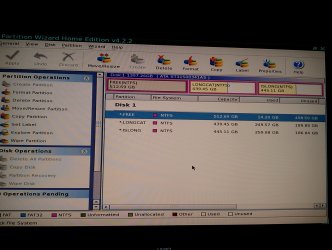
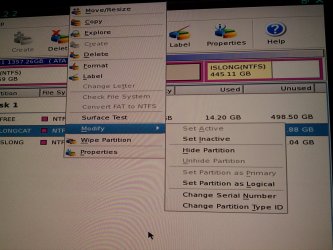
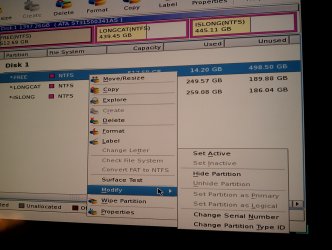
I was able to apply the "Converting Dynamic Disk to Basic Disk" inside PW 4.2. It completed the operation successfully. However, when moving onto gregrockers next step for converting my main Windows 7 install as primary. When I right click or go up to the partition menu the option for "Modify>Set Partition as Primary" is grayed out. The "Set Partition as Logical" is not grayed out though, does this mean it's already set as the Primary? How can I check? I've attached a screenshot.

Edit* for clarification, LONGCAT is my C: main partition with windows 7. ISLONG is the E: drive and does not have an OS on it at all, just data, movies, etc. Lastly, FREE is the D: drive I formatted which also happened to be my System Partition and got me into this mess. I tried re-installing windows 7 on it which is why it has about 14GB used up on it.
 

Attachments

  • main_screen.jpg
    main_screen.jpg
    365.1 KB · Views: 15
  • modify.jpg
    modify.jpg
    564.6 KB · Views: 13
  • modify2.jpg
    modify2.jpg
    385.1 KB · Views: 13

My Computer

OS
Windows 7 Ultimate x64
Do you need to maximize the window or scroll right so we can see the partition labels? It's rare there are none to be seen at all. If the first partition is labeled System, for example, we should try first to move the Active flag there to rebuild the MBR or repair it's System boot files.

Win7 partition apparently already Primary and Set Active, so click on Disk1 to highlight it, then from Disk tab select Rebuild MBR, Apply.

If Win7 doesn't start after reboot during which PW CD is pulled out, boot into Win7 DVD or System Repair Disk to run Startup Repair - Run 3 Separate Times until Win7 starts on its own.
 
/facepalm DURRR, I'm a moron. When I scroll over they are ALL listed as Primary. Should I set all of the ones I don't want as Primary's to logical? I'm so close, but I have to leave to see The Avengers movie soon. I'll probably be back late late for my subsequent updates. Thank you SO much for the help so far greg. You're a wizard Greggy!
 

My Computer

OS
Windows 7 Ultimate x64
Don't do anything other than the steps you've been given or you will mess it up again.

I'd like to see a Disk mgmt screenshot with the window maximized or at least scrolled over to the right to see the other labels if they're there. If not, which partition is labeled System?
 
Okay, sorry for the delay I'm back (had a long night)

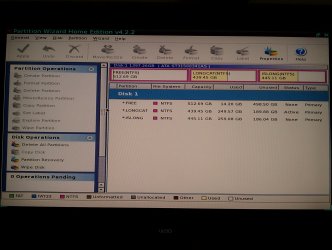
Before I left I tried clicking on Disk 1 in PW 4.2 and clicked on "Disk>Rebuild MBR" which completed successfully. Then tried booting and ran into the same old "Loading Operating System..." problem I've been having. I booted into windows 7 repair and tried running that a few times with "no problems found."

So now I'm back in PW 4.2 and I attached a screenshot (with the full menu in view this time). How do I know which partition is system? I don't see a label anywhere.
 

Attachments

  • PW_screeny.jpg
    PW_screeny.jpg
    377.6 KB · Views: 17

My Computer

OS
Windows 7 Ultimate x64
Did you run Startup Repair 3 separate times with reboots in between each to try to write the System boot files to the known Win7 partition which is marked Active?

If you have done this fully and without shortcut, then try rightclicking on first partition to Modify>Set to Active, click OK, then again highlight Disk1 to Rebuild MBR from Disk tab, Apply. If this fails to start Win7 at reboot then again run 3 Startup Repairs to see if it will reestablish it as System partition for the old Win7 installation.

If not boot the Win7 DVD to Custom Install to the first partition, which will give you access to your old Win7 files and allow you to gradually move it over to first partition. If you do this while it is marked Active it may work better than before. I would first use Custom install's Drive Options to delete the first partition (only) then just click Next to let it auto-create and -format and begin install. Clean Install Windows 7

May I ask why you had such a large System partition to begin with? Was there another OS there at one time? Have you had Linux GRUB bootloader on the drive as this can corrupt Win7 beyond repair? If not it may be random and reckless changes you made which corrupted Win7 beyond repair.
 
i bought a new hp dv4 laptop. i bought windows ultimate x64 dvd. so was going to install it and accidentally converted my 640GB HDD to dynamic. i was able to boot but was not able to convert it back to basic as the c: drive was in use because of the windows. i struggled a lot today on the net but i was not able to find a proper solution.
i came to this thread and VIOLA!! problem solved.
i would like to thank gregrocker from the core of my heart. god bless you

I registered just to say thanks :D
 

My Computer

Computer Manufacturer/Model Number
hp pavillion dv6-7011tx
OS
windows 7 home premium x64
CPU
Intel Core i5-3210M
Motherboard
Hewlett-Packard 181B
Memory
hyundai 4*2 DDR3 SDRAM
Graphics Card(s)
GeForce GT 630M 2GB
Sound Card
Intel Panther Point PCH
Monitor(s) Displays
LG Philips
Screen Resolution
1366 x 768
Hard Drives
ST640LM000 HM641JI

610,480 MBytes (640 GB)

5400 RPM
Back
Top