JavaScript is disabled. For a better experience, please enable JavaScript in your browser before proceeding.
You are using an out of date browser. It may not display this or other websites correctly.
You should upgrade or use an
alternative browser .
Solved Accidentally renamed user folder!
Hi,
In trying to move my Downloads folder I seem to have accidentally renamed my User folder 'Downloads'.
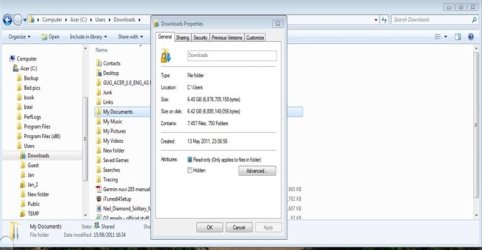
It only appears like this in my area when I look in Windows Explorer. Other users still see it as its original name. (See attached screen shot.) It also has a picture of a lock and a blue arrow in the icon which the other user accounts don't have.
Grateful for any advice on how to sort this out!
abw1
Computer Manufacturer/Model Number Acer X5900 OS Windows 7 - 64 bit Memory 4Gb
Administrator
Staff member
Hello Abw, and welcome to Seven Forums.
What happens when you right click on the user profile folder to rename it back to the orignal user name?
Here's a copy of your
screenshot for others to see:
Computer type PC/Desktop Computer Manufacturer/Model Number Self built custom OS 64-bit Windows 11 Pro for Workstations CPU Intel i7-8700K OC'd to 5 GHz Motherboard ASUS ROG Maximus XI Formula Z390 Memory 64 GB (4x16GB) G.SKILL TridentZ RGB DDR4 3600 MHz Graphics Card(s) ASUS ROG-STRIX-GTX1080TI-O11G-GAMING Sound Card Integrated Monitor(s) Displays 2 x Samsung Odyssey G7 27" Screen Resolution 2560x1440 Hard Drives 1TB Samsung 990 PRO M.2, PSU Seasonic Prime Titanium 850W Case Thermaltake Core P3 Cooling Corsair Hydro H115i Keyboard Logitech wireless K800 Mouse Logitech MX Master 4 Internet Speed 2 Gb/s Download and 100 Mb/s Upload Antivirus Malwarebyte Anti-Malware Premium Browser Google Chrome Other Info Logitech Z625 speaker system,
New member
Guru
Gold Member
Computer Manufacturer/Model Number Hewlett packard/p6512uk OS Microsoft Windows 7 Home Premium 64-bit 7600 CPU IIx4 amd athelon 635 processor Motherboard FOXCONN 2AA9 Memory 2x2gb Graphics Card(s) ati radeon HD 5450 Sound Card (1) Realtek High Definition Audio (2) AMD High Definition Monitor(s) Displays samsung lcd tv 32" Screen Resolution 1360x 768 Hard Drives (1) WDC WD10 01FAES-60Z2A0 SATA Disk Device (2) Maxtor OneTouch USB Device (3) ST310003 33AS USB Device (4) WD My Book 1111 USB Device PSU ? Cooling air! Keyboard wireless hp Mouse wireless Hp,optical Internet Speed 1.10mb/s Antivirus MSE Browser Firefox
New member
Thread Starter
Thanks guys. Sorry not to reply earlier but I've been away for a couple weeks. Thanks for the advice. With your help I've managed sort out my folder name!
Computer Manufacturer/Model Number Acer X5900 OS Windows 7 - 64 bit Memory 4Gb
That's OK. Pleased to hear you have managed to fix things and thanks for letting us know as we can mark the thread as resolved.
Computer Manufacturer/Model Number HP Pavilion Elite 495UK OS Windows 7 Ultimate SP1 64-Bit CPU Intel Core i7 870 @ 2.93GHz Motherboard MSI 2A9C (CPU1) Memory 8Gb Dual-Channel DDR3 @ 664MHz Graphics Card(s) nVidia GeForce GTX 460 1024MB dedicated RAM Sound Card Realtek HD Audio Monitor(s) Displays HP2310i Screen Resolution 1920 x 1080 Hard Drives 1x1954GB Hitachi HDS22020ALA 330 (RAID), 1x1954GB Hitachi External for backup and storage PSU 460W Case HP Elite Cooling Air cooled Keyboard Logitech K750 solar-powered keyboard Mouse Logitech Wireless M180 mouse Internet Speed 2Mb Other Info Pure Avanti Flow Internet Radio with iPod Dock, 64Gb iPod, HP USB Speakers, Sony MDR-V500 Headphones, Sony Vaio F-Series Laptop

 It only appears like this in my area when I look in Windows Explorer. Other users still see it as its original name. (See attached screen shot.) It also has a picture of a lock and a blue arrow in the icon which the other user accounts don't have.