Hello all
I received noticed of a new update for my GPU. Normally I click 'custom install' as to avoid installing any of the 3D drivers since I had no need for them.
Without thinking, I hit 'express install' and ended up installing all of the new drivers. After the install was complete, I went to manually uninstall the drivers I did not need.
I ended up uninstalling the wrong driver, and now my GPU will no longer display. I plugged into my motherboard directly, which is how I can see my display.
I went back to NVIDIA to try and install the drivers, but I get an error message during the install phase that "the graphics driver could not find the compatible graphics hardware".
I went back to NVIDIA's website to try and install the oldest drivers I could after receiving this message, but I am met with the same thing.
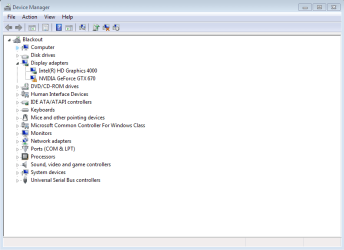
The last thing I did was go into my Device Manager -> Display Adapters in hopes that it would be there so I could reset it, but it's not showing up there either.
Any help would be appreciated.
I received noticed of a new update for my GPU. Normally I click 'custom install' as to avoid installing any of the 3D drivers since I had no need for them.
Without thinking, I hit 'express install' and ended up installing all of the new drivers. After the install was complete, I went to manually uninstall the drivers I did not need.
I ended up uninstalling the wrong driver, and now my GPU will no longer display. I plugged into my motherboard directly, which is how I can see my display.
I went back to NVIDIA to try and install the drivers, but I get an error message during the install phase that "the graphics driver could not find the compatible graphics hardware".
I went back to NVIDIA's website to try and install the oldest drivers I could after receiving this message, but I am met with the same thing.
The last thing I did was go into my Device Manager -> Display Adapters in hopes that it would be there so I could reset it, but it's not showing up there either.
Any help would be appreciated.
My Computer
At a glance
Windows 7 ProfessionalGenuineIntel Intel(R) Core(TM) i7-3770K CPU @...16.0 GBNVIDIA GeForce GTX 1070
- Computer type
- PC/Desktop
- Computer Manufacturer/Model Number
- Custom Build
- OS
- Windows 7 Professional
- CPU
- GenuineIntel Intel(R) Core(TM) i7-3770K CPU @ 3.50GHz
- Motherboard
- ASRock, Z77 Extreme4
- Memory
- 16.0 GB
- Graphics Card(s)
- NVIDIA GeForce GTX 1070
- Monitor(s) Displays
- Viewsonic VX2450WM-LED 24-Inch
- Screen Resolution
- 1080
- Hard Drives
- 1TB WD Black
250 GB 850 EVO
- PSU
- HX 650
- Antivirus
- MSE
- Browser
- Brave