Accounts and duplication

lonny

New member
Member
Local time
4:36 PM
Messages
65
I'm new to W7 and there are quite a few changes since XP. I'm on W7 Pro 64-bit and it is running fine except for some functions that I can not figure. I'm the only user of this PC.

For example, I have an user account which I take will limit me on various options. I tried to view the temporary Internet folder, to copy a flv video to my desktop, which I'm not allowed to open - "Location is not available" and "Access is denied". Okay, I can accept that and then opened a new account Administrator with all rights.
Same story, I have ticked "Show hidden files, folders, and drives". What gives?

Because I started a new Admin account I now have a blank Desktop except for two progs that were originally installed "Everyone". Is there an easy (or quicker) way to have the Admin account Desktop with all I've done on my user account Desktop? All and everything I've set must be redone in the Admin account? Even if I access any installed prog shortcut on my user Desktop it it seen as a first time run? Incl Windows Live Mail.

I can understand that W7 sees these two accounts as dif people and keeping all separated but I'm pushing my luck :confused:
Any tips most welcome.
 

My Computer

Computer type
PC/Desktop
OS
Win7 Pro x64
CPU
Intel(R) Core(TM) i7-2600 CPU @ 3.40GHz
Motherboard
ASRock H61M-VS4
Graphics Card(s)
ATI Radeon HD 5450
Screen Resolution
2560 x 1440
Hard Drives
WDC WD10EALX-009BA0 ATA x2
Internet Speed
100 Mbps
Browser
Waterfox 64-bit
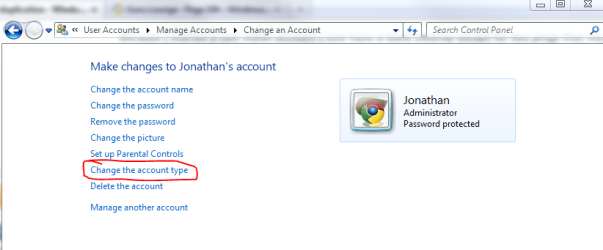
What you could do is log into your new admin account, then change your other account to also be administrator.

Capture.PNG
 

My Computer

Computer Manufacturer/Model Number
Custom
OS
Windows 7 Professional x64
CPU
Intel i7 2600K OC'd @ 4620 MHz
Motherboard
Asus P8Z68-V Pro
Memory
16GB GSkill Sniper 2133 Mhz (4x4GB)
Graphics Card(s)
EVGA GeForce GTX 480 SuperClocked+
Sound Card
Realtek High Definition Audio
Monitor(s) Displays
2x Acer S273HLbmii 27"
Screen Resolution
2 x 1920x1080
Hard Drives
64GB Crucial M4 SSD

Storage: Hitachi 1TB 5400RPM, Samsung 1.5TB 5400RPM
PSU
Corsair HW Series 750w (modular)
Case
Cooler Master HAF 932 Advanced Blue Edition
Cooling
CM Hyper 212+ CPU cooler, 3x 230mm + 1x 140mm case fans
Keyboard
Logitech MK320 (wireless)
Mouse
Logitech MK320 (wireless)
Internet Speed
30 Mb/s : 2 Mb/s

My Computer

Computer type
PC/Desktop
Computer Manufacturer/Model Number
Dell XPS 420
OS
Windows 10, Home Clean Install
CPU
Intel Core2 processsor Q8200(2.33Ghz 1333FSB) Quad Core Tech
Motherboard
Dell
Memory
6 gb
Graphics Card(s)
ATI Radeon 256MB HD3650
Sound Card
Intergrated 7.1 Channel Audio
Monitor(s) Displays
Dell SP2009W 20"
Hard Drives
640 GB Serial ATA Hard drive
Cooling
Fan
Keyboard
Dell USB Keyboard
Mouse
Dell Premium Optical USB
Internet Speed
DSL 2.85
For example, I have an user account which I take will limit me on various options. I tried to view the temporary Internet folder, to copy a flv video to my desktop, which I'm not allowed to open - "Location is not available" and "Access is denied". Okay, I can accept that and then opened a new account Administrator with all rights.
Same story, I have ticked "Show hidden files, folders, and drives". What gives?
If you are getting "Access Denied" then you are trying to access a junction point which is not the real location. If you are receving access denied in your User folder that is an indication that it is a junction. (See the link in ma signature for more information.)

Temporary Internet Files is located here:
C:\Users\[username]\AppData\Local\Microsoft\Windows\Temporary Internet Files
 

My Computer

Computer type
PC/Desktop
Computer Manufacturer/Model Number
Alienware Aurora ALX R4
OS
Windows 10 Pro (x64)
CPU
Intel Core i7-3930K (3.2GHz - 4.5GHz)
Motherboard
Alienware Aurora-R4 x79
Memory
4x Samsung 4GB PC3-12800 DDR3 (16GB 1600MHz)
Graphics Card(s)
Nvidia Geforce GTX 690
Sound Card
SteelSeries Siberia Elite
Monitor(s) Displays
Dell UltraSharp U3011
Screen Resolution
2560x1600
Hard Drives
Samsung 850 Pro 256 GB, Seagate 1TB Desktop Hybrid HDD, 2x Western Digital 4TB Green HDD
PSU
875W Some Dell PSU <.<
Case
Alienware Aurora ALX
Cooling
Custom Liquid Cooling (EK CPU & GPU blocks) dual EK 480RAD
Keyboard
Logitech G710+ Mechanical
Mouse
Logitech G700s
Internet Speed
Verizon Fios (50 mbps average)
Other Info
Server: Intel NUC D54250WYK: i5-4250U, 16GB, 256 GB mSATA, Windows Server 2012 R2
Thanks folk, I've followed all suggested.

Jonathan_King - I've changed the account as suggested and that solved 99% of the issues. What I found weird was that I have two administrator accounts, one is titled "administrator" and the other "administrators". Can I remove/delete/disable one w/o any repercussions?
At some stage in the past I've changed a setting and found afterwards that the desktop of that account changed to blank, all icons missing except for two progs?

I currently have two .ini files on my desktop, are they involved:
1 = desktop.ini
[.ShellClassInfo]
LocalizedResourceName=@%SystemRoot%\system32\shell32.dll,-21799

2 = desktop.ini
[.ShellClassInfo]
LocalizedResourceName=@%SystemRoot%\system32\shell32.dll,-21769
IconResource=%SystemRoot%\system32\imageres.dll,-183

richc46 - maybe one of the above two acc is this "special administrator" acc?

logicearth - yep, what an eye opener. I followed various links in the tree and there were many "links" marked with a shortcut arrow and/or a small lock icon. They all ended at nothing should I select them. The "lock" icons now gone after Jonathan_King's tip.
Eventually found a clean route. This is a drastic change from XP, thanks.
 

My Computer

Computer type
PC/Desktop
OS
Win7 Pro x64
CPU
Intel(R) Core(TM) i7-2600 CPU @ 3.40GHz
Motherboard
ASRock H61M-VS4
Graphics Card(s)
ATI Radeon HD 5450
Screen Resolution
2560 x 1440
Hard Drives
WDC WD10EALX-009BA0 ATA x2
Internet Speed
100 Mbps
Browser
Waterfox 64-bit
The two desktop.ini files on the desktop...One in is your user account's "Desktop" folder, the other is in Public/Desktop. Public's desktop is shared across all accounts.

Administrators with an "s" is a group. Administrator without an "s" is the big boss user that is normally turned off. Aka., Hidden Administrator account.
 

My Computer

Computer type
PC/Desktop
Computer Manufacturer/Model Number
Alienware Aurora ALX R4
OS
Windows 10 Pro (x64)
CPU
Intel Core i7-3930K (3.2GHz - 4.5GHz)
Motherboard
Alienware Aurora-R4 x79
Memory
4x Samsung 4GB PC3-12800 DDR3 (16GB 1600MHz)
Graphics Card(s)
Nvidia Geforce GTX 690
Sound Card
SteelSeries Siberia Elite
Monitor(s) Displays
Dell UltraSharp U3011
Screen Resolution
2560x1600
Hard Drives
Samsung 850 Pro 256 GB, Seagate 1TB Desktop Hybrid HDD, 2x Western Digital 4TB Green HDD
PSU
875W Some Dell PSU <.<
Case
Alienware Aurora ALX
Cooling
Custom Liquid Cooling (EK CPU & GPU blocks) dual EK 480RAD
Keyboard
Logitech G710+ Mechanical
Mouse
Logitech G700s
Internet Speed
Verizon Fios (50 mbps average)
Other Info
Server: Intel NUC D54250WYK: i5-4250U, 16GB, 256 GB mSATA, Windows Server 2012 R2
Thanks logicearth, that is most interesting info, Googled it heavy and learnt a lot.
I currently have two options to select when I boot up, an Admin acc and my "own" acc which I use. Is there a way of changing it so that I only have one option or even better that I'm logged in automatically to my own acc? I do not use a password.
 

My Computer

Computer type
PC/Desktop
OS
Win7 Pro x64
CPU
Intel(R) Core(TM) i7-2600 CPU @ 3.40GHz
Motherboard
ASRock H61M-VS4
Graphics Card(s)
ATI Radeon HD 5450
Screen Resolution
2560 x 1440
Hard Drives
WDC WD10EALX-009BA0 ATA x2
Internet Speed
100 Mbps
Browser
Waterfox 64-bit
Back
Top