Solved acer 5551 power up problem

david1954

New member
Local time
8:07 PM
Messages
6
Acer laptop 5551, just redid cmos battery, put everything back together but as soon as I hit the power on button I get nothing. Checked and rechecked MB ribbon and keyboard ribbon but still no power on light. If I plug in power source, I get battery light charging and in the blue. Any ideas anyone?
Was working before, just disconnected cmos battery for 1 hour to bypass lost bios password


solved everyone......bad keyboard....
changed it and all is running well.
Taking off cmos battery did clear password for bios, BUT after the hell I went through, wouldn't recommend it for those like me who are not sure of what they are doing.

Once again, I thank everyone who took the time to read and reply
 
Last edited:

My Computer

Computer Manufacturer/Model Number
acer
OS
Windows 7 Home Premium 32bit.
Did you guard against static discharge to the electronics? That can fry a mobo.

Laptops can be a maze to get into the CMOS battery, so are you sure you reassembled everything correctly, made connections tightly, secured the CMOS battery right side up?

Do you get any LED lights? Is the CPU fan or a case fan running? Is there any signal to the screen at all?

Pull out the A/C adapter plug and battery, hold power button for 30 seconds to drain power. Plug back in only a/co adapter to see if it will start. Anything?
 
acer powerless

did as you suggested but still nothing but a blue battery full light.
I only removed 1 side of cmos battery, then resoldered it 1 hour later to clear bios password that I forgot.
re-assembled exactly. Only removed 2 ribbons....
keyboard which ribbon goes under brown plastic lock
MB ribbon which goes over brown plastic lock......both are secure

still no power. Everything did work great before.....
thank you for reading and answering

still stumped
 

My Computer

Computer Manufacturer/Model Number
acer
OS
Windows 7 Home Premium 32bit.
Replacing the CMOS battery in a laptop should not be much different than shown here in this video I found by simply googling "replace laptop CMOS battery:"


How exactly were you able to remove only half of a CMOS battery requiring you to resolder it back together? This sounds like it could easily ruin the mobo in a number of ways.
 
re acer 5551

there are 2 contact points, undid 1. left off 1 hour and replaced contact point, all done without battery etc. I made sure there was no power to laptop and did discharge everything by holding down power-on for 2 minutes before I worked on cmos battery.
I did google before starting.
Does it sound like either keyboard or MB connection is the problem? Even though I reseated the ribbons countless times.
It's like to on button not talking to motherboard. Hope I didn't screw up the ribbon for the keyboard.
Thanks again, hope I am not being a pain...
 

My Computer

Computer Manufacturer/Model Number
acer
OS
Windows 7 Home Premium 32bit.
You said this.
I only removed 1 side of cmos battery, then resoldered
That is scary.
You state you Googled before starting. Could you show us the site you Googled.
 

My Computer

Computer type
PC/Desktop
Computer Manufacturer/Model Number
Home made Desktop
OS
Windows 10 Pro. 64/ version 1709 Windows 7 Pro/64
CPU
Intel i7-6800K @ 4.3
Motherboard
ASUS X-99 Deluxe II
Memory
Corsair Platinum 16 gig @2400
Graphics Card(s)
EVGA GTX 1070 OC
Monitor(s) Displays
Asus 27" LED LCD/VE278Q
Screen Resolution
1920-1080 or 1280-720 HDMI
Hard Drives
INTEL SSD 730-240 Gb Sata 3.0/
PSU
EVGA Platium 1200W
Case
Phanteks Luxe Tempered Glass 8 fans/ one radiator
Cooling
XSPC/ Water Cooled CPU
Keyboard
Das 4 Professional
Mouse
Logitech M705/MX Anywhere 2-S
Internet Speed
100 mbits
Antivirus
Microsoft Security Essentials/ Malwarebytes Premium 3.0/ SAS
Browser
I.E. 11 default/Firefox/ ISP Time Warner Cable/Spectrum
Other Info
LG BluRay Burner/
Sound system-KLipsch-THX/
Icy Dock ssd Hot Swap bays.
Your AC Adapter may be bad. It happened to my laptop ;)
 

My Computer

Computer type
PC/Desktop
Computer Manufacturer/Model Number
Bruce ... somewhere in his 40's
OS
Windows 7 Ultimate 32bit SP1
CPU
Intel(R) Core(TM)2 Quad CPU @ 2.40GHz, 2400 MHz
Motherboard
INTEL/D975XBX2
Memory
4 GB
Graphics Card(s)
ATI Radeon HD 2600 Pro
Monitor(s) Displays
Samsung SyncMaster 914v
Screen Resolution
1280 x 1024
Hard Drives
2/500GB each ... ST3500630AS ATA Device.
One is not connected
PSU
Rocketfish 700 W
Case
G.Skill Gigabyte Chassis
Keyboard
Standard PS/2 Keyboard
Mouse
Microsoft PS/2 Mouse
Internet Speed
DSL
Antivirus
Avira Internet Security
Browser
IE 11
Other Info
ATI HDMI Audio
What were the results of the power reset steps I gave you earlier? After discharging the power with both battery and adapter unplugged, what were the results with either and both?
 
no results from what you suggested concerning discharging the the power etc and sorry it took so long to get back to you. On the weekends when I leave the work place I have zero access to computers.
That being said, I will once again carefully dismantle my laptop and re-assemble to see what happens.
 

My Computer

Computer Manufacturer/Model Number
acer
OS
Windows 7 Home Premium 32bit.
anyway to check mobo with a tester?
 

My Computer

Computer Manufacturer/Model Number
acer
OS
Windows 7 Home Premium 32bit.
Other than the manufacture and their equipment and personnel I know of no way to test a motherboard other than physical inspection for something obvious.
 

My Computer

Computer type
PC/Desktop
Computer Manufacturer/Model Number
Home made Desktop
OS
Windows 10 Pro. 64/ version 1709 Windows 7 Pro/64
CPU
Intel i7-6800K @ 4.3
Motherboard
ASUS X-99 Deluxe II
Memory
Corsair Platinum 16 gig @2400
Graphics Card(s)
EVGA GTX 1070 OC
Monitor(s) Displays
Asus 27" LED LCD/VE278Q
Screen Resolution
1920-1080 or 1280-720 HDMI
Hard Drives
INTEL SSD 730-240 Gb Sata 3.0/
PSU
EVGA Platium 1200W
Case
Phanteks Luxe Tempered Glass 8 fans/ one radiator
Cooling
XSPC/ Water Cooled CPU
Keyboard
Das 4 Professional
Mouse
Logitech M705/MX Anywhere 2-S
Internet Speed
100 mbits
Antivirus
Microsoft Security Essentials/ Malwarebytes Premium 3.0/ SAS
Browser
I.E. 11 default/Firefox/ ISP Time Warner Cable/Spectrum
Other Info
LG BluRay Burner/
Sound system-KLipsch-THX/
Icy Dock ssd Hot Swap bays.
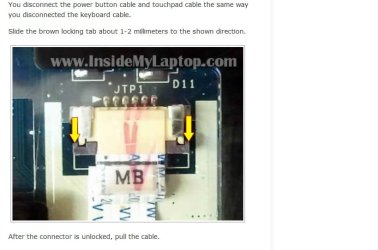
I believe this is the problemacer.jpg
 

My Computer

Computer Manufacturer/Model Number
acer
OS
Windows 7 Home Premium 32bit.
It's a tempermental locking tab which pins the power button, touchpad and keyboard ribbon to their contacts. I had a struggle with one on a Compaq laptop I disassembled last summer. One of the flimsy tabs (about the heft of a fingernail clipping) broke with almost no pressure applied at all, so I had to jerryrig one.

Although it's running fine now after cleaning out the heatsink and repasting the CPU, I've come to the conclusion it's not really practical to disassemble a laptop unless its a last resort before it goes in the bin, for practice.
 
Back
Top