Acer 5750g Odd Behaviour

ps1000

New member
Local time
5:09 PM
Messages
10
I have an interesting issue with my Acer 5750g. The issue is by no means a problem to me, and I don't care if it is not solved, but I have always been a bit curious as to what causes it.

I have had the laptop for about 4 years now I think? And the issue started after about 1 year.

The laptop emits an audible beep when ever the AC adapter is connected or disconnected.
Sometimes the laptop would emit this beep as if the adapter had been disconnected, and then the power LEDs would flash. The laptop would not charge in this state despite the AC adapter being connected and if left for a while, the plug that connects to the laptop would become hot. Simply disconnecting and reconnecting the AC adapter would return the laptop to its usual state.

The issue did grow to be a minor annoyance to me in time, as sometimes I would leave the laptop on overnight to download something, only to find that the issue had occurred, battery had depleted and the laptop had shutdown.

Having thought that this issue might be with the AC adapter, I swapped mine with a friends. (He had almost the same model, voltage, amperage and plugs all matched) The problem completely disappeared, and he never had any problem like I had had.

About 2 months ago however, it started to happen again.

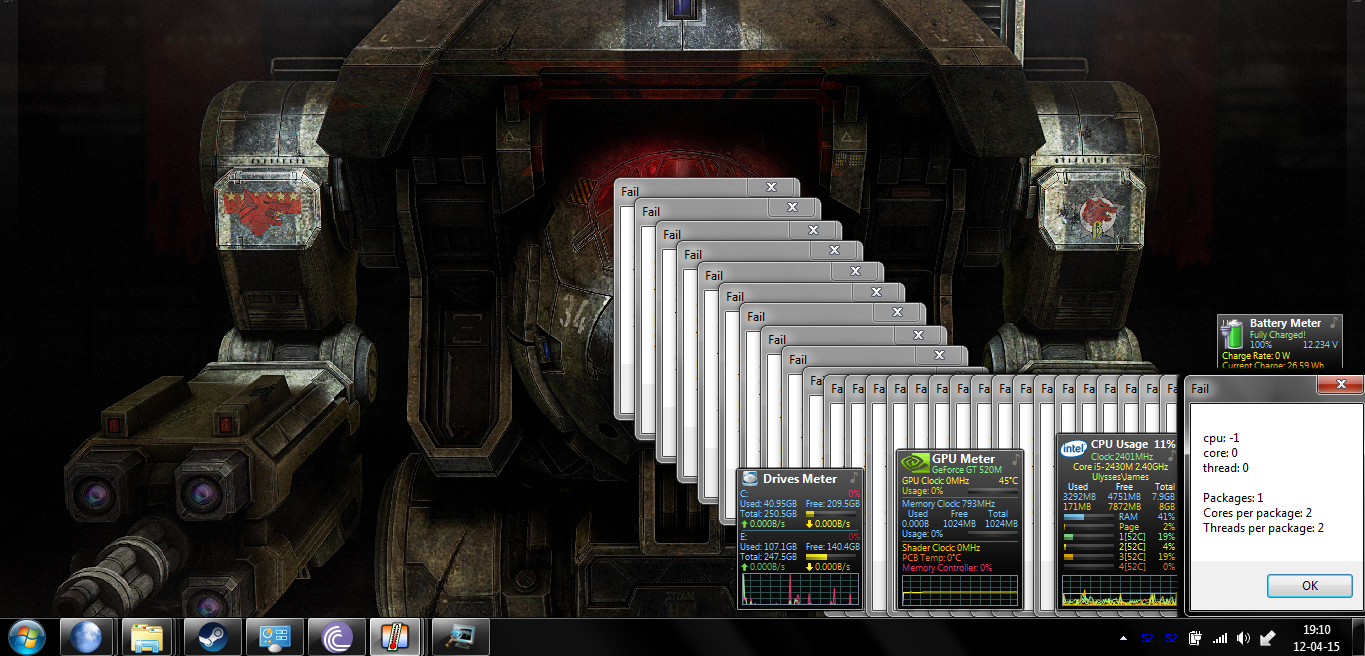
I just finished replacing the hard drive and reinstalling everything due to the old hard drive failing, when something new happened. I use CoreTemp to keep an eye on my temperatures, and when the problem happened again, CoreTemp began to spam some error messages.

mSDEKft.png


Here you can see the sheer amount of them:
jefJ2d8.png


The messages were appearing about 1 per second.


So does this perhaps mean the the issue is related somehow to the CPU? Perhaps a faulty temperature sensor? Or something to do with the CPU voltage regulation?

Anyway, like I said at the start, I am not really bothered if it is fixable or not, I am more interested in what causes it and why.
 

My Computer

Computer Manufacturer/Model Number
Acer Aspire 5750g
OS
Windows 7 Ultimate x64
CPU
i5 2430m Sandy Bridge 2.4ghz
Memory
8gb Kingston
Graphics Card(s)
Nvidia Geforce GT 520m
Hard Drives
Seagate 500gb

My Computer

Computer type
PC/Desktop
Computer Manufacturer/Model Number
Custom assembled by me :}
OS
Win-7-Pro64bit 7-H-Prem-64bit
CPU
i7-5930K 2nd i9-9940x both water blocked VRM's too
Motherboard
ASUS SABERTOOTH X99 2nd ASUS x299 Apex
Memory
Trident-z 3200C14 2nd Trident-z 3600C16
Graphics Card(s)
EVGA 1080ti ftw3 2nd Titan Xp both water blocked
Sound Card
Built-in Realtek
Monitor(s) Displays
1-AOC G2460PG 24"G-Sync 144Hz/ 2nd 1-ASUS VG248QE 24" 144Hz
Screen Resolution
1920 x 1080 144Hz
Hard Drives
2-Samsung M.2 Evo & Evo Plus
2-Samsung 850 EVO 500GB SSD's/ 3-2.5 W.D. Black 1tb-&3-1tb/3-3.5 WD Black 1tb hdd's
PSU
EVGA SuperNOVA 1000-P2 2nd 1200-P2
Case
2-Corsair Obsidian Series 450D Black ATX Mid Tower
Cooling
Custom water loops
Keyboard
Logitech G710+/ 2nd Logitech G910
Mouse
2-RedDragon M901 Perdition 16400 dpi Gaming mouse = wired
Internet Speed
Comcast Ping 19ms 89.31mbps download speed 6.12mbps upload
Antivirus
Malwarebytes Pro/ Superantispyware Pro
Browser
FireFox & Pale moon
Other Info
2nd ASUS X299 Apex/Intel i9-9940x with Custom water loop/7H-Prem-x64/Corsair 450D case/Ram Trident-z 3600C16 4x8gb / Samsung970Evo plus 500gb SSD/Dual ssd EZ swap evo/PSU EVGA SuperNova 1200w-P2 80+Platinum/GPU Titan Xp /8-ML-140 on push-pull on 2-280GTX rads
Thanks ThrashZone,
I checked both the power leads, the one I'm using now is marked LS-38 and the original one is marked LH-54, so it looks it like I've got unaffected cables. I do have a couple spare leads lying around though, so I'll give another one a try for a while and see what happens. :)

I also checked the manufacturers website for any recalls and there was a recall issued for devices with Sandy Bridge processors, which my laptop has, but after checking the serial number it appears to be unaffected by that as well.
 

My Computer

Computer Manufacturer/Model Number
Acer Aspire 5750g
OS
Windows 7 Ultimate x64
CPU
i5 2430m Sandy Bridge 2.4ghz
Memory
8gb Kingston
Graphics Card(s)
Nvidia Geforce GT 520m
Hard Drives
Seagate 500gb
It does look like you have a nice back ground image do use a third party theme by chance ?
Nothing on taskbar looks third party = pretty much default theme.
The only other thing might be the battery that I can think of ?
 

My Computer

Computer type
PC/Desktop
Computer Manufacturer/Model Number
Custom assembled by me :}
OS
Win-7-Pro64bit 7-H-Prem-64bit
CPU
i7-5930K 2nd i9-9940x both water blocked VRM's too
Motherboard
ASUS SABERTOOTH X99 2nd ASUS x299 Apex
Memory
Trident-z 3200C14 2nd Trident-z 3600C16
Graphics Card(s)
EVGA 1080ti ftw3 2nd Titan Xp both water blocked
Sound Card
Built-in Realtek
Monitor(s) Displays
1-AOC G2460PG 24"G-Sync 144Hz/ 2nd 1-ASUS VG248QE 24" 144Hz
Screen Resolution
1920 x 1080 144Hz
Hard Drives
2-Samsung M.2 Evo & Evo Plus
2-Samsung 850 EVO 500GB SSD's/ 3-2.5 W.D. Black 1tb-&3-1tb/3-3.5 WD Black 1tb hdd's
PSU
EVGA SuperNOVA 1000-P2 2nd 1200-P2
Case
2-Corsair Obsidian Series 450D Black ATX Mid Tower
Cooling
Custom water loops
Keyboard
Logitech G710+/ 2nd Logitech G910
Mouse
2-RedDragon M901 Perdition 16400 dpi Gaming mouse = wired
Internet Speed
Comcast Ping 19ms 89.31mbps download speed 6.12mbps upload
Antivirus
Malwarebytes Pro/ Superantispyware Pro
Browser
FireFox & Pale moon
Other Info
2nd ASUS X299 Apex/Intel i9-9940x with Custom water loop/7H-Prem-x64/Corsair 450D case/Ram Trident-z 3600C16 4x8gb / Samsung970Evo plus 500gb SSD/Dual ssd EZ swap evo/PSU EVGA SuperNova 1200w-P2 80+Platinum/GPU Titan Xp /8-ML-140 on push-pull on 2-280GTX rads
Yeah, the theme is default minor some colour changes and transparency, the background is also just an image, nothing fancy. ;)

I'll take the battery out and see if the problem persists.

Thanks for the suggestion.
 

My Computer

Computer Manufacturer/Model Number
Acer Aspire 5750g
OS
Windows 7 Ultimate x64
CPU
i5 2430m Sandy Bridge 2.4ghz
Memory
8gb Kingston
Graphics Card(s)
Nvidia Geforce GT 520m
Hard Drives
Seagate 500gb
Well, this evening it happened again, and that was with the different power cable and the battery removed. :confused:

At least, I assume that is what happened. The computer immediately powered off after a very brief beep.

I needed to reconnect the AC adapter for it to power back on as well, so I guess that confirms this as being a hardware problem?
 

My Computer

Computer Manufacturer/Model Number
Acer Aspire 5750g
OS
Windows 7 Ultimate x64
CPU
i5 2430m Sandy Bridge 2.4ghz
Memory
8gb Kingston
Graphics Card(s)
Nvidia Geforce GT 520m
Hard Drives
Seagate 500gb
My guess would be that a hardware problem is driving all the errors, and that the MB is the likely source. I would try a BIOS update, but there is risk in it, especially with a failing board.
 

My Computer

Computer type
PC/Desktop
Computer Manufacturer/Model Number
dell precision t3400 tower
OS
Linux Lite 3.2 x64; Windows 7, 8.1
CPU
Core2Duo 2.4
Memory
6GB ddr2
Graphics Card(s)
nVidia
Hard Drives
120gb SSD, 1TB HD, 2TB HD; sata II
Internet Speed
12/2
Browser
Vivaldi, Slimjet (Chromium) x64
In addition please re-spec both the A/C adapter and the battery to make sure they are exactly correct for your PC, especially the voltage.

Reinstall Core Temp. If the popups continue replace it with SpeedFan.

Run SFC, all malware scans, replace any bloated AV, establish a Clean Boot, as well as all hardware tests from Troubleshooting Steps for Windows 7.

Is this the Acer install or have you yet done a Clean Reinstall Windows 7 following the steps compiled there that work best with Win7, so that we know you have a perfect baseline install.

Paul has you ably covered on hardware so I will focus more on software. Even though the primary issue is clearly hardware, other issues you present are likely software.
 
The computer has had a few BIOS updates over its life, the original being 1.13 and the latest being 1.21 (which is the latest available BIOS). At the moment it does have an unlocked BIOS because of something I was trying with the hard drive, but nothing other than a few boot options have been changed and the problem has persisted though all of the updates. Except maybe the original BIOS... I can't remember.


gregrocker, sorry I may have misunderstood that first suggestion, do you mean check technical specs of the power requirements?

The laptop has printed on the bottom:

DC Rating: 19V 4.74A (4.74A)

Which matches both power adapters. (19V 4.74A)

The battery has printed on it:

10.8V 4400mAh 48Wh Max Current: 3.52A 12.69V

I could not find what the laptop expects from battery printed anywhere though.

(sorry for this poorly formatted mess)
SFC reports no errors or "Windows Resource Protection did not find any integrity violations."
MBAM and Comodo both report zero infections.
I tested the hard drive very recently due to installing a new one, there were zero problems with it.
I'll test the RAM tonight when I go to bed.
I have recently disassembled the entire laptop and cleaned all dust out of it.
I configured windows to only boot the essentials when I reinstalled it, and I just rechecked it.
All drivers are up to date.
Nothing looked out of the ordinary in the performance logs, just some processes taking longer than usual to start up, etc.
Performance report was all good.
There are no issues in the action centre.

The computer is running a clean install of Windows 7 Ultimate, which my university provided free of charge. The original was Home Premium, but the problem has occurred in both.

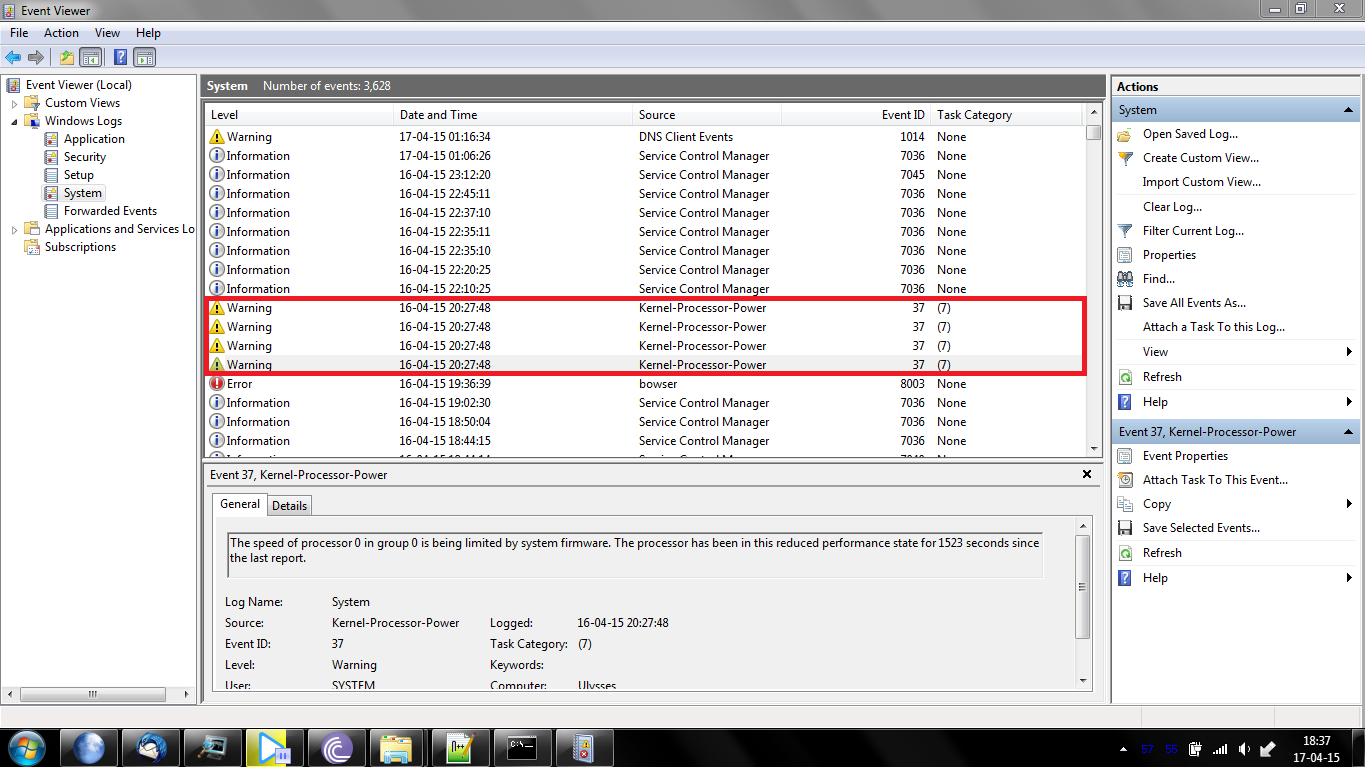
I can't be 100% certain on this without waiting for the problem to happen again, but these error messages in the event viewer are dated at about the same time the problem happened last night:

Cy1vx0K.png

Cy1vx0K

One other interesting thing, CoreTemp only seems to show those popups when it's started by windows - I have to end the CoreTemp process to stop the popups, but if I restart the program and the problem happens again, it shows no popups.

Edit:
I can confirm that those event messages do indeed appear when the problem occurs.

Cy1vx0K
 
Last edited:

My Computer

Computer Manufacturer/Model Number
Acer Aspire 5750g
OS
Windows 7 Ultimate x64
CPU
i5 2430m Sandy Bridge 2.4ghz
Memory
8gb Kingston
Graphics Card(s)
Nvidia Geforce GT 520m
Hard Drives
Seagate 500gb
The laptop will have specifications for its battery and power adapter. You can find these in its Manual on the maker's Support Downloads webpage or by asking google, or search the model for parts replacement to see what the specs of those spare parts are exactly. Both should only be for that model PC or it could damage the laptop. You must spec these parts closely when replaced. Most cheap replacement parts are junk but there are mid-range price choices when searching that perform well for buyers as judged by their comments and ratings, e.g. $12 no-name vs. $39 Anker vs. $150 PC maker replacement batteries.

In Power Options set the Balanced Power plan to defaults, then enter Advanced settings to adjust Sleep to 30 and to Hibernate at 60.

If you follow the suggestions in Troubleshooting Steps for Windows 7 to google repeat error text you'll learn how others fix them. I always resolve all repeat Errors, however those lower-level Warnings are indeed interesting enough I'd want to resolve them.

Every BIOS has beep codes which mean something specific for each. Belarc Advisor should tell you the BIOS maker. Many Acers have Phoenix BIOS: BIOS - Error Codes/Beeps - Entering BIOS/CMOS
 
Back
Top