acer al2216w windows 7 resolution issues

bbrian017

New member
Local time
3:06 AM
Messages
8
I'm having acer al2216w windows 7 screen resolution issues with ati radeon 8500

IT's a brand new xps9000 stidio cps I have the following specs,

Intel® Core™ i7-920 processor(8MB L3 Cache, 2.66GHz), 64bit, 6GB Tri-Channel DDR3 SDRAM at 1066MHz – 6 DIMMs 750GB 7200 RPM SATA Hard Drive, ATI Radeon HD 5870 1GB GDDR5.

Any suggestions it was working fine with my xps600 windows 7 ?

Dell tried a few things like installing updates and uninstalling and reinstalling to see if they could find an issues and nothing.

Thanks

Brian
 

My Computer

OS
Windows 7
CPU
3.2
Motherboard
Dell
Memory
4 gigs DDR2
Graphics Card(s)
SLI 2gig
Sound Card
Crappy
Monitor(s) Displays
22 inch anbd 19 inch LCD
Hard Drives
300 gig and another 45 gig

My Computer

Computer Manufacturer/Model Number
Custom
OS
Win 7 Ult
CPU
3Ghz Core 2 Duo
Motherboard
MSI P7N SLI Plat
Memory
4 GB
Graphics Card(s)
Sapphire 5850
Sound Card
onboard
Have you installed the Monitor driver along with the newest Catalyst driver. Its a HD5800 series you are having difficulty with, isn't it?
http://global-download.acer.com/GDF...rid=633794439748296159&Step1=Monitor&Step2=AL Series&Step3=AL2216W&OS=V10&LC=en&BC=Acer&SC=PA_7

This driver is for all OS x86 x64. It adds the monitor timings for 640x480, 800x600, 1024x768, 1280x1024, 1680x1050. Use DVI to DVI if available.

What is the exact issue.
 

My Computer

OS
Windows 7 Home Premium (64-bit) SP1 RTM
CPU
Intel Core2Duo [email protected]
Motherboard
ASUS P5Q (BIOS 2208)
Memory
2x2Gb GEIL DDR2 800 4-4-4-12 @ 1.8v
Graphics Card(s)
ASUS HD4850 512Mb @700/1100
Sound Card
Realtek ALC1200 @ Intel 82801JB ICH10
Monitor(s) Displays
Samsung Syncmaster T220
Screen Resolution
1680x1050x32@60Hz
Hard Drives
Seagate ST3500410AS SATA300 500Gb
Hitachi HDS721032CLA362 SATA300 320Gb
PSU
Antec NeoPower 650W 3.3v@24A/5v@24A/12v@19A/12v@19A/12v@19A
Internet Speed
3Mbps
The monitor is stuck at 640 480 and I cannot set it to any other resolution.

p.s. thanks for the idea sedgr it was a good one but the monitor is on digital.
 

My Computer

OS
Windows 7
CPU
3.2
Motherboard
Dell
Memory
4 gigs DDR2
Graphics Card(s)
SLI 2gig
Sound Card
Crappy
Monitor(s) Displays
22 inch anbd 19 inch LCD
Hard Drives
300 gig and another 45 gig
I'm still stuck at this resolution. I wonder what the issue is.

Could it be with my video card?
 

My Computer

OS
Windows 7
CPU
3.2
Motherboard
Dell
Memory
4 gigs DDR2
Graphics Card(s)
SLI 2gig
Sound Card
Crappy
Monitor(s) Displays
22 inch anbd 19 inch LCD
Hard Drives
300 gig and another 45 gig
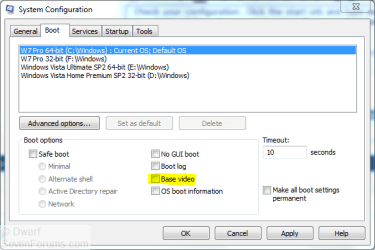
Check your configuration. Click the start orb and type msconfig.exe into the search box. Right-click on the program, select Run as administrator and provide administrative credentials.

Select the Boot tab and ensure that Base video is unchecked, as shown here.
Capture.PNG
 

My Computer

Computer type
PC/Desktop
Computer Manufacturer/Model Number
Dwarf Dwf/11/2012 r09/2013
OS
Windows 8.1 Pro RTM x64
CPU
Intel Core-i5-3570K 4-core @ 3.4GHz (Ivy Bridge) (OC 4.4GHz)
Motherboard
ASRock Z77 Extreme4-M
Memory
4 x 4GB DDR3-1600 Corsair Vengeance CMZ8GX3M2A1600C9B (16GB)
Graphics Card(s)
MSI GeForce GTX770 Gaming OC 2GB
Sound Card
Realtek High Definition on board solution (ALC 898)
Monitor(s) Displays
ViewSonic VA1912w Widescreen (VGA)
Screen Resolution
1440x900
Hard Drives
OCZ Agility 3 SSD 120GB SATA III x2 (RAID 0)
Samsung HD501LJ 500GB SATA II x2
Hitachi HDS721010CLA332 1TB SATA II
Iomega 1.5TB Ext USB 2.0
WD 2.0TB Ext USB 3.0
PSU
XFX Pro Series 850W Semi-Modular
Case
Gigabyte IF233
Cooling
1 x 120mm Front Inlet 1 x 120mm Rear Exhaust
Keyboard
Microsoft Comfort Curve Keyboard 3000 (USB)
Mouse
Microsoft Comfort Mouse 3000 for Business (USB)
Internet Speed
NetGear DG834Gv3 ADSL Modem/Router (Ethernet) ~4.0 Mb/s (O2)
Antivirus
Avast! 8.0.1497
Browser
IE 11
Other Info
Optical Drive: HL-DT-ST BD-RE BH10LS30 SATA Bluray
Lexmark S305 Printer/Scanner/Copier (USB)
WEI Score: 8.1/8.1/8.5/8.5/8.25
Asus Eee PC 1011PX Netbook (Windows 7 x86 Starter)
Same issue here

Hi,

I have exactly the same issue.
Win 7 x64 ATI HD5870 ACER AL2216W wont run any other resolution than 640*480 other monitor runs fine in 1280*1024...

The Acer drivers don't do anything as I can't install them.
Is this an ATI problem?
 

My Computer

Computer Manufacturer/Model Number
Dell Alienware Aurora
OS
windows 7 x64
CPU
i7 930 2.8Ghz
Motherboard
X58
Memory
6GB DDR3
Graphics Card(s)
ATI HD5870
Sound Card
onboard
Monitor(s) Displays
Dell 19" and Acer AL2216W
Hard Drives
1Tb Samsung
PSU
875W
Case
Alienware
Cooling
Liquid CPU cooling
Problem solved dude,

Just take a VGA cable and use a DVI adapter and your problem is solved, did it and got my 1680*1050 resolution back :)

Good luck and happy gaming!

Of course why would anyone want to use a VGA cable with DVI adapter when you have a DVI cable... uhu... it's a strange world we live in... ;)
 

My Computer

Computer Manufacturer/Model Number
Dell Alienware Aurora
OS
windows 7 x64
CPU
i7 930 2.8Ghz
Motherboard
X58
Memory
6GB DDR3
Graphics Card(s)
ATI HD5870
Sound Card
onboard
Monitor(s) Displays
Dell 19" and Acer AL2216W
Hard Drives
1Tb Samsung
PSU
875W
Case
Alienware
Cooling
Liquid CPU cooling
I didn't do anything. one day I started my pc and it was working.
 

My Computer

OS
Windows 7
CPU
3.2
Motherboard
Dell
Memory
4 gigs DDR2
Graphics Card(s)
SLI 2gig
Sound Card
Crappy
Monitor(s) Displays
22 inch anbd 19 inch LCD
Hard Drives
300 gig and another 45 gig
cable change fixed problem

Windows 7 + NVIDIA GeForce 9800GT + Acer AL2216W + DVI cable

---> Max res: 1280 (no matter what I did or drivers I installed)

Upon replacing the DVI cable with a VGA cable, the display immediately changed to 1680x1050 as soon as I plugged it in.

Thanks to other posters for VGA cable hint!
 

My Computer

OS
Windows 7 Professional 32-bit
Can you imagine this issue came back out of no where and is affecting my monitor once again, I"m now stuck at Generic NON PnP Monitor and the resolution is 640 x 480.

What's going on?

Could this be an issue with my Video Card?
 

My Computer

OS
Windows 7
CPU
3.2
Motherboard
Dell
Memory
4 gigs DDR2
Graphics Card(s)
SLI 2gig
Sound Card
Crappy
Monitor(s) Displays
22 inch anbd 19 inch LCD
Hard Drives
300 gig and another 45 gig
Amazingly, this issue just came up for me on this Acer ACL2216W monitor when I upgraded one of my PC's to Windows 10 (but the resolution worked fine under Windows 7) . After upgrading, Win10 was forcing me to use 1600x1200 resolution on a 1680x1050 monitor, which made the display stretched and blurry. I tried a number of solutions to no avail and then found this thread suggesting the VGA cable.

Doubting this solution but getting desperate, I swapped the VGA-DVI adapter cable that had been working all along in Windows 7 with a new DVI-DVI cable, and voila, back to native 1680x1050 resolution again. Very strange... Anyway, thank you for this rather old, but still quite valid solution :)
 

My Computer

Computer type
PC/Desktop
OS
Windows 7,8, & 10 x64
Back
Top