[Acer Aspire 5750G] Fan not turning on/off when needed.

Foivos

New member
Local time
11:19 PM
Messages
19
Ok so i'm gonna tell you the whole story so that you'll know everything needed , and answer me instantly without asking questions that you'd normally do with the first reply.
I had some very severe problems with FPS while playing League of Legends. Pretty unusual , very low , and 15~ FPS.So it appears that the problem is throttling. Temperatures reached 95-100 C while playing.Clock speed went to 0.8 from the 2.7 it normally should be.Pretty huge i (assume?). Then a friend explained to me the whole deal with CPU throttling.(Laptop is ~3 years old) I never actually opened it since the day i bought it.So he told me to open it up (sidenote , watch this video and you'll understand why i wouldn't even try : https://www.youtube.com/watch?v=maoRU9NhyJo ) and clean every possible dust buildup that there is , including inside the fan , and to apply a good-quality thermal paste to CPU/GPU.And so I did it.In case you wanna know which thermal paste i used , its Arctic MX-4.An other thing i missed to tell you is that before i opened up the laptop , fan was not even working.At all.And i think it really should have cuz there wasnt a huge dust buildup or something like that.ok so after that i obviously tested the FPS i'd get.it was still the same as before with 5 C diffrence.nothing in FPS tho.then after playing and other game , the fan decided it was time to actually work.and when it did i literally felt vibrating the whole laptop.and this time from the left side , istead of just being hot , there was a ****ing flamethrower ...(really damn hot air coming out) temperetaures reduced by approx. 20 C when fan was active.overall run the game on medium without shadows and perma stable 60 FPS. exactly what i wanted.then i played an other game. fan said it was time to sleep so it went off and fps dropped again.anyway these happened many times so then i decided to look for some Fan Control utilities , like acfancontrol and an other thingy from youtube that seemed to work for other 5750g owners.i dont know which worked , or if they even worked , after playing some games , fan was perma-on and it was some really satisfying gameplay.then i shutted down the laptop and booted again.fan then was off the whole game.fps was a liiiitle higher but i couldnt play to my full potential.ok so guys. what do you think will fix my problem and make my fan controllable so i can set a temp when it starts to turn on ? or perhaps its jsut faulty and i need to replace it? it wont be very costy since i have to buy the exact same model which is shitty and cheap probably..what do you think i should do ?

p.s : an other piece of information that's probably useless but i want to mention it : i also have a thing that helps the laptop stand and offer some cool air.
 

My Computer My Computer

At a glance

Windows 7 Ultimate x64 bitIntel(R) Core(TM) i5-2410M CPU @ 2.30GHzNVIDIA GeForce GT 540M
Computer type
Laptop
Computer Manufacturer/Model Number
Acer Aspire 5750G
OS
Windows 7 Ultimate x64 bit
CPU
Intel(R) Core(TM) i5-2410M CPU @ 2.30GHz
Graphics Card(s)
NVIDIA GeForce GT 540M
Screen Resolution
1366 x 768
Internet Speed
~1.3~ Mega Bytes per Second.
Browser
Mozilla Firefox
Did you double check the fan program? Maybe you missed a setting.
Try loading the defaults in BIOS.
 

My Computer My Computer

At a glance

Windows 7 Ultimate x64 SP1AMD Phenom 2 1090T2x8GB Kingston HyperX Fury Black 1600Mhz Unga...MSI GTX 970 Gaming 4G
Computer type
PC/Desktop
Computer Manufacturer/Model Number
Custom Build
OS
Windows 7 Ultimate x64 SP1
CPU
AMD Phenom 2 1090T
Motherboard
Gigabyte GA-890FXA-UD5
Memory
2x8GB Kingston HyperX Fury Black 1600Mhz Unganged
Graphics Card(s)
MSI GTX 970 Gaming 4G
Sound Card
Realtek On-Board HD 7.1 Audio / Logitech G35
Monitor(s) Displays
3xAcer GD245HQ
Screen Resolution
1920x1080
Hard Drives
Samsung 850 Pro 512GB SSD - OS /
WD Caviar Black SATA 3 - 1 TBx2 - Dynamic RAID 0 /
WD Caviar Green SATA 2 - 640GBx2 - Dynamic RAID 0 /
WD Caviar Green SATA 2 - 640GB - Internal Backup /
Seagate Barracude SATA 3 - 3TB - External Backup/ Sync
PSU
HighPower 1000W
Case
Cooler Master HAF 932
Cooling
Noctua NH-D14
Keyboard
Logitech G19
Mouse
Logitech G500
Internet Speed
100/4 Mbit Cable (100GB quota)
Antivirus
ZoneAlarm Extreme Security / MBAM Pro / MBAE Free / SAS Free
Browser
IE 11 - Firefox - Chrome
Other Info
Logitech F710/ G27/ G940/ Z5500 // TrackIR 5 // Nvidia 3D Surround Vision
On the first fan program there were only 2 buttons.On the second one it was very complicated and you had to torture your cpu to get soem values and then try combinations of numbers in order to get your fan to do what you want.I didnt even bother.i just put it to "smart" mode.im not very confident it actually did something i just thought of mentioning it.what does that one mean? defaults in BIOS? default settings of the fan? if thats what you mean , there are no such fan settings as far as i know.actually ima restart rite now and check if there are any.

Update : Just opened up BIOS , fan settings just dont exist.
 

My Computer My Computer

At a glance

Windows 7 Ultimate x64 bitIntel(R) Core(TM) i5-2410M CPU @ 2.30GHzNVIDIA GeForce GT 540M
Computer type
Laptop
Computer Manufacturer/Model Number
Acer Aspire 5750G
OS
Windows 7 Ultimate x64 bit
CPU
Intel(R) Core(TM) i5-2410M CPU @ 2.30GHz
Graphics Card(s)
NVIDIA GeForce GT 540M
Screen Resolution
1366 x 768
Internet Speed
~1.3~ Mega Bytes per Second.
Browser
Mozilla Firefox
I guess it is on the Exit menu in BIOS for some laptops.
 

My Computer My Computer

At a glance

Windows 7 Ultimate x64 SP1AMD Phenom 2 1090T2x8GB Kingston HyperX Fury Black 1600Mhz Unga...MSI GTX 970 Gaming 4G
Computer type
PC/Desktop
Computer Manufacturer/Model Number
Custom Build
OS
Windows 7 Ultimate x64 SP1
CPU
AMD Phenom 2 1090T
Motherboard
Gigabyte GA-890FXA-UD5
Memory
2x8GB Kingston HyperX Fury Black 1600Mhz Unganged
Graphics Card(s)
MSI GTX 970 Gaming 4G
Sound Card
Realtek On-Board HD 7.1 Audio / Logitech G35
Monitor(s) Displays
3xAcer GD245HQ
Screen Resolution
1920x1080
Hard Drives
Samsung 850 Pro 512GB SSD - OS /
WD Caviar Black SATA 3 - 1 TBx2 - Dynamic RAID 0 /
WD Caviar Green SATA 2 - 640GBx2 - Dynamic RAID 0 /
WD Caviar Green SATA 2 - 640GB - Internal Backup /
Seagate Barracude SATA 3 - 3TB - External Backup/ Sync
PSU
HighPower 1000W
Case
Cooler Master HAF 932
Cooling
Noctua NH-D14
Keyboard
Logitech G19
Mouse
Logitech G500
Internet Speed
100/4 Mbit Cable (100GB quota)
Antivirus
ZoneAlarm Extreme Security / MBAM Pro / MBAE Free / SAS Free
Browser
IE 11 - Firefox - Chrome
Other Info
Logitech F710/ G27/ G940/ Z5500 // TrackIR 5 // Nvidia 3D Surround Vision
What does that mean ? I dont get it at all.
 

My Computer My Computer

At a glance

Windows 7 Ultimate x64 bitIntel(R) Core(TM) i5-2410M CPU @ 2.30GHzNVIDIA GeForce GT 540M
Computer type
Laptop
Computer Manufacturer/Model Number
Acer Aspire 5750G
OS
Windows 7 Ultimate x64 bit
CPU
Intel(R) Core(TM) i5-2410M CPU @ 2.30GHz
Graphics Card(s)
NVIDIA GeForce GT 540M
Screen Resolution
1366 x 768
Internet Speed
~1.3~ Mega Bytes per Second.
Browser
Mozilla Firefox
Open BIOS again and switch to the Exit menu (right most?). And find the option to "load defaults".
 

My Computer My Computer

At a glance

Windows 7 Ultimate x64 SP1AMD Phenom 2 1090T2x8GB Kingston HyperX Fury Black 1600Mhz Unga...MSI GTX 970 Gaming 4G
Computer type
PC/Desktop
Computer Manufacturer/Model Number
Custom Build
OS
Windows 7 Ultimate x64 SP1
CPU
AMD Phenom 2 1090T
Motherboard
Gigabyte GA-890FXA-UD5
Memory
2x8GB Kingston HyperX Fury Black 1600Mhz Unganged
Graphics Card(s)
MSI GTX 970 Gaming 4G
Sound Card
Realtek On-Board HD 7.1 Audio / Logitech G35
Monitor(s) Displays
3xAcer GD245HQ
Screen Resolution
1920x1080
Hard Drives
Samsung 850 Pro 512GB SSD - OS /
WD Caviar Black SATA 3 - 1 TBx2 - Dynamic RAID 0 /
WD Caviar Green SATA 2 - 640GBx2 - Dynamic RAID 0 /
WD Caviar Green SATA 2 - 640GB - Internal Backup /
Seagate Barracude SATA 3 - 3TB - External Backup/ Sync
PSU
HighPower 1000W
Case
Cooler Master HAF 932
Cooling
Noctua NH-D14
Keyboard
Logitech G19
Mouse
Logitech G500
Internet Speed
100/4 Mbit Cable (100GB quota)
Antivirus
ZoneAlarm Extreme Security / MBAM Pro / MBAE Free / SAS Free
Browser
IE 11 - Firefox - Chrome
Other Info
Logitech F710/ G27/ G940/ Z5500 // TrackIR 5 // Nvidia 3D Surround Vision
Alright i'll do that.Ima try search for the word default options or setting or w/e.

Update : Acer , after years of its users complaining about the heat management in their products , they released a small software which seems they did not even work on it for more than 2 hours , for 3 models , one of which is mine , Aspire 5750G.
ftp://ftp2.acer-euro.com/notebook/aspire_5750G/fan/FanController_V1.0.0.3.zip
ftp://ftp2.acer-euro.com/notebook/aspire_5750G/fan/SOP_AS5750G_Fan_Control_Utility.pdf
altho it seems even if i press "Full On" to supposedly make the fan turn on , it doesnt.even when i enter a game and the temperatures rise a lot.i tried like 2-3 games , fan didnt turn on.i dont know what to do.honestly. (now im going to restart to try to search for the default settings gokay talked about.)

2nd Update : there was only one thing with the default word inside.i did that and saved settings , apparently my boot password is gone , which means that it worked.gonna play a game and see what the fan'll do.

3rd update : the fan did not start at all , fps dropped to 15-5 , temperatures were around 85-90 and my guess on the clock speed is probably 0.8 GHz as usual.
 
Last edited:

My Computer My Computer

At a glance

Windows 7 Ultimate x64 bitIntel(R) Core(TM) i5-2410M CPU @ 2.30GHzNVIDIA GeForce GT 540M
Computer type
Laptop
Computer Manufacturer/Model Number
Acer Aspire 5750G
OS
Windows 7 Ultimate x64 bit
CPU
Intel(R) Core(TM) i5-2410M CPU @ 2.30GHz
Graphics Card(s)
NVIDIA GeForce GT 540M
Screen Resolution
1366 x 768
Internet Speed
~1.3~ Mega Bytes per Second.
Browser
Mozilla Firefox

My Computer My Computer

At a glance

Windows 7 Ultimate x64 SP1AMD Phenom 2 1090T2x8GB Kingston HyperX Fury Black 1600Mhz Unga...MSI GTX 970 Gaming 4G
Computer type
PC/Desktop
Computer Manufacturer/Model Number
Custom Build
OS
Windows 7 Ultimate x64 SP1
CPU
AMD Phenom 2 1090T
Motherboard
Gigabyte GA-890FXA-UD5
Memory
2x8GB Kingston HyperX Fury Black 1600Mhz Unganged
Graphics Card(s)
MSI GTX 970 Gaming 4G
Sound Card
Realtek On-Board HD 7.1 Audio / Logitech G35
Monitor(s) Displays
3xAcer GD245HQ
Screen Resolution
1920x1080
Hard Drives
Samsung 850 Pro 512GB SSD - OS /
WD Caviar Black SATA 3 - 1 TBx2 - Dynamic RAID 0 /
WD Caviar Green SATA 2 - 640GBx2 - Dynamic RAID 0 /
WD Caviar Green SATA 2 - 640GB - Internal Backup /
Seagate Barracude SATA 3 - 3TB - External Backup/ Sync
PSU
HighPower 1000W
Case
Cooler Master HAF 932
Cooling
Noctua NH-D14
Keyboard
Logitech G19
Mouse
Logitech G500
Internet Speed
100/4 Mbit Cable (100GB quota)
Antivirus
ZoneAlarm Extreme Security / MBAM Pro / MBAE Free / SAS Free
Browser
IE 11 - Firefox - Chrome
Other Info
Logitech F710/ G27/ G940/ Z5500 // TrackIR 5 // Nvidia 3D Surround Vision
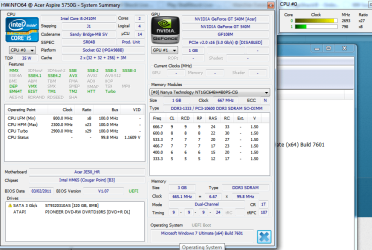
here's a pic from the program you gave me ..does that give you a conclusion or something? because i cant find the fan speed.
 

Attachments

  • hwinfo.png
    hwinfo.png
    46.5 KB · Views: 0

My Computer My Computer

At a glance

Windows 7 Ultimate x64 bitIntel(R) Core(TM) i5-2410M CPU @ 2.30GHzNVIDIA GeForce GT 540M
Computer type
Laptop
Computer Manufacturer/Model Number
Acer Aspire 5750G
OS
Windows 7 Ultimate x64 bit
CPU
Intel(R) Core(TM) i5-2410M CPU @ 2.30GHz
Graphics Card(s)
NVIDIA GeForce GT 540M
Screen Resolution
1366 x 768
Internet Speed
~1.3~ Mega Bytes per Second.
Browser
Mozilla Firefox
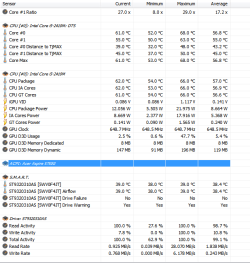
Sorry forgot to say either start in sensor mode or at the top menu select Monitoring - Sensor status.
 

My Computer My Computer

At a glance

Windows 7 Ultimate x64 SP1AMD Phenom 2 1090T2x8GB Kingston HyperX Fury Black 1600Mhz Unga...MSI GTX 970 Gaming 4G
Computer type
PC/Desktop
Computer Manufacturer/Model Number
Custom Build
OS
Windows 7 Ultimate x64 SP1
CPU
AMD Phenom 2 1090T
Motherboard
Gigabyte GA-890FXA-UD5
Memory
2x8GB Kingston HyperX Fury Black 1600Mhz Unganged
Graphics Card(s)
MSI GTX 970 Gaming 4G
Sound Card
Realtek On-Board HD 7.1 Audio / Logitech G35
Monitor(s) Displays
3xAcer GD245HQ
Screen Resolution
1920x1080
Hard Drives
Samsung 850 Pro 512GB SSD - OS /
WD Caviar Black SATA 3 - 1 TBx2 - Dynamic RAID 0 /
WD Caviar Green SATA 2 - 640GBx2 - Dynamic RAID 0 /
WD Caviar Green SATA 2 - 640GB - Internal Backup /
Seagate Barracude SATA 3 - 3TB - External Backup/ Sync
PSU
HighPower 1000W
Case
Cooler Master HAF 932
Cooling
Noctua NH-D14
Keyboard
Logitech G19
Mouse
Logitech G500
Internet Speed
100/4 Mbit Cable (100GB quota)
Antivirus
ZoneAlarm Extreme Security / MBAM Pro / MBAE Free / SAS Free
Browser
IE 11 - Firefox - Chrome
Other Info
Logitech F710/ G27/ G940/ Z5500 // TrackIR 5 // Nvidia 3D Surround Vision
ok i did that.thing is i cant see anything rpm related.also when i click the "acpi" as shown , nothing appears/happens.
 

Attachments

  • acpi.png
    acpi.png
    17.1 KB · Views: 6

My Computer My Computer

At a glance

Windows 7 Ultimate x64 bitIntel(R) Core(TM) i5-2410M CPU @ 2.30GHzNVIDIA GeForce GT 540M
Computer type
Laptop
Computer Manufacturer/Model Number
Acer Aspire 5750G
OS
Windows 7 Ultimate x64 bit
CPU
Intel(R) Core(TM) i5-2410M CPU @ 2.30GHz
Graphics Card(s)
NVIDIA GeForce GT 540M
Screen Resolution
1366 x 768
Internet Speed
~1.3~ Mega Bytes per Second.
Browser
Mozilla Firefox
:( Yeah, it is supposed to be under that.

I searched but couldn't find the manual which shows BIOS options. What options do you have for the fan control? Does it show an explanation to the right side when you select it in BIOS?
 

My Computer My Computer

At a glance

Windows 7 Ultimate x64 SP1AMD Phenom 2 1090T2x8GB Kingston HyperX Fury Black 1600Mhz Unga...MSI GTX 970 Gaming 4G
Computer type
PC/Desktop
Computer Manufacturer/Model Number
Custom Build
OS
Windows 7 Ultimate x64 SP1
CPU
AMD Phenom 2 1090T
Motherboard
Gigabyte GA-890FXA-UD5
Memory
2x8GB Kingston HyperX Fury Black 1600Mhz Unganged
Graphics Card(s)
MSI GTX 970 Gaming 4G
Sound Card
Realtek On-Board HD 7.1 Audio / Logitech G35
Monitor(s) Displays
3xAcer GD245HQ
Screen Resolution
1920x1080
Hard Drives
Samsung 850 Pro 512GB SSD - OS /
WD Caviar Black SATA 3 - 1 TBx2 - Dynamic RAID 0 /
WD Caviar Green SATA 2 - 640GBx2 - Dynamic RAID 0 /
WD Caviar Green SATA 2 - 640GB - Internal Backup /
Seagate Barracude SATA 3 - 3TB - External Backup/ Sync
PSU
HighPower 1000W
Case
Cooler Master HAF 932
Cooling
Noctua NH-D14
Keyboard
Logitech G19
Mouse
Logitech G500
Internet Speed
100/4 Mbit Cable (100GB quota)
Antivirus
ZoneAlarm Extreme Security / MBAM Pro / MBAE Free / SAS Free
Browser
IE 11 - Firefox - Chrome
Other Info
Logitech F710/ G27/ G940/ Z5500 // TrackIR 5 // Nvidia 3D Surround Vision
If you're talking about the utility it only has 2 buttons , normal and full on.On BIOS , theres nothing fan related , only a button that restores settings to default.nothing else.
 

My Computer My Computer

At a glance

Windows 7 Ultimate x64 bitIntel(R) Core(TM) i5-2410M CPU @ 2.30GHzNVIDIA GeForce GT 540M
Computer type
Laptop
Computer Manufacturer/Model Number
Acer Aspire 5750G
OS
Windows 7 Ultimate x64 bit
CPU
Intel(R) Core(TM) i5-2410M CPU @ 2.30GHz
Graphics Card(s)
NVIDIA GeForce GT 540M
Screen Resolution
1366 x 768
Internet Speed
~1.3~ Mega Bytes per Second.
Browser
Mozilla Firefox
*bump*
 

My Computer My Computer

At a glance

Windows 7 Ultimate x64 bitIntel(R) Core(TM) i5-2410M CPU @ 2.30GHzNVIDIA GeForce GT 540M
Computer type
Laptop
Computer Manufacturer/Model Number
Acer Aspire 5750G
OS
Windows 7 Ultimate x64 bit
CPU
Intel(R) Core(TM) i5-2410M CPU @ 2.30GHz
Graphics Card(s)
NVIDIA GeForce GT 540M
Screen Resolution
1366 x 768
Internet Speed
~1.3~ Mega Bytes per Second.
Browser
Mozilla Firefox
Back
Top